AI Chatbot: How It Works and When to Use One (2026)
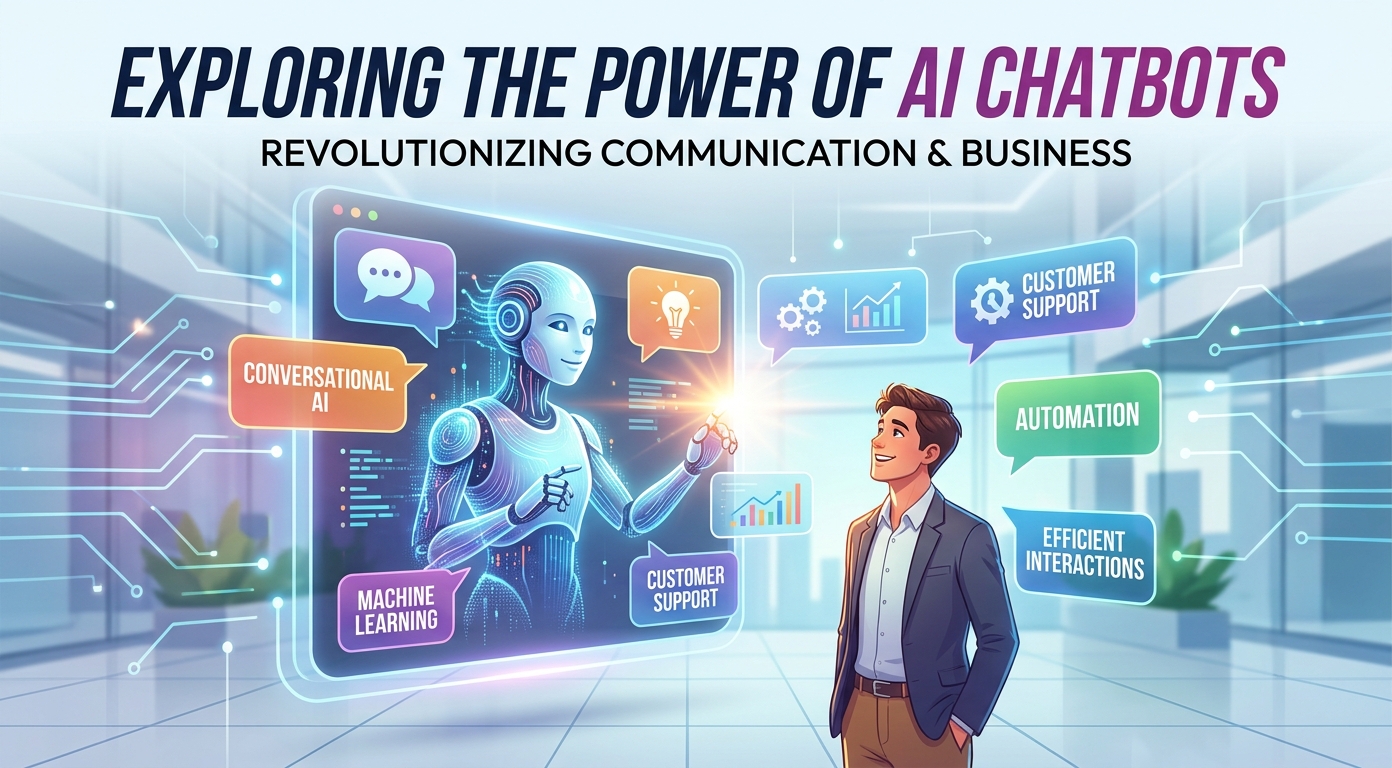
An AI chatbot is software that holds a conversation in plain language: it reads a question the way a person wrote it, works out the intent behind it, and composes an answer from content it has been trained on. That is the whole difference from the button-and-menu bots most people remember. Instead of walking visitors down a decision tree, an AI chatbot understands the question it was actually asked, even when the phrasing is new. This guide covers how the technology works, what it can take off a team's plate, where it fails, and how to launch one without handing your customers to a machine that guesses.
It is written for founders, support leads, and marketers evaluating the category, no machine learning background required.
What is an AI chatbot?
A useful definition has three parts. First, natural language understanding: the bot interprets free-form text rather than exact keywords, so "my invoice looks wrong" and "billing error?" land in the same place. Second, a knowledge source: it answers from material you control (help articles, product docs, website pages), not from a generic model's imagination. Third, generation: the reply is composed for the specific question, in a normal sentence, rather than pasted from a template.
In practice, the bot lives where your customers already are: a widget on the website, a messenger inside the product, or a channel like WhatsApp or Instagram. Modern tools also let it act, not just answer: capture a lead, book a call, check an order, or hand the thread to a human. If you are new to the wider category, our guide to chatbots covers the basics that apply to every bot, scripted or intelligent.
How an AI chatbot works
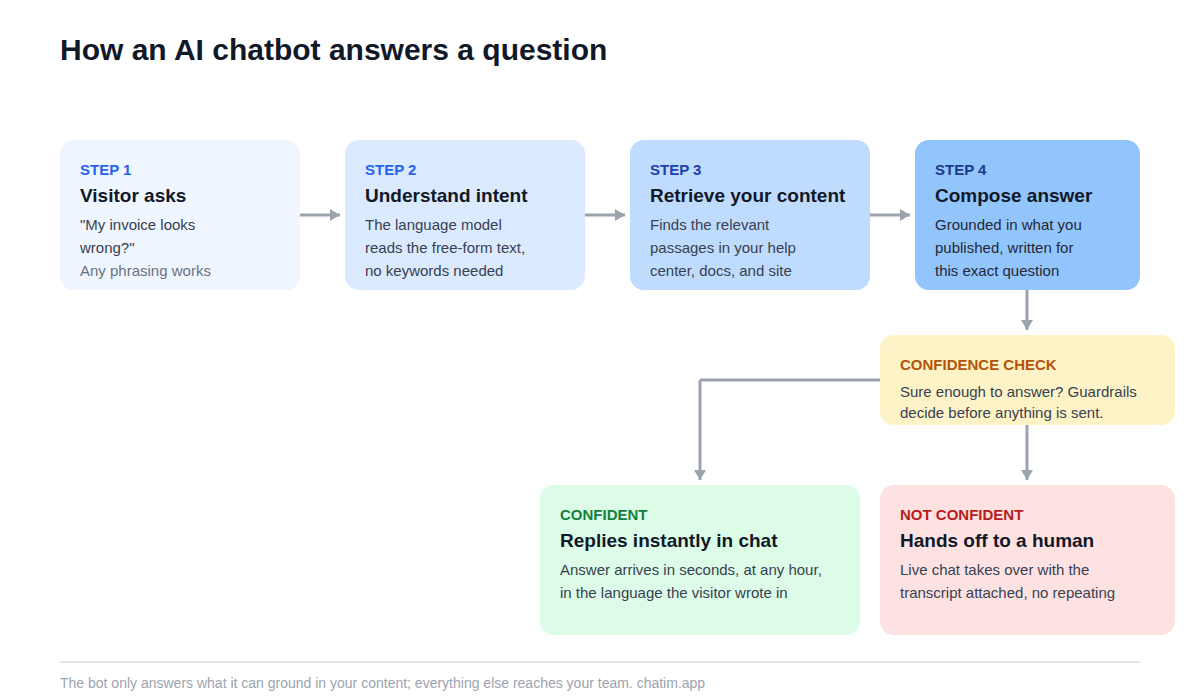
Under the hood, most modern bots follow the same pipeline, and understanding it makes every buying decision easier.
From scripts to language models
Early chatbots matched keywords: if the message contained "refund", fire the refund reply, and anything unexpected fell through to "Sorry, I did not understand." The next generation classified intents from training phrases, which helped, but still required every intent to be predicted in advance. Today's bots are built on large language models, which arrive already fluent in language. The vendor's job, and yours, is no longer teaching the bot English; it is connecting that fluency to your business.
How the bot learns your business
Training mostly means pointing the bot at your content: the help center, product docs, policy pages, and the site itself. When a question arrives, it retrieves the most relevant passages and composes the answer from them, so the reply is grounded in what you actually published rather than in the open internet. This is why the quality of your knowledge base quietly decides the quality of your bot: twenty accurate articles produce a better assistant than two hundred stale ones.
Guardrails and human handoff
A production bot also needs limits. Good tools let you restrict what it may answer, keep it silent on topics where a wrong answer is expensive (legal questions, refunds above a threshold), and set a confidence bar below which it stops guessing. The handoff is the other half of the design: when the bot is out of its depth, the conversation should slide into live chat with a human, with the transcript attached, so the customer never repeats themselves.
AI chatbot vs rule-based chatbot
The two kinds of bot fail in opposite directions, which is the fastest way to understand them.
| Rule-based chatbot | AI chatbot | |
|---|---|---|
| Understands | Exact keywords and button clicks | Free-form questions in any phrasing |
| Answers with | Pre-written replies and menus | Answers composed from your content |
| Setup | Map every flow by hand | Connect docs and site, then review |
| Maintenance | Update flows one by one | Keep the source content current |
| Best at | Structured tasks: bookings, order status, lead forms | Open questions and long-tail topics |
| Main risk | Dead ends on unexpected questions | Confident wrong answers without guardrails |
The practical answer for most teams is both. Keep deterministic flows for the steps that must never improvise (payments, cancellations, data requests) and let the AI layer absorb the open questions around them. Most serious platforms now ship the two together, so this is less a purchase decision than a configuration one.
What businesses actually use these bots for
Customer support is the anchor use case: the bot absorbs the repetitive half of the queue (password resets, shipping policies, plan limits, how-do-I questions) around the clock, in most languages your customers write in. The value is not only the answered question; it is that the answer arrives at 2 a.m., mid-checkout, when nobody is on shift.
Sales and lead capture come second. On a marketing site, the bot greets visitors, answers pre-sales questions, qualifies the serious ones (company size, use case, timeline), and books the meeting or starts the trial, turning anonymous traffic into named pipeline. Ecommerce stores lean on product questions and cart help. SaaS teams point the bot at onboarding, where a stuck new user answered in seconds is often the difference between activation and a silent exit. And a growing share of deployments are internal: an assistant trained on company docs, answering the team's own questions.
Customer service automation, the honest version
The honest framing is deflection with a door. The bot's job is to resolve the questions that never needed a human, instantly, and to escalate the rest gracefully. A bot that traps people in loops to protect the queue converts a support cost into a churn cost, and no deflection number is worth that.
Measure it accordingly: count conversations resolved without a human that did not come back within a few days, read the transcripts weekly, and treat every failed bot conversation as free user research. The questions your bot cannot answer are a to-do list, and each item has three possible fixes: write the missing article, add the missing flow, or fix the product so the question stops arriving.
How to choose one: six things that matter
Six things separate tools in practice. Training sources: it should learn from your help center, website, and files, and re-sync when they change. Guardrails: topic restrictions, confidence thresholds, and a tone you control. Handoff: escalation into live chat should carry the transcript and, ideally, the page the visitor was on; our live chat software comparison ranks how the combined chat-plus-bot tools handle this. Channels: the widget belongs on the website and in the product, and if your customers live on WhatsApp or Instagram, the bot should follow them there.
Then pricing and proof. Prefer predictable per-plan pricing over per-conversation metering, which punishes success. And prefer tools with a free tier, because the only reliable way to evaluate this category is to train the bot on your real content and throw your real questions at it for a week. A demo trained on the vendor's own docs proves nothing about yours.
Five mistakes that sink chatbot projects
Launching with no content, so the bot has nothing to ground its answers in and improvises. Hiding the path to a human, which converts frustrated customers into ex-customers rather than tickets. Measuring success by how many people the bot kept away instead of how many it actually helped. Letting the source content go stale, so the bot recites last year's pricing with this year's confidence. And skipping the weekly transcript review, which is where every one of the previous four mistakes would have been caught in week one.
Launch your first bot in an afternoon
The starting point is smaller than most teams expect. List your twenty most-asked questions from chat and email history. Publish short answers to them, in your customers' own phrasing. Connect a bot to those answers plus your site and docs, then set the handoff: online, escalate to a human in chat; offline, collect an email and promise a reply. Finally, attack your own bot for an hour with real questions, wrong spellings, and questions it should refuse, and tighten the guardrails wherever it wobbles.
Run it for two weeks, review the transcripts, and expand from what customers actually asked. The economics are friendly to starting small: the free tier of a chat-plus-chatbot tool covers the whole experiment, and paid plans only become relevant once the bot has proven it can carry real volume. The teams that succeed with this technology are rarely the ones with the biggest budgets; they are the ones that treated the first month as a conversation with their own customers rather than a set-and-forget install.
More on this from our team: AI customer service, how to build an AI chatbot, AI chatbot for your website, conversational AI, chatbot vs AI agent, and AI chatbot ROI.
Frequently Asked Questions
What is an AI chatbot?
It is software that holds free-form conversations: it interprets a question written in everyday language, finds the relevant material in content it was trained on, and composes a natural-sounding answer. Unlike menu-driven bots, it handles phrasings nobody scripted in advance.
How does an AI chatbot work?
Most follow the same pipeline: the message is interpreted for intent, relevant passages are retrieved from the business's help center, docs, and website, and a reply is composed from those passages. Confidence thresholds and topic guardrails decide when the bot answers and when it hands the conversation to a human.
What is the difference between an AI chatbot and a regular chatbot?
A rule-based bot follows scripted flows: it recognizes keywords or button clicks and returns pre-written replies, so it dead-ends on anything unexpected. An AI-powered bot understands free-form questions and composes answers from source content, so it covers the long tail, at the cost of needing guardrails against confident wrong answers. Most teams run both together.
Is a business AI chatbot the same as a general-purpose AI assistant?
No. A general assistant answers from broad training data and speaks for nobody. A business bot is scoped: it answers from the company's own content, follows its tone and topic rules, escalates to the team's inbox or live chat, and declines questions outside its remit. The underlying models are similar; the scoping is the product.
Can an AI chatbot replace human support agents?
It replaces the repetitive portion of the queue, not the team. The realistic outcome is that routine questions get resolved instantly around the clock, while humans handle edge cases, upset customers, and anything with real stakes. Deployments that remove the path to a human tend to trade support costs for churn.
How do I add an AI chatbot to my website?
With modern no-code tools it is a short job: install the chat widget snippet (or the platform plugin for Shopify or WordPress), point the bot at your help articles and site pages so it has something to learn from, set the handoff and offline behavior, and test it with real questions before turning it on for visitors.
What data does an AI chatbot train on?
Mainly the content you give it: help center articles, product documentation, policy pages, uploaded files, and the website itself. Good tools re-sync when that content changes. The bot's accuracy tracks the accuracy of these sources, which is why stale docs are the most common cause of wrong answers.
Do AI chatbots make things up?
They can. Language models generate fluent text even when unsure, which is why grounding and guardrails matter: restrict answers to retrieved source content, set a confidence bar below which the bot stops guessing, and route sensitive topics straight to a human. A well-configured bot says "let me connect you with the team" instead of improvising.
Are AI chatbots safe to use with customer data?
They can be, with the same diligence as any vendor handling customer conversations: check where transcripts are stored and for how long, whether conversation data is used to train shared models, and whether the tool lets you keep sensitive topics away from the bot entirely. Review transcripts regularly rather than assuming.
Can an AI chatbot speak multiple languages?
Generally yes. Modern language models are multilingual, so the bot can usually answer in the language the visitor writes in, even when the source content is in English. Answer quality still follows source quality, so businesses with international customers should spot-check conversations in their top languages.
Can an AI chatbot generate leads?
Yes, and for many sites it is the fastest payback: the bot greets visitors, answers pre-sales questions immediately, asks qualifying questions, captures contact details, and books meetings or starts trials. Speed is the mechanism; questions answered in the moment convert at a different rate than emails answered the next day.
How much does an AI chatbot cost?
Pricing models vary more than capabilities: some tools charge per plan, others meter per conversation or per resolution, which gets expensive as usage grows. Free tiers are common and are the sensible starting point; train the bot on your real content, run it for a couple of weeks, and let observed volume justify a paid plan.
How do I measure whether the bot is actually working?
The cleanest metric is conversations resolved without a human that did not come back within a few days. Watch the handoff rate, CSAT on bot-handled conversations as a trend, and the transcript log. Rising deflection with falling satisfaction means the bot is blocking people, not helping them.
Related articles
More in Chatbots & AI → Facebook Messenger Chatbot: The 2026 Guide + 5 Platforms
How Messenger chatbots work now: comment-to-DM automation, click-to-Messenger ads, 5 platforms compared, and when a contact button is enough.
 Chatbot Templates: 26 Free, Ready-to-Use Flows (2026)
26 free chatbot templates organized by goal and industry, what a good template contains, and the five edits that turn a ready-made flow into your own bot.
 Best WhatsApp Chatbots in 2026: 7 Platforms Compared
7 WhatsApp chatbot platforms compared, with both bills modeled: subscriptions and Meta fees. Plus the free path if you only need a WhatsApp button.
 Best Chatbot Platforms in 2026: 10 Builders Compared
10 chatbot platforms compared by what their pricing actually meters, with free plans, AI features, and a pick for each use case