What is a free invoice generator?
A free invoice generator is an online tool that turns business and client details into a clean professional PDF - no spreadsheet, no accounting software, no fees. The free invoice generator above is a free invoice maker for freelancers, small businesses, agencies, and anyone billing clients in seconds.
Unlike a full accounting platform, this invoice creator focuses on one job: producing a professional invoice you can email or print, formatted to match what most accounting departments expect to receive. You enter the data, the tool builds the document, you download. The whole flow runs in your browser - no document leaves your machine until you decide to send it.
Free invoice templates and online invoice generators are now standard in modern small-business workflows. Where a freelancer would once have built an invoice in Google Docs and exported a PDF, a free invoice builder produces the same result in a fraction of the time, with a professional layout already done.
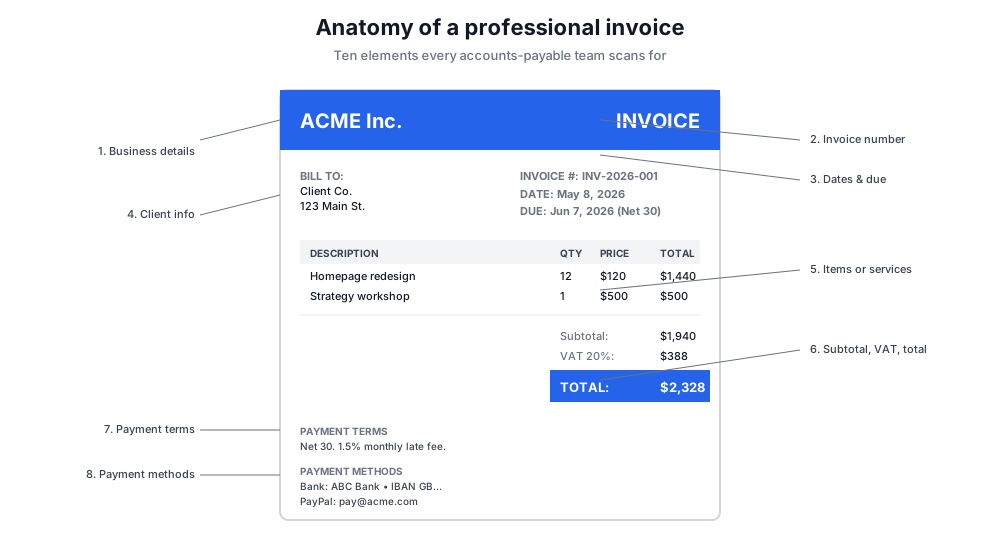
The 10 key sections of an invoice
Every professional invoice contains the same building blocks. Skip one and the invoice may be questioned, delayed, or returned. Use this checklist before you click Download.
Your business details
Company name, address, contact email, tax/VAT registration number where applicable. This anchors the document to a real legal entity.
Unique invoice number
Sequential, never reused. Required by most tax authorities for audit trails. The tool defaults to a sequential pattern; override it if you maintain your own series.
Invoice date and due date
The invoice date is when the document was issued. The due date defines payment terms - Net 14, Net 30, or whatever you agreed.
Client (bill-to) information and invoice details
Client name, billing address, and email. Match the legal entity name on the contract - not the brand name - for clean records on the client side.
Items or services
Each line: description, quantity, unit price. Be specific - vague descriptions get questioned. "Web development" weakens the invoice; "Homepage redesign - 12 hours @ $120" survives an audit.
Subtotal, VAT/tax, total
Subtotal pre-tax, tax rate broken out separately (regulatory requirement in most jurisdictions), and the final total a single highlighted figure.
Payment terms
Net days, late fees, accepted payment methods, currency. Even on a small freelance invoice, payment terms protect you when something goes sideways.
Payment methods and bank details
Bank account, PayPal, Stripe, Wise, or other accepted channels. Without this section, you'll get a follow-up email asking how to pay.
Notes and terms section
Any agreed-upon delivery clauses, refund policy, project scope reference, or thank-you note. Optional but professional.
Your branding
Logo, brand colors in the header, consistent typography. A branded invoice from a freelancer or small business reads as professional invoices that an accounts-payable team won't question.
How to create an invoice in seconds
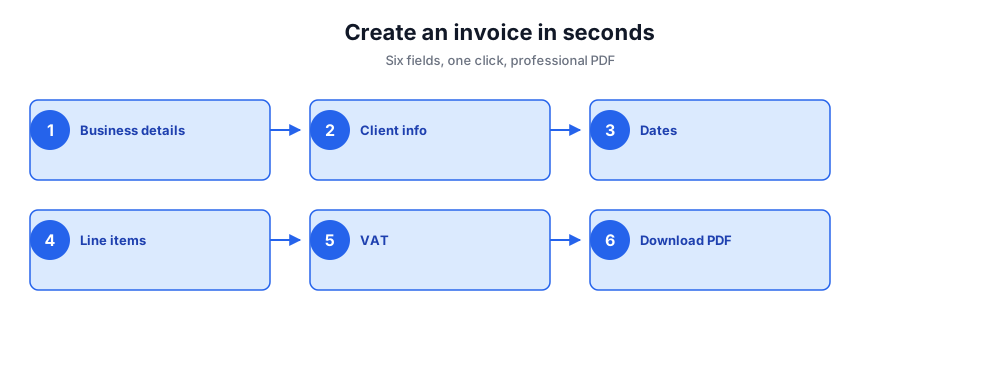
Build a professional invoice without spreadsheets, signups, or fees. Five fields, one click, professional PDF.
- Enter your business details - company name, address, and a unique invoice number.
- Add the client's information - name, billing address, and email.
- Set the invoice date and due date so payment terms are unambiguous.
- Add line items - items or services, quantity, and price. Repeat for every billable item.
- Toggle VAT/sales tax if applicable, set the VAT rate, and review the subtotal and total.
- Click Download Invoice - the professional PDF saves directly to your browser, ready to email or print.
Anatomy of a professional invoice
Every professional invoice produced by a quality invoice creator follows the same visual hierarchy: business identity at the top, client and invoice metadata in a clean two-column block, line items in a table, totals stacked at the bottom-right, payment terms and bank details below.
This pattern works because every accounts-payable team in the world has been trained to scan invoices in this order: who's billing me, who's the client, what's the total, when is it due, where do I pay. The free invoice templates produced by this tool follow this exact structure so the document feels familiar to the person processing it.
Departing from the layout - putting totals at the top, splitting bank details across pages, hiding the invoice number - increases the chance the document gets stuck in review. The unique invoice number alone is the single most-checked field in an AP review queue.
Free invoice templates by profession
Different roles bill differently. The same free invoice template can serve everyone, but a few details matter per profession. Use these patterns as a starting point.
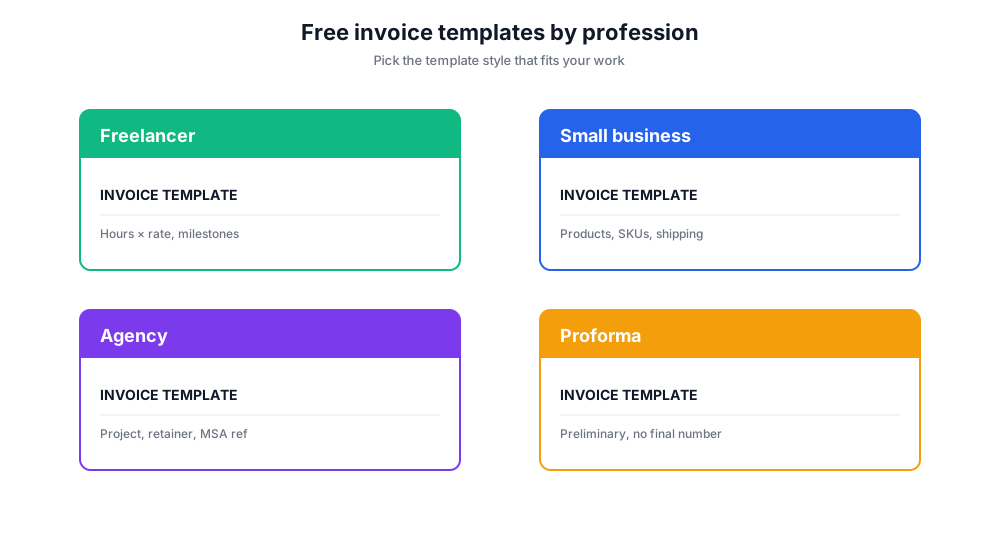
Freelancer invoice template. Time-based line items (hours × rate), milestone references where relevant, terms section with Net 14 or Net 30. Most freelancers benefit from including a contract reference number in the notes.
Small business product invoice template. Items or services with SKUs, quantity columns, unit price, optional discount line, VAT/sales tax broken out. Include shipping if you ship physical goods.
Agency or consultancy invoice template. Project-based or retainer-based line items, scope summary in notes, deliverable references. Agencies should always cite the master services agreement number for clean reconciliation.
Proforma invoice template. A proforma invoice is a preliminary bill - the client uses it to get internal approval or arrange international shipping. The free invoice generator can produce a proforma invoice by adding 'PROFORMA' to the notes section and not assigning a sequential invoice number until the real document is issued.
Payment terms, fees, and payment methods
Payment terms turn an invoice from a polite request into an enforceable financial document. The standard short forms - Net 14, Net 30, Net 60 - define how many days the client has to pay from the invoice date. Pick one based on your industry and your cash-flow tolerance: SaaS and digital services are usually Net 14, professional services Net 30, large enterprise contracts Net 60 or longer.
Late fees protect against slow-paying clients. A 1.5% monthly late fee is the most common pattern in US small business invoicing - it's enforceable in most jurisdictions and keeps the conversation about payment, not about whether you'll charge at all. Reference your fees and late-payment policy in the terms section so they're never a surprise.
Payment methods on the invoice should be specific and current. Bank transfer details, Stripe payment link, Wise payment details, PayPal address - list whichever your accounting workflow supports. The fewer steps a client has to take to pay, the faster they pay.
Who uses this free invoice maker?
Freelancers and small businesses are the core audience. A graphic designer billing $1,500 for a logo project doesn't need a $30/month accounting subscription - they need a professional PDF in three minutes. The free invoice template above produces exactly that, formatted to look like the invoices their clients receive from larger agencies.
Side hustles and contractors use the tool to keep paid work clean from personal records. A part-time consultant who closes one engagement a quarter benefits from a quick invoice in seconds without standing up a full accounting workflow.
International freelancers use it to bill clients across borders - multi-currency support, VAT/GST/sales tax fields adaptable per jurisdiction, and a download invoice option that produces a professional PDF every accounts-payable system worldwide can read.
Free invoice generator vs accounting software
A free invoice generator and an accounting platform solve different problems. Here's where this tool fits.
Chatim Free Invoice Generator (this tool)
Pros: No signup. Instant professional PDF. Free invoice template included. Works in any browser. Good for one-off invoices and small businesses billing under ten clients.
Cons: No saved client list. No automatic invoice number tracking across sessions. No payment integration.
QuickBooks / Xero / FreshBooks
Pros: Full accounts-receivable tracking, automatic numbering, recurring invoices, payment integrations, tax filing prep.
Cons: Paid monthly. Setup overhead. Overkill if you bill less than ten invoices a month.
Wave / Zoho Invoice (free tier)
Pros: Free tier with client list, recurring invoices, payment links.
Cons: Requires signup. Email and contact data live in their cloud.
Word / Google Docs invoice template
Pros: Familiar tools, fully customizable.
Cons: Manual formatting per invoice. Easy to break the layout. No free invoice template that's both clean and quick to fill.
If you bill a handful of invoices a month and want a fast, professional PDF without a SaaS subscription, this free invoice maker fits. If you process dozens of invoices, manage AR aging, or handle multi-currency reporting, graduate to dedicated accounting software.
Common invoice mistakes that delay payment
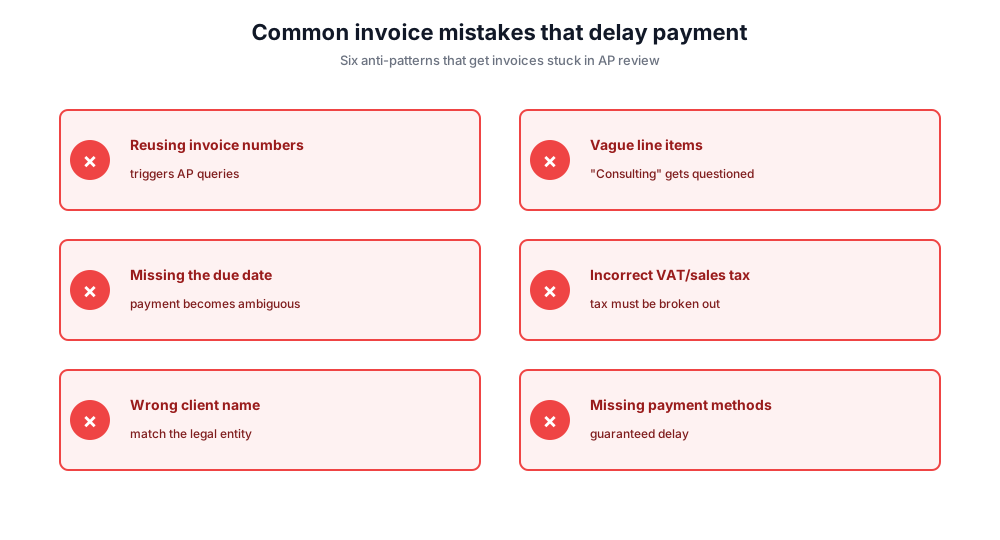
Reusing invoice numbers. Each invoice number must be unique and sequential. Duplicates trigger AP queries and may violate tax-authority audit requirements.
Vague line items. "Consulting" is a question waiting to be asked. "Strategy workshop, March 12" is approved on first review.
Missing the due date. Without a due date, payment terms are ambiguous and "when we get to it" is a valid answer. Always include a specific date.
Incorrect VAT/sales tax handling. Tax rate, rate label, and tax amount must each appear separately. Bundling tax into the unit price violates most jurisdictional requirements.
Wrong client name. Match the client's legal entity, not the trading name. Sending to "Jane's Consulting" instead of "Jane Smith Consulting LLC" can stall payment for weeks.
Missing payment methods. Without bank details, PayPal, or Stripe info, the client has to ask. That's a guaranteed delay.
Privacy: built in your browser, not on our servers
All invoice generation happens entirely in your browser. Your business details, client information, line items, and the resulting PDF are never sent to Chatim's servers, never logged, and never shared. Close the tab and the data is gone.