What is a typing test?
A typing test measures how fast and how accurately you can type. It's the standard way to benchmark typing skills for jobs that involve heavy keyboard use - customer support, transcription, data entry, programming, journalism, and live chat agent roles. The output is a WPM score (words per minute) plus an accuracy percentage.
Most online tools run for 60 seconds. You're given a passage of text and you type it as quickly as you can. An online typing test counts correctly typed words and divides by the time elapsed to give your typing speed. A free version like this one returns the same information as paid software with no signup and no ads.
How WPM (words per minute) is calculated
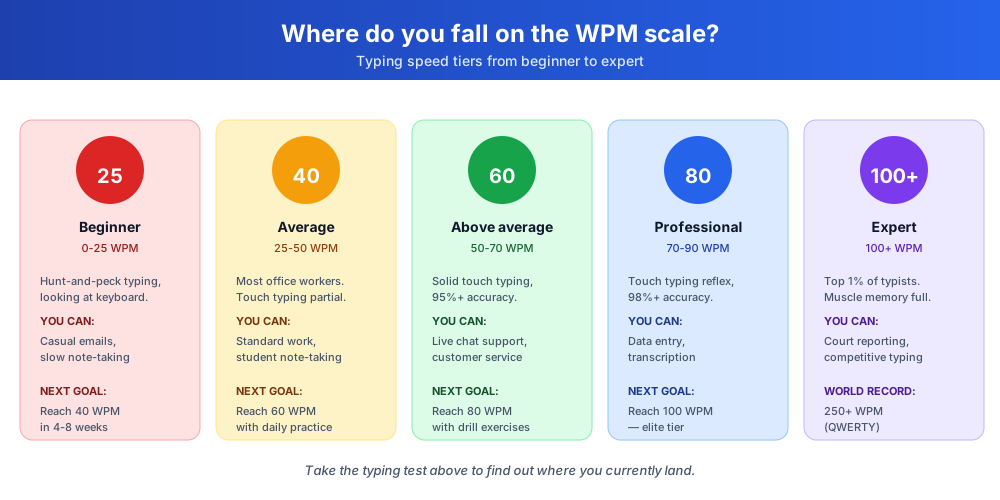
The standard formula is straightforward: WPM = (correct characters typed / 5) / minutes elapsed. The division by 5 is the conventional definition of a 'word' in tests of this kind - five characters including spaces. So if you type 300 correct characters in 60 seconds, your WPM score is 60.
Accuracy is measured separately. The tool counts every keystroke against the displayed text. If you type 300 characters with 290 correct, your accuracy is 96.7%. The most useful metric for most roles is WPM at 95%+ accuracy - speed without accuracy is just typing fast errors that you'd have to fix later.
How to take the speed test
The 60-second test runs entirely in your browser. No signup, no ads, no installation.
- Click anywhere in the input box to start
- Type the displayed text as quickly and accurately as you can
- Watch your WPM score and accuracy update in real time
- When the 60-second timer ends, your final result appears
- Compare your score to industry benchmarks for your role
- Click 'Reset Test' to take another round with a fresh phrase
- Practice regularly to train typing skills and improve over time
Speed test vs accuracy: balancing both
Beginners often focus only on speed and ignore accuracy. The result is a high raw WPM that drops dramatically once you account for backspaces and corrections. Most online speed test tools (including this one) penalize errors so the score reflects real productive typing, not just fast keystrokes.
The right way to take a speed test: aim for 95%+ accuracy first, then push speed. As you build muscle memory through practice, your typing speed climbs while accuracy holds. Skipping the accuracy phase and pushing speed early creates bad habits that are hard to fix later.
Touch typing fundamentals
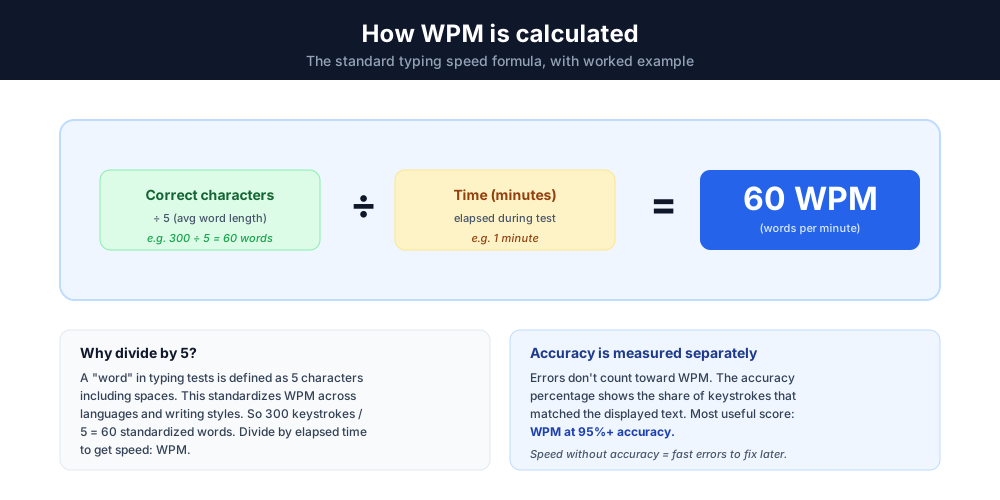
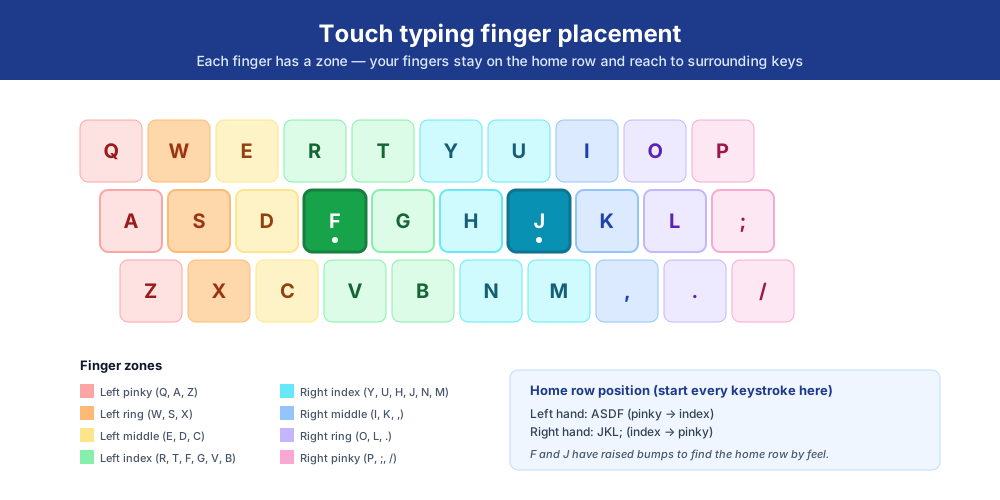
Touch typing is the technique of typing without looking at the keyboard. Your fingers stay on the home row (ASDF for the left hand, JKL; for the right) and reach to the surrounding keys without breaking position. Once mastered, touch typing roughly doubles speed compared to hunt-and-peck.
Learning takes 4-8 weeks of daily practice for most people to reach 40-50 WPM, then several more months to reach 60-80 WPM. Use the tool to measure progress weekly. The goal is muscle memory - your fingers should know where every key is without conscious thought.
How to practice and improve typing skills
Five techniques that consistently move WPM up - used by typists ranging from beginner to 100+ WPM pros.
Practice 15 minutes daily
Consistency beats intensity. Fifteen minutes a day for a month outperforms two hours once a week. Use the tool as a daily warm-up to train typing skills with measurable progress.
Focus on weak keys
Most typists have specific keys they stumble on (often Y, B, P, or the number row). Spot them in the result, then practice deliberately. Typing games and drill apps target individual keys.
Use proper finger placement
Each finger has a 'zone' on the keyboard. Memorize the home row position and which finger covers which keys. Touch typing is impossible without it.
Don't look at the keyboard
The fastest way to plateau is glancing down at the keyboard. Cover it with a cloth or use one with blank keycaps for practice. Discomfort means progress.
Take a measurement weekly
Measure WPM and accuracy at the same time each week. The graph of your typing speed over time is the most motivating practice tool - small wins compound.
Who benefits from a typing test
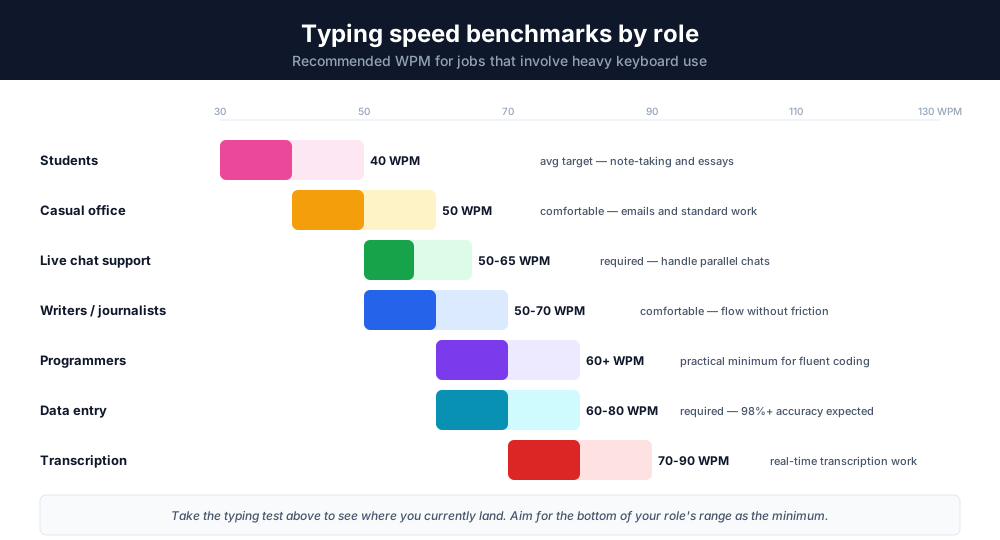
Several roles depend on fast, accurate typing. Use the WPM benchmarks below as targets.
Customer support and live chat agents
Live chat support requires 50-65 WPM minimum. Faster typing = handling more conversations per shift = better customer experience. Use the live chat speed simulation to practice the conditions.
Data entry specialists
Data-entry jobs typically require 60-80 WPM with 98%+ accuracy. Many employers screen with a typing assessment as part of the application.
Transcription and captioning
Real-time transcription typically requires 70-90 WPM; court reporting and captioning roles require 200+ WPM (with stenography keyboards). Standard QWERTY transcription work usually needs 80+.
Programmers and developers
While code is read more than written, fast typing reduces friction in pair programming, code review, and writing comments. 60+ WPM is the practical minimum.
Writers, journalists, and bloggers
Writing flow is interrupted by slow typing. 50-70 WPM is the comfortable range for most professional writers, with editors trending higher because they make more revisions per session.
Students
Note-taking, essay writing, and online exams all benefit from typing speed of 40+ WPM. Below 30 WPM, the act of typing slows down thinking; above 50, typing keeps up with thought.
Free typing test features
Six built-in features that make our tool faster and more accurate than typing games or paid practice software.
Live WPM score
Watch your speed and WPM score update letter by letter as you type. The live indicator helps you adjust speed and accuracy in real time.
Accuracy tracking
Every keystroke counts. The tool measures both speed and accuracy so you see exactly where errors happen and how to improve.
Variety of practice phrases
The text rotates through 10+ varied phrases covering science, travel, business, and curiosity topics - closer to real-world typing than a tool that just repeats the same words.
Instant results, no signup
Get your result the moment the timer stops. No account, no email, no paywall - just your WPM score, accuracy, and characters per minute.
No ads, clean interface
We remove ads and pop-ups so you can focus. Most free alternatives bury the input under banner ads; ours keeps the box front and center.
Privacy first - runs in browser
All data stays in your browser. Your WPM score, the phrases you typed, and error patterns are never sent to a server.
No ads, no signup, no distractions
Many free practice sites cover the page with banner ads, pop-ups, and signup gates. We remove ads from this tool entirely. The interface is the input box, the timer, and the live WPM score. That's it.
There's no email gate, no account creation, no usage cap. Take the test once, take it 50 times, take it on mobile or desktop - the experience is identical and free. The tool runs in your browser and doesn't send your data anywhere, which makes it suitable for a workplace where you don't want a third-party site logging your keystrokes.
Data privacy and security
All data is processed in your browser only. Your WPM score, accuracy results, and the keystrokes you type are never sent to a server. Even Chatim has no access to your results - they exist only on your device.