What is a WhatsApp link?
A WhatsApp link is a short URL - usually a wa.me link - that opens a chat with a specific phone number when a user taps it. The tool above takes a phone number and an optional custom message and builds the link for you. No coding, no WhatsApp API integration, no third-party platform.
There are three flavors of WhatsApp links you'll see in the wild. A direct WhatsApp link points to a phone number and opens an empty chat. A custom WhatsApp link adds a pre-filled custom message - useful for sales on WhatsApp where you want the conversation to open with a specific question or offer. A WhatsApp group link invites the recipient into a group chat instead of a one-to-one conversation.
The format is simple: https://wa.me/PHONENUMBER for a direct wa.me link, or https://wa.me/PHONENUMBER?text=YOUR%20MESSAGE for a custom wa.me link with a pre-filled message. The phone number is just digits - no plus sign, no spaces, no parentheses, just the country code followed by the local number.
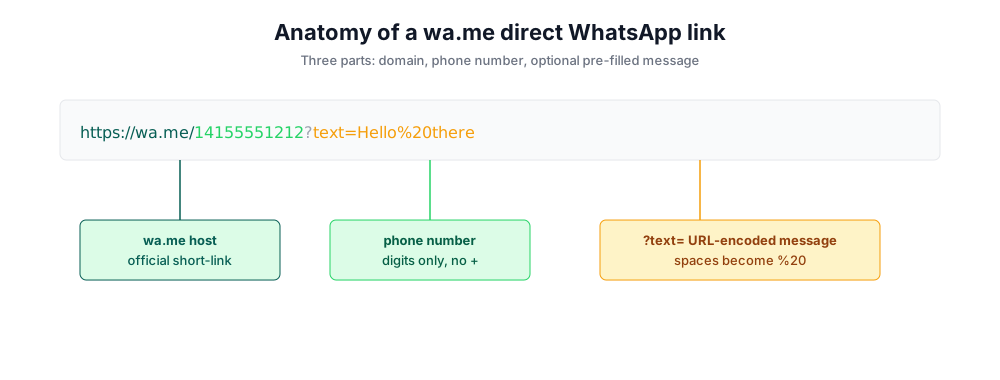
Anatomy of a wa.me direct WhatsApp link
Every WhatsApp click-to-chat link follows the same structure. Understanding it lets you build one by hand if you ever need to skip a tool.
https://wa.me/14155551212?text=Hello%20thereThe wa.me domain is the official WhatsApp short-link host. The number after the slash is the WhatsApp business number or personal phone, in international format with no plus sign. The optional ?text= query parameter holds the custom message - spaces become %20, line breaks become %0A. That's it. No API key, no developer token.
There is also a longer, equivalent format: https://api.whatsapp.com/send?phone=14155551212&text=Hello%20there. Both api.whatsapp.com and wa.me links open the same chat - wa.me is simply the official short version, which is why this generator uses it. If you ever see an api.whatsapp.com link in the wild, you can convert it to a wa.me link by moving the phone number into the path.
Why use a WhatsApp link generator instead of writing the link by hand?
You can absolutely write a wa.me link by hand. But three things go wrong often enough that a free WhatsApp link generator earns its keep (especially when you need a custom link with a pre-filled message):
Phone number formatting
Half of broken WhatsApp links have a stray + or a space the user didn't notice. The tool strips those automatically.
URL-encoding the message
Spaces have to become %20, ampersands become %26, emoji break entirely if not encoded. The generator does the encoding for you.
QR code generation
Pairing a link with a WhatsApp QR code is a separate step. The tool produces both at once - useful for print, business cards, and storefront signage.
How to use this WhatsApp link generator
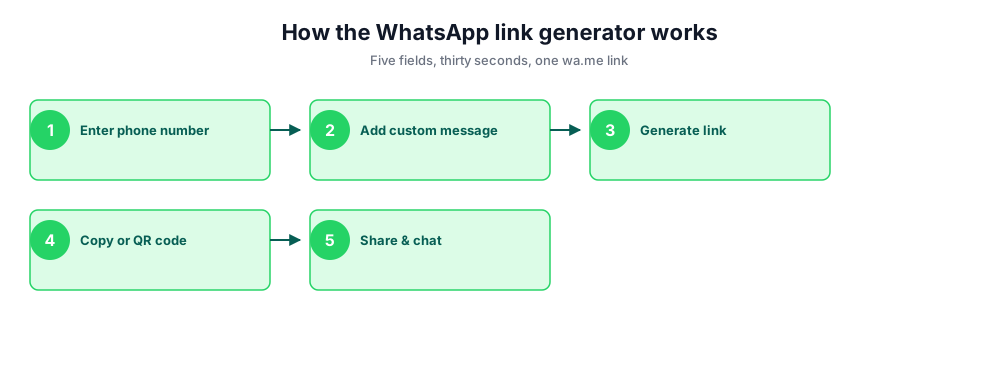
Generate an instant wa.me link in three fields. No login, no API key, no app - paste a phone number, add a custom message, copy.
- Enter the WhatsApp business number or personal number with country code (e.g., +1 for US, +44 for UK).
- Add an optional custom message that pre-fills in the chat (great for sales on WhatsApp and customer support).
- Click Generate WhatsApp Link to build your wa.me direct WhatsApp link.
- Copy the link, or scan the WhatsApp QR code to open the chat on a phone.
- Paste the link into Facebook, Instagram, your website, an email signature, or any social networks profile.
Where to use your WhatsApp click-to-chat link
Once you have a custom wa.me link with a pre-filled message, paste it everywhere a customer might want to talk to you. A custom WhatsApp link opens a WhatsApp chat with the right context every time. Each channel has its own conventions.
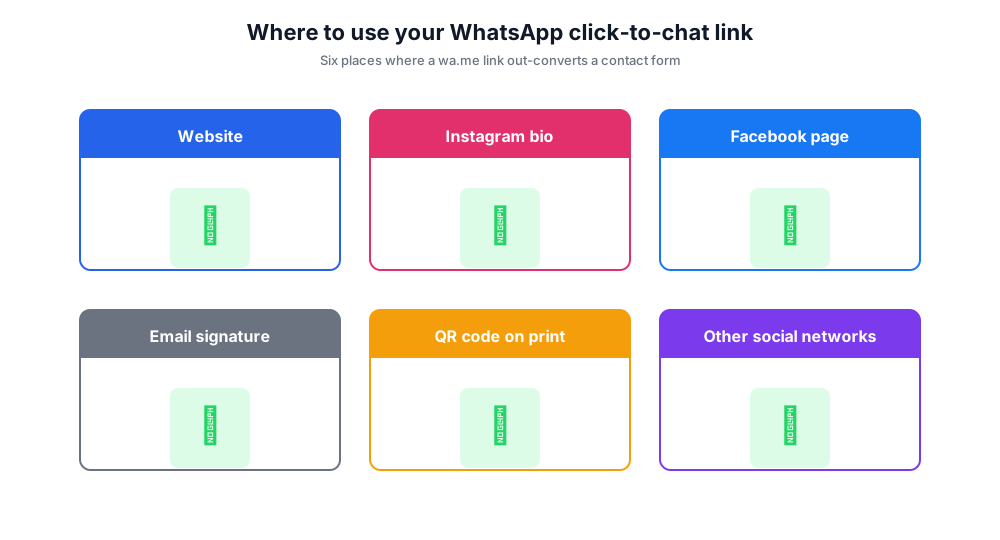
Website. Add an instant WhatsApp button or chat link in your header, floating CTA, or contact page. Pair the WhatsApp click with a QR code on the same page so desktop visitors can scan with their phone.
Instagram bio. Instagram allows one link in bio. A direct wa.me link with a pre-filled custom message turns DM-curious visitors into conversations without forcing them through the Instagram inbox.
Facebook page and ads. Facebook supports WhatsApp click-to-chat as a CTA on Page buttons and lead-gen ads. Use a custom message that references the ad creative so the lead lands warm.
Email signature. Add the chat link below your phone number - great for B2B sales reps whose buyers are remote and prefer messaging over scheduled calls.
QR code on print or storefront. Print the WhatsApp QR code on receipts, menus, packaging, or a window decal. Customers scan, the chat opens with your custom message pre-filled.
Other social networks. TikTok bio, LinkedIn header, X (Twitter) link, YouTube description, Pinterest profile - anywhere you have a single CTA slot, a free link to WhatsApp out-converts a generic contact form.
When to use a WhatsApp QR code instead of a link
A link works on screens; a WhatsApp QR code works in physical space. The two are interchangeable on the link side - the QR encodes the same wa.me URL, the same phone number, the same custom message - but the use cases are different.
Use a QR code on anything printed: business cards, packaging, point-of-sale displays, restaurant menus, event banners. Customers scan with the camera app, the WhatsApp chat opens, the pre-filled message is ready to send. No typing, no number to dial, no friction.
Use a plain wa.me link in any digital context - websites, emails, ads, social bios. A QR code on a webpage looks awkward unless the page is designed to be photographed by a different device.
WhatsApp marketing and sales playbook
WhatsApp marketing built on click-to-chat links is one of the highest-converting outbound channels for SMBs in regions where WhatsApp is the dominant messenger - Latin America, Western Europe, parts of Asia, Middle East and Africa. The pattern: send traffic to a custom wa.me link, the conversation opens warm, your sales team replies in minutes.
The custom message in the link controls the opening tone. "Hi, I'd like to know more about your spring catalog" pre-loads context that takes the conversation directly to a sales conversation. "Hi! Just had a question about my order" sorts inbound to a support queue. Use different free links with different pre-filled custom messages for different campaigns and you get free segmentation in your WhatsApp inbox.
For larger volume - broadcast lists, automated drip campaigns, integration with a CRM - you'll outgrow click-to-chat links and graduate to the WhatsApp Business API. Until then, a free WhatsApp link generator and a couple of well-chosen custom WhatsApp links cover most needs.
WhatsApp Business vs personal number - which to use?
If you'll receive more than five or six chats a day, use a WhatsApp Business number, not your personal one. WhatsApp Business is a free app available alongside the regular WhatsApp app and gives you a business profile, away messages, quick replies, product catalog, and the ability to label conversations. The wa.me link format is identical - same phone number, same custom message - but the inbox is built for sales on WhatsApp.
For higher volume - multi-agent inbox, broadcast at scale, chatbot automation - the WhatsApp Business API is the next step up. The API is a different product (paid, requires a Business Solution Provider), but the click-to-chat link still works the same way: customers tap, the chat opens to whatever endpoint you've connected to the WhatsApp business number.
Common mistakes when creating a WhatsApp link
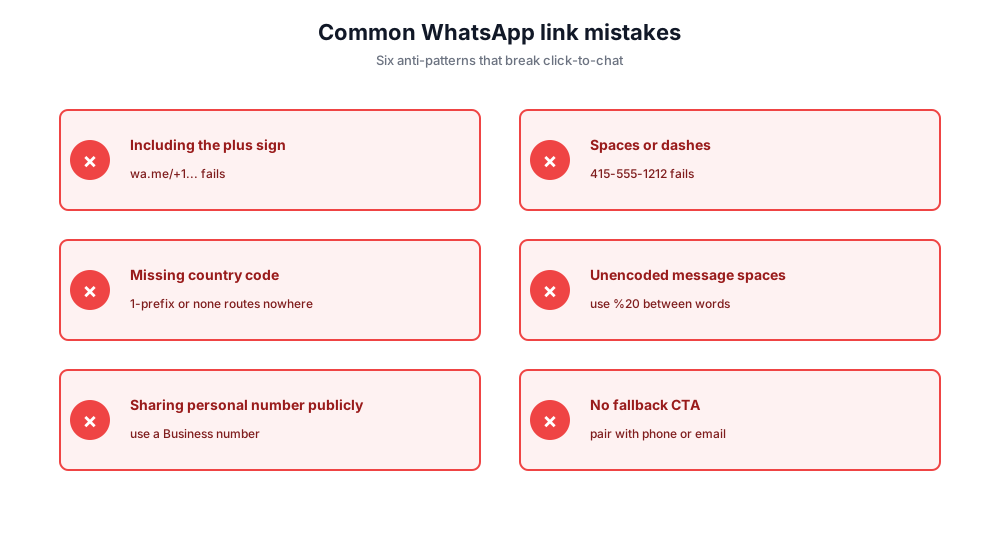
Including the plus sign. wa.me/+14155551212 fails. Use wa.me/14155551212 - digits only.
Spaces or dashes in the number. wa.me/415-555-1212 fails. Strip every separator.
Forgetting the country code. A US number without a leading 1 routes nowhere. Always include the country code.
Spaces in the custom message that aren't URL-encoded. Use %20 between words, or let the tool do the encoding for you.
Sharing a personal number publicly. Once your personal phone is in a public wa.me link on Instagram or Facebook, you can't unshare it. Use a WhatsApp Business number you can rotate.
Missing a fallback CTA. Some recipients don't have WhatsApp. Pair the link with a plain phone number or email so they have an alternative.
Free WhatsApp link generator vs paid WhatsApp marketing platforms
A handful of free and paid tools generate WhatsApp links. Here's how this free tool stacks up.
Chatim Free WhatsApp Link Generator (this tool)
Pros: No signup. Builds a wa.me direct wa.me link with custom message. Generates a WhatsApp QR code in the same flow. Mobile-friendly.
Cons: No bulk batch generation, no link analytics.
Walink (create.wa.link)
Pros: Polished UI, branded short links available on the paid tier.
Cons: Free tier basic; advanced features behind paywall.
WhatsApp Business app (official)
Pros: Free, official, includes a built-in click-to-chat link in the app's settings.
Cons: Requires you to install WhatsApp Business and have an active business account.
Click-to-chat platforms (Kommo, Interakt, Chatfuel)
Pros: Full chatbot, CRM integration, and WhatsApp marketing automation.
Cons: Paid plans; overkill if you only need a single link.
If you need one custom WhatsApp link right now to paste into Instagram or your website, this free tool gets you there in under thirty seconds. If you're running paid WhatsApp marketing campaigns at scale with a CRM and a chatbot, a paid platform makes sense.
Privacy: built in your browser, not on our servers
This free WhatsApp link generator runs entirely in your browser. Your phone number, custom message, and the resulting wa.me link are never sent to Chatim's servers, never logged, and never shared with third parties. Close the tab and the data is gone.