Help Desk Software: A Complete Guide for 2026
Every company that answers questions needs a system for it. Help desk software is that system: a single place where customer questions, IT problems, and internal requests arrive, get tracked, and get resolved. Without it, requests scatter across email, chat, and sticky notes, and the important ones quietly fall through the cracks while customers wait.
This complete guide explains what help desk software is, how it works, the main types and the key features, the real benefits, the tools worth knowing, how to choose, the metrics to track, and the best practices that keep a help desk running well. It is written for support leaders, IT managers, and small business owners alike.
Whether you run a two-person customer support team or a large IT helpdesk handling thousands of tickets, the right software turns scattered requests into one organized, measurable process that your customers and your support staff can both rely on every day.
What is help desk software?
Help desk software is a tool that collects support requests from every channel, turns each request into a trackable ticket, and helps a support team resolve it quickly. It is the platform behind the support experience your customers and employees actually feel.
It helps to separate two ideas. A help desk is the function: the team and the process that answer questions and fix problems. The software is the engine that powers that function, giving support agents one shared workspace instead of a tangle of personal inboxes and forwarded messages.
At its core, this kind of tool does three things well. It captures every customer request in one queue, it gives each request an owner and a status, and it records what happened so the company can measure and improve. Good software makes support visible, and visible work is work that a manager can actually run.
The category covers a wide range. At one end sits a simple shared inbox for a small shop; at the other, a full enterprise platform that routes thousands of tickets a day across many teams. The label stays the same, but the scale, the price, and the feature set change a great deal across that range.
The term itself has variants. You will see it written as helpdesk software, as a service desk, or as a ticketing system, and those differences are real. The next sections sort them out so you can shop for the right help desk software with confidence.
Help desk vs service desk
People use the terms help desk and service desk almost interchangeably, but there is a genuine distinction worth knowing before you shop.
A help desk is mostly reactive. It exists to answer questions and fix issues fast, whether those issues come from paying customers or from staff. A service desk is broader. Built around IT service delivery, it handles not just incidents but change, assets, requests, and the wider catalog of services that an organization delivers.
In practice, a service management tool such as Jira Service Management leans toward formal, structured process, while a customer support platform leans toward fast, conversational help desk work. Many companies only ever need the help desk side, and choosing the simpler tool is perfectly sensible.
Who uses help desk software
Three groups rely on help desk software every day, and a single platform often serves all of them at once.
Customer support teams use it to answer customers and keep their promises on response times. IT teams run an internal helpdesk for password resets, broken laptops, and access requests. Other departments, from HR to facilities, use the same kind of tool to handle their own steady stream of employee requests and questions.
Company size shapes the choice. A small business usually wants simple, affordable help desk tools that work on day one, while a large enterprise needs deep customization, strict permissions, and reporting that satisfies leadership and auditors. The right tool is the one that matches your size today and your size in two years.
How help desk software works
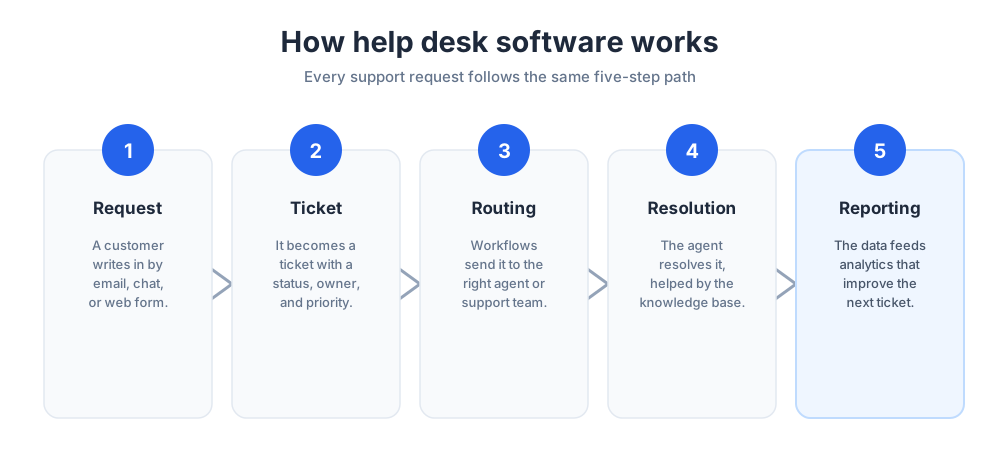
The promise of the software is simple: nothing gets lost, and everyone knows what to do next. It delivers that promise through a small set of mechanics that work much the same way across almost every tool on the market.
Ticket creation and tracking
Everything starts with a ticket. When a customer emails, opens a chat, or fills in a web form, the software creates a ticket that holds the full history of that request in one place.
Each ticket carries a status, a priority, and an owner, so anyone on the support team can see where it stands at a glance. Because the history travels with the ticket, a customer never has to repeat their story when a second agent picks it up, and managers can see every open ticket without asking.
Over a single week, a busy support team can open hundreds of tickets, and the value of the tool is that none of those tickets are ever invisible. Each one is counted, tracked, and accounted for until it is closed.
Routing and assignment workflows
Once a ticket exists, it has to reach the right person. Routing rules and workflows send each ticket to the team or agent best suited to handle it, based on topic, priority, language, or customer tier.
Good workflows also enforce the promises a company makes. They escalate a ticket that has been sitting too long, flag one that is about to breach a service level agreement, and group similar tickets so the same issue is never worked twice. This routing automation is quiet but constant, and it is a big part of why support teams trust the tool with their workload.
Knowledge base and self-service
The fastest ticket is the one that never has to be opened. A knowledge base is a library of help articles that lets customers and employees solve common problems on their own, at any hour.
Paired with a self-service portal, that library deflects routine customer questions around the clock. A self-service portal also lets customers check the status of an existing ticket without contacting an agent at all, which removes a whole class of follow-up messages from the queue.
The result is that support agents spend their time on the harder cases that genuinely need a human, while the simple, repeated questions are handled before they ever become tickets.
Reporting and analytics
Every action in a help desk leaves data behind, and reporting turns that data into management decisions. Built-in analytics show how many tickets arrive, how fast they are resolved, and exactly where the queue gets stuck.
That visibility is what separates a managed support operation from a merely busy one. With clear analytics, a leader can staff the right shifts, spot a failing product early, and prove the value of the customer support team to the rest of the company with hard numbers rather than anecdotes.
Types of help desk software
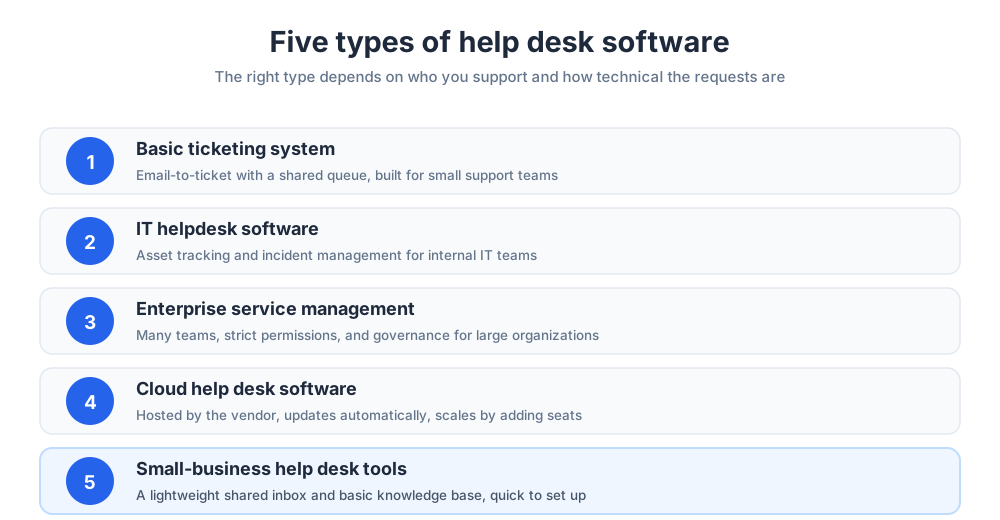
Help desk software is not one product but a family of them. The right type depends on who you support, how technical the requests are, and how large your organization has grown. Picking the wrong type is the most common and most expensive buying mistake.
Basic ticketing system
A basic ticketing system is the simplest form of help desk software. It captures customer queries from email and a contact form, turns them into tickets, and tracks each one through to resolution.
This is ticketing software at its most focused: email integration, a shared queue, canned replies, and light reporting. For a small support team that mainly needs to stop losing messages, a clean ticketing system is often all the software they will ever need, and it keeps costs low.
IT helpdesk software
IT helpdesk software is built to manage technical issues: hardware faults, software errors, network outages, and access requests. It adds capabilities that a customer support queue simply does not need.
Those capabilities include asset management, incident management, and a service catalog of common requests. Good IT helpdesk software also leans heavily on automation to handle the high volume of repetitive tickets, such as password resets, that flood any internal IT team. The goal is to keep the company running while IT staff focus on real problems.
Enterprise help and service management
Enterprise help desk software is built for scale and complexity. It supports many teams, strict role-based permissions, and the formal processes a large organization depends on every day.
At this level the line into formal service delivery blurs. An enterprise platform often unifies customer service, IT, HR, and facilities into one system, with the governance and reporting that leadership and auditors expect. Enterprise service management is simply this idea applied across the whole company, so every department runs support the same disciplined way.
At the enterprise scale, the helpdesk also becomes a hub of automation and workflows. A large enterprise runs hundreds of workflows, ties the helpdesk into other enterprise systems through integrations, and expects the helpdesk to report cleanly to enterprise leadership. This is where strong workflows and deep integrations stop being optional extras and become the reason the enterprise helpdesk works at all.
Cloud help desk software
Most modern help desk software is cloud software, hosted by the vendor and reached through a browser. The cloud model has become the default for new buyers, and for good reasons.
This kind of helpdesk needs no servers to maintain, it updates automatically, and it lets support agents work from anywhere. The cloud also scales smoothly: you add seats as the team grows rather than planning a hardware project. A small number of organizations still pick an on-premise help desk for strict data-control reasons, but the cloud is now firmly the mainstream choice.
Small-business help desk tools
Not every team needs a heavy platform. A growing shop is usually better served by lightweight help desk tools that are quick to set up and easy for anyone to learn.
These help desk solutions focus on the essentials: a shared inbox, simple tickets, canned replies, and a basic knowledge base. The goal is a tool that an owner can run without a dedicated administrator, and that still looks professional and organized to every single customer who writes in.
Key features of help desk software
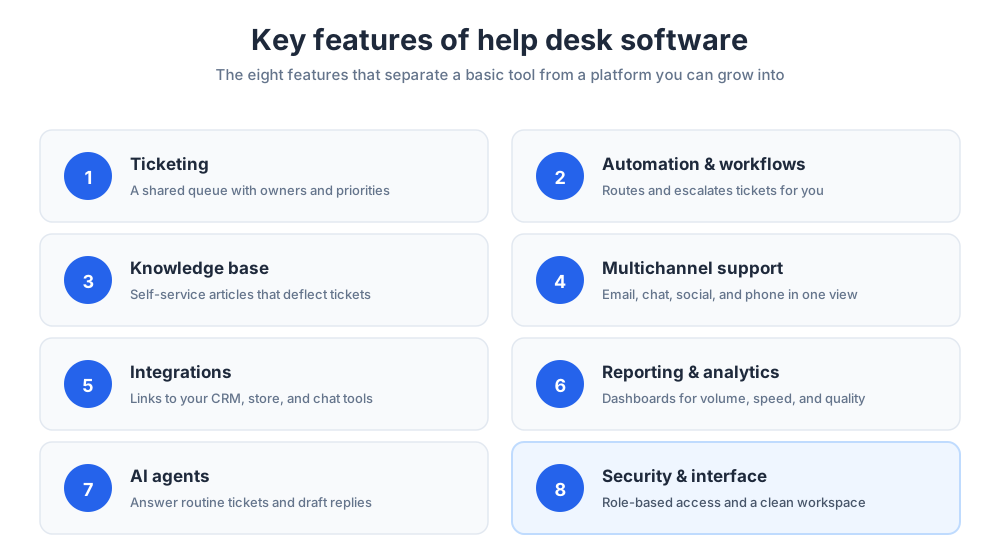
Two tools can both be called help desk software and still feel completely different to use. The difference lives in the feature set. These are the key features that matter most when you compare the options, and the features a demo should always cover.
No single tool leads on every one of these features, so the real goal is to match a tool's strongest features to your daily work. The key features below appear on almost every help desk, yet their depth varies enormously, and that depth is what a buyer is truly comparing. Rank the features your team will use every hour above the features that only sound impressive on a slide, and weigh the features as one connected set rather than a checklist.
Ticketing and the shared queue
Ticketing is the foundation feature. A strong ticketing system gives every request a clear owner, status, and priority, and shows the whole support team one shared queue that everyone trusts.
The details matter in this feature. Look for tags, custom fields, internal notes, merge options for duplicate tickets, and a clean view of related tickets, because those small features are what keep a busy queue from turning into chaos on a hard day.
Automation and workflows
Automation is where the software starts to save real time. Instead of routing every ticket by hand, you build workflows that do the routing for you, consistently and instantly.
Useful automation includes assigning tickets by topic, sending status updates to customers, escalating anything that breaches a deadline, and closing resolved tickets after a quiet period. Each automated workflow removes a manual step, and across a year of support those saved steps add up to weeks of recovered time.
The best automation tools let a non-technical manager build these workflows with a visual editor, so the automation grows with the team rather than waiting on a developer. Strong workflows are the quiet engine of an efficient help desk.
Knowledge base
A built-in knowledge base lets you publish help articles for customers and internal guides for agents in one place. It is one of the highest-return features in any help desk.
For customers, it powers self-service and cuts ticket volume noticeably. For agents, it is a single source of truth that keeps answers accurate and consistent no matter who happens to reply to a ticket.
Multichannel support
Customers reach out by email, live chat, social media, phone, and web forms, and they expect one joined-up conversation rather than five separate ones. Multichannel support pulls all of those channels into a single ticket view.
Adding live chat to the mix is one of the fastest ways to lift customer satisfaction, since it answers people in the moment they are stuck. Our guide to the best live chat software covers that channel in depth.
Integrations
A help desk does not work alone, so integrations are a feature you should weigh early. Integrations connect the help desk to the other systems a company runs, so data flows automatically instead of being retyped by hand.
Common integrations link the help desk to a CRM, an e-commerce store, a billing system, and team chat. The more integrations a platform offers, the less an agent has to switch tabs, and the more context every ticket carries from the very first reply. When you shortlist tools, the depth of the integrations often matters more than any single headline feature.
Strong integrations also future-proof the purchase, because they let the help desk fit whatever new tools the company adopts later. Treat the integrations list as a core part of the comparison, not a footnote.
Reporting and analytics
Reporting turns a help desk from a black box into a managed operation. Strong reporting covers volume, speed, quality, and team workload, with dashboards a manager can read in seconds.
The best reporting tools also let you slice the analytics by channel, product, or agent, so you can find the real cause of a slow week instead of guessing at it. Good reporting makes every later decision about staffing and process easier to defend.
AI agents and AI automation
Artificial intelligence has moved from a buzzword to a practical feature. Modern help desk software now ships AI features, including agents that can answer routine questions, offer instant assistance, draft replies for human review, and tag incoming tickets automatically.
Used well, this AI assistance handles the simple, repetitive volume so human agents can focus on judgment calls and tricky cases. AI agents are best understood as another layer of automation: they do not remove the need for people, they change what a support day is spent on. The strongest AI assistance learns from your own knowledge base and past tickets.
Security features and the user interface
Two features are easy to overlook and costly to ignore. The first is security. Useful protections include role-based access, encryption, and audit logs, because every ticket may hold personal customer data that the company is responsible for protecting.
The second is the interface itself. A clean, fast interface is not a luxury, since support agents live inside this tool all day. A cluttered screen slows down every single ticket, while a clear, well-designed workspace quietly speeds up the entire team.
Benefits of help desk software
The features above exist to deliver outcomes. When a support team adopts the right tools and uses them well, four benefits show up reliably, and together they explain why the category keeps growing.
Faster, more consistent customer support
The clearest benefit is better customer support. A shared queue means no customer request is ever missed, and routing automation means each one reaches the right agent quickly without anyone sorting tickets by hand.
Consistency improves too. With a knowledge base and saved replies behind them, every agent gives the same accurate answer, so the quality of support no longer depends on which agent happens to pick up the ticket.
For any customer-facing business, this consistency is the foundation of good customer service. Every customer who contacts the business meets the same standard, and that reliability is what slowly turns first-time buyers into loyal customers. Strong customer service software does not simply close a customer ticket; it protects the customer relationship that the whole business quietly depends on.
Lower costs and less manual work
The software lowers the cost of every resolved ticket. Automation removes manual routing and follow-ups, and self-service deflects the simplest customer questions entirely before they reach an agent.
That efficiency means a support team can handle a steadily growing volume of tickets without growing its headcount at the same pace, which is one of the most direct ways the software pays for itself within a year.
Better visibility for support teams
Without software, support is invisible to management: managers cannot see the backlog, the trends, or the strain on the team until something breaks. With the right tool, everything is measurable.
That visibility lets support teams staff the right shifts, catch a product problem early from a spike in related tickets, and show the rest of the company exactly how much work they quietly absorb. Invisible work is hard to fund; measured work is easy to defend in a budget meeting.
A scalable foundation for growth
Finally, the software gives a company a foundation it can build on. The processes you set up for a handful of agents still hold when the support team is ten times larger.
New hires learn one system, workflows enforce the standards automatically, and the knowledge base keeps growing with every case. Support scales as a managed process rather than collapsing into daily firefighting, and that is the difference between a help desk that grows well and one that burns its people out.
Popular help desk software to know
The market is crowded, which is good news for buyers and their customers. The tools below are among the most widely used help desk software platforms, and looking at them shows the real range of the category. None is best for everyone; the right fit depends on your size, your budget, and whether your focus is customer support or an internal IT helpdesk. Among the top help desk solutions, the platforms below show how varied the category has become.
Zendesk
Zendesk is one of the most recognized names in customer support software. It is a mature platform with deep features, built around ticketing, a knowledge base, and multichannel support, with a large marketplace of integrations.
Zendesk suits mid-size and larger support teams that want depth and room to grow. Zendesk can feel heavyweight for a very small shop, and the price climbs as you add features, so teams weighing Zendesk often compare it with lighter tools first. Our guide to Zendesk alternatives walks through that comparison, and the right tool for a small team is often simpler than Zendesk.
Zoho Desk
Zoho Desk is the help desk software in the broad Zoho suite. The strongest appeal of Zoho Desk is value and the way it connects to other Zoho products, from CRM to billing to analytics.
For a company already using Zoho, Zoho Desk is an easy and natural fit, since the data and the login are shared. Zoho Desk offers solid ticketing features, automation, a knowledge base, and a customer-facing service portal, and it scales reasonably well from a small team upward. Even for teams outside the Zoho world, Zoho Desk is a credible, well-rounded help desk worth a place on any shortlist. Many teams shortlist Zoho Desk first for exactly that reason.
Freshdesk and Freshservice
Freshworks offers two related products. Freshdesk is its customer support help desk, while Freshservice is its IT service management and service desk tool.
The split is genuinely useful. A customer-facing team picks Freshdesk; an internal IT team picks Freshservice for asset and incident management. Freshservice in particular is a clean, modern take on the service desk, with a tidy self-service area for employees, and the shared Freshworks platform makes it simple to run Freshservice and Freshdesk side by side. Freshservice is a strong option whenever IT support is the priority.
HubSpot Service Hub
HubSpot Service Hub is the support product inside the wider HubSpot platform. The defining strength of Service Hub is the tight link between support, marketing, and sales data on one system.
For a company already on HubSpot, Service Hub means every support ticket sits right next to the full customer record. That shared context is the main reason teams choose HubSpot Service Hub over a standalone help desk, and it keeps the whole customer relationship in one place.
Jira Service Management
Jira Service Management, from Atlassian, is a service desk built for IT and software development teams. Jira Service Management was formerly known as Jira Service Desk before the rename.
Its advantage is the connection to Jira itself, so a support ticket can link directly to the engineering work that will fix the underlying bug. Jira Service Management is a strong choice for technical organizations that want service management and software delivery joined up in one connected system rather than two.
Salesforce Service Cloud
Salesforce Service Cloud is the customer service product on the Salesforce platform, and it is aimed squarely at the enterprise.
For a large organization already standardized on Salesforce, Service Cloud puts support on the same platform as sales and customer data, which is a powerful combination. Salesforce Service Cloud is rich in features and highly customizable, though that depth means it usually needs real configuration, and often a Salesforce specialist, before it fits a team well.
SolarWinds Service Desk
It is an IT service management platform aimed at internal support. It focuses on incident management, asset tracking, and a clear service catalog for employees.
It suits IT teams that want structured service management without the full weight of the largest enterprise suites, and it pairs naturally with the rest of the SolarWinds IT toolset that many technical teams already run.
ProProfs Help Desk and more
The category runs deeper still. It is a straightforward, shared-inbox tool aimed at smaller teams that want simplicity over a long feature list, and it is an easy first step up from a plain inbox.
Beyond that sit many more options, from open-source projects to niche industry tools. The lesson is not to memorize a software shortlist but to match the tool to your needs, which the next section walks through step by step.
How to choose the right help desk software
With so many help desk solutions and support tools available, choosing well matters far more than choosing fast. A clear process keeps you from buying either too much platform or too little, and from regretting the decision in a year.
Map your support needs first
Start with your own situation, not a feature list. Write down who you support, how many tickets arrive, which channels they use, and where the current process hurts most.
That short brief is your filter. A customer support team and an internal IT helpdesk will weigh the same product very differently, and knowing clearly which one you are stops you chasing the wrong tools and the wrong demos.
Compare key features and integrations
Next, compare the key features that map to your brief. Sort the features into must-haves and nice-to-haves, so a flashy demo cannot distract you from what your team will use every day.
Pay close attention to integrations and to the service options each vendor offers. The help desk has to connect to the CRM, the store, and the other tools you already run, because a platform that does not fit your stack quietly creates manual work every single day.
Think hard about the management features as well. Strong reporting, workload management, and desk management all decide how easy the tool is to run once the support team grows. A small business can start with light tools, but a growing business should confirm that the platform's integrations and management options will still fit in two years. A help desk is really management software for support work, so the integrations matter a great deal: the best integrations turn separate tools into one connected system, and you should weigh those integrations as carefully as the headline features.
Weigh the pros and cons
Every option has trade-offs, so weigh the pros and cons honestly. A large enterprise platform brings power, and also complexity and cost. A simple tool brings speed, and also limits you may outgrow within a year or two.
Read independent reviews, study each platform's pros and cons, and then run a free trial with real tickets. A short hands-on test reveals the genuine pros and cons far better than any polished sales call. Some vendors even offer a free helpdesk tier, which is a low-risk way to test the fit before you commit a budget.
Plan for scale and budget
Finally, look ahead. The right help desk software fits both the team you have now and the team you expect in two years, so plan for scale from the start.
Check how the price grows as you add agents and features, and confirm the tool can handle more volume without a painful migration later. The cheapest tool today is not a bargain if it forces a costly switch tomorrow. Picking the right help desk solution is a multi-year decision, so treat it like one and choose the tool you can grow into.
Help desk metrics and KPIs to track
The software gives you data, but data only helps if you watch the right numbers. A small set of key performance indicators tells you honestly whether the help desk is working, and these helpdesk metrics belong on every support management dashboard.
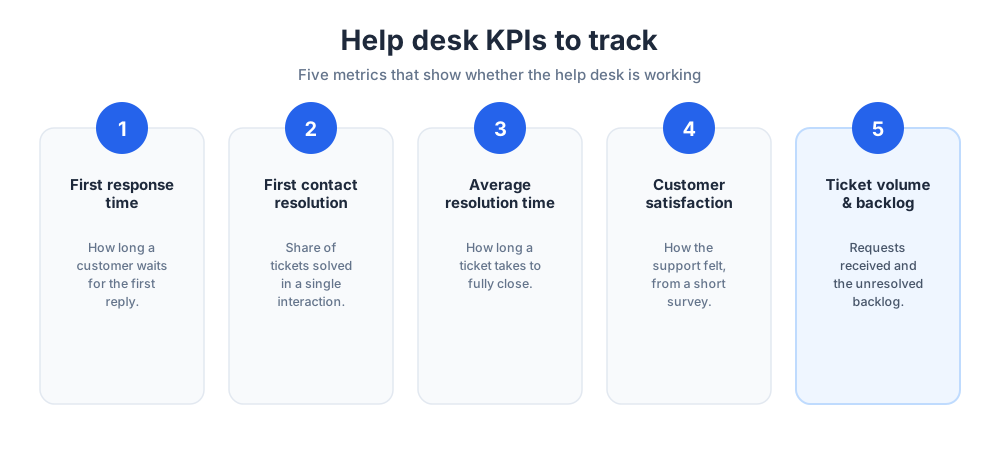
First response time
First response time measures how long a customer waits for any reply after they get in touch. It is the first thing people notice, and a fast first response sets the tone for the whole interaction.
Even an automated acknowledgment counts here, because it tells the customer their request was received and is safely in the queue. Slow first responses are the single most common customer service complaint a help desk hears.
First contact resolution
First contact resolution tracks the share of tickets solved in a single interaction, with no follow-up needed. It is one of the strongest signals of a healthy help desk.
A high rate usually means support agents have good tools and solid documentation behind them. A low rate points to gaps in training, in information, or in how tickets are routed in the first place.
Average resolution time
Average resolution time measures how long a ticket takes to fully close, from creation to resolution. It reflects the efficiency of the whole customer service process, not just the speed of the first reply.
Watch this metric by ticket type. A rising average often points to one category of repeat tickets that needs a better workflow, a new automation, or a fresh knowledge base article to fix the root cause.
Customer satisfaction
Customer satisfaction, usually measured with a short survey after a ticket closes, captures how the support actually felt to the customer on the other end.
Speed metrics can look healthy while satisfaction quietly slips, so this score is the reality check. It keeps a support team focused on the quality of the customer service, not only on the speed of it, and it is the metric management tends to care about most.
Ticket volume and backlog
Ticket volume is the count of customer requests over a period, and backlog is the set that remains unresolved. Together they show whether the support team is keeping pace with demand.
Trends matter more than any single day. A steady climb in ticket volume is a staffing signal, while a sudden spike in one topic is often an early warning of a product or service problem that needs attention upstream.
Best practices for running a help desk
Good help desk software is necessary but not sufficient on its own. These best practices are what turn a capable platform into support that customers actually praise to their friends.
Build a strong knowledge base
Treat the knowledge base as a core project, not an afterthought. Write a clear article every time the same question appears more than a few times in your tickets.
A good knowledge base deflects tickets, speeds up support agents, and improves with every resolved case. Keep it current, because an outdated article costs more trust than no article at all, and review it on a fixed schedule.
Automate repetitive workflows
Look for the manual steps your team repeats all day and turn them into workflows. Ticket routing, acknowledgments, escalations, and follow-up reminders are all easy automation wins that pay off immediately.
Automation should remove busywork, not personality. Keep automated messages warm and human, and always leave a clear path to a real person, because over-automation frustrates customers faster than slow replies do.
Tier and route tickets well
Not every ticket is equal, so do not treat them as if they were. Strong ticket management starts here: sort incoming tickets by urgency and complexity, and route each one to the right tier of support.
Simple questions should be resolved fast at the front line, while complex tickets go straight to a specialist. Clear tiers and good routing keep both the easy and the hard tickets moving instead of clogging a single shared queue.
Train and support your team
The software does not answer the customer; a person does. Invest in onboarding, ongoing training, and regular coaching for your support teams.
Give the support team time to read the documentation, share hard cases, and learn new features as they ship. A confident, well-supported agent resolves tickets faster and leaves customers measurably happier than a rushed, undertrained one.
Review analytics and keep improving
Set a regular rhythm to review the analytics together as a support team. Look at the KPIs, read a sample of real tickets, and pick one specific thing to improve before the next review.
Small, steady changes compound over time. A help desk that reviews its own data and acts on it gets a little better every month, and customers genuinely feel that steady progress in the quality of support.
The future of help desk software
The biggest question facing the category is artificial intelligence. AI agents now resolve a real share of routine tickets on their own, and that share is growing with every product release.
This raises a fair worry: is AI replacing the IT helpdesk? The honest answer is that it is reshaping the role rather than removing it. AI handles the repetitive, well-documented requests, while people take on the complex, sensitive, and judgment-heavy work that software cannot.
For most teams, the future is a blend. The software will keep automating the predictable volume, and the human helpdesk will move up the value chain toward problem-solving, relationships, and trust. The tools change; the need for genuine, capable customer support does not.
Choosing well today sets you up for that future. Pick help desk software that captures every request, measures honestly, and grows with your company, then run it with the best practices above, and your support becomes a real, lasting advantage rather than a daily scramble to keep up with the queue.
More on this from our team: help desk vs service desk and best help desk for SaaS.
Frequently Asked Questions
What is the best help desk software?
There is no single best help desk software, because the right choice depends on your team size, your budget, and whether your focus is customer support or internal IT. Widely used platforms include Zendesk, Zoho Desk, Freshdesk, Freshservice, HubSpot Service Hub, Jira Service Management, and Salesforce Service Cloud. Shortlist two or three that match your needs, then run a free trial with real tickets before you decide.
What software is used in help desks?
Help desks run on help desk software, also called ticketing software or service desk software. It captures requests from email, chat, and web forms, turns them into tickets, and helps a team track and resolve each one. Popular options include Zendesk, Zoho Desk, Freshdesk, and Jira Service Management, along with lighter tools for smaller teams. Most also include a knowledge base, automation, and reporting.
What is a help desk software?
Help desk software is a tool that collects support requests from every channel, turns each request into a trackable ticket, and helps a team resolve it. It gives agents one shared queue instead of scattered inboxes, routes tickets to the right person, and records data for reporting. It is the platform behind the customer support or IT support that a business provides.
Is AI replacing IT's help desk?
AI is reshaping the IT help desk rather than replacing it. AI agents now resolve a share of routine, well-documented tickets on their own, such as password resets and common questions. Complex, sensitive, and judgment-heavy work still needs people. For most teams the future is a blend: AI handles the predictable volume, and human agents move toward problem-solving and higher-value support.
What is the difference between a help desk and a service desk?
A help desk is mostly reactive: it answers questions and fixes issues fast for customers or staff. A service desk is broader, built around IT service management, and handles incidents along with change, assets, requests, and a wider service catalog. Tools like Jira Service Management and SolarWinds Service Desk lean toward formal service management, while many businesses only ever need the help desk side.
What are the main types of help desk software?
The main types are a basic ticketing system for small teams, IT helpdesk software for technical support, enterprise help desk and service management platforms for large organizations, cloud help desk software hosted by the vendor, and lightweight help desk tools for small businesses. Most modern options are cloud-based, and the right type depends on who you support and how technical the requests are.
What features should help desk software have?
Look for the core features first: ticketing with a shared queue, automation and workflows, a knowledge base, multichannel support, integrations with your CRM and other tools, and reporting and analytics. Newer platforms add AI agents that handle routine tickets. Strong security and a clean user interface matter too, since support agents work inside the tool all day long.
How much does help desk software cost?
Help desk software is usually priced per agent per month, and the range is wide. Some vendors offer a free tier or a free trial, lightweight tools sit at the low end, and enterprise platforms cost much more once advanced features are added. Pricing changes often, so check each vendor's current pricing page and confirm how the cost grows as you add agents and features.
Do small businesses need help desk software?
Most growing small businesses benefit from it. Once support requests outgrow a single inbox, messages start slipping, and a simple help desk fixes that. Small businesses do not need a heavy enterprise platform; lightweight help desk tools with a shared inbox, simple tickets, and a basic knowledge base are quick to set up and keep support organized and professional.
What is the difference between help desk software and a CRM?
A CRM manages the sales relationship: contacts, deals, and pipeline. Help desk software manages support: tickets, questions, and issue resolution. The two overlap and often integrate, so an agent can see the customer record while answering a ticket. Some platforms, such as HubSpot and Zoho, offer both. In short, a CRM is built to win and grow customers, and a help desk is built to support them.
What are help desk KPIs?
Help desk KPIs are the metrics that show whether support is working. The core ones are first response time, first contact resolution, average resolution time, customer satisfaction (CSAT), and ticket volume with backlog. Tracked together, they reveal speed, quality, and workload. Review them on a fixed schedule and change one thing at a time so you can see what actually improved.
Is cloud help desk software better than on-premise?
For most teams, yes. Cloud help desk software needs no servers to maintain, updates automatically, scales by adding seats, and lets agents work from anywhere. On-premise help desk software still suits a small number of organizations with strict data-control requirements. For new buyers, the cloud is the mainstream choice because it is faster to launch and easier to run.
How do I choose the right help desk software?
Start by mapping your support needs: who you support, your ticket volume, and the channels people use. Compare key features and integrations against that brief, sorting must-haves from nice-to-haves. Weigh the pros and cons of each option, run a free trial with real tickets, and plan for scale so the tool fits the team you expect in two years, not just today.
What is a ticketing system?
A ticketing system is the core of help desk software. It turns each support request into a ticket that carries a status, a priority, and an owner, then tracks it from creation to resolution. The ticket holds the full history, so no request is lost and no customer has to repeat their story. A basic ticketing system is often all a small team needs.
Related articles
More in Customer service → SaaS Customer Support: The Stage-by-Stage Guide (2026)
How SaaS customer support actually works at each stage: the right stack from founder-led live chat to a full support operation, channels, and metrics.
 How to Reduce Customer Churn: 5 Levers in Payback Order
Reduce customer churn by pulling five levers in payback order: payment recovery, onboarding, support quality, pricing fit, and a 90-day win-back.
 10 FAQ Page Examples That Actually Help Customers (2026)
10 FAQ page examples from Shopify, Airbnb, Slack, Nike and more, with the exact pattern each gets right and a checklist to build your own FAQ page.
 12 Customer Service Email Templates for Every Scenario (2026)
12 customer service email templates for complaints, refunds, delays, bugs and saying no, plus the five-line skeleton that keeps them sounding human.