What is a pay stub?
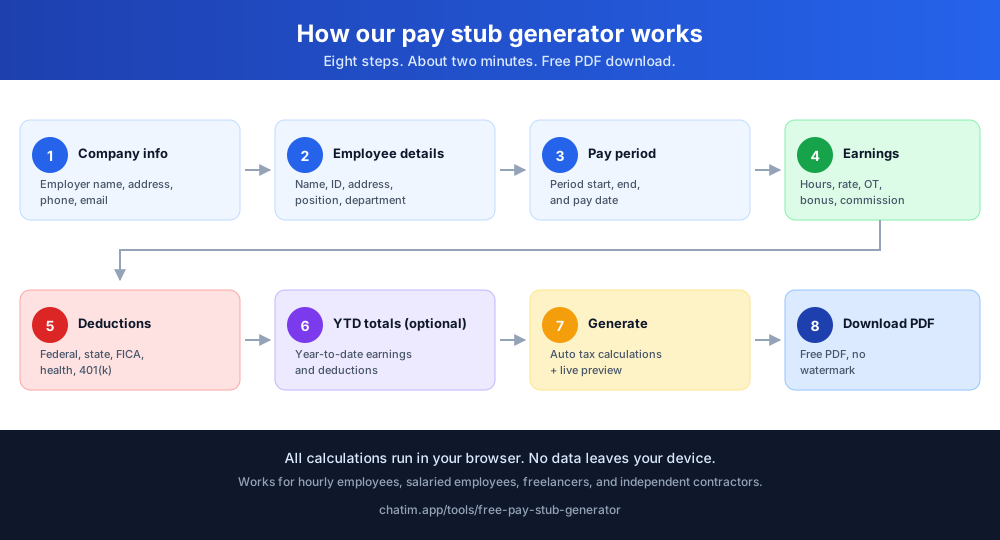
A pay stub is a document that breaks down an employee's earnings for a specific pay period. It shows gross pay (total earnings before deductions), every withholding and payroll deduction applied, and the final net pay deposited into the employee's account. Pay stubs go by several names depending on where you live: pay slip, wage slip, paycheck stub, check stub, or paystub (the contracted spelling). All refer to the same document - a record of payment that includes salary details, taxes, and the net amount.
Pay stubs are required under the Fair Labor Standards Act recordkeeping rules in many U.S. states, and most employers issue them automatically with each paycheck. For independent contractors, freelancers, and self-employed workers, generating your own paystub is a quick way to document income for loan applications, rental agreements, or tax purposes - without paying for a payroll service subscription.
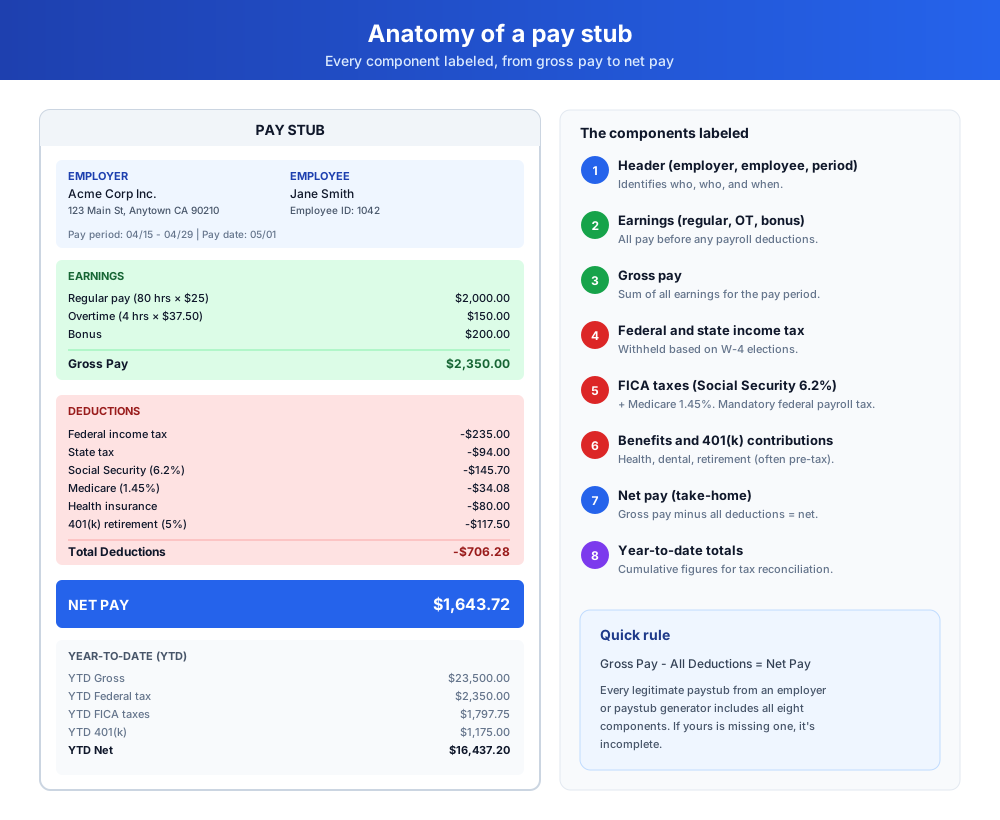
How our pay stub generator works
Creating a pay stub with our free paystub creator takes about two minutes. The paystub template handles all the math automatically based on the employee details and earnings you enter.
- Fill in the company information section with your employer's details
- Enter your personal information in the employee section
- Specify the particular pay period dates and pay date
- Enter your earnings details including hours worked and pay rates
- Add any applicable deductions such as federal tax, state tax, and FICA taxes
- Include year-to-date totals if available
- Click "Generate Pay Stub" to preview your professional paystub
- Download the pay stub as a PDF for your records
Pay stub template features and customization
Our free pay stub generator includes everything employers, employees, and contractors need to produce accurate pay stubs.
Professional pay stub templates
Create professional paystubs with all the essential information employers, employees, and contractors expect to see - earnings, deductions, gross pay, net pay, and YTD totals.
Paystub creator with customizable fields
Customize every aspect of the document including earnings, deductions, employee info, and company information. The template adapts to hourly employees, salaried employees, freelancers, and independent contractors. Use the paystub creator to produce a tailored result for any role or pay schedule.
Instant PDF downloads
Generate and download a clean, watermark-free PDF instantly for printing, emailing, or digital record-keeping.
Built-in pay stub calculator
The built-in calculator automatically computes gross pay, payroll deductions, and net pay based on the values you provide. The tax calculations cover federal income tax, state tax, FICA taxes (Social Security and Medicare), and any other withholdings you add.
YTD tracking
Include year-to-date totals for earnings and deductions to keep track of your annual income, salary, and employee contributions to retirement accounts.
Free to use, no signup
Our free pay stub creator is completely free with no hidden fees, no subscriptions, and no signup required. Built as an alternative to paid payroll service subscriptions for one-off generation, and no watermark on your documents.
Who needs a paystub?
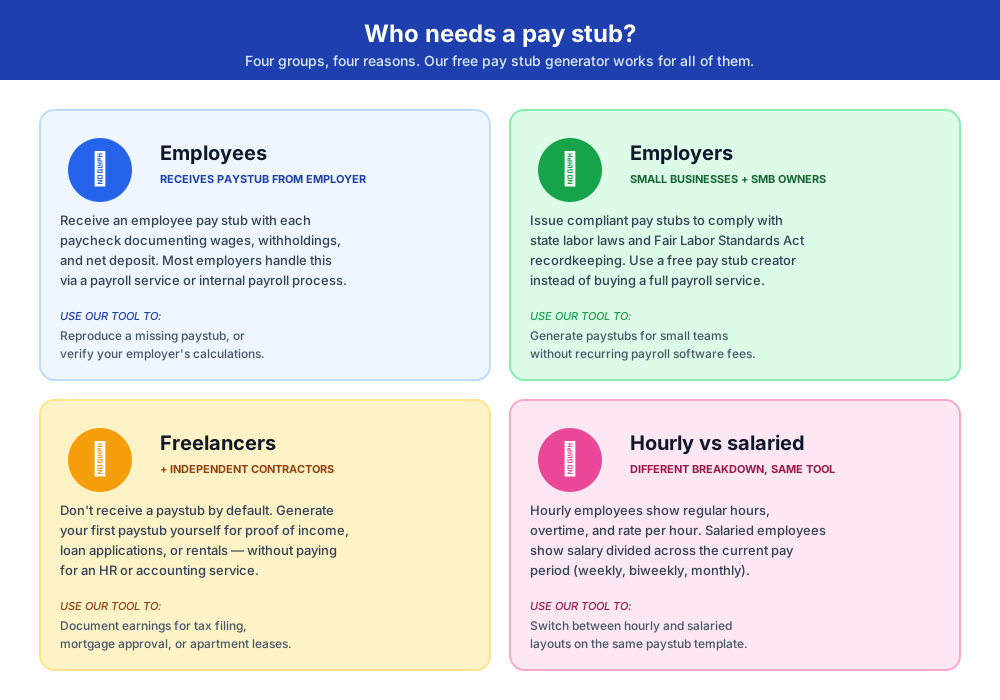
Different groups need these documents for different reasons. Our free paystub generator works for all of them.
Employees
Employees receive an employee paystub from their employer with each paycheck. It documents wages earned, withholdings for federal and state tax, FICA taxes, employee contributions to retirement and benefits, and the net amount deposited. Most employers handle this automatically through a payroll service or internal payroll process.
Employers and small businesses
Employers must issue these records to comply with state labor laws and Fair Labor Standards Act recordkeeping requirements. Small businesses without dedicated HR can use a free paystub creator to issue compliant documents without paying for a full payroll service subscription. The check stub maker covers all the standard fields a typical paystub template includes.
Freelancers and independent contractors
Freelancers and independent contractors don't receive pay stubs by default - they invoice clients and receive payments. To document income for tax filing, loan applications, or rentals, a contractor can generate their first paystub themselves using a free paystub generator. This is one of the most common reasons people search for a paystub creator online.
Hourly employees vs salaried employees
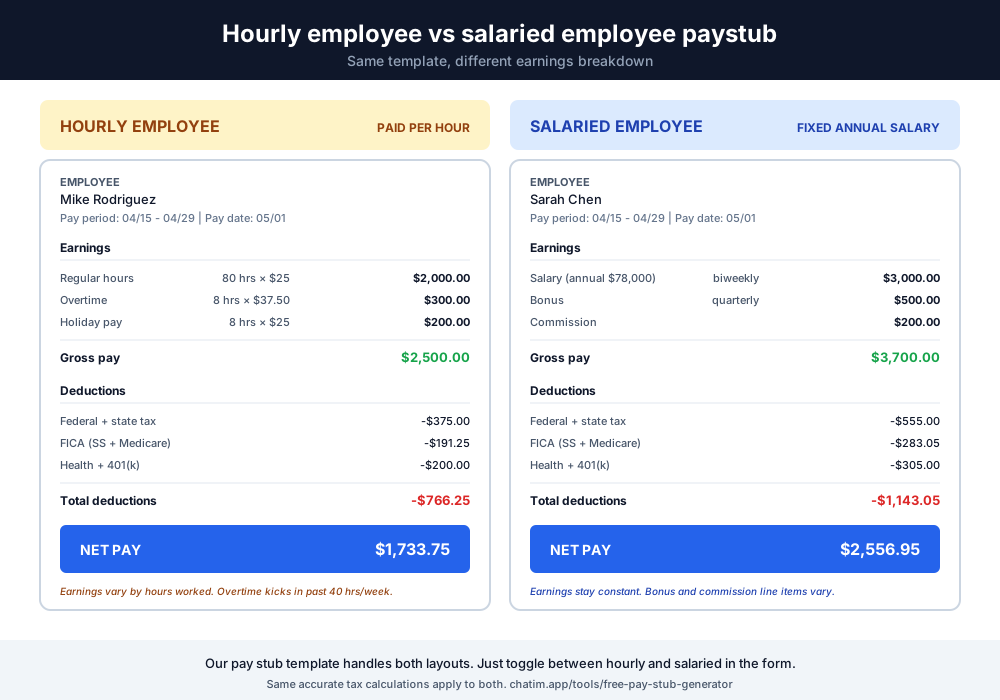
Both hourly employees and salaried employees need these records, but the breakdown looks different. Hourly employees show regular hours, overtime, and rate per hour. Salaried employees show their salary divided across the current pay period (weekly, biweekly, or monthly), with optional bonuses and commission lines. Our paystub template handles either layout.
What pay stubs are used for
These documents serve several practical purposes beyond documenting a payment.
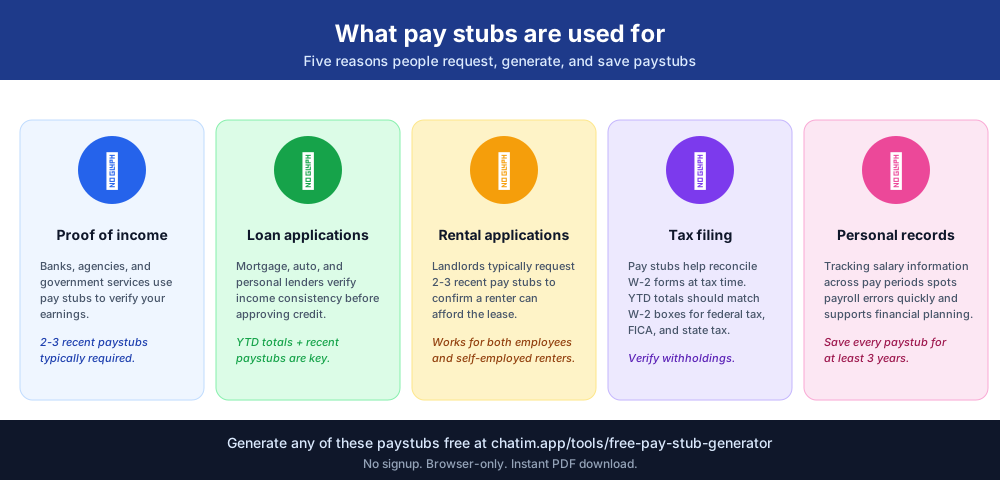
Proof of income
Banks, landlords, and government agencies often require recent paystubs to verify income. Two or three recent records typically satisfy the requirement.
Loan applications
Mortgage lenders, auto lenders, and personal loan providers review recent earnings statements to confirm income before approving a loan. They look at gross pay, net pay, and YTD totals to validate income consistency.
Rental applications
Landlords typically request 2-3 recent paystubs to confirm a renter can afford the lease. This applies to both employees on payroll and self-employed contractors who generate their own paystubs.
Tax filing and W-2 reconciliation
These records help reconcile W-2 forms at tax time. Year-end YTD totals from your last paystub of the year should match your W-2 boxes for gross wages, federal tax withheld, FICA taxes, and state tax.
Personal record-keeping
Tracking salary information and payment details across pay periods helps spot payroll errors quickly and supports financial planning, budgeting, and retirement contribution decisions.
Understanding payroll deductions and tax calculations
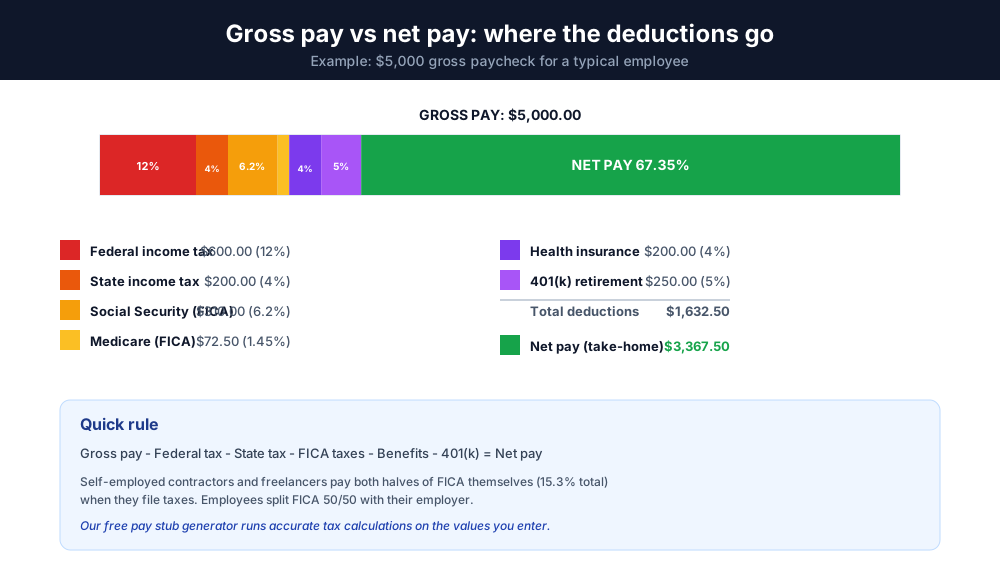
Every paycheck has two halves: gross pay (what you earned) and net pay (what you take home). The difference between them is payroll deductions - taxes and withholdings the employer subtracts before you receive your money.
Federal income tax is withheld based on your W-4 form and the current pay period earnings. State tax varies by state - Texas, Florida, Nevada, and a few others have no state income tax, while California, New York, and others use progressive brackets.
FICA taxes are the mandatory federal payroll taxes: Social Security at 6.2% and Medicare at 1.45%. Employers match those amounts. Self-employed independent contractors pay both halves themselves (15.3% total) when they file taxes.
Other common deductions include health insurance, dental, vision (typically pre-tax for medical), 401(k) retirement contributions (pre-tax up to the annual IRS limit), garnishments, union dues, and parking permits. Our generator includes fields for each of these so you can produce accurate output for any situation.
Paystub vs paycheck stub vs check stub vs pay slip
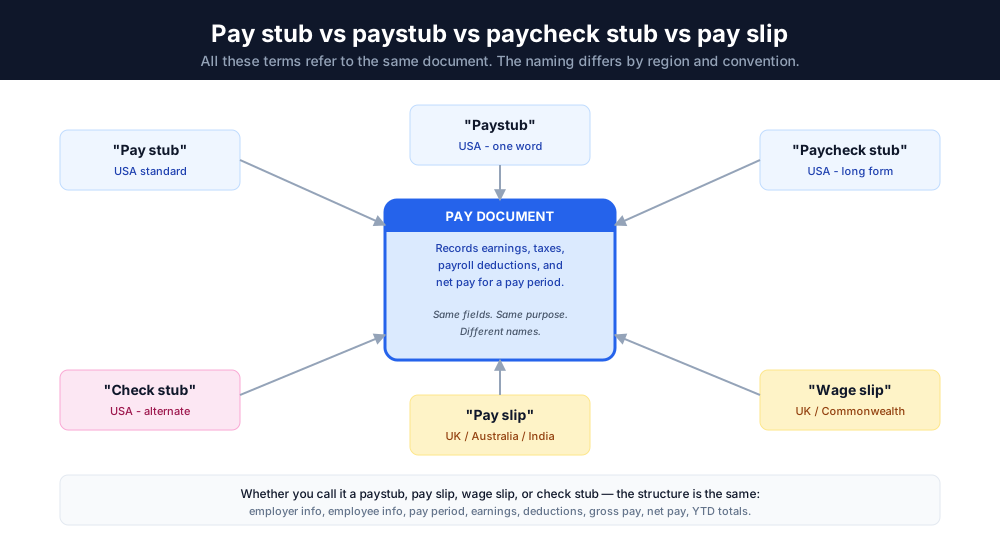
These terms get used interchangeably and refer to the same document. The main difference is regional vocabulary: "pay slip" and "wage slip" are common in the UK, Australia, and India. "Paystub," "paycheck stub," and "check stub" are the U.S. spellings. "Paystub" (one word) is the most common search-engine version of the term.
Functionally, all of these documents include the same fields: employee details, employer information, period dates, earnings broken down by type (regular pay, overtime, bonus, commission), payroll deductions and taxes, and the net pay total. Whether you call it a paystub, pay slip, wage slip, or check stub, the structure is the same.
The risks of fake pay stubs
Some online paystub creators advertise themselves as fake paystub generators. Creating fake paystubs for novelty or social media is harmless. Creating fake pay stubs to deceive lenders, landlords, or government agencies is illegal in every U.S. state and qualifies as fraud - not just a minor offense.
Modern income-verification systems cross-reference these records against bank deposit history, tax returns, employer records, and credit-bureau data. The mismatch is easy to detect. The penalty (denied loan or lease, criminal charges, repayment obligations, jail time in extreme cases) always outweighs the short-term benefit.
Our free paystub creator is designed to produce accurate documentation for real income and real payment details. If you're an employee, contractor, or freelancer documenting genuine earnings, you're using the tool correctly. If you're considering inflating numbers for an application, don't - work with a CPA or financial advisor on legitimate paths to higher loan approval limits instead.
Data privacy and security
All information entered into our free paystub generator is processed entirely within your browser. No employee details, salary information, or payment details are sent to or stored on our servers. Your sensitive financial information stays private - the paystub generator runs locally so even Chatim has no access to the data you enter.
Legal disclaimer
Important - please read before using the pay stub generator.
Chatim's Pay Stub Generator is a free formatting tool. The generator outputs a PDF based on the values you enter - it does not calculate, withhold, or remit taxes on behalf of any employer or government entity.
It is the user's sole responsibility to ensure that all data entered (including tax rates, deductions, exemptions, and pay period information) complies with applicable federal, state, and local labor and tax laws. Chatim is not a tax professional, certified public accountant, payroll service, or legal advisor.
Use of this tool is at your own risk. Chatim makes no warranty, express or implied, regarding the accuracy, completeness, or legal compliance of generated documents. Chatim is not liable for any errors, omissions, financial losses, employment-law violations, or legal consequences resulting from use of this generator. For payroll processing, tax filing, or compliance advice, consult a licensed CPA, payroll service provider, or attorney.
By generating a pay stub on this page, you acknowledge that you have read and agree to this disclaimer and to Chatim's Terms of Service and Privacy Policy. The English version of this disclaimer is authoritative; translations are provided for convenience.