20 Best Email Tracking Software Tools to Use in 2026
The right email tracking software tells you exactly what happens after you click send: who opened the email, when, on what device, which links they clicked, and whether they replied. For sales reps, that data is the difference between a follow-up that lands and one that goes ignored. For marketers, it is the foundation of every funnel report. For everyone else, it is a fast way to know whether the email actually got through.
This guide covers the 20 best email tracking tools to use in 2026, organized by use case (Gmail, Outlook, sales, marketing, deliverability), with pricing, free-tier limits, and the situations each tool is best for. You will also find a buying framework for picking the right email tracker program, an honest look at what email tracking software cannot tell you (Apple Mail Privacy, image blocking), and a section on the legal side of email open tracking.
What is email tracking software?
Email tracking software is a tool that monitors what happens to an email after it leaves your outbox. The best email tracking software tracks four signals at minimum: open events (was the email opened, and how many times), link clicks (which links were clicked, on which device), engagement metadata (geolocation, email client, time of day), and downstream actions (replies, forwards, unsubscribes). Most modern email tracking tools also surface aggregate analytics: open rates, click-through rates, bounce rates, and reply rates per campaign, per recipient, or per template.
Email tracking software falls into three buckets, and the right pick depends on which bucket you live in:
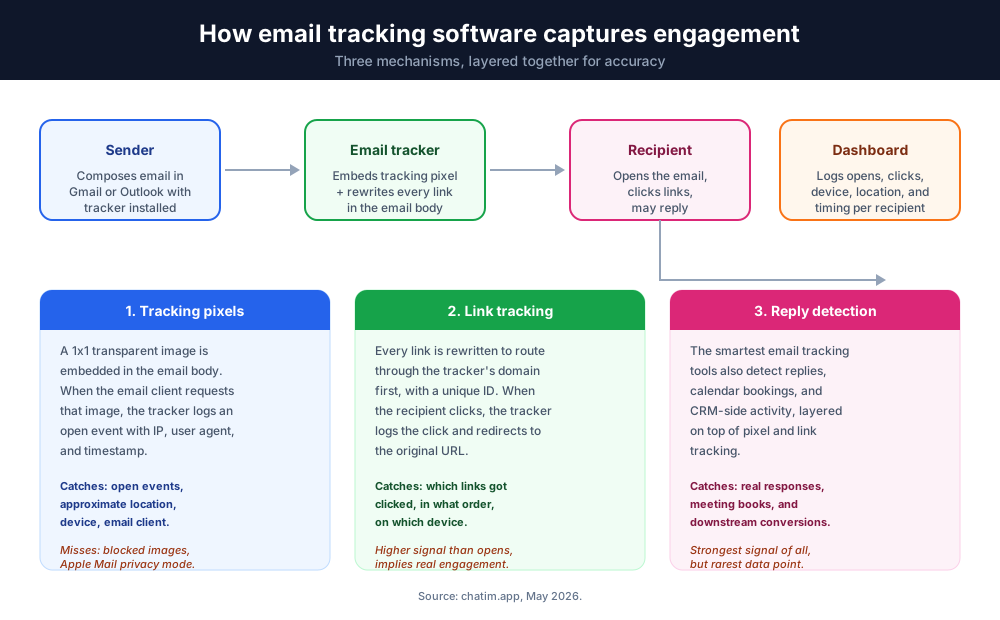
- Inbox-attached email trackers. Browser extensions or add-ins that turn Gmail or Outlook into a sales-style tracking surface. Examples: Mailtrack, MailTracker by Hunter, Mixmax, Right Inbox, Streak, MailTag. Cheap, fast to install, perfect for individual reps and small teams.
- Sales-engagement and CRM-integrated email tracking tools. Track every email tied to a deal or contact, log to the CRM automatically. Examples: HubSpot, Salesforce Pardot, Cirrus Insight, SalesHandy. Built for outbound and account executive workflows.
- Email marketing platforms with built-in tracking. Bulk send, segmentation, automation, and per-campaign analytics. Examples: Mailchimp, ActiveCampaign, Campaign Monitor, Zoho Campaigns. Built for newsletters, drip campaigns, and lifecycle marketing.
A fourth, narrower category is email verification and deliverability tools (ZeroBounce, NeverBounce, Bounceless.io, Kickbox). These do not track opens directly, they ensure the email even gets to the inbox. Many teams pair an email tracker program with a verification tool, since tracking opens on bounced emails is wasted effort.
How does email tracking work?
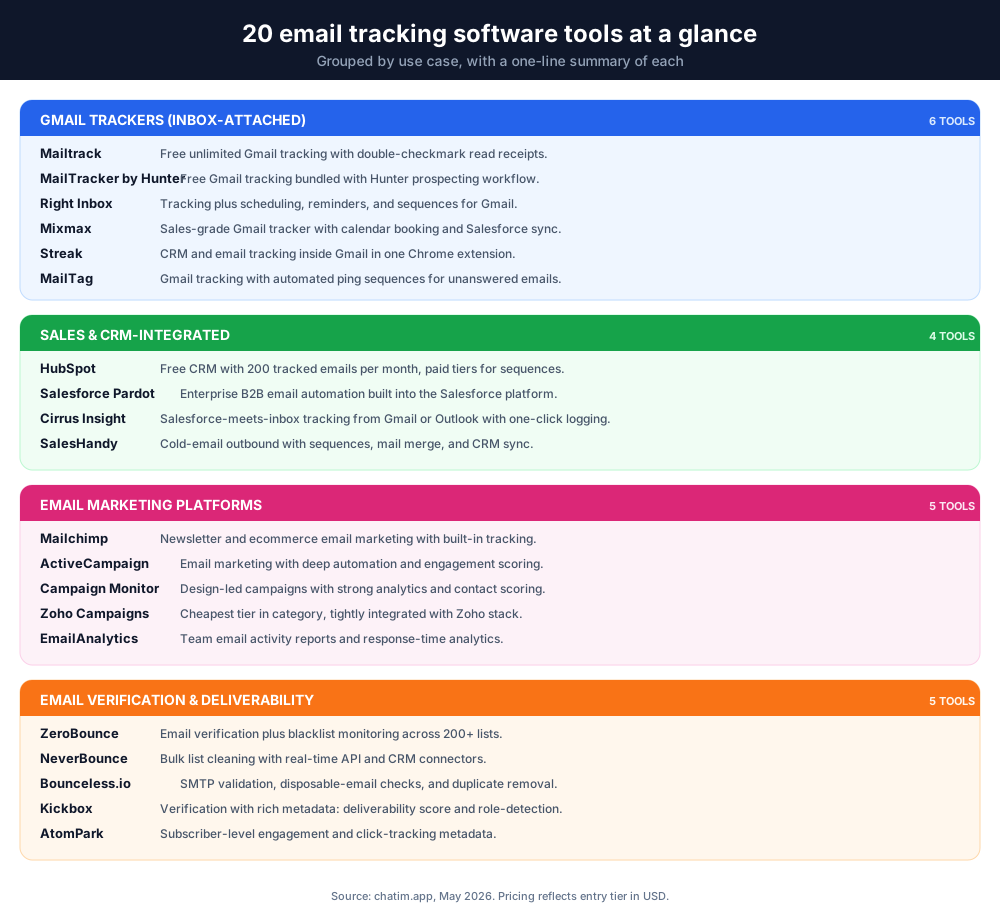
Most email tracking software relies on three mechanisms, sometimes layered together for accuracy.
Tracking pixels
The most common mechanism. The email tracker software embeds a tiny 1x1 transparent image (the tracking pixel) in the email body. When the recipient opens the email, their email client requests the image from the tracker's server, and that request is logged as an open event. The log captures the IP address, timestamp, and user-agent string, which together yield approximate geolocation, device, and email client.
Pixels are simple but imperfect. They miss opens when the recipient blocks images, when the email client caches images aggressively (which now includes Apple Mail's Mail Privacy Protection), or when corporate firewalls strip remote content. The best email tracking software handles these false negatives by combining pixel data with link tracking and reply detection.
Link tracking and click tracking
Every link in a tracked email gets rewritten to route through the tracker's domain first, with a unique ID that ties the click to the recipient. When the recipient clicks, the tracker logs the click (link, device, location) and then redirects them to the original URL. Link clicks are higher-signal than opens because they imply the recipient actually engaged with the content.
Reply detection and engagement signals
The smartest email tracking tools (HubSpot, SalesHandy, Cirrus Insight, Mixmax) also detect replies, calendar bookings, and CRM-side activity. This catches the engagement that pixel and link tracking miss, especially in a post-Apple-Mail-Privacy world where pixel data has gotten noisier.
Once the tracker captures these signals, it pipes them into a dashboard. The reporting layer is where the email tracking software earns its keep, expect campaign-level analytics, per-recipient timelines, and (in the better tools) AI-suggested follow-up timing based on historical engagement patterns.
What to look for in email tracking software
The best email tracking software for a 1-person sales team is not the same as the best email tracking software for a 50-person marketing org. Use the criteria below to match the email tracker program to your situation.
Platform: Gmail, Outlook, or both
Most email tracking tools work natively with Gmail. Outlook support is more variable. If your team is on Outlook (Office 365 or on-prem Exchange), narrow the list early: HubSpot, Salesforce Pardot, Mailtrack (Outlook add-in), and Cirrus Insight are the safest picks. If you switch clients between Gmail and Outlook, look for tools that have both add-ins (Mailtrack and HubSpot are the cleanest cross-platform options).
Volume: 1-to-1 vs. bulk send
For 1-to-1 sales emails, an inbox-attached email tracker (Mailtrack, MailTracker by Hunter, Mixmax) is the right call. For bulk newsletters and drip campaigns, an email marketing platform (Mailchimp, ActiveCampaign, Campaign Monitor) makes more sense. Mixing them up creates duplicate-tracking artifacts and CAN-SPAM compliance headaches.
Team and CRM
If you log every customer touch in Salesforce or HubSpot, pick the email tracking software that ships native CRM logging (HubSpot's own tool, Salesforce Pardot, Cirrus Insight, or SalesHandy with its CRM connectors). Otherwise you will spend agent hours copy-pasting tracked-email metadata into the CRM by hand.
Pricing model
Email tracking software pricing falls into three patterns: per-seat (Mailtrack, Mixmax, Right Inbox, HubSpot Sales Hub), per-contact (Mailchimp, Campaign Monitor, ActiveCampaign), or per-verification (NeverBounce, Kickbox, ZeroBounce). For sales teams under 10 reps, per-seat is almost always cheaper than per-contact. For email marketing at scale, per-contact wins.
Deliverability and verification
Email tracking that runs against bounced or blacklisted addresses is expensive noise. The strongest email tracking software either bundles verification (HubSpot, Mailchimp) or integrates cleanly with a standalone verifier (ZeroBounce, NeverBounce). Run a verification pass on any list older than 90 days before you trust the open-rate numbers.
Privacy and Apple Mail Privacy Protection
Since iOS 15, Apple Mail pre-fetches tracking pixels for all users with Mail Privacy Protection enabled (most iOS Mail users by default). This generates artificial "opens" that inflate open-rate metrics. The best email tracking tools (HubSpot, Mixmax, SalesHandy, Right Inbox) now flag Apple-Mail-driven opens as low-confidence so you can read past them. Older email tracker software that has not adapted will quietly overstate engagement.
Email tracking software comparison: pricing, free tier, best for
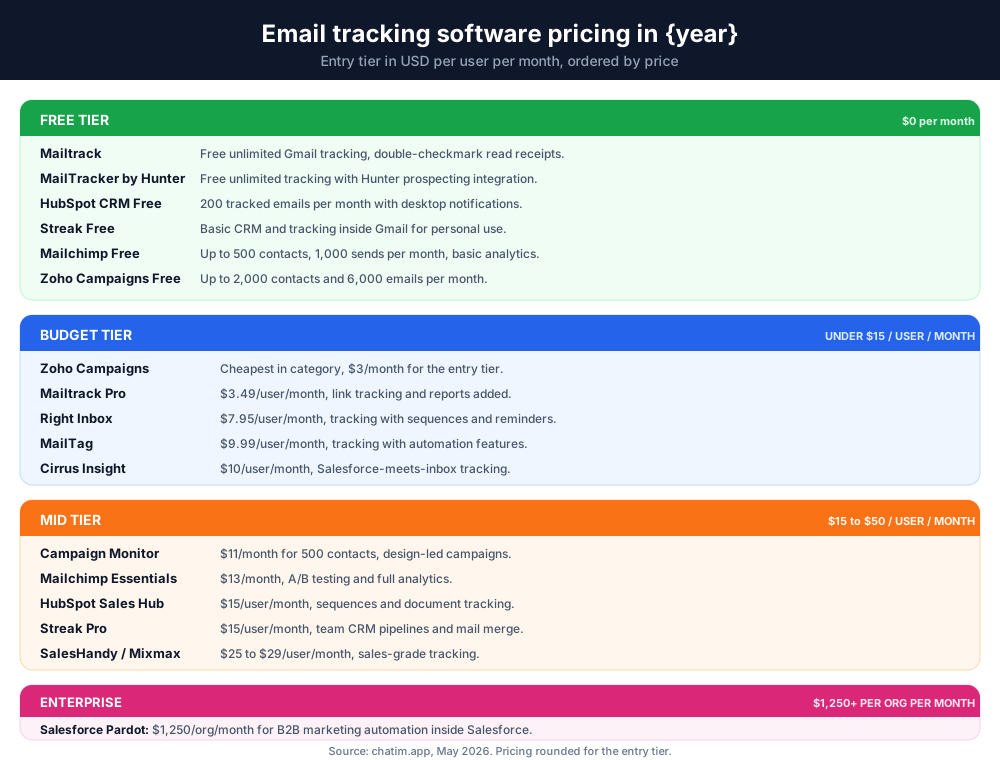
The 20 email tracking tools below are organized by use case. Pricing is the entry tier as of 2026, in USD per user per month unless noted.
| Email tracking software | Best for | Free plan | Paid from |
|---|---|---|---|
| Mailtrack | Free Gmail tracking | Yes, unlimited tracked emails | $3.49 |
| MailTracker by Hunter | Free Gmail tracking with Hunter integration | Yes, unlimited tracked emails | Bundled with Hunter |
| Right Inbox | Gmail tracking with scheduling and sequences | 5 emails per month | $7.95 |
| Mixmax | Sales reps using Gmail | 100 tracked emails per month | $29 |
| Streak | CRM inside Gmail | Yes, basic CRM and tracking | $15 |
| MailTag | Gmail with tracking automation | 14-day trial | $9.99 |
| HubSpot | CRM-integrated email tracking | Yes, 200 tracked emails per month | $15 (Sales Hub Starter) |
| Salesforce Pardot | B2B marketing automation | No | $1,250 per org per month |
| Cirrus Insight | Salesforce reps in inbox | 14-day trial | $10 |
| SalesHandy | Cold-email outreach | Yes, basic tracking | $25 |
| Mailchimp | Newsletter and marketing analytics | Yes, up to 500 contacts | $13 |
| ActiveCampaign | Email marketing with automation | 14-day trial | $15 |
| Campaign Monitor | Designed campaign tracking | 5 contacts test send | $11 |
| Zoho Campaigns | Zoho-stack marketing | Up to 2,000 contacts | $3 |
| EmailAnalytics | Team email activity reports | 14-day trial | $15 |
| AtomPark | Subscriber-level engagement data | 14-day trial | $9 |
| ZeroBounce | Email verification and deliverability | 100 free verifications | $15 per 2,000 verifications |
| NeverBounce | Bulk list cleaning | 1,000 free verifications | $0.008 per verification |
| Bounceless.io | SMTP and disposable-email checks | 100 free credits | $0.005 per verification |
| Kickbox | Deliverability with detailed metadata | 100 free verifications | $5 per 500 verifications |
Best email tracking software for Gmail
Gmail is the easiest email client to track, every modern email tracker program ships a Chrome extension that drops a tracking toggle into the Gmail compose window. The picks below cover the strongest free options, the strongest sales-focused options, and the strongest options for teams that want CRM-style features without leaving the inbox.
Mailtrack
Best for: free, unlimited Gmail tracking.
Mailtrack is the most-installed free email tracking software for Gmail, with over 4 million users. The free plan gives you unlimited tracked emails, double-checkmark read receipts (the green pair shows on opens), and signature-line confirmation. Paid tiers ($3.49 to $9.99 per user per month) add real-time desktop notifications, link tracking, daily reports, and the ability to remove the Mailtrack signature from outgoing email. Outlook is supported via a separate add-in.
Pick Mailtrack if you want the simplest, cheapest entry point into email open tracking for Gmail. The free tier alone outclasses many paid email trackers.
MailTracker by Hunter
Best for: free Gmail tracking bundled with the Hunter email-finder workflow.
MailTracker by Hunter is a free Chrome extension that records opens, click-throughs, devices, and locations for every tracked email. Because it is built by the team behind Hunter, the email tracker syncs with Hunter campaigns and the Hunter CRM connector, which is useful if you do outbound prospecting. The extension itself is fully free with no opens cap.
Right Inbox
Best for: Gmail power users who want tracking plus sequences, scheduling, and reminders.
Right Inbox is one of the most polished inbox-attached email tracking tools for Gmail. The Pro tier ($7.95 per month) bundles email open tracking, link tracking, send-later scheduling, follow-up reminders, recurring emails, signatures, and email sequences. The free tier covers 5 tracked emails per month, enough to test the workflow before committing.
Mixmax
Best for: sales reps and customer-success teams who live in Gmail.
Mixmax goes further than a pure email tracker, the platform combines email open tracking, link tracking, calendar booking, sequences, polls inside email, Salesforce sync, and AI-written templates. The Starter tier ($29 per user per month) includes unlimited tracking. Mixmax is widely cited as the best email tracker for Gmail by SDR and AE teams in the SaaS space.
Streak
Best for: Gmail users who want a CRM and an email tracker in one extension.
Streak embeds a full CRM directly inside Gmail. Tracked-email metadata flows automatically into deal pipelines, so every open, click, and reply becomes a CRM event without copy-paste. The free tier covers basic email tracking and CRM features for personal use; the Pro tier ($49 per user per month) adds team pipelines, mail merge, and shared inboxes.
MailTag
Best for: Gmail users who want lightweight tracking with workflow automation.
MailTag tracks opens and clicks, sends real-time notifications, and supports "ping" sequences (automated follow-ups for unanswered emails). Pricing starts at $9.99 per user per month after a 14-day trial.
Best email tracking software for sales teams
Sales teams need email tracking software that ties every open and click back to a contact record in the CRM. The picks below are the strongest options for outbound SDRs, account executives, and customer-success teams.
HubSpot
Best for: teams that want the email tracker, the CRM, and the marketing platform in one stack.
HubSpot's email tracking software is part of Sales Hub. The free CRM tier includes 200 tracked emails per month with desktop notifications. Sales Hub Starter ($15 per user per month) lifts the cap and adds sequences, document tracking, and meeting links. Sales Hub Professional ($90 per user per month) adds A/B testing, predictive lead scoring, and deeper analytics. HubSpot's strength is the unified data model, every tracked email becomes a contact-timeline event automatically, with no manual logging.
Salesforce Pardot (Marketing Cloud Account Engagement)
Best for: B2B marketing teams running on Salesforce.
Pardot (now Marketing Cloud Account Engagement) is the email tracker software for Salesforce-first organizations. It handles email campaigns, lead nurturing, scoring, and deep email tracking inside the Salesforce data model. Pricing starts at $1,250 per org per month for the Growth plan, which prices it out of the SMB market but makes sense for Salesforce-anchored mid-market and enterprise teams.
Cirrus Insight
Best for: Salesforce reps who want to track email from inside Gmail or Outlook.
Cirrus Insight is a Salesforce-meets-inbox email tracking software. From Gmail or Outlook you get email open tracking, calendar sync, contact enrichment, and a one-click "log to Salesforce" button. Pricing starts at $10 per user per month. The reason teams pick Cirrus Insight over Pardot is that it leaves the rep's inbox as the work surface, while still feeding Salesforce the activity data the company needs.
SalesHandy
Best for: cold-email and outbound campaigns at small scale.
SalesHandy bundles email open tracking, link tracking, mail merge, automated follow-up sequences, and CRM integrations. The free plan covers basic tracking and 25 emails per day; paid plans ($25 per user per month and up) lift the limits and add A/B testing, unified inbox views, and custom domain tracking.
Best email tracking software for marketing campaigns
Marketing teams send to lists of hundreds, thousands, or millions, and need email tracking software designed for bulk send. The picks below are the strongest email marketing platforms with built-in tracking, segmentation, and automation.
Mailchimp
Best for: small businesses, newsletters, and ecommerce teams.
Mailchimp is the original email marketing platform with built-in email tracking. Reports cover open rate, click rate, bounce rate, unsubscribe rate, and (on paid tiers) per-link click maps. The free tier supports up to 500 contacts and 1,000 sends per month. The Essentials tier ($13 per month) lifts the limits and adds A/B testing; Standard ($20 per month) adds send-time optimization and customer journeys.
ActiveCampaign
Best for: teams that want email tracking software with deep automation.
ActiveCampaign is the most-cited email marketing platform for teams that need automation. Email tracking includes opens, clicks, link reports, geographic data, and engagement scores tied to contact records. Pricing starts at $15 per month for the Lite tier (500 contacts) and scales by contact volume. The automation builder is the differentiator, you can branch sequences based on opens, clicks, and reply behavior.
Campaign Monitor
Best for: design-led email campaigns.
Campaign Monitor is the email marketing platform of choice for brands that ship beautifully designed newsletters. The drag-and-drop builder, the analytics suite, and the contact-engagement scoring all work well, and the email tracker captures the standard set of opens, clicks, geo, and device data. Pricing starts at $11 per month for 500 contacts.
Zoho Campaigns
Best for: Zoho-stack businesses.
Zoho Campaigns ties email marketing tightly into the rest of the Zoho stack (Zoho CRM, Zoho Books, Zoho Desk). The email tracking software covers opens, click maps, A/B testing, autoresponders, and dynamic-content rules. Pricing is among the cheapest in the category, $3 per month for the entry tier covering up to 500 contacts.
Best email verification software for deliverability
An email tracker that runs against bounced addresses is expensive noise. Pair your email tracking software with one of the verification tools below to ensure tracked emails actually reach inboxes.
ZeroBounce
Best for: teams that want verification plus blacklist monitoring and inbox-placement testing.
ZeroBounce verifies email addresses, identifies bounced and disposable addresses, checks SMTP and DNS records, and runs blacklist checks against more than 200 lists. Free tier covers 100 verifications per month; paid plans start at $15 for 2,000 verifications and scale down per-verification as volume grows.
NeverBounce
Best for: bulk list cleaning ahead of major sends.
NeverBounce is built for high-volume list cleaning, real-time API verification, automated re-verification of older lists, and a CRM connector ecosystem covering HubSpot, Salesforce, Mailchimp, and ActiveCampaign. Pricing starts at $0.008 per verification with the first 1,000 free.
Bounceless.io
Best for: SMTP validation and disposable-email detection.
Bounceless.io specializes in SMTP-level verification, disposable-email identification, and duplicate removal. The dashboard makes it easy to clean a list, then export it back to whichever email tracking software you use for the actual send. Pricing starts at $0.005 per verification with 100 free credits to start.
Kickbox
Best for: teams that want detailed metadata on every verified address.
Kickbox returns the standard verification result plus rich metadata: deliverability score, role-based-address detection (info@, sales@), free-mail provider detection, and accept-all-domain warning. Pricing starts at $5 per 500 verifications with 100 free verifications to start.
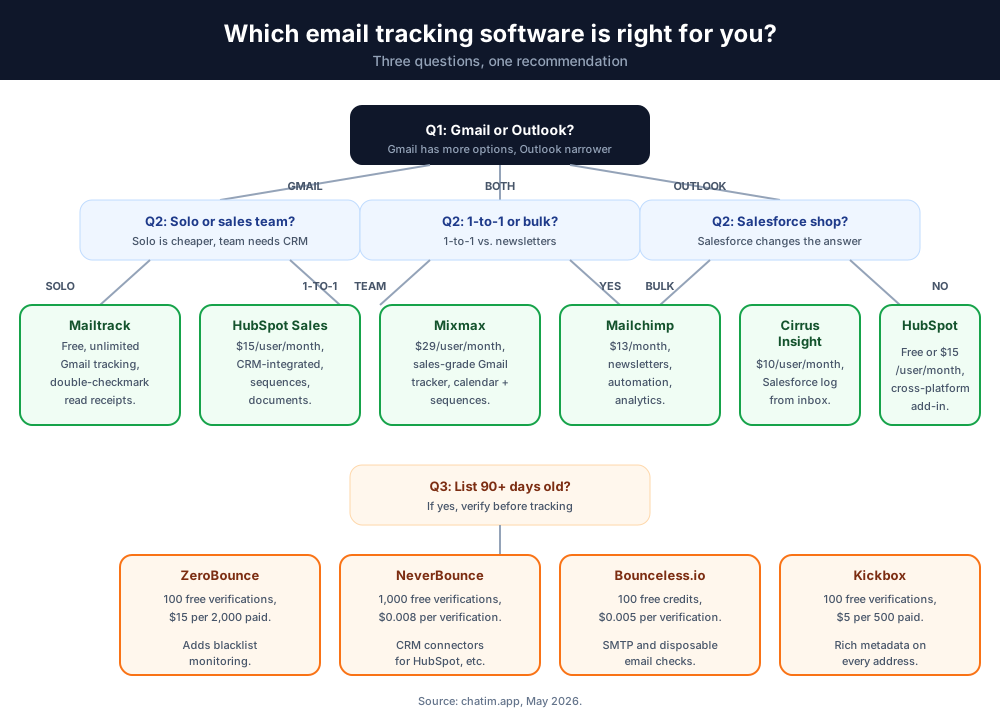
How to choose the right email tracking software in 5 steps
The 20 tools above cover most of the email tracking software market. Use the framework below to narrow it to one in under an hour.
Step 1: Pick your platform first
Gmail or Outlook? Both? If your team is split, prioritize email trackers that ship native add-ins for both (Mailtrack, HubSpot, Cirrus Insight). If you are 100% Gmail, the field opens up: Mailtrack, MailTracker by Hunter, Mixmax, Right Inbox, and Streak all work natively.
Step 2: Define your volume and use case
1-to-1 sales emails, bulk newsletters, or both? For 1-to-1, an inbox-attached email tracker (Mailtrack, Mixmax, Right Inbox) wins on price and simplicity. For bulk send, an email marketing platform (Mailchimp, ActiveCampaign) is the right call. If you do both, pair an inbox-attached tracker with a marketing platform, do not try to force one tool to cover both jobs.
Step 3: Decide on CRM integration depth
If your sales team logs every touch in HubSpot or Salesforce, the email tracking software needs to feed that CRM automatically. HubSpot's own email tracker, Salesforce Pardot, Cirrus Insight, and SalesHandy are the safest picks. If you are CRM-light, an inbox-attached email tracker is enough.
Step 4: Test deliverability before paying for tracking
Run your list through a free verification tier (ZeroBounce, NeverBounce, or Kickbox each give 100-1,000 free verifications) and clean it. Tracking opens on a list with a 30% bounce rate is wasted spend, the tracking is not the issue, the list is.
Step 5: Pilot for 14 days, then commit
Almost every email tracking software in this guide offers a free tier or a 14-day trial. Pilot two finalists side by side for two weeks. Compare the open-rate accuracy (cross-reference with link clicks), the time-to-log-to-CRM, and the dashboard speed. Commit to the one that wins on workflow, not features-on-paper.
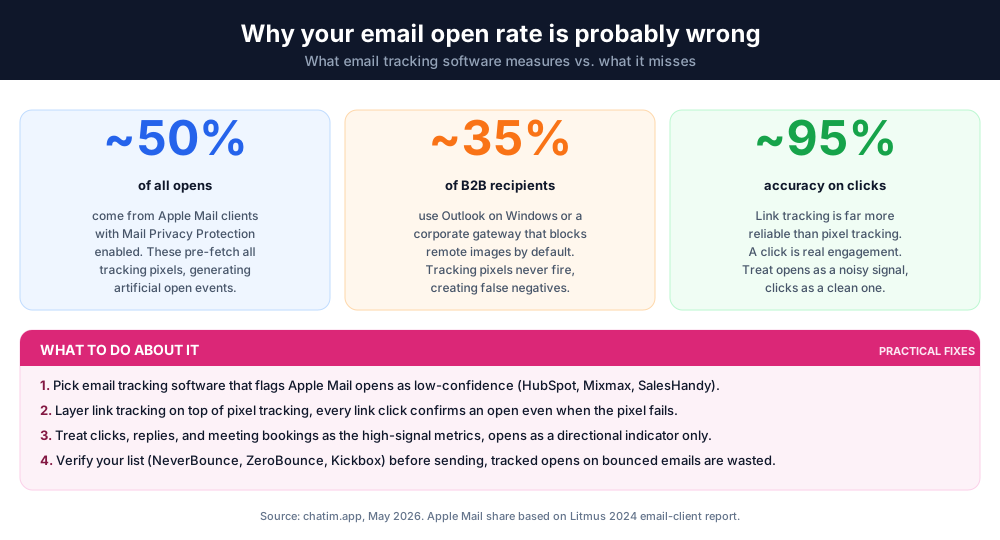
Email tracking software limitations and workarounds
Email open tracking is not a perfect signal. Three issues show up frequently and the strongest email tracking software handles each explicitly.
Apple Mail Privacy Protection inflates open rates
Since iOS 15, Apple Mail pre-fetches all tracking pixels for users with Mail Privacy Protection enabled, which is the default. This generates artificial "opens" on iOS Mail clients. The best email tracking tools (HubSpot, Mixmax, SalesHandy) now flag Apple-Mail opens as low-confidence so you can read the engagement data correctly. If your email tracker software still reports a 90% open rate on iOS-heavy lists, the data is overstating engagement.
Image blocking misses opens
Outlook on Windows blocks remote images by default; many corporate email gateways do the same. Tracking pixels in those emails never fire, which means the email tracker registers a false negative. Layering link tracking on top of pixel tracking captures most of these opens after the fact, since recipients who click anything in the email confirm an open even when the pixel is blocked.
Legality and consent
Email tracking software falls under multiple privacy regimes. The EU's GDPR treats tracking pixels in unsolicited B2C emails as data processing that requires consent in many member states. CAN-SPAM in the US is laxer but still requires accurate sender info, a working unsubscribe link, and no deceptive subject lines. The safest stance: include a privacy policy reference in tracked emails, honor unsubscribes immediately, and stop tracking recipients in jurisdictions where you cannot establish a lawful basis. The big email marketing platforms (Mailchimp, ActiveCampaign, HubSpot) handle most of the compliance plumbing automatically; the inbox-attached email trackers (Mailtrack, Mixmax, Right Inbox) leave more of it to the sender.
Email tracking software, the rest of the questions
The picks above cover the core decision. The FAQ below answers the rest of the common questions on email tracking, including which email tracking software is free, whether email tracking is legal, and how to track an email in Gmail or Outlook.
For a deeper look at related workflows, see our guides on Chrome extensions for Gmail, customer service fundamentals, and building a professional email signature that pairs with any tracked-email setup.
Frequently Asked Questions
What is the best email tracking software?
The best email tracking software depends on your platform and use case. For free Gmail tracking, Mailtrack and MailTracker by Hunter both offer unlimited tracked emails. For sales teams in Gmail, Mixmax ($29) and Right Inbox ($7.95) are the strongest. For CRM-integrated tracking, HubSpot (free tier with 200 tracked emails, paid from $15) is the most-cited pick. For Salesforce-anchored teams, Cirrus Insight ($10) or Salesforce Pardot ($1,250 per org). For bulk email marketing, Mailchimp, ActiveCampaign, and Campaign Monitor lead the category.
Is email tracking legal?
Email tracking is legal in most jurisdictions but the rules vary. The EU's GDPR treats tracking pixels in B2C emails as data processing that often requires consent. CAN-SPAM in the US is more permissive but requires accurate sender info, a working unsubscribe link, and honest subject lines. The safest stance for any business using email tracking software: include a privacy policy reference, honor unsubscribes immediately, and check the rules in any jurisdiction where you cannot establish a lawful basis. The major email marketing platforms (Mailchimp, ActiveCampaign, HubSpot) handle most of this automatically; inbox-attached email trackers leave more of the compliance work to the sender.
How do I track if an email was read?
Install an email tracker program like Mailtrack, MailTracker by Hunter, or Mixmax in your Gmail or Outlook account. Once installed, every email you send through that account can be tracked, the email tracking software embeds a tracking pixel and rewrites links to detect opens, clicks, devices, and locations. You will see real-time notifications when the recipient opens the email, plus a dashboard that shows open counts, link clicks, and engagement timing. Most email tracking tools work in under 30 seconds to install.
Does Gmail have email tracking built in?
Gmail does not have native email tracking on the free or paid Workspace tiers. To track opens, clicks, and engagement, you need a Chrome extension or third-party email tracking software like Mailtrack, MailTracker by Hunter, Right Inbox, Mixmax, or Streak. Google Workspace Business Plus and Enterprise tiers include some sender-side analytics through Google Workspace's reporting tools, but not the per-email open tracking that dedicated email tracker software provides.
Can the recipient see that I am tracking my email?
Most email tracking software is invisible to the recipient by default, the tracking pixel and rewritten links are hidden in the email body. However, the EU's GDPR and several US state laws may require you to disclose tracking, and email-savvy recipients can sometimes spot the wrapped links or the tracking-pixel signature line that some free email trackers add. Mailtrack's free tier, for example, adds a small 'Sent with Mailtrack' line to outgoing emails (paid plans remove it). For B2B sales tracking, disclosure is rarely required; for B2C marketing, the privacy policy linked from the email usually covers consent.
What is the best free email tracking software?
Mailtrack is the most-installed free email tracking software with unlimited tracked emails on Gmail. MailTracker by Hunter is also fully free with unlimited tracked emails and integrates cleanly with Hunter's email-finder workflow. HubSpot's free CRM tier includes 200 tracked emails per month with desktop notifications, more than enough for solo reps. Streak Free covers basic email tracking and CRM features for personal use. For bulk email marketing, Mailchimp's free tier (up to 500 contacts, 1,000 sends per month) is the standard starting point.
How accurate is email tracking software?
Email tracking software is approximately 70-90% accurate on most lists, with two big caveats. First, Apple Mail Privacy Protection (default on iOS Mail since iOS 15) pre-fetches all tracking pixels for protected users, generating artificial opens that inflate metrics. Second, Outlook on Windows and many corporate email gateways block remote images by default, generating false negatives. The best email tracking tools (HubSpot, Mixmax, SalesHandy) flag Apple-Mail opens as low-confidence and layer link tracking on top of pixel tracking to recover false negatives. For most teams, treating opens as a noisy signal and clicks/replies as a clean signal gets you most of the way there.
What is the difference between email tracking and email analytics?
Email tracking captures per-email events, did this specific recipient open this specific email, click which link, on what device. Email analytics aggregates those events into rates and trends, open rate, click-through rate, bounce rate, conversion rate per campaign or per template. Most modern email tracking software does both, the per-email tracking feeds the analytics dashboard. Inbox-attached email trackers like Mailtrack focus more on per-email events; email marketing platforms like Mailchimp focus more on campaign-level analytics.
Can I track emails sent from my phone?
Yes, but with conditions. Most email tracking software runs as a Chrome extension or browser add-in, which only works in a desktop browser. To track emails sent from a phone, you need an email tracker program with a mobile companion app (HubSpot Sales has one), a server-side email tracker that works from any device (Mailtrack supports it for Gmail iOS/Android with the toggle in the Mailtrack mobile app), or a workflow where you compose on desktop and schedule send. The cleanest option for mobile-heavy teams is HubSpot Sales or SalesHandy, both ship full mobile apps that match the desktop tracking experience.
How does email tracking software affect deliverability?
Email tracking software adds a tracking pixel and rewrites links, both of which can slightly impact deliverability if implemented poorly. Pixel-based tracking is broadly safe with reputable email trackers; link rewriting through an unfamiliar tracking domain can occasionally trip spam filters. The strongest email tracking tools (HubSpot, Mailchimp, ActiveCampaign, Campaign Monitor) maintain dedicated tracking domains with strong sender reputation, which keeps deliverability healthy. For cold-email outbound, custom-domain tracking (supported by SalesHandy and Mixmax on higher tiers) preserves deliverability better than the shared-domain tracking on free tiers.
What is the best email tracker for Outlook?
For Outlook (Microsoft 365 or on-prem Exchange), the strongest email tracking software picks are HubSpot (best for CRM-integrated tracking), Mailtrack (cleanest cross-platform Outlook add-in), Cirrus Insight (best for Salesforce reps on Outlook), and Yesware (cited frequently for sales teams on Outlook). Salesforce Pardot is the enterprise pick for Salesforce-anchored Outlook teams. The category is thinner than Gmail, expect fewer free options.
Can I track multiple Gmail accounts with one email tracking software?
Most email tracking tools support multiple Gmail accounts on the same Chrome browser, including Mailtrack, MailTracker by Hunter, Mixmax, Right Inbox, Streak, and HubSpot. The email tracker activates on whichever Gmail account is currently signed in. Some require you to grant permission separately for each Gmail account on first use, but the setup is one-time. For teams with shared inboxes, Streak and HubSpot are the strongest picks because both surface tracked-email metadata to every team member with access.
How much does email tracking software cost?
Email tracking software pricing in 2026 ranges from free (Mailtrack, MailTracker by Hunter, HubSpot Free, Streak Free) to enterprise (Salesforce Pardot at $1,250 per org per month). The most-common pricing band for inbox-attached email trackers is $3-$30 per user per month (Mailtrack $3.49, Right Inbox $7.95, Cirrus Insight $10, Streak $15, HubSpot Sales Hub Starter $15, SalesHandy $25, Mixmax $29). Email marketing platforms scale by contact volume, Zoho Campaigns from $3, Campaign Monitor from $11, Mailchimp from $13, ActiveCampaign from $15.
Should I use email tracking for cold outreach?
Yes, but pair the email tracking software with a verified list and a sender-reputation strategy. Tracking opens and clicks tells you which prospects engaged, which is the single most valuable signal for follow-up timing. The strongest email tracking tools for cold outbound are SalesHandy, Mixmax, and HubSpot, all three support sequences, custom-domain tracking, and engagement-based branching. Run the list through a verifier (NeverBounce, ZeroBounce, or Kickbox) before the first send, and warm up the sending domain for two to three weeks if the address is new.
Related articles
More in Tools & productivity → Website Proposal Template: 8 Sections That Win (2026)
A free website proposal template with all 8 sections copy-paste ready, plus the walkthrough: scoping, three-tier pricing, follow-up, and the expiry date.
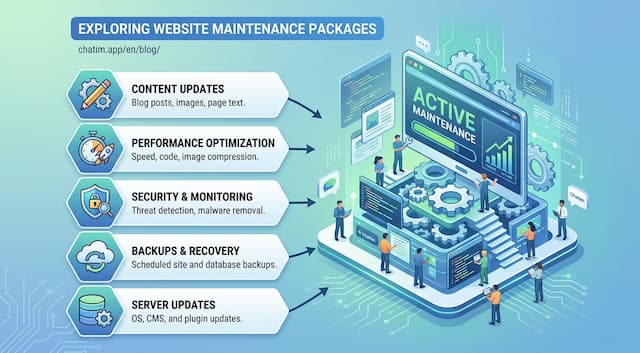 Website Maintenance Packages: What to Include & Charge (2026)
What goes into a website maintenance package, how providers price three tiers, the full maintenance checklist, and the recurring line items clients notice.
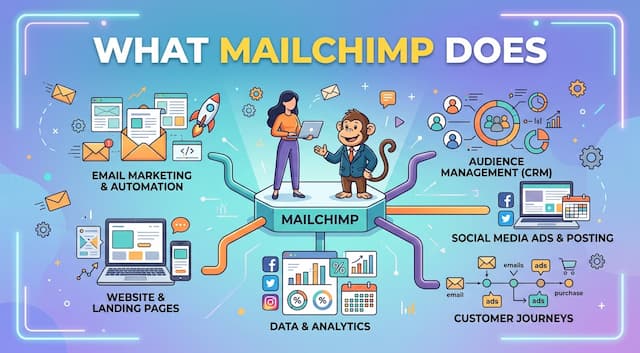 What Is Mailchimp? A Complete Guide to What It Does
Mailchimp is a leading email marketing platform. Learn what it is, what it does, its features and plans, and top alternatives.
 Best Account-Based Marketing Software Platforms for 2026
Compare the best account-based marketing software platforms for 2026. Learn what ABM software does, its key features, and how to choose.