Website Maintenance Packages: What to Include & Charge (2026)
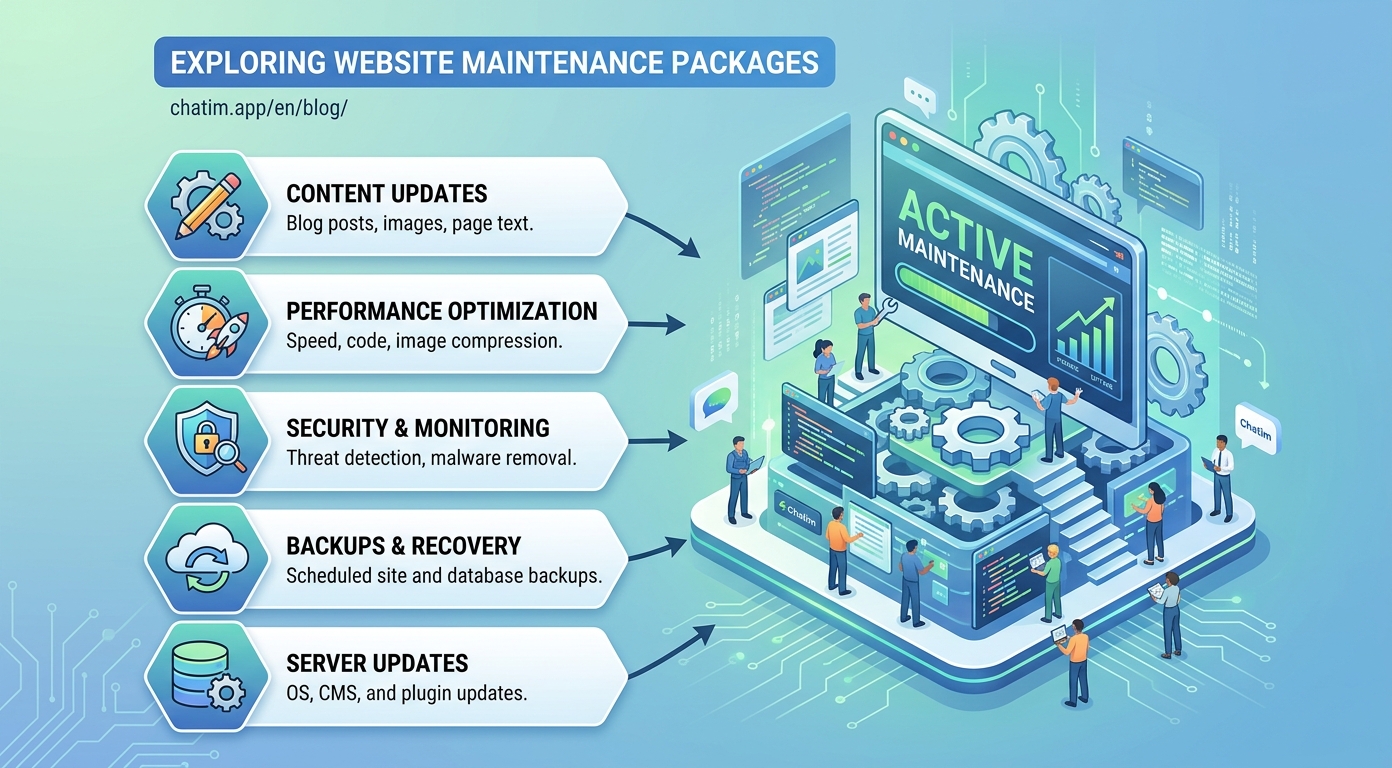
Website maintenance packages are how agencies and freelancers turn one-off website projects into recurring revenue, and how business owners keep a site fast, secure, and actually working after launch day. Done well, a package is a win on both sides: the client gets a site that never quietly rots, and the provider gets predictable monthly income that smooths out the feast-and-famine project cycle. This guide covers what belongs in a maintenance package, how providers structure and price tiers, a working maintenance checklist, and the recurring line items (like a managed live chat widget) that raise a package's value without raising its workload much.
It is written for both sides of the invoice: providers designing a package, and businesses deciding what to buy.
What a website maintenance package is (and is not)
A website maintenance package is a recurring service agreement covering the routine work that keeps a website healthy: software updates, backups, security monitoring, uptime checks, small content edits, and periodic reporting. The key word is routine. A package is not a bucket of free redesigns, and it is not an on-call development retainer, though many providers sell those separately. The clearest packages define three things in writing: what is included every month, what counts as a small task versus billable project work, and how fast the provider responds when something breaks.
What goes into a maintenance package
Core software updates. CMS core, themes, and plugins, applied on a schedule and after testing, because an un-updated WordPress site is the single most common way small business sites get compromised.
Backups you can actually restore. Automated, stored off the hosting server, and tested with a real restore periodically. A backup nobody has ever restored is a hope, not a backup.
Security monitoring. Malware scanning, firewall or security plugin management, SSL certificate renewal, and a documented response plan for the bad day.
Uptime and performance monitoring. Automated uptime checks with alerting, plus periodic speed reviews, because a slow site loses visitors silently and a down site loses them loudly.
Content edits within a limit. A monthly allowance of small changes (swap an image, update hours, add a testimonial), with a clear definition of where "small" ends.
Reporting. A short monthly summary of updates applied, uptime, traffic, and work performed. The report is how the client remembers what they are paying for; skipping it is how packages get cancelled.
How providers structure tiers (and what the market charges)
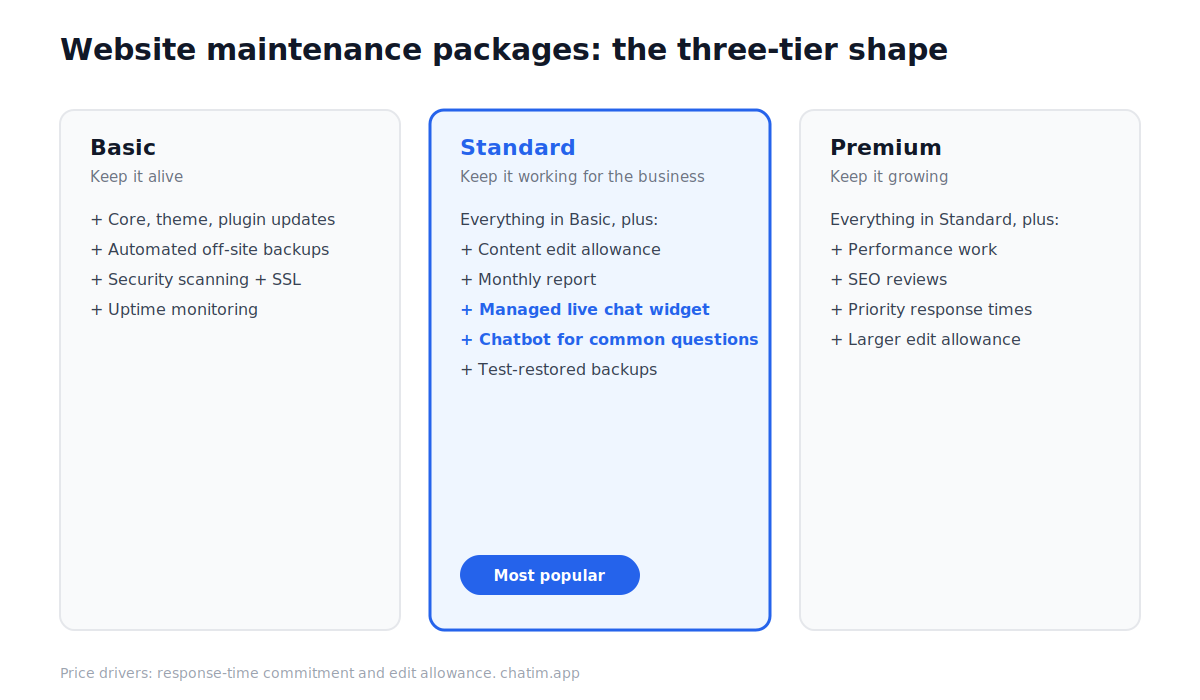
Most providers sell three tiers, because clients understand good-better-best. A typical shape: a basic tier with updates, backups, security, and uptime monitoring; a standard tier adding a content-edit allowance, monthly reporting, and managed extras such as a live chat widget; and a premium tier adding performance work, SEO reviews, priority response times, and a larger edit allowance.
On pricing, published packages across the market commonly run from roughly $30 to $200 per month for basic care, into several hundred per month for standard business tiers, and higher for ecommerce or high-traffic sites where downtime is expensive. Treat those as orientation, not gospel; the honest driver of price is response-time commitment and the size of the edit allowance, because those are the two items that consume real hours. Providers pricing only against "updates and backups" race to the bottom against automation; providers pricing against responsiveness and outcomes do not.
The website maintenance checklist
Whether you sell maintenance or do it yourself, this website maintenance checklist covers the work that matters, grouped by cadence.
Weekly: apply plugin and theme updates after a quick compatibility check, verify backups completed, scan for malware, review uptime alerts, check forms and checkout flows actually submit, and skim 404 logs for broken links worth fixing.
Monthly: test-restore one backup, review site speed on key pages, update content per the client's edit requests, check SSL and domain expiry dates, review search visibility basics (indexing errors, top queries), and send the report.
Quarterly: audit user accounts and access, prune unused plugins and themes, review analytics for decaying pages worth refreshing, re-test the site on current browsers and devices, and revisit the package scope itself against what the client actually requested all quarter.
Yearly: renew and verify domain, hosting, and licenses; review the design against the business's current offering; and have the awkward conversation about the features nobody uses.
The recurring line item most packages miss: managed live chat
The weakness of a classic maintenance package is that its best work is invisible: nothing broke, nothing got hacked, the backups sat unused. Smart providers add line items the client sees working every week, and a managed live chat widget is one of the cleanest. The provider installs the widget, builds a simple chatbot flow for the client's most common questions (hours, pricing, booking, directions), routes real conversations to the client's phone or inbox, and reviews the transcripts monthly for new questions worth automating. For the client, the site stops being a brochure and starts capturing leads. For the provider, it is an hour or two of setup, minutes of monthly upkeep, and a visible reason the retainer renews. On WordPress sites specifically, a free live chat plugin makes the setup cost close to zero, which means the margin on that line item is nearly all margin.
Pricing and selling your own package
Three rules keep maintenance profitable. Anchor the value to risk, not tasks: the client is not buying "plugin updates", they are buying "your site will not be the one that gets hacked the week before your busiest season." Define the edit allowance in hours and put a number on it, because "small changes" without a number becomes unlimited changes with resentment. And invoice automatically on a schedule; a recurring service with manual invoicing is a cancellation waiting for an excuse (a free invoice generator covers the early days, and proper recurring billing follows once the roster grows). When a prospect balks at the monthly price, quote the hourly cost of the same work bought reactively after something breaks; the package almost always wins the comparison honestly.
Buying maintenance: what to look for and what to avoid
If you are on the buying side, three questions separate good packages from theater. Ask what happens when the site goes down at night, and listen for a concrete answer with a response-time commitment. Ask when they last test-restored a backup for any client; hesitation is your answer. And ask what is in the monthly report; if there is no report, you will never know whether anything was done. Red flags worth walking away from: packages that lock your own admin access away from you, contracts with no defined scope, and providers who cannot explain what they would do in a malware incident. A fair package reads like a checklist with times attached, not like a promise to "take care of everything."
Maintenance is the least glamorous part of running a website and the most predictive of how it performs a year from now. Whether you sell it or buy it, the package that wins is the one where both sides can point at the list and say what got done this month, and where at least one line item, like a chat widget quietly collecting leads, makes the value visible between the bad days it prevents.
More on this from our team: website proposal templates and website builders.
This guide is for general informational purposes and is not legal or financial advice. Pricing bands are illustrative and vary by market, scope, and jurisdiction. Have a qualified professional review any service agreement before you sign or issue it.
Frequently Asked Questions
What is a website maintenance package?
A website maintenance package is a recurring service agreement, usually monthly, covering the routine work that keeps a website healthy: software updates, backups, security monitoring, uptime checks, a small-content-edit allowance, and reporting. It is distinct from project work like redesigns, which providers scope and bill separately.
What should be included in a website maintenance package?
Six core items: CMS, theme, and plugin updates applied on a schedule; automated off-server backups that get test-restored; security monitoring with SSL management; uptime and performance monitoring with alerting; a defined monthly allowance of small content edits; and a monthly report of what was done.
How much does website maintenance cost per month?
Published packages commonly run from roughly $30 to $200 per month for basic care, several hundred for standard business tiers, and more for ecommerce or high-traffic sites. The real price drivers are the response-time commitment and the size of the edit allowance, since those consume actual provider hours.
How do agencies price website maintenance packages?
Most use three tiers (basic, standard, premium) differentiated by edit allowance, response time, and extras like performance work or managed live chat. Profitable providers anchor pricing to risk and responsiveness rather than task lists, define edit allowances in hours, and bill automatically on a recurring schedule.
What is included in a website maintenance checklist?
Weekly: updates, backup verification, malware scan, uptime review, form testing, broken-link check. Monthly: a test restore, speed review, content edits, SSL and domain expiry checks, search-visibility basics, and the client report. Quarterly: access audit, plugin pruning, analytics review, cross-device testing. Yearly: renewals and a design review.
Is a website maintenance package worth it?
For most businesses without in-house technical staff, yes. The package converts unpredictable emergencies (hacks, outages, broken checkouts) into a predictable monthly cost, and the routine work it covers, especially updates and tested backups, prevents the most common and most expensive failures small business sites experience.
How often should a website be maintained?
Software updates and backup checks belong on a weekly cadence, content and performance reviews monthly, deeper audits quarterly, and renewals plus a design review yearly. Sites handling payments or high traffic compress those cadences further because the cost of downtime is higher.
What is the difference between website maintenance and a retainer?
Maintenance covers defined routine care with a small-task allowance. A retainer reserves development hours for ongoing project work like new features or design changes. Many providers sell both: the maintenance package keeps the site healthy, and the retainer funds its evolution. Mixing them in one vague agreement is where scope creep starts.
Can I maintain my website myself?
Yes, if you keep a cadence: apply updates weekly, verify and occasionally test-restore backups, monitor uptime with an automated checker, and review forms and speed monthly. The checklist in this guide covers the full routine. Most owners who stop doing it themselves stop because of consistency, not difficulty.
What extras raise the value of a maintenance package?
Line items the client sees working: a managed live chat widget with a chatbot answering common questions, lead capture reporting, periodic SEO reviews, and performance improvements with before-and-after numbers. Visible extras balance the invisible core work (nothing broke, nothing got hacked) that clients otherwise forget they are paying for.
Why add live chat to a website maintenance package?
Because it converts the package from pure insurance into visible value: the provider installs the widget, automates the client's common questions with a chatbot, routes real conversations to the client, and reviews transcripts monthly. Setup takes an hour or two, upkeep takes minutes, and the client gets a site that captures leads instead of just existing.
What questions should I ask before buying website maintenance?
Three that reveal the most: What happens when my site goes down outside business hours, and what response time do you commit to? When did you last test-restore a backup? What exactly appears in the monthly report? Concrete answers to all three usually indicate a well-run service; hesitation on any of them is a warning.
What are red flags in a website maintenance contract?
Providers who keep sole admin access to your own site, contracts without a defined scope or edit allowance, no stated response time, no reporting, and no incident plan for malware or downtime. A trustworthy package reads like a specific checklist with cadences and commitments, not a promise to take care of everything.
Related articles
More in Tools & productivity → Website Proposal Template: 8 Sections That Win (2026)
A free website proposal template with all 8 sections copy-paste ready, plus the walkthrough: scoping, three-tier pricing, follow-up, and the expiry date.
 What Is Mailchimp? A Complete Guide to What It Does
Mailchimp is a leading email marketing platform. Learn what it is, what it does, its features and plans, and top alternatives.
 20 Best Email Tracking Software Tools to Use in 2026
20 email tracking tools compared: Mailtrack, HubSpot, Mixmax, Mailchimp, ZeroBounce. Pricing, free tiers, Gmail and Outlook picks for sales teams.
 Best Account-Based Marketing Software Platforms for 2026
Compare the best account-based marketing software platforms for 2026. Learn what ABM software does, its key features, and how to choose.