What is a free ROI calculator?
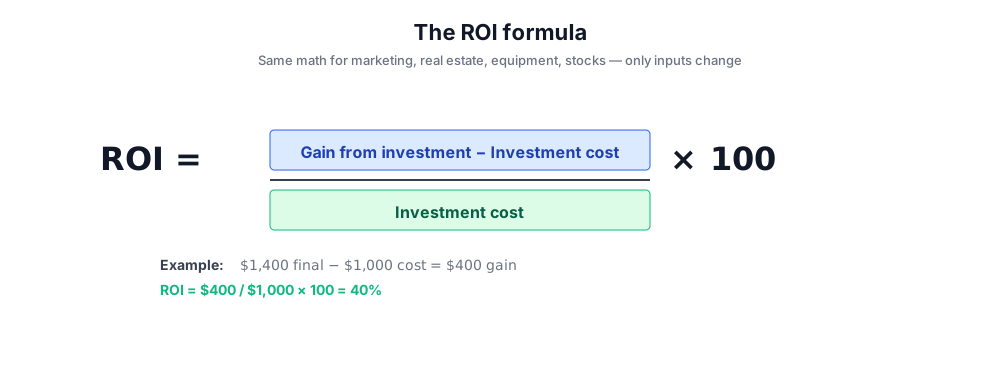
A free ROI calculator (sometimes called a return on investment calculator) is an online tool that applies the standard return on investment formula - (gain from investment − initial investment cost) ÷ initial investment cost × 100 - to whatever numbers you enter. The free ROI calculator above handles two common variants: Basic ROI for any particular investment (real estate, equipment, equity, side projects) and Marketing ROI with ROAS and break-even for ad campaign analysis.
Where the math takes ten seconds in a calculator, the value an online ROI calculator adds is interpretation: a clean rate of return percentage with annualization so you can compare different investments fairly, plus an interpretation layer that flags whether the result is excellent, positive, or negative. The investor then has a starting point for the next set of financial decisions and investment decisions.
This free investment calculator is one of several other calculators marketing teams and finance teams use day-to-day - alongside tools like compound interest calculators, balance sheet calculators, and net income models in Excel. It's deliberately simple: ROI in, interpretation out, no spreadsheet required.
ROI formula and rate of return basics
The roi formula at the heart of every ROI calculator is the same: ROI = (gain from investment − investment cost) / investment cost × 100. A particular investment that returns $1,400 on a $1,000 investment cost has an investment gain of $400 and a roi result of 40% - a healthy positive rate of return. The same formula handles a real estate flip, a marketing campaign, and a personal retirement contribution; only the inputs differ.
For investments held over different periods, raw ROI is misleading: 40% ROI over five years is much weaker than 40% ROI over six months. That's why the calculator above also returns an annualized rate of return, which converts ROI into a yearly figure so you can compare different investments fairly. Annualized rate of return = ((1 + ROI) ^ (1 / years)) − 1 - the tool runs this automatically.
Two related metrics frequently come up alongside ROI: ROAS (Return on Ad Spend), which is revenue divided by ad cost - useful for marketing teams who care about top-line revenue per dollar spent - and net profit, which is revenue minus COGS minus marketing cost. The Marketing ROI mode of the calculator returns both.
How to use the free ROI calculator
Pick a calculation mode, enter the numbers, click calculate. The free ROI calculator handles the math and returns ROI percentage, total gain or loss, annualized rate of return, and (in Marketing mode) ROAS and break-even.
Basic ROI mode
- Select Basic ROI for general investment, real estate, or any particular investment.
- Enter your initial investment in the local currency.
- Enter the final value (or expected total value) of the investment.
- Specify investment length - months or years.
- Click Calculate ROI - the tool returns ROI percentage, gain from investment, and annualized ROI.
Marketing ROI mode
- Select Marketing ROI for ad campaign analysis.
- Enter total marketing cost - ad spend, creative, agency fees.
- Enter the revenue generated from the campaign.
- Enter cost of goods sold (COGS) so net income is computed correctly.
- Specify campaign duration in months.
- Click Calculate - the tool returns ROI, ROAS, net profit, and break-even revenue.
Where investors and teams use an online ROI calculator
Different investments need different framing. The free ROI calculator handles each by adjusting the inputs - the formula is the same, the interpretation differs.
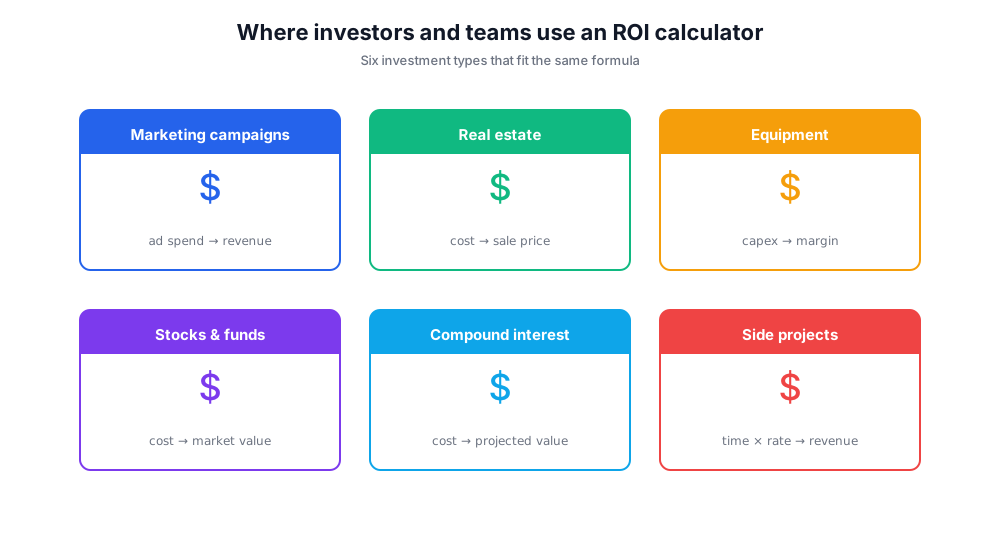
Marketing campaigns
Ad spend goes in, campaign revenue and COGS come back out as ROI, ROAS, and break-even. Use Marketing ROI mode for paid social, paid search, influencer campaigns, and email programs.
Real estate
Initial investment cost is the down payment plus closing costs and renovation; final value is the sale price minus selling costs. Real estate ROI typically ignores rental income - pair this with a separate cash-on-cash return calculation for the full picture.
Equipment and tools
A small business buying a $5,000 machine that produces $2,500 of additional gross margin per year over its useful life can plug numbers into the basic ROI mode for an apples-to-apples comparison with other investments.
Stocks and funds
An investment in funds, ETFs, or individual stocks held for a defined period gives a clean basic ROI calculation. Annualized ROI is especially useful here for comparing investments of different durations.
Compound interest scenarios
While ROI is a single-period metric, you can stack it with compound interest assumptions and interest rate inputs to project total value at retirement - useful for setting long-term financial goals and investment goals.
Side projects and freelance work
Hours invested × hourly opportunity cost on the input side, total project revenue on the output side. Often a humbling exercise for hobby projects.
Interpreting your ROI result
A high ROI is not always a good outcome - it depends on the investment length, the risk profile, and what alternative investments were available. A 30% ROI on a high-risk venture over five years (about 5.4% annualized) underperforms a basic S&P 500 index fund over the same period. The roi result is only useful in context.
For marketing teams, the rule of thumb is a 4:1 to 5:1 ROAS as the threshold of campaign effectiveness - anything below 3:1 typically means the campaign is unprofitable once you factor in COGS, headcount, and overhead. The calculator's break-even result tells you the minimum revenue required for the campaign to clear zero net profit.
For investors, the standard benchmark is the 7-10% annualized real (inflation-adjusted) return of a diversified equity portfolio. Any particular investment with an annualized ROI below that benchmark needs to be justified by something else - risk reduction, cash flow, strategic value - to be worth keeping in the portfolio.
Limitations of ROI
ROI is a simple metric, and that simplicity comes with real limitations. The calculator runs the standard formula and produces a result - but the result doesn't capture risk, timing of cash flows, taxes, fees, opportunity cost, or the cost of borrowed capital. Two investments with identical ROI can have wildly different risk-adjusted profiles.
Specific limitations of ROI to keep in mind: it doesn't account for the time value of money (a discounted cash flow analysis would), it doesn't normalize for risk (a Sharpe ratio would), and it ignores anything that doesn't appear on the balance sheet - brand value, customer relationships, learning effects. For a marketing campaign that builds long-term brand equity but underperforms on first-touch revenue, ROI alone tells the wrong story.
ROI also breaks down for investments with negative or zero initial cost - common in joint ventures, sweat equity, or affiliate setups. In those cases, the formula returns infinity or undefined, which is mathematically correct but useless as a decision input.
Free ROI calculator vs Excel and other calculators
The free ROI calculator above is one option in a category of investment calculators. Here's how it stacks up against alternatives.
Chatim Free ROI Calculator (this tool)
Pros: No signup. Two modes (Basic ROI, Marketing ROI). Returns ROI, ROAS, annualized rate of return, gain or loss, net profit, break-even. Mobile-friendly. Built-in interpretation layer.
Cons: Single-period only - no multi-year cash flow modeling. No tax modeling.
Excel / Google Sheets ROI template
Pros: Fully customizable, supports multi-period DCF, integrates with the rest of a financial model.
Cons: Setup overhead. Easy to make formula mistakes. No built-in interpretation.
Calculator.net / Omnicalculator ROI calculators
Pros: Reputable, more advanced features (different interest scenarios, compound interest options).
Cons: Display-heavy, slower workflow for a quick check. No marketing ROI mode.
HubSpot Sales ROI Calculator
Pros: Sales-team-specific framing, integrates with HubSpot CRM.
Cons: Marketing/CRM bias; less useful for general investment analysis.
If you need a quick rate of return check or a marketing ROI analysis with break-even and ROAS, this free online ROI calculator gets you there in under thirty seconds. For full financial modeling - multi-year cash flows, sensitivity analysis, scenario planning - Excel or a dedicated finance platform is the right tool.
Common ROI calculation mistakes
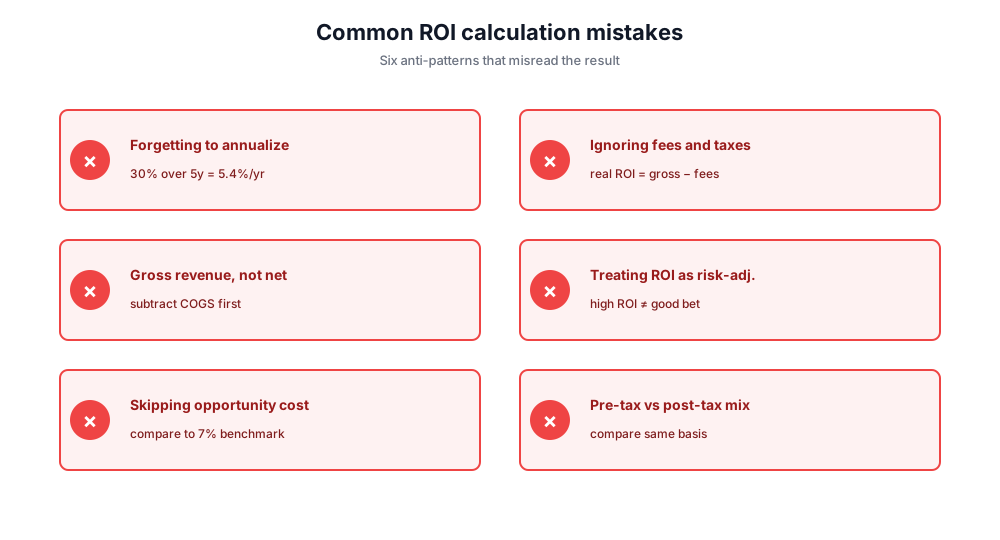
Forgetting to annualize. A 30% ROI over five years is not a 30% annual return - it's about 5.4% annualized. Always look at annualized rate of return when comparing different investments.
Ignoring fees and taxes. Brokerage fees, management fees, capital gains tax, and transaction costs reduce real ROI. The raw calculation overstates actual returns.
Using gross revenue instead of net income. ROI based on revenue misses COGS and operating costs. The Marketing ROI mode above factors in COGS so the result reflects net contribution.
Treating ROI as risk-adjusted. A high ROI doesn't mean a good investment. A 50% ROI on a coin-flip bet has a 50% chance of being negative.
Skipping opportunity cost. If you could have earned 7% in an index fund instead, your ROI on a side project should be measured against that benchmark, not zero.
Comparing pre-tax to post-tax. Always compare the same currency, the same tax basis. Pre-tax ROI vs post-tax ROI is apples to oranges.
Privacy and Data Security
All ROI calculations are performed entirely in your browser. No financial data is sent to any server or stored. Your information remains completely private and secure.