AI Chatbot for Website: How to Pick and Launch One (2026)
A website without a way to ask questions is a store with no staff. Visitors arrive with a specific doubt (does this work with my setup, what does the free plan include, can I cancel anytime), and when the page does not answer it, most leave rather than email you. This guide covers everything that matters when choosing an AI chatbot for website support and sales: what it actually does for a site, the features that separate useful from gimmick, where the widget should live, and how to launch one for free without annoying the visitors it is supposed to help.
If you want the deeper technology background first, our chatbot guide covers the category basics; this page stays practical and site-focused.
What an AI chatbot does on a website
A modern AI chatbot for a website is trained on your own content (your pages, help articles, and policies) and answers free-form visitor questions in normal sentences, at any hour, in the language the visitor writes in. That is a different animal from the pop-up bots of a few years ago that could only offer four buttons and a sorry. When it does not know, a well-configured bot says so and hands the conversation to your team instead of improvising.
The reason it earns a place on the page is timing. A visitor's question is worth the most in the moment they have it: mid-comparison, mid-checkout, mid-signup. An answer that arrives in seconds keeps the visit moving; the same answer by email the next morning usually reaches someone who already chose a competitor or gave up. The bot's job is to catch intent while it is still warm.
The four jobs it can hold
Most deployments are some mix of four roles, and naming yours upfront makes every later decision easier.
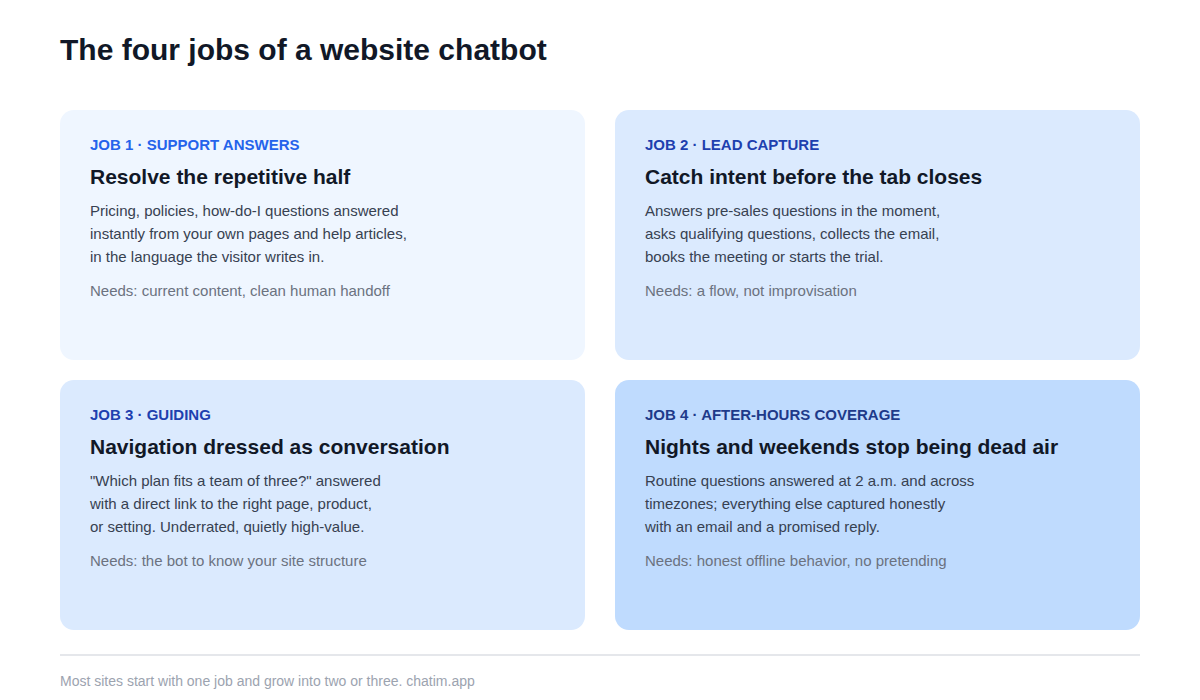
Support answering is the classic: the repetitive half of customer questions resolved instantly from your content. Lead capture is the commercial twin: greeting the right visitors, answering pre-sales questions, and collecting a name and email before the tab closes, with qualifying questions if you want them. Guiding is the least appreciated: "which plan fits a team of three" or "where do I find invoices" answered with a direct link, which is navigation help dressed as conversation. And after-hours coverage is the quiet workhorse: nights, weekends, and other timezones stop being dead air. A team of one benefits from that last job more than anyone.
Features that matter, and ones that do not
Six features do most of the work in a website chatbot. Training on your own content, with automatic re-sync when pages change. A human handoff into live chat that carries the transcript. Deterministic flows for structured tasks like lead forms and bookings. Widget customization so the chat matches your brand rather than advertising a vendor. Transcripts and simple analytics, because the conversation log is where all the improvement lives. And honest offline behavior: capture an email and promise a reply instead of pretending someone is there.
What you can mostly ignore: avatar galleries, fake typing delays, gamified greetings, and any feature whose demo is more impressive than its transcript. One filter cuts through marketing pages quickly: ask how the bot behaves when it does not know the answer. Tools built for trust have a detailed answer; tools built for demos change the subject.
How to add it to your site
Installation is the easy hour. On a custom site, it is a small script snippet pasted once; on platform sites there is usually a native integration, and our Shopify live chat and WordPress live chat pages cover those two paths end to end. The work that decides whether the bot helps or embarrasses you happens before the snippet: preparing accurate answers to your real top questions, pointing the bot at them, restricting its scope, and testing it with hostile questions before visitors meet it. Launch scoped to the topics you prepared, then widen weekly from what the transcripts show.
Where and how the widget should appear
Bottom corner, collapsed by default, one polite proactive prompt at most. The widget is a door, not a billboard: visitors who need it will find it in the corner where every site keeps it, and visitors who do not should be able to ignore it completely. Reserve proactive messages for moments with real intent, such as a long pause on the pricing page, and never fire one on arrival. On mobile, the collapsed widget must not cover buttons or content, and the open chat should be dismissible with one tap. Every additional interruption buys a few more conversations and costs a little trust across every visitor who did not want one; the corner widget with a fast, honest answer inside is the version that wins over time.
Free vs paid, and when each is right
Free tiers in this category are unusually usable: widget, bot, training on your content, and basic handoff typically all included, which covers a small site's whole first year of need. Paid tiers earn their keep when volume and team size do: more agent seats, deeper automation, integrations with your other tools, and richer analytics. The thing to scrutinize is not the price but the meter: per-plan pricing stays predictable as you grow, while per-conversation or per-resolution pricing quietly turns your bot's success into your largest new expense. Start free, measure for a month, and let the transcript volume make the upgrade decision for you; current tiers are on the pricing page.
Mistakes that make visitors close the widget
Firing a pop-up the second the page loads, before the visitor has read a headline. Pretending to be human, which converts the first "are you a bot?" into distrust of every answer that follows. Burying the path to a person, so the widget feels like a wall instead of a door. Answering from stale content, so the bot contradicts the page it sits on. And launching without reading transcripts, which turns week-one teething problems into month-six reputation problems. Every one of these is avoidable with settings and habits, not budget.
A one-afternoon launch plan
Write down the ten questions visitors actually ask, from chat history, email, or memory. Publish short answers. Connect a bot to those answers plus your site, restrict it to those topics, brand the widget, set the offline behavior, and place it in the corner with proactive prompts off. Test it like a skeptic for an hour, then ship it and read every transcript for two weeks. If you are still comparing tools first, our live chat software comparison ranks the chat-plus-bot platforms; whichever you pick, the afternoon of content preparation above, more than the tool choice, is what determines whether the AI chatbot on your website becomes an asset or an ornament.
More on this from our team: AI chatbots, how to build an AI chatbot, and live chat vs chatbot.
Frequently Asked Questions
What is an AI chatbot for a website?
A chat widget that answers visitors' free-form questions using content from the site itself, help articles, and policies, in natural sentences and at any hour. Unlike older menu-driven widgets, it handles questions nobody scripted, and a well-configured one hands off to a human rather than guessing.
How do I add an AI chatbot to my website?
On a custom site, paste a small script snippet once; on Shopify, WordPress, and similar platforms, use the native integration or plugin. The real work is preparation: write accurate answers to your top visitor questions, point the bot at them plus your site, restrict its scope, and test it before launch. No coding is required on any mainstream platform.
Is there a free chatbot for websites?
Yes; free tiers in this category typically include the widget, the bot, training on your own content, and basic handoff to a human. That covers a small site's needs comfortably. Paid plans add agent seats, deeper automation, and integrations, and are best adopted after transcript volume proves the bot is carrying real weight.
Do I need to know how to code?
No. Installation is copy-paste or a platform plugin, training is pointing the bot at your pages and documents, and configuration is settings, not scripts. Developer time only enters the picture for deep integrations, like letting the bot query an internal system.
Where should the chat widget appear on the page?
Bottom corner, collapsed by default, on every page where a question might arise. It should never cover content or buttons, especially on mobile, and should be dismissible in one tap. Visitors expect the corner placement, which is precisely why it works.
Should the chatbot pop up automatically?
Sparingly if at all. A proactive prompt tied to real intent, such as a long pause on the pricing page, can help; a greeting that fires on arrival mostly teaches visitors to close widgets faster. When in doubt, launch with proactive messages off and add one deliberate trigger later, measured against its own transcripts.
Does it work on Shopify or WordPress?
Yes; both are first-class citizens for most chat platforms, with app-store or plugin installs that skip the code snippet entirely. Store sites get the extra benefit of product and order questions being answered mid-purchase, which is where cart decisions actually happen.
How does the bot learn my website's content?
You point it at sources: the site URL, help center, and uploaded documents. It indexes them and grounds its answers in what it finds, re-syncing as content changes. Its ceiling is the quality of those sources, so fixing stale pages is the highest-leverage setup step.
Can a website chatbot capture leads?
Yes, and for many sites this is the fastest payback: it answers pre-sales questions in the moment, asks qualifying questions, collects a name and email, and books meetings. The conversational form converts differently than a static one because the visitor gets value (answers) before being asked for anything.
Will a chatbot slow down my website?
A well-built widget loads asynchronously after the page content and has no meaningful effect on perceived speed or Core Web Vitals. It is still worth verifying on your own site: run a before-and-after check with your usual page-speed tool rather than trusting any vendor's claim, ours included.
What happens when my team is offline?
The bot keeps answering everything within its scope, and for the rest it should be honest: say the team is away, collect an email, and promise a reply. That honest offline state outperforms a widget that pretends someone is typing, because the visitor chooses to wait instead of discovering the wait.
Can it answer in my visitors' languages?
Generally yes; modern bots usually reply in the language the visitor writes, even when the source content is in English. If a meaningful share of your traffic writes in a specific language, spot-check those transcripts after launch rather than assuming quality matches the English answers.
How do I know if the chatbot is helping or hurting?
Read the transcripts weekly and watch three signals: conversations resolved without a human that did not come back, how often visitors ask for a person and how that handoff feels, and whether satisfaction on bot conversations trends up. A bot whose transcripts you never read is the one that ends up in a screenshot.
Related articles
More in Chatbots & AI → Facebook Messenger Chatbot: The 2026 Guide + 5 Platforms
How Messenger chatbots work now: comment-to-DM automation, click-to-Messenger ads, 5 platforms compared, and when a contact button is enough.
 Chatbot Templates: 26 Free, Ready-to-Use Flows (2026)
26 free chatbot templates organized by goal and industry, what a good template contains, and the five edits that turn a ready-made flow into your own bot.
 Best WhatsApp Chatbots in 2026: 7 Platforms Compared
7 WhatsApp chatbot platforms compared, with both bills modeled: subscriptions and Meta fees. Plus the free path if you only need a WhatsApp button.
 Best Chatbot Platforms in 2026: 10 Builders Compared
10 chatbot platforms compared by what their pricing actually meters, with free plans, AI features, and a pick for each use case