How to Build an AI Chatbot Without Writing Code (2026)
Learning how to build an AI chatbot used to mean months of engineering. Today the honest answer is that a working bot, trained on your own content and answering real customer questions on your website, is an afternoon of focused work on a no-code platform, and most of that afternoon is spent on your content rather than on the bot. This guide walks through the whole path: the decisions to make before you start, the three ways to build, and the five steps from empty page to a bot you can trust in front of customers.
No programming knowledge is assumed. Where code is genuinely the better route, the guide says so and explains why.
Decide what the bot is for
Skipping this section is the main reason first bots disappoint. Before touching any tool, write down three things. The job: which questions should this bot resolve on its own? "Everything" is not an answer; the useful version sounds like "our top twenty support questions plus pre-sales questions about plans." The channel: website widget, in-product messenger, or a messaging app, because that choice shapes which platform fits. And the success measure: what number should move, whether that is questions resolved without a human, leads captured, or after-hours coverage.
If you have not yet settled what kind of bot you need at all, our chatbot guide covers the categories; the rest of this page assumes you want the modern kind, one that answers free-form questions from your own content rather than walking users through fixed menus.
Three ways to build an AI chatbot
Every build route is a tradeoff between control and effort. There are only three that matter.
| No-code platform | Developer framework | From scratch on model APIs | |
|---|---|---|---|
| Who it is for | Business teams, founders, marketers | Teams with developers and custom needs | Product companies making the bot itself the product |
| Time to first bot | An afternoon | Days to weeks | Weeks to months |
| Training on your content | Point it at your site and docs | You wire up retrieval yourself | You build the whole pipeline |
| Widget, inbox, handoff | Included | Assembled from parts | Built by you |
| Maintenance | Keep your content current | Content plus code | Content, code, and infrastructure |
| When it wins | Support, lead capture, FAQ automation | Deep integrations, unusual workflows | Novel products, full control requirements |
For the jobs this guide covers (customer support, lead capture, website answers), the no-code platform wins on every axis that matters, because the undifferentiated work (widget, chat inbox, retrieval, handoff) is already built and maintained for you. The comparison shifts only when the bot needs to do something no platform anticipates. If you are weighing specific platforms, our live chat software comparison covers the tools that bundle the bot with chat and a shared inbox, which is the combination a support use case ends up needing anyway.
Step 1: prepare the content it will learn from
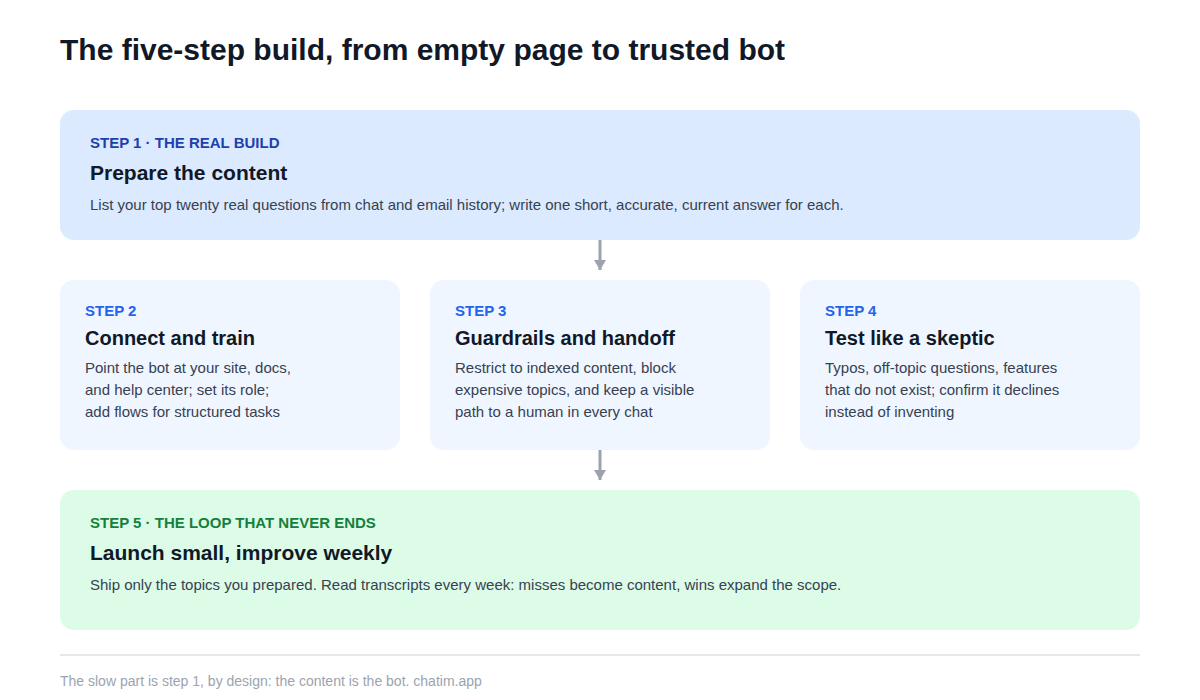
The bot will be exactly as good as what you feed it, so this step is the real build. Pull your last few months of chat and email history and list the questions that actually arrive, in the customers' own phrasing. Write or fix one short, accurate answer per question. If you have a knowledge base, bring those top articles up to date first; if you do not, a page of honest answers to your top twenty questions is a perfectly good starting corpus. Delete or fix anything stale while you are there, because an old pricing page in the training set will resurface as a confident wrong answer later.
Step 2: connect and train
On a no-code platform this is the fast part. Create the bot, point it at its sources (your website URL, help center, and any documents worth uploading), and let it index them. Give it a short role description in plain language: who it speaks for, what tone to use, what it must never discuss. Then add deterministic flows for the handful of tasks that must not improvise, such as capturing a lead's email or walking through a booking, since structured steps belong in flows even in an AI-first bot. Most platforms ship a gallery of chatbot templates for exactly these patterns, and starting from one beats assembling flows from nothing.
Step 3: set guardrails and the human handoff
Two settings separate a trustworthy bot from a liability. The first is scope: restrict answers to your indexed content, keep the bot silent on topics where a wrong answer is expensive (refunds beyond policy, legal questions, anything medical), and set the confidence threshold so it escalates instead of guessing. The second is the exit: a visible path to a person in every conversation. Wire the handoff into live chat when your team is online and into an email-capture promise when it is not, and make sure the transcript travels with the customer so nobody repeats themselves.
Step 4: test it like a skeptic
Do not test with the questions you trained it on; you already know it answers those. Spend an hour attacking it. Ask real questions in broken phrasing and with typos. Ask things it should not answer and confirm it declines. Ask about competitors, discounts you do not offer, and features that do not exist, and watch for invention. Ask the same question three ways and check the answers agree. Then hand it to someone who was not involved in the build, because they will find the failure you cannot see. Every miss goes on a list with one of three fixes: improve the content, tighten the guardrails, or add a flow.
Step 5: launch small and improve weekly
Ship it scoped: the topics you prepared, the handoff on, and nothing else. Then adopt the one habit that separates bots that improve from bots that rot: read the transcripts every week. The questions the bot missed are next week's content additions; the questions it aced are candidates for expanding its scope; the moments customers asked for a human tell you whether the handoff feels like a door or a wall. Expansion after that is a loop, not a project: add a topic, watch it for a week, keep what works.
Mistakes first-time builders make
Building the bot before the content, then wondering why it improvises. Testing only the happy path and shipping the demo. Giving it every topic on day one instead of the twenty questions that make up most of the queue. Hiding the human exit to make the automation numbers look better. And treating launch as the finish line when it is the starting line: the transcript review loop is where a mediocre first version becomes the bot your customers actually thank you for.
The economics of starting are friendlier than most teams expect: free tiers cover the whole first build, including the widget and the handoff, and paid plans enter the picture only when real volume does. Set aside the afternoon, start with your top twenty questions, and you will know within two weeks of transcripts whether the bot has earned a bigger job.
Related reading: AI chatbots, AI chatbot for your website, and AI chatbot ROI.
Frequently Asked Questions
Can I build an AI chatbot without coding?
Yes, and for support and lead-capture use cases it is now the default route. No-code platforms handle the hard parts (language understanding, retrieval from your content, the chat widget, the human handoff), leaving you the parts only you can do: choosing the bot's job, preparing accurate content, and reviewing transcripts.
How long does it take to build an AI chatbot?
A scoped first version is an afternoon of work on a no-code platform, and most of that time goes into content preparation rather than configuration. Custom builds on developer frameworks or raw model APIs run days to months, which is why they only make sense when the bot needs something no platform provides.
How much does it cost to build an AI chatbot?
On no-code platforms, free tiers typically cover the entire first build, including the website widget and handoff to a human. Paid plans become relevant with volume and team features; watch the pricing model, since per-conversation metering grows costs exactly when the bot succeeds. For custom builds, developer time dwarfs every other line item.
What data do I need to train the bot?
The content your customers' questions are already about: help center articles, product documentation, policy pages, and the website itself. The highest-value preparation is a current, accurate answer to each of your top twenty real questions, phrased the way customers ask them. Stale content is the most common cause of wrong answers.
Can I train an AI chatbot on my website?
Yes; pointing the bot at your site URL and letting it index the pages is the standard first step on modern platforms, usually alongside a help center and uploaded documents. Re-syncing after content changes matters as much as the initial indexing, so check that the platform refreshes automatically.
Do I need a developer to add the bot to my site?
No. Installation is a copy-paste snippet, and platform plugins for Shopify or WordPress remove even that step. A developer becomes useful when you want deep integrations, such as letting the bot look up order status in an internal system or write to your CRM beyond what built-in integrations cover.
Should I build a custom bot or use a platform?
Use a platform unless the bot itself is your product or it must do something no platform anticipates. The undifferentiated machinery (widget, inbox, retrieval, escalation) is identical across custom builds and platforms; paying developers to rebuild it rarely survives contact with the actual requirement, which is usually answering customers well.
How do I stop the bot from making things up?
Three controls together: restrict answers to your indexed content so replies are grounded in something you published, set a confidence threshold below which it escalates instead of guessing, and block the topics where a wrong answer is expensive. Then test adversarially before launch by asking about things that do not exist and confirming it declines.
Can the bot do more than answer questions?
Yes. Deterministic flows handle actions: capturing and qualifying leads, booking meetings, creating tickets, checking order status through integrations. The reliable pattern is AI for open questions and flows for structured tasks, in one bot, so nothing with real stakes depends on improvisation.
How should I test the bot before launch?
Like a skeptic, not an owner. Use questions it was not trained on, broken phrasing, and typos; probe for invention by asking about nonexistent features and discounts; ask the same thing three ways and compare; confirm the handoff to a human works mid-conversation. Then let a colleague who did not build it try to break it.
What should the bot hand off to a human?
Anything that is a decision rather than a fact: billing disputes, refunds beyond policy, upset customers, bug reports needing follow-up, and any conversation where its confidence is low or the customer asks for a person. The handoff should carry the transcript so the customer never repeats themselves.
How do I measure whether the bot is working after launch?
Track conversations resolved without a human that did not come back within a few days, the handoff rate, and satisfaction on bot-handled conversations as a trend. Pair the numbers with a weekly transcript read; the misses are your content backlog, and rising deflection with falling satisfaction means the bot is blocking rather than helping.
When does building on model APIs directly make sense?
When the conversation itself is your product, when you need full control over the pipeline for compliance or product reasons, or when the bot must live somewhere no platform supports. For a business adding support or sales automation to an existing product, that flexibility rarely justifies rebuilding the widget, inbox, retrieval, and handoff a platform already ships.
Related articles
More in Chatbots & AI → Facebook Messenger Chatbot: The 2026 Guide + 5 Platforms
How Messenger chatbots work now: comment-to-DM automation, click-to-Messenger ads, 5 platforms compared, and when a contact button is enough.
 Chatbot Templates: 26 Free, Ready-to-Use Flows (2026)
26 free chatbot templates organized by goal and industry, what a good template contains, and the five edits that turn a ready-made flow into your own bot.
 Best WhatsApp Chatbots in 2026: 7 Platforms Compared
7 WhatsApp chatbot platforms compared, with both bills modeled: subscriptions and Meta fees. Plus the free path if you only need a WhatsApp button.
 Best Chatbot Platforms in 2026: 10 Builders Compared
10 chatbot platforms compared by what their pricing actually meters, with free plans, AI features, and a pick for each use case