Top Knowledge Base Software for 2026: 15 Tools + Examples
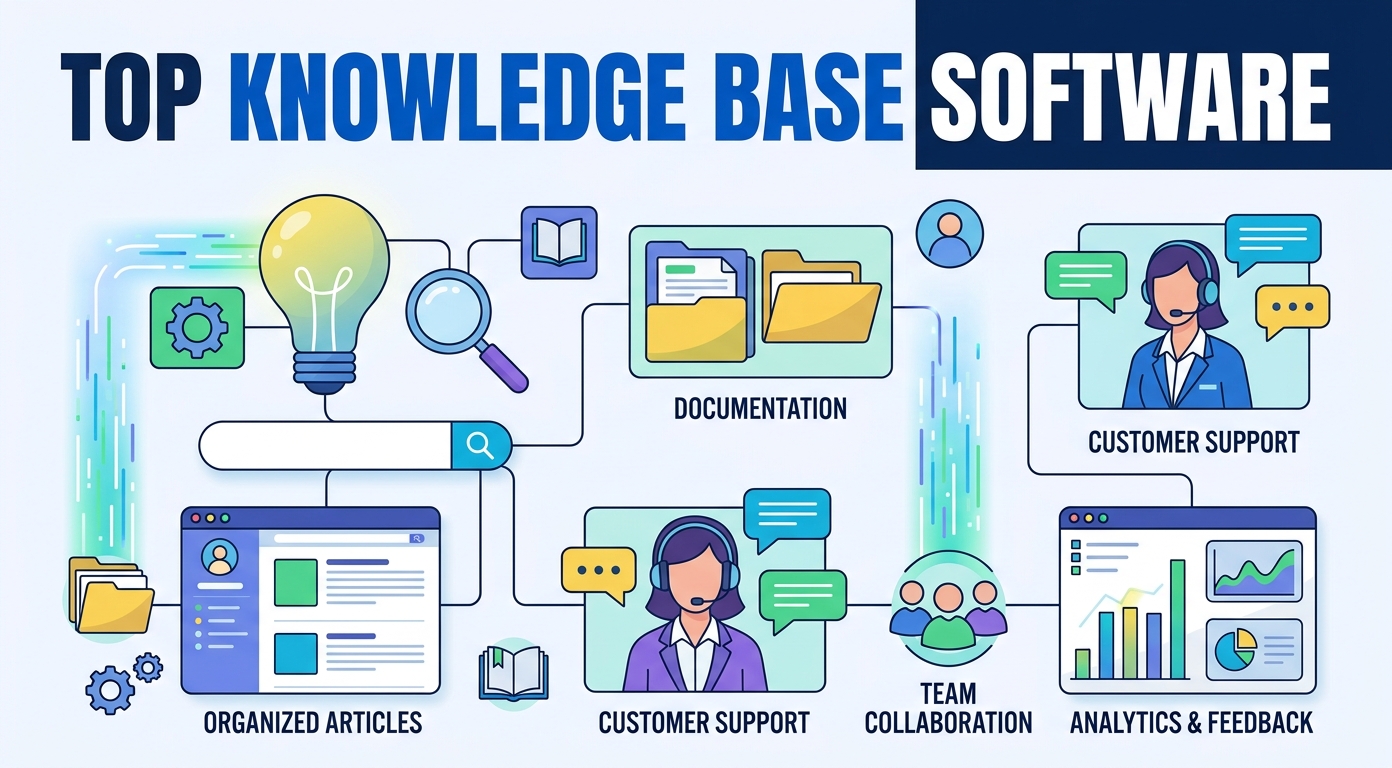
Top Knowledge Base Software for 2026
The right knowledge base software turns scattered organizational knowledge into a single, searchable source of truth. Whether you are building a public help site for customers or an internal wiki for staff, a good knowledge platform answers questions before they ever reach your support team.
This guide reviews the best knowledge base software for 2026, grouped by the job each tool does best. You will find customer-facing help portal options, internal team wiki products, AI knowledge base products, enterprise systems, and a free open-source choice.
Each review explains who the tool suits, its standout features, and how it handles content, search, and collaboration, so you can shortlist the products that fit your team and your budget. We also cover the benefits, the key features, the common mistakes, and a practical setup plan.
What Is Knowledge Base Software?
Knowledge base software is a tool for creating, organizing, and publishing help content in one central place. It gives your company a structured library of articles, guides, and resources that staff and customers can search at any time. The key features all aim at one outcome: the right answer, found fast. A good help center earns its keep within weeks.
A knowledge hub can be customer-facing, internal, or both. A customer-facing knowledge base is a public help site that lets customers solve problems on their own. A staff-facing knowledge base stores process notes, policies, and product knowledge for your own staff.
Most knowledge base products share the same core features: an editor for writing content, a category structure for organizing it, a search engine for finding answers fast, and analytics for tracking what works. Many now add AI tools that draft content and surface answers automatically. These features define how a system performs day to day, so it pays to compare the features carefully.
At its simplest, knowledge base tools replace the messy mix of documents, chat threads, and tribal knowledge that slows a team down. They make the right answer easy to find for whoever needs it, and they do so without constant manual upkeep.
The category covers a wide spectrum. Some tools are lightweight wikis for a handful of employees, while others are full knowledge management suites for thousands of staff. Understanding that range helps you match features to the size and shape of your team. The features that a tiny team needs differ sharply from the features a global support group depends on.
Why Your Business Needs a Knowledge Base
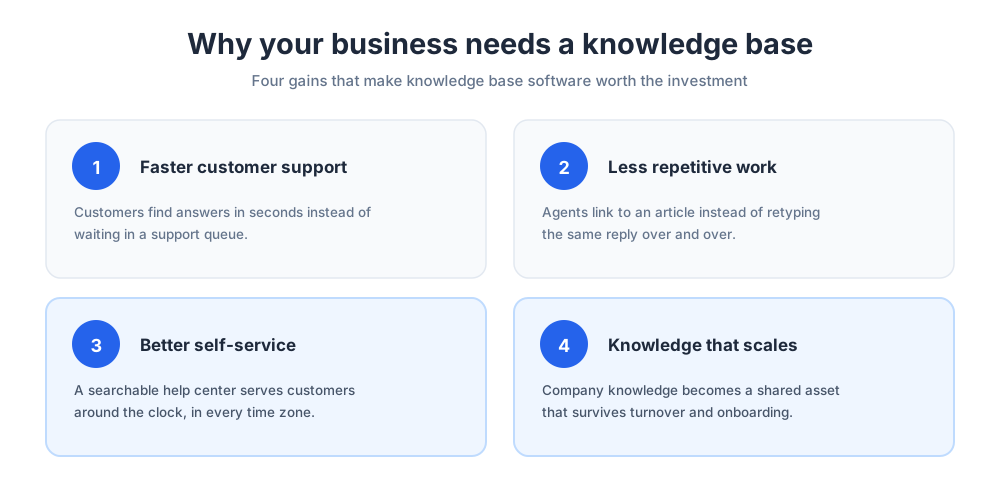
A knowledge hub is one of the highest-return investments a growing company can make. The payoff compounds as your customer base and your team expand, and it shows up in both speed and consistency.
Faster Customer Support
A well-built help site resolves common questions instantly. Customers find answers in seconds instead of waiting in a queue, and that speed lifts customer satisfaction across every channel. Fast customer support is the first benefit teams notice after launch.
For your support team, fewer repetitive tickets means more time for the complex cases that actually need a human. Good knowledge base software is the foundation of efficient customer service, and stronger customer support is the most visible payoff. A help site that absorbs routine questions makes every support shift calmer and customer support more predictable.
A solid knowledge base also raises the floor on quality. New customer support hires lean on the same articles as veterans, so customer support stays consistent no matter who is on shift.
Less Repetitive Work for Your Team
Support agents answer the same questions over and over. A good help portal captures those answers once, so agents link to an article instead of retyping a reply.
That shift frees support teams from repetitive work and keeps every answer consistent. When the documentation is the single source, customers and support agents always get the same information.
Better Self-Service for Customers
Most customers would rather solve a problem themselves than contact support. A searchable self-service site gives them that option around the clock, in every time zone.
Strong self-service also scales. The system can serve a large audience at once without adding headcount, which is why self-service is central to modern customer support. The benefits reach the whole team and customers alike, and a calmer support queue is the clearest sign it is working.
Scaling Knowledge as You Grow
As a company grows, knowledge gets trapped in individual heads and private chats. A solid system turns that company knowledge into a shared asset that survives turnover and onboarding.
New employees ramp faster when help content is centralized, and a team makes better decisions when the same facts are available to everyone. Good knowledge management protects that information as headcount changes.
Internal vs Customer-Facing Knowledge Bases
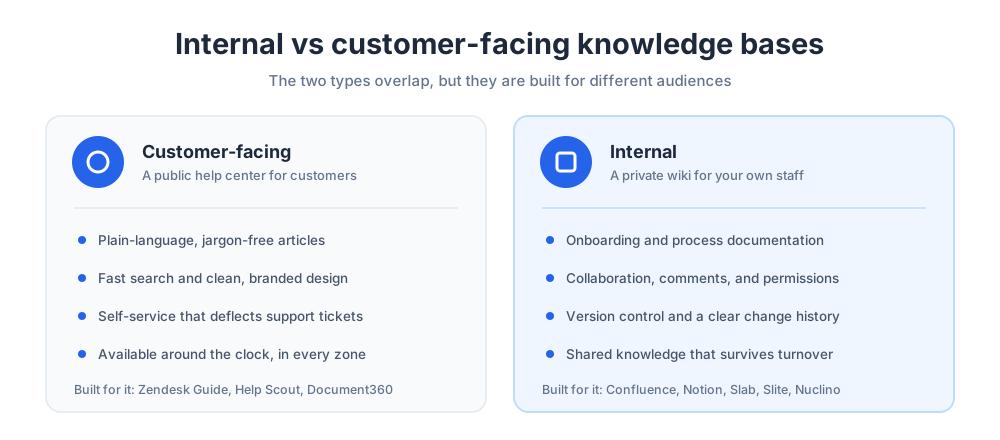
Before choosing a tool, decide which kind of help platform you need. The two types overlap, but they are optimized for different audiences and different content.
An external knowledge base software product is built for a public audience. It is designed for a broad readership, so it prioritizes clean design, fast search, and articles written in plain language. Tools like Zendesk, Help Scout, and Document360 lead here. They package external knowledge for customers in a polished, branded help site.
An internal knowledge base serves employees. It stores onboarding material, process notes, and product knowledge, and it values collaboration, change history, and permissions. Confluence and Notion are common choices for a staff-only hub.
Many businesses run both. Some knowledge base platforms support several separate help sites from one account, so a single tool can power a public help portal and a private staff wiki side by side. That dual setup is common once a company scales.
The choice also shapes tone and structure. A public help center rewards short, jargon-free articles, while a staff hub can assume more context. Mapping that difference early keeps your content useful for the audience that actually reads it. The internal knowledge a staff hub holds is rarely written the way customers expect to read it.
Key Features to Look For in Knowledge Base Software
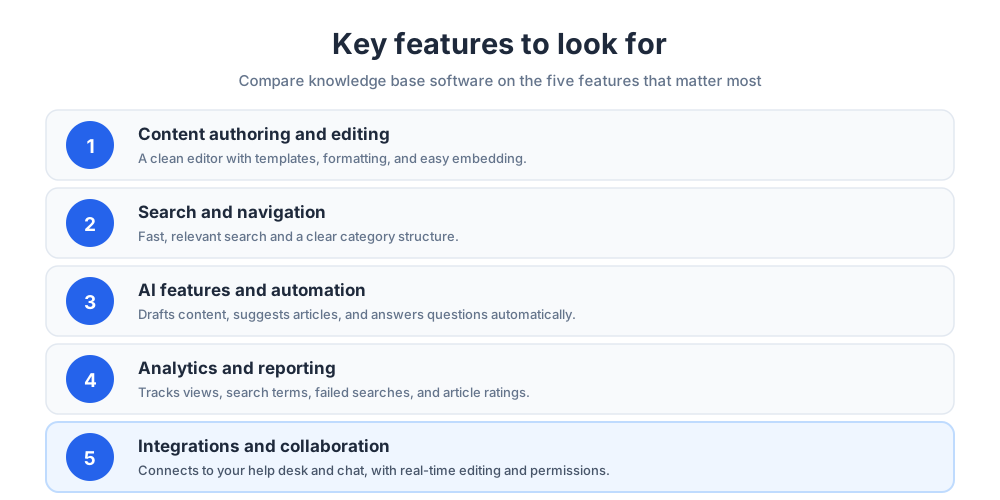
Knowledge base platforms vary widely. These are the key features that matter most when you compare your options, and the ones worth testing in any trial. Look beyond the basic features to the advanced features your team will lean on every week. The right features save hours; the wrong feature set quietly costs them.
Content Authoring and Editing
The editor is where your team will spend most of its time. Look for a clean authoring experience with templates, formatting, images, and easy embedding. These editing features sound minor until you write a hundred articles.
Strong content tools also make updates painless. Articles go stale quickly, so editing and republishing should take seconds, not a workflow ticket. The best editors treat content creation as a fast, everyday task, and that is a key feature buyers often overlook.
Search and Navigation
Search is the feature visitors use most. Weak search functionality is the fastest way to make a help site useless, no matter how good the content is. Search is the one feature that has to be excellent, so test its search functionality before you commit.
Look for fast, relevant search and a clear category structure. Good navigation and search functionality work together so visitors reach the right answers in one or two clicks. Strong search is non-negotiable for any serious tool, and faceted filtering is a feature worth checking. Test the search yourself before you commit.
AI Features and Automation
AI features are now standard in knowledge base software. AI can draft content, suggest related articles, translate languages, and reply to questions directly from your knowledge hub. These automation features change how a small team operates.
An AI-driven knowledge base also surfaces direct replies inside chat and search, so customers get a clear response instead of a list of links. Automation keeps content fresh by flagging articles for review, and that single feature pays for itself over time.
Analytics and Reporting
Analytics show which articles help and which fall short. Look for reporting features that cover views, search terms, failed searches, and article ratings.
Good analytics and reporting turn your help content into a feedback loop. Failed searches reveal missing content, and low-rated articles reveal what to rewrite. These reporting features make the difference between a static library and a living one.
Integrations and Collaboration
A help platform should connect to the rest of your stack. Check for integrations with your help desk, your chat tools, and the other tools your teams already use. A knowledge base that links to your support tools keeps every workflow in one place.
Collaboration features matter too. Real-time editing, comments, and clear permissions let multiple contributors keep the content accurate without stepping on each other. Smooth teamwork keeps a growing library reliable, and these key features scale with you. The best tools serve customers and support teams from the same knowledge base.
How to Choose the Right Knowledge Base Platform
The best platform for one company is the wrong fit for another. Start by deciding whether your priority is a customer help site, an internal wiki, or both.
Next, weigh your team size and technical comfort. A small team wants fast setup and a gentle learning curve, while a large enterprise needs permissions, audit trails, and a dedicated admin to manage it all.
Finally, map the must-have features against your budget. List the features you will use in the first ninety days, test two or three platforms with a real article, and choose the one your team will actually keep using. Comparing features side by side prevents an expensive mismatch later, and the features that demo well are not always the ones you use.
Best Knowledge Base Software Compared
The table below summarizes the fifteen tools reviewed in this guide. Use it as a quick shortlist, then read the full review of any platform that fits your audience and team.
| Tool | Type | Best for | Standout strength |
|---|---|---|---|
| Zendesk | Customer-facing | Zendesk support teams | AI search tied to ticketing |
| Help Scout | Customer-facing | Small support teams | Help site plus shared inbox |
| Document360 | Customer or internal | Dedicated documentation | Categories and version control |
| Helpjuice | Customer or internal | Fully branded help portals | Deep customization |
| Confluence | Internal | Atlassian and Jira users | Team wiki at scale |
| Notion | Internal | Flexible all-in-one teams | Docs, wiki, and databases |
| Slab | Internal | Modern team wikis | Clean editor and unified search |
| Slite | Internal | Remote teams | AI assistant for answers |
| Nuclino | Internal | Lightweight collaboration | Fast, visual knowledge graph |
| Guru | Internal | In-context knowledge | Browser and chat extension |
| Bloomfire | Internal or enterprise | Knowledge sharing at scale | AI search across content |
| KnowledgeOwl | Customer or internal | Customizable help portals | Simple, flexible pricing |
| ServiceNow | Enterprise | Large IT and HR teams | Multiple knowledge bases |
| monday service | Enterprise | Service teams on monday | Help portal plus workflows |
| BookStack | Open source | Self-hosted teams | Free and self-hosted |
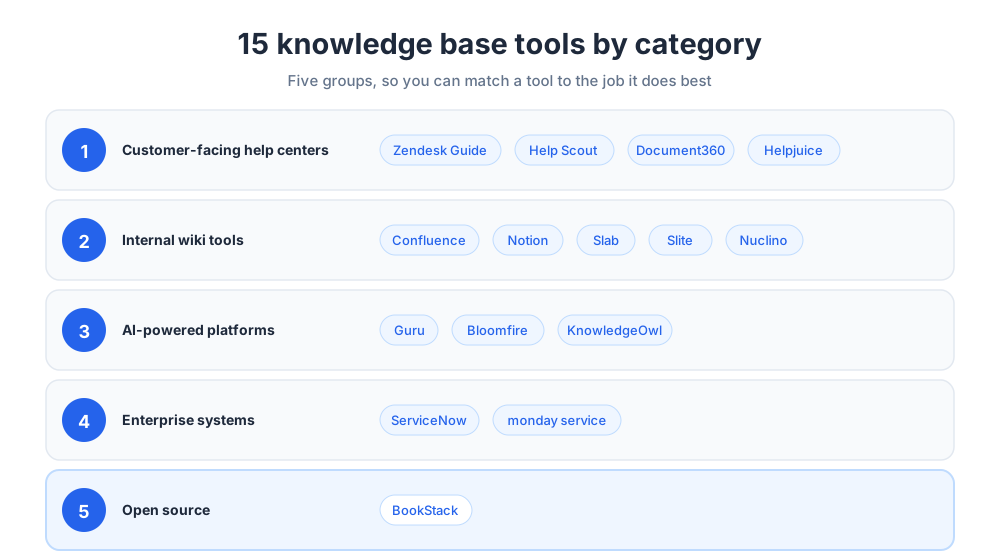
Customer-Facing Help Center Software
Customer-facing knowledge base software powers the public help center your customers search. These tools prioritize clean design, fast search, and tight links to your support channels. A polished help site is the front door to your support experience.
Zendesk Guide
Zendesk is the knowledge base side of the broader Zendesk customer service platform. It lets support teams build a branded help portal that sits alongside Zendesk ticketing and live chat.
Its strongest feature is AI search. The Zendesk knowledge base surfaces relevant articles inside the search bar and the chatbot, so customers get answers without opening a ticket. Content suggestions also help agents reuse articles inside replies.
Guide comes bundled with Zendesk Suite plans, which start at $55 per agent per month billed annually as of July 2026. Zendesk suits teams already using Zendesk for support. Because the help portal and the help desk share one system, every ticket can feed new article ideas back into the help site. That tight loop is its main selling point.
Help Scout
Help Scout pairs a shared inbox with a built-in help center, so a small support team gets a help desk and a knowledge base in one tool. You can publish a customer-facing knowledge base in minutes, which makes it a fast way to launch self-service.
Its Beacon widget embeds knowledge base articles directly on your site and offers a chat handoff when customers still need help. That blend of self-service and live support keeps simple questions out of the inbox.
As of July 2026, paid plans start at $25 per user per month, a free tier covers up to 5 users, and the Docs knowledge base is a paid add-on rather than a bundled feature. Help Scout is a strong fit for small and mid-sized teams that want a clean, low-maintenance help center. For a wider look at this category, see our guide to help desk software.
Document360
Document360 is a dedicated knowledge base platform built for both customer-facing help portals and internal documentation. It is designed around structured content rather than bolted onto a help desk.
It offers a clean category structure, version control, workflow states for drafts and reviews, and detailed analytics. Teams that publish a lot of content value its editorial controls and its AI writing assistant. Its document management approach keeps large libraries orderly.
Document360 suits product, support, and documentation groups that treat their content as a serious publishing project rather than an afterthought.
Helpjuice
Helpjuice is a dedicated knowledge management tool known for deep customization. Teams can match the help site to their brand closely, from layout to styling, without heavy development work.
It includes a simple article editor, real-time collaboration, AI search, and analytics that show how visitors use the help site. Helpjuice can serve a public help portal or a private staff hub.
Helpjuice is a good choice for companies that want a fully branded, flexible knowledge base and value straightforward, predictable pricing. It is a user-friendly knowledge base for teams without a developer on hand.
Internal Knowledge Base and Team Wiki Tools
Internal wiki tools store shared knowledge for your own employees. They emphasize collaboration, structure, and search across everything your teams write. Internal knowledge tends to grow fast, so structure matters.
Confluence
Confluence, by Atlassian, is one of the most widely used internal wiki and team documentation tools. It organizes content into spaces and pages, so each team gets its own area inside a shared system.
Its biggest advantage is the Atlassian ecosystem. Confluence links tightly to Jira, so product and engineering teams keep documentation next to their work. Templates, permissions, and version control make it reliable at scale.
Confluence suits mid-sized and enterprise teams that need a structured internal hub and already rely on Atlassian tools. Its strong knowledge management features hold up under heavy use.
Notion
Notion is a flexible workspace that many teams use as their internal wiki. It combines documents, a wiki, and databases, so process documentation lives next to projects and notes.
Its drag-and-drop editor and large template library make it easy to build a company wiki without technical skills. Notion is popular with teams that want one tool for documentation, planning, and collaboration.
Notion works best for a small or mid-sized team that values flexibility. Very large organizations sometimes need stricter permissions than an all-in-one tool provides.
Slab
Slab is a modern internal wiki built for clarity. Its editor is clean and distraction-free, and its structure keeps a growing library easy to browse.
The tool also unifies search across connected apps, so a query can return results from the help hub, your chat app, and your other content in one place. That makes it a strong hub for team knowledge.
It suits teams that want a focused, well-designed internal home for their content without the complexity of a larger system.
Slite
Slite is an internal documentation tool built for remote and distributed teams. It keeps the writing experience simple so teams actually maintain their content.
Its AI assistant can answer questions directly from your content and flag documents that look outdated. That keeps a staff hub trustworthy as it grows.
Slite is a good fit for remote teams that want a lightweight, AI-assisted home for shared knowledge. The simple editor lowers the barrier to writing things down.
Nuclino
Nuclino is a lightweight collaborative wiki built for speed. It opens fast, edits in real time, and keeps the interface minimal so teams can capture knowledge without friction.
A standout feature is its visual knowledge graph, which shows how documents connect. Teams can navigate the library as a network of linked ideas rather than a flat list.
Nuclino suits small teams that want a fast, simple internal hub and value collaboration over heavy formatting.
AI-Powered Knowledge Base Platforms
Every modern tool uses some AI, but the platforms below put AI features at the center. They focus on surfacing the right answers automatically wherever your teams work, and their capabilities go well beyond a basic editor.
Guru
Guru is an AI knowledge base that lives inside your workflow. Instead of asking teams to visit a separate site, the tool delivers knowledge through a browser extension and chat apps.
Its verification workflows are a standout. Each piece of knowledge has an owner and a review date, so the system stays trustworthy instead of drifting out of date. The tool also uses AI to answer questions from your verified content.
Guru suits support and sales teams that need accurate answers in the moment, without leaving the tools they already use. Its workflow-first design is the main reason teams pick it.
Bloomfire
Bloomfire is a knowledge sharing platform aimed at larger teams. It centralizes documents, videos, and discussions, then makes everything searchable with AI.
Its AI search indexes the words spoken inside videos as well as written content, so answers surface from any format. Bloomfire leans toward engagement, encouraging employees to contribute and discuss shared knowledge.
Bloomfire works well for mid-sized and enterprise teams that want knowledge sharing and discovery across many content types. Its search capabilities are its strongest asset.
KnowledgeOwl
KnowledgeOwl is a dedicated knowledge management tool that balances simplicity with flexibility. It can power a public help portal or a private staff hub, and it is known for friendly, responsive support. Teams use it to keep internal knowledge tidy as headcount grows.
It offers a clean editor, strong search, customization options, and analytics, without the per-author pricing that makes some platforms expensive as teams grow. KnowledgeOwl keeps the focus on the content itself.
KnowledgeOwl suits teams that want a straightforward, customizable system and predictable costs. Its simple capabilities make it easy to adopt.
Enterprise Knowledge Management Software
Large organizations need knowledge management that handles many teams, strict permissions, and high volume. An enterprise knowledge base ties the documentation into wider service workflows, and these platforms are built for that scale.
ServiceNow
ServiceNow is an enterprise platform with a powerful knowledge management module. It lets a large organization run many separate help sites from one system, with distinct spaces for IT, HR, and customer service teams.
Knowledge in ServiceNow connects directly to service workflows, so an article can resolve an IT or HR request inside the same system. Reporting shows what content exists and how it performs. As an enterprise knowledge base, it is built for governance and scale.
ServiceNow suits large enterprises that already use it for service management and want knowledge management built into those processes. Salesforce Service Cloud offers similar knowledge features for companies standardized on Salesforce, and Salesforce remains a common alternative for enterprise buyers.
monday service
monday service is the service management product from monday.com. It pairs ticketing and request workflows with a help portal and self-service site.
Because the product is built on the monday platform, the help portal sits next to boards, automations, and dashboards. Teams already using monday can add an enterprise knowledge base without adopting a separate tool.
monday service suits IT, HR, and operations teams that want service management and structured help content in one familiar workspace. Its knowledge base management stays inside the same workspace staff already know.
Free and Open-Source Knowledge Base Software
Not every team needs a paid platform. Open-source knowledge base software is a strong option for technical teams that want full control over their data.
BookStack
BookStack is a free, open-source, self-hosted knowledge base. It organizes content with a familiar metaphor of books, chapters, and pages, which keeps a large library easy to browse.
It includes a capable editor, built-in diagram support, and solid search capabilities. Because BookStack is self-hosted, your content stays on your own servers, which appeals to teams with strict data requirements.
BookStack suits technical groups that are comfortable hosting software themselves and want a no-cost system they fully control.
Knowledge Base Examples Worth Studying
Before you build, spend an hour inside help sites that already work. The knowledge base examples below are all public, all free to browse, and each one teaches a different lesson you can copy regardless of which tool you pick.
Shopify. The Shopify Help Center is organized around what merchants are trying to do (start an online store, manage orders, get paid), not around the product menu. Task-first structure is the single most copyable habit here: customers arrive with a job, not a feature name.
Stripe. Stripe splits its material cleanly into guides for doing and reference for looking up, and puts working examples beside the prose. Even outside developer products, the lesson holds: separate how-do-I articles from what-does-this-mean articles instead of blending them.
Notion. Notion keeps articles short and heavily illustrated, with screenshots that mirror exactly what the reader sees in the product. When an article looks like the screen in front of the customer, trust and completion both go up.
Zapier. Zapier titles its troubleshooting articles the way people actually phrase problems, which is why its help content so often wins the search results its customers start from. Write titles in the customer's words, not the team's.
Airbnb. The Airbnb Help Center asks who you are first (guest or host) and shapes everything after that answer. If your product serves two audiences, splitting the help site by audience beats mixing both into one category tree.
Slack. Slack's help articles read like the product sounds: plain language, short numbered steps, no jargon. A help site is brand voice under pressure, and consistency between product tone and support tone is a feature.
Spotify. Spotify Support strips top-level navigation to a handful of categories and pushes everything else through search. For consumer products with a few dominant problems, fewer doors beat more doors.
The pattern across every one of these knowledge base examples: organize by the customer's task, title by the customer's words, show the interface, keep the path to a human visible, and let search carry the load. Any of the 15 tools reviewed above can produce a help site like these; none of them will do it for you.
Knowledge Base Best Practices
The software is only half the job. A few simple habits separate a help site that customers love from one they ignore, and they apply to every tool on this list.
Keep content fresh. Assign each article an owner and a review date so the documentation never drifts out of date. Outdated answers erode trust faster than missing ones.
Write for search and scanning. Use plain titles that match how customers phrase questions, short paragraphs, and clear headings, so answers are easy to find and easy to read.
Use your analytics. Failed searches show missing content, and low-rated articles show what to rewrite, so let the data guide what your team works on next. Consistent upkeep keeps the whole library healthy.
How to Set Up a Knowledge Base
Setting up a help site does not have to be a huge project. Start with the questions your support team answers most often.
Pull your top twenty support tickets and turn each one into a clear article. That small set of knowledge base articles will deflect a surprising share of incoming questions from day one.
Next, organize articles into a simple category structure, add search, and connect the tool to your help desk and chat. Then expand steadily, using analytics to decide what content to write next.
Treat the help content as a living product. A short monthly review to update, retire, and add content keeps it valuable for readers and employees alike. Good knowledge management is a routine, not a launch.
Common Knowledge Base Mistakes to Avoid
A few mistakes show up again and again. The first is letting content go stale, which quietly destroys trust in the whole help site.
The second is writing for the company instead of the customer. Articles full of internal jargon do not match the words people actually search, so the right answer never surfaces.
The third is launching and forgetting. A help site needs an owner and a regular review, or it slowly decays into a graveyard of outdated documentation.
The last mistake is ignoring feedback. Article ratings and failed searches are free guidance, and teams that act on them keep their content genuinely useful. The right management habits prevent every one of these problems.
The Future of Knowledge Base Software
The future of knowledge base software is being shaped by AI. AI assistants now answer customer questions in natural language, drawing directly from your content instead of returning a list of links.
This shifts the role of the platform. It is becoming the trusted source that AI agents and chatbots rely on, which makes accurate, well-structured content more important than ever.
AI also lowers the cost of maintenance. It can draft new articles, translate content for language support, flag outdated pages, and spot gaps from failed searches, so smaller teams can keep a large library healthy. These capabilities shrink the workload that once required a full team.
Whatever platform you choose, the goal stays the same. The best knowledge base software gives customers fast answers, frees your support team from repetitive work, and turns shared knowledge into an asset that grows with your business. Pick the system your teams will actually use, and the rest of the benefits follow.
Related reading: FAQ page examples.
Frequently Asked Questions
What is an example of a kms?
A kms, or knowledge management system, is software that captures, organizes, and shares an organization's knowledge. Examples include Confluence, Guru, ServiceNow, and Zendesk Guide. Each one stores articles and documentation in a structured, searchable library so employees and customers can find answers quickly. The right choice depends on whether you need an internal system, a customer-facing help center, or both.
What are the 4 pillars of KM?
Knowledge management, or KM, is commonly described as resting on four pillars: people, process, technology, and content. People create and use the knowledge, process defines how it is captured and reviewed, technology is the software that stores and surfaces it, and content is the articles themselves. Frameworks vary, but the idea is consistent: tools alone do not work without people, process, and well-maintained content behind them.
What is an example of a knowledge base system?
A knowledge base system is software that hosts a searchable library of help articles. Zendesk Guide, Document360, Helpjuice, and Confluence are all common examples. Some are built for public help centers that customers search on their own, while others are internal wikis for staff. Most include an editor, a category structure, search, and analytics.
What are some good knowledge base examples?
Shopify, Stripe, Notion, Zapier, Airbnb, Slack, and Spotify all run public help centers worth studying. The shared traits matter more than the brands: content organized by customer task, article titles that match how people phrase problems, screenshots of the actual interface, search as the primary navigation, and a visible path to human support when the article does not solve it.
What is a knowledge base system?
A knowledge base system is a tool for creating, organizing, and publishing help content in one central place. It turns scattered documents and tribal knowledge into a structured, searchable resource. A knowledge base can be customer-facing, internal, or both, and modern systems add AI search that answers questions directly instead of returning a list of links.
What is knowledge base software?
Knowledge base software is a category of tools for building a searchable library of articles, guides, and answers. It gives a company one place to publish help content for customers, employees, or both. Most platforms include a content editor, a category structure, search, analytics, and increasingly AI features that draft articles and answer questions automatically.
What is the best knowledge base software?
There is no single best knowledge base software, only the best fit for your needs. Zendesk Guide and Help Scout suit customer-facing support teams, Confluence and Notion are strong internal wikis, Guru delivers knowledge inside your workflow, and ServiceNow fits large enterprises. Decide whether you need a customer help center, an internal knowledge base, or both, then shortlist tools that match your team size and budget.
What is the difference between an internal and a customer-facing knowledge base?
A customer-facing knowledge base is a public help center designed for customers, so it prioritizes clean design, fast search, and plain-language articles. An internal knowledge base serves employees and stores onboarding material, process documentation, and product knowledge, with an emphasis on collaboration and permissions. Many businesses run both, and some platforms can power a public help site and a private wiki from one account.
How much does knowledge base software cost?
Pricing varies widely. Many platforms offer a free tier or trial, then charge per user, per author, or by the size of your help center. Open-source options like BookStack are free to use if you host them yourself. Costs can climb as your team and content grow, so model the expected spend at the size you plan to reach and confirm current figures on each vendor's own pricing page.
Is there free knowledge base software?
Yes. BookStack is a free, open-source, self-hosted knowledge base, and several paid platforms offer a free tier or trial for small teams. Free and open-source options give technical teams full control over their data, while free tiers of hosted tools are a low-risk way to test a platform before committing budget.
What features should knowledge base software have?
Look for a clean content editor with templates, fast and relevant search, a clear category structure, and analytics that show views and failed searches. Strong integrations with your help desk and chat tools matter, along with collaboration features like real-time editing and permissions. AI features that draft content and answer questions are now standard and worth testing.
How do I create a knowledge base?
Start small. Pull the twenty questions your support team answers most often and turn each into a clear article. Organize those articles into a simple category structure, add search, and connect the knowledge base to your help desk and chat. Then expand steadily, using analytics to decide what to write next, and review the content monthly so it never goes out of date.
Does knowledge base software use AI?
Most modern knowledge base software now includes AI. AI can draft articles, suggest related content, translate languages, and answer customer questions in natural language directly from your articles. AI also helps with maintenance by flagging outdated pages and spotting content gaps from failed searches, which lets smaller teams keep a large knowledge base healthy.
What is the best knowledge base software for small businesses?
Small businesses usually want fast setup, a gentle learning curve, and low entry pricing. Help Scout, KnowledgeOwl, and Notion all fit that profile, and Help Scout is especially convenient because it pairs a help center with a shared inbox. BookStack is a good free option for teams comfortable hosting their own software.
How does a knowledge base reduce support tickets?
A knowledge base lets customers find answers themselves instead of contacting support. When common questions are documented in clear, searchable articles, many customers solve problems on their own around the clock. That deflects routine tickets, frees your support team for complex cases, and keeps every answer consistent.
Related articles
More in Customer service → SaaS Customer Support: The Stage-by-Stage Guide (2026)
How SaaS customer support actually works at each stage: the right stack from founder-led live chat to a full support operation, channels, and metrics.
 How to Reduce Customer Churn: 5 Levers in Payback Order
Reduce customer churn by pulling five levers in payback order: payment recovery, onboarding, support quality, pricing fit, and a 90-day win-back.
 10 FAQ Page Examples That Actually Help Customers (2026)
10 FAQ page examples from Shopify, Airbnb, Slack, Nike and more, with the exact pattern each gets right and a checklist to build your own FAQ page.
 12 Customer Service Email Templates for Every Scenario (2026)
12 customer service email templates for complaints, refunds, delays, bugs and saying no, plus the five-line skeleton that keeps them sounding human.