Service Desk Software: 16 Best Tools Compared
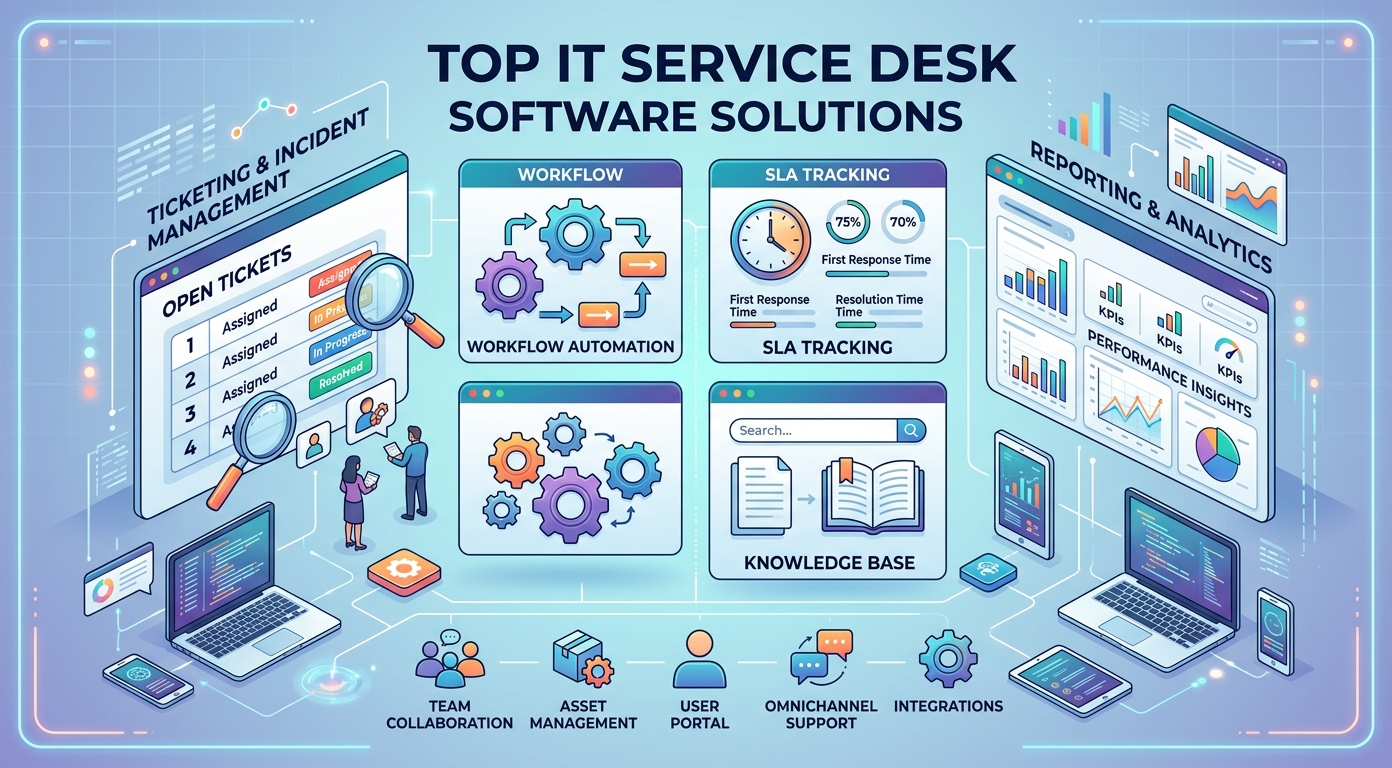
Service desk software is the system an IT team uses to take in requests, track incidents, and keep work moving in one place. The right help desk platform turns a chaotic inbox into an organized, measurable support operation that scales as the company grows.
This guide explains what service desk software is, how a service desk differs from a help desk and a CRM, the features that matter most, and the 16 best help desk and service desk tools available today, with a clear note on the team each one suits.
Whether you run a small support team or a large enterprise IT department, there is a help desk solution here that fits your size, your budget, and your tech stack. We will start with the fundamentals, then move into the full tool roundup and a practical buyer's guide.
What is service desk software?
Service desk software is a platform that manages IT support requests from start to finish. An employee or customer submits a ticket, the help desk routes it to the right agent, and the system tracks that ticket until the issue is resolved and closed.
Most service desk software follows ITSM, or IT service management, best practices. That means it handles far more than simple tickets. Incident management, problem management, change management, a service catalog, and a knowledge base all sit inside one platform, which is what separates a true service desk from a basic help desk.
Modern help desk tools are usually cloud based, so a support team can work from anywhere without managing servers. They add automation and workflows that route, prioritize, and escalate every ticket without manual effort, and they include reporting that shows exactly how the support operation is performing.
The payoff is a single source of truth. Instead of requests scattered across email, chat, and sticky notes, every issue lives in one help desk, with a clear owner, a clear priority, and a complete history. That structure is the whole reason this category of software exists, and it is why even small teams outgrow a shared inbox quickly.
Service desk vs help desk: what is the difference?
The terms help desk and service desk are often used interchangeably, and most modern software blurs the line. Still, there is a real distinction worth knowing before you choose a tool.
A help desk is focused and reactive. It exists to resolve incidents and answer questions fast. A user reports a broken laptop, the help desk fixes it. Help desk software is built around tickets, a shared inbox, and quick resolution, and for many small teams that is exactly enough.
A service desk is broader and more strategic. It still resolves incidents, but it also manages the wider delivery of IT services: change management, asset management, a service catalog, and alignment with ITSM frameworks. In short, a service desk is a help desk plus the structured processes around it.
In practice the label matters less than the feature set. Many vendors sell help desk and service desk capabilities under one platform and let you grow into the deeper modules. A small team may only ever need help desk software, while a growing IT department benefits from a full service desk that supports proper service management and reporting.
When you read the roundup below, treat help desk software and service desk software as one spectrum. The simple tools sit at the help desk end; the heavy ITSM platforms sit at the service desk end; and most options land somewhere in between.
Service desk software vs CRM
A service desk and a CRM both store records of customer interactions, which is why people confuse them. The difference is purpose. A CRM manages the sales relationship: leads, deals, pipeline, and revenue. A help desk or service desk manages support: tickets, incidents, and the service delivery that follows a sale.
Customer service software often sits between the two, and some platforms bundle both. The core split still holds, though. Use a CRM to win and grow accounts, and use service desk software to support those accounts well after they sign.
Many businesses run both systems and connect them, so an agent working a ticket can see a customer's full sales history without leaving the help desk. That link is useful, but it does not make the two tools the same. Buying a CRM when you need a service desk, or the reverse, is a common and expensive mistake.
Why your team needs service desk software
Running IT support from a shared inbox works until it does not. As request volume grows, good help desk software becomes the difference between a calm team and a buried one.
It speeds up resolution. Automation routes each ticket to the right person, sets a priority, and escalates anything at risk, so support requests are handled in a sensible order rather than by whoever shouts loudest. Agents stop triaging and start fixing.
It makes work measurable. A service desk reports on ticket volume, response time, and resolution rate, so a manager can spot bottlenecks and prove the value of the support team. That visibility is almost impossible to get from email alone, and it is what justifies the next hire.
It scales knowledge. A built-in knowledge base lets users solve common problems through a self-service portal, which cuts ticket volume and frees agents for harder work. Self-service also lifts customer satisfaction, because answers arrive instantly instead of waiting in a queue.
It protects the business. Proper change management and a configuration management database reduce the risk of an unplanned outage, and a clear audit trail helps with security and compliance. For an IT team, that risk reduction alone can pay for the software.
Finally, it improves the customer experience. Faster, more consistent support is something users notice, and a smooth help desk experience quietly builds trust in the whole IT function.
Key features to look for in service desk software
Help desk and service desk tools differ widely, but a strong platform covers the same core ground. These are the key features worth checking before you commit to any tool.
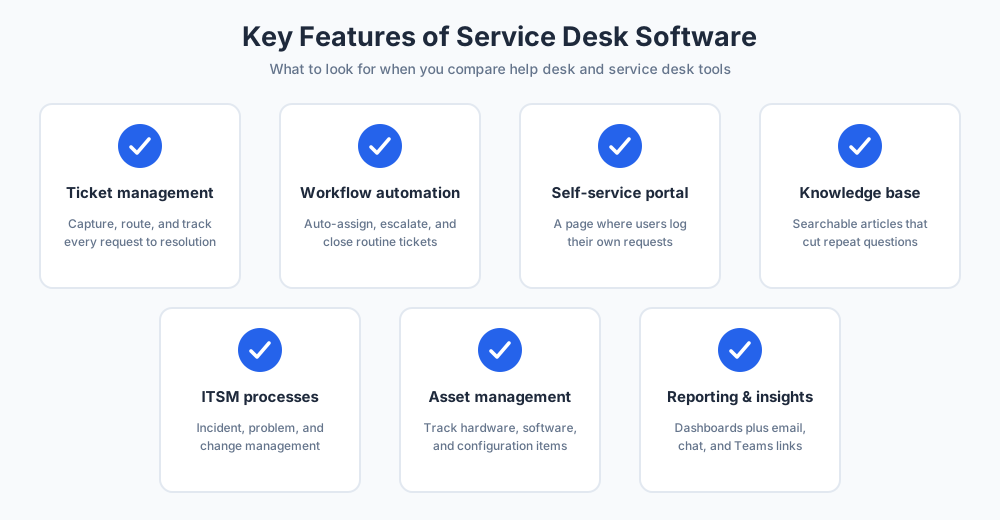
Ticket management. Every request should become a tracked ticket with an owner, a priority, and a status. This is the heart of any help desk, and it should feel fast for agents to use all day.
Automation and workflows. Look for customizable workflows that route, assign, and escalate tickets automatically. Strong automation tools remove the repetitive admin that slows a support team down and keep desk automation working in the background.
A self-service portal and knowledge base. A service portal lets users log requests and find answers themselves, while the knowledge base stores fixes so the same question is never solved from scratch twice. Together they are the biggest lever for cutting ticket volume.
ITSM processes. For IT teams, incident, problem, and change management, plus a service catalog, turn a basic help desk into a true service desk that supports real service management.
Asset and configuration management. Tracking hardware and software, ideally with a configuration management database, links every ticket to the device behind it and speeds up diagnosis.
Reporting and management features. Dashboards and reports expose performance and support better decisions about staffing and process. The best management features make trends obvious at a glance.
Integrations. The tool should connect to email, chat, Microsoft Teams, and the rest of your tech stack, so the help desk fits the way the team already works rather than forcing a new habit.
How we chose these service desk tools
The roundup below favors help desk and service desk software that is widely used, well supported, and genuinely covers the features above. This software shortlist spans the full range: simple help desk tools for small teams, full ITSM platforms for the enterprise, and many capable options in between. Each entry weighs the pros and cons and notes the ideal user, so you can match a tool to your situation rather than chase the longest feature list. Pricing changes often and varies by plan, so this guide focuses on what each tool does well rather than on exact figures.
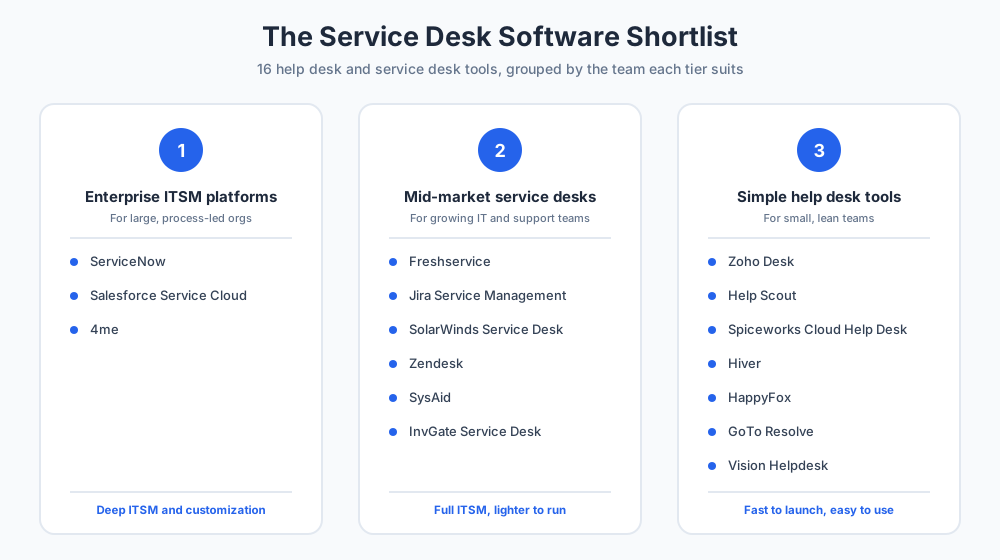
The 16 best service desk software tools
Here are 16 of the best help desk and service desk tools available today. For each one you will find the key features and the team it suits best, so you can build a shortlist quickly.
Zendesk
Zendesk is one of the most widely used support platforms in the world, covering both customer service and the internal IT help desk. It is polished, scalable, and backed by a large marketplace of integrations, which is why so many growing companies land on it. Zendesk has spent years refining the agent experience, and that maturity shows in how little training a new agent needs.
Key features
Zendesk offers omnichannel ticketing across email, chat, and social, generative AI that drafts replies and surfaces insights, a knowledge base, and strong analytics. Workspaces group related tickets so agents stay focused, and the open marketplace connects Zendesk to almost any other tool in your stack.
Best for
Best for support teams that want a refined, scalable platform and are willing to pay for it. Zendesk suits growing companies and mid-market businesses more than tight-budget small teams, and it works equally well for customer support and an internal help desk.
Freshservice
Freshservice, from Freshworks, is a purpose-built ITSM platform with a clean, modern interface. It delivers full service desk capabilities without the weight and cost of a legacy enterprise system, which has made Freshservice a favorite of IT teams that find ServiceNow excessive. The product feels current, and setup is far quicker than the enterprise alternatives.
Key features
Freshservice covers incident, problem, and change management, asset management, a self-service portal, and a service catalog. Its Freddy AI handles routine workflows, suggests solutions from the knowledge base, and keeps desk automation running so agents spend less time on triage.
Best for
Best for IT teams that want modern ITSM and strong automation without the complexity of the enterprise heavyweights. Freshservice scales comfortably from a mid-sized IT department upward.
Jira Service Management
Jira Service Management is Atlassian's service desk, and its single biggest strength is how tightly it connects to the rest of the Atlassian suite. For any team already living in Jira, this is the natural service desk choice, because support tickets and engineering work finally sit in one ecosystem.
Key features
Jira Service Management handles incident, problem, change, and request management, with a knowledge base delivered through Confluence. It links a support ticket directly to developer work in Jira, automates routine workflows, and offers solid ITSM coverage for technical teams.
Best for
Best for software and IT teams that already use Jira and want their service desk, knowledge base, and engineering backlog joined up. Teams new to Atlassian will get less out of it.
ServiceNow
ServiceNow is the enterprise ITSM heavyweight. It is a vast platform that manages IT, HR, and operations service delivery across very large organizations, and it is the standard many global enterprises measure other tools against.
Key features
ServiceNow offers deep ITSM, a powerful configuration management database, advanced customizable workflows, and broad automation across every service process. It is highly configurable and built to scale across an entire enterprise, with management capabilities that few rivals match.
Best for
Best for large enterprises with complex IT estates and the budget and dedicated team to run a heavy platform. For a small business or a lean IT team, ServiceNow is almost always more than they need.
SolarWinds Service Desk
SolarWinds Service Desk is a cloud ITSM tool known for pairing the service desk with strong IT asset management. It gives smaller IT departments enterprise-style structure without enterprise-level complexity, and the SolarWinds Service Desk interface stays approachable even as you switch on more modules.
Key features
SolarWinds Service Desk includes incident and change management, a service catalog, automated asset discovery, and a configuration management database, plus dependable automation and clear reporting that links tickets to the hardware behind them.
Best for
Best for IT teams that want service desk and asset management bundled in one straightforward cloud platform, without committing to a system as large as ServiceNow.
Zoho Desk
Zoho Desk is an affordable, capable help desk that fits naturally into the wider Zoho ecosystem. It balances genuine value with a solid feature set, and Zoho Desk is often the first paid help desk a growing small business adopts.
Key features
Zoho Desk offers multichannel ticketing, a knowledge base, workflow automation, and the Zia AI assistant. It connects tightly to Zoho CRM and the rest of the Zoho suite, so support and sales data flow together.
Best for
Best for small and mid-sized businesses that want strong value for the price, and especially for teams already using other Zoho tools.
Salesforce Service Cloud
Salesforce Service Cloud is the service desk arm of Salesforce. Its defining advantage is a direct connection to the Salesforce CRM, so support and sales share one customer record and one platform. For Salesforce customers, that alignment is hard to beat.
Key features
Salesforce Service Cloud delivers case management, omnichannel routing, AI through Einstein, a knowledge base, and the deep customization Salesforce is known for. The Salesforce Service Cloud platform can be shaped to almost any support process.
Best for
Best for companies already invested in Salesforce that want their service operation on the same platform as their CRM, with the budget to support it.
Spiceworks Cloud Help Desk
Spiceworks Cloud Help Desk stands out for one simple reason: it is free. For small IT teams watching every dollar, this helpdesk is a genuinely useful starting point rather than a stripped-down trial.
Key features
Spiceworks Cloud Help Desk provides ticketing, a knowledge base, user portals, and IT inventory, plus remote support, all at no cost. It is a complete, if basic, helpdesk for a small team.
Best for
Best for small IT teams that need working help desk software but have no budget for a paid platform. Larger teams will eventually outgrow it.
SysAid
SysAid is an ITSM platform with a strong focus on automation. It works for both smaller teams and larger enterprises, and SysAid aims to take as much routine work off agents as the software possibly can.
Key features
SysAid covers ticketing, asset management, a self-service portal, and broad automation, with an AI copilot that helps personalize and speed up support. Its customizable workflows let an IT team automate most repetitive steps.
Best for
Best for IT teams that want automation-heavy ITSM with solid asset management built into the same system.
Help Scout
Help Scout is a simple, friendly help desk built around a shared inbox. It deliberately skips heavy ITSM in favor of a clean experience that feels personal to customers, and Help Scout is a popular pick for teams that find full service desk software overkill.
Key features
Help Scout offers a shared inbox, live chat, a knowledge base, saved replies for FAQs, and light automation, all in an interface that takes minutes to learn.
Best for
Best for small teams that want straightforward customer support software rather than a full IT service desk, and that value simplicity over deep configuration.
HappyFox
HappyFox is a solid, ticketing-focused help desk for support teams that want structure and automation without a steep learning curve. It sits comfortably in the mid-market between simple inboxes and heavy ITSM platforms.
Key features
HappyFox provides a shared inbox, a capable ticketing system, multichannel support, a customer portal, and a good range of automation tools that keep tickets moving.
Best for
Best for customer support teams that want dependable ticketing, useful automation, and a quick return on investment.
Hiver
Hiver is a help desk that lives inside Gmail and Google Workspace. For teams that already run on Google, Hiver adds real support structure without a new interface to learn, which keeps adoption almost effortless.
Key features
Hiver turns a shared Gmail inbox into a help desk, with ticket assignment, status tracking, performance analytics, and knowledge base integration, all without leaving Gmail.
Best for
Best for small teams on Google Workspace that want help desk structure but do not want to move their support work into a separate platform.
InvGate Service Desk
InvGate Service Desk is an ITSM platform known for an approachable interface and a touch of gamification that keeps agents engaged. It offers serious capability without the intimidating feel of the enterprise tools.
Key features
InvGate Service Desk covers incident and problem management, a self-service portal, a knowledge base, and gamification, with broad integrations across the common tools an IT team already runs.
Best for
Best for IT teams that want capable ITSM with a friendlier, more engaging interface than the enterprise heavyweights offer.
GoTo Resolve
GoTo Resolve combines a help desk with remote support and IT management, which makes it a strong fit for teams that fix devices directly rather than only logging tickets.
Key features
GoTo Resolve offers ticketing, a self-service portal, change and incident management, remote support, and remote monitoring in a single platform, so an agent can diagnose and fix a device from the same screen.
Best for
Best for IT teams that need remote support and a service desk together rather than buying and juggling two separate tools.
4me
4me is an enterprise service management platform built for organizations that coordinate many internal and external service providers at once. It is a specialist choice for a specific, complex need.
Key features
4me covers ITSM, SIAM for managing multiple service providers, KPI tracking, a self-service portal, and integrations with Slack, Jira, and other tools, all geared toward smooth service delivery across teams.
Best for
Best for enterprises that need to manage service delivery across several internal teams and outside vendors from one coordinated platform.
Vision Helpdesk
Vision Helpdesk is a multichannel helpdesk with a satellite desk feature that supports several brands or companies from one place. It is a practical pick for businesses that wear more than one hat.
Key features
Vision Helpdesk includes ticketing, a service catalog, asset management, automation, and a multi-company satellite desk, with full ITSM capabilities for IT teams that need them.
Best for
Best for managed service providers and multi-brand businesses that support more than one company from a single helpdesk.
How to choose the right service desk software
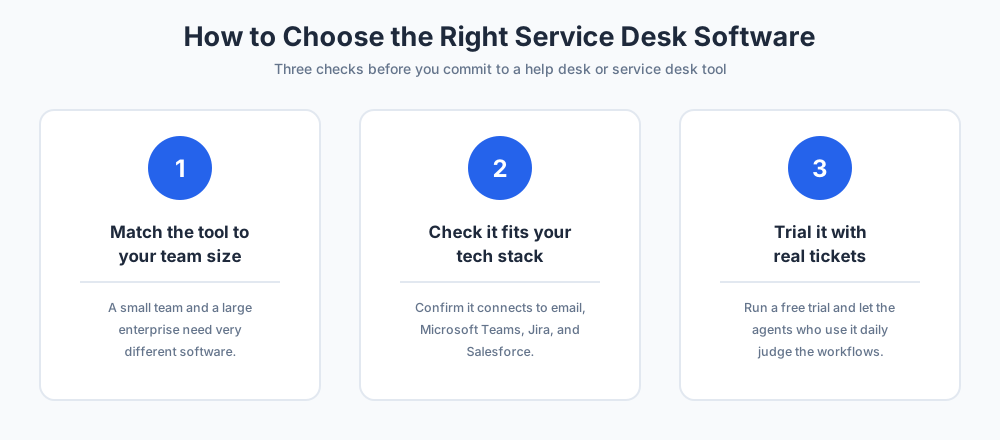
With so many help desk tools available, the goal is not the longest feature list but the right fit. Three checks narrow any shortlist quickly and keep you from overbuying.
Match the tool to your team size
A five-person IT team and a global enterprise need very different software. Small teams are well served by a simple help desk or a free tool; larger IT departments need a full service desk with change management and a configuration management database. Pick the tier that fits the work you do today, with a little room to grow, rather than the tier that looks most impressive.
Check integrations and your tech stack
The best service desk software is the one that fits your existing tech stack. If your team lives in Google Workspace, a Gmail-native help desk wins; if you run Jira, a connected service desk wins; if your data sits in Salesforce, a Salesforce-based tool wins. Confirm the platform connects to email, Microsoft Teams, and the apps you already depend on before you shortlist it.
Try the help desk before you commit
Never buy on a demo alone. Use a free trial, load real tickets, and let the agents who will work in the tool every day judge it. A short, honest test reveals whether the workflows feel fast or fiddly far better than any feature list, and it is the surest way to pick the right tool.
Service desk software for small businesses
A small business does not need an enterprise platform. The goal is working help desk software that organizes requests without a heavy setup or a heavy bill.
Free and low-cost options go a long way here. Spiceworks Cloud Help Desk is free, Zoho Desk is affordable, and tools like Help Scout and Hiver keep things simple. Any of them beats a shared inbox once ticket volume starts to climb, and each one can be running in a day.
Start with the basics: ticketing, a knowledge base, and a self-service portal. Skip the deep ITSM modules until the team genuinely needs change management or a service catalog. It is easy to move up a tier later, and far harder to unwind a complex tool nobody adopted.
Whatever you pick, make sure it is easy for non-technical staff to log a request. The simplest help desk the whole company will actually use beats a powerful service desk that only the IT team understands. Adoption, not feature count, decides whether the software pays off.
Is AI replacing the IT help desk?
AI is changing the service desk, but it is not replacing the IT help desk. It is reshaping what the people on it spend their time doing.
AI now handles the routine layer well. Chatbots answer common questions, AI suggests solutions from the knowledge base, and automation closes simple tickets without an agent ever touching them. That genuinely reduces help desk workload and shortens wait times.
What AI does not replace is judgment. Complex incidents, frustrated users, change decisions, and anything touching security still need a skilled human. AI clears the easy tickets so agents can focus on the hard ones, which is a shift in the work rather than a removal of it.
The realistic future is a hybrid help desk: AI on the front line for speed, experienced people behind it for the work that needs judgment. Teams that adopt that mix tend to do more with the same headcount rather than cutting staff, and their customer experience improves at the same time.
Final thoughts
The best service desk software is the one that matches your team size, your budget, and your tech stack. Enterprises need the depth of ServiceNow or Salesforce Service Cloud; mid-sized IT teams do well with Freshservice, Jira Service Management, or SolarWinds Service Desk; small teams thrive with Zoho Desk, Help Scout, or free Spiceworks.
Start from the features that matter to your team, shortlist two or three tools, and trial each one with real tickets before you decide. Weigh the pros and cons honestly, and remember that the tool your agents will actually use beats the one with the longest spec sheet.
Done right, the move from a shared inbox to proper help desk software turns IT support from a daily scramble into a calm, measurable operation that the whole business can rely on.
For more on building great support, see our guides to customer service and help desk software, and explore Chatim live chat to add a fast front-line channel to your help desk.
More on this from our team: help desk vs service desk.
Frequently Asked Questions
What is service desk software?
Service desk software is a platform that manages IT support requests from start to finish. A user submits a ticket, the system routes it to the right agent, and it tracks the ticket until the issue is resolved. Most service desk software also follows ITSM practices, adding incident, problem, and change management, a service catalog, and a knowledge base, so every request lives in one organized place.
What are the top 5 ticketing systems?
Lists vary, but five ticketing and service desk systems come up most often: Zendesk, Freshservice, Jira Service Management, Zoho Desk, and ServiceNow. Zendesk and Zoho Desk lean toward customer support, Freshservice and Jira Service Management toward IT service management, and ServiceNow toward large enterprises. The best pick depends on your team size, budget, and existing tools rather than the ranking itself.
What is the difference between a CRM and a service desk?
A CRM manages the sales relationship: leads, deals, pipeline, and revenue. A service desk manages support: tickets, incidents, and the IT service delivery that follows a sale. They both store customer records, which causes confusion, but the purpose differs. Many businesses run both and connect them, so an agent can see a customer's sales history while working a support ticket, but the two tools are not interchangeable.
Is AI replacing IT's help desk?
No, AI is reshaping the help desk rather than replacing it. AI handles the routine layer well: chatbots answer common questions, AI suggests fixes from the knowledge base, and automation closes simple tickets. What it does not replace is judgment on complex incidents, frustrated users, and security issues. The realistic future is a hybrid help desk, with AI on the front line and skilled people behind it.
What is the difference between a help desk and a service desk?
A help desk is focused and reactive: it resolves incidents and answers questions fast, built around tickets and a shared inbox. A service desk is broader, adding the wider delivery of IT services such as change management, asset management, a service catalog, and ITSM processes. In short, a service desk is a help desk plus the structured processes around it. Most modern software covers both.
What is the best service desk software?
There is no single best tool, only the best fit. Large enterprises tend to choose ServiceNow or Salesforce Service Cloud; mid-sized IT teams do well with Freshservice, Jira Service Management, or SolarWinds Service Desk; small teams thrive with Zoho Desk, Help Scout, or free Spiceworks. Match the tool to your team size, budget, and existing tech stack rather than picking by brand.
What features should service desk software have?
Look for solid ticket management, automation and customizable workflows, a self-service portal, and a knowledge base. IT teams should also want ITSM processes (incident, problem, and change management), asset and configuration management, clear reporting and dashboards, and integrations with email, chat, and Microsoft Teams. The exact mix depends on whether you need a simple help desk or a full service desk.
Is there free service desk software?
Yes. Spiceworks Cloud Help Desk is fully free and includes ticketing, a knowledge base, user portals, and IT inventory, which makes it a genuine option for small IT teams on no budget. Several paid tools, such as Zoho Desk and Freshservice, also offer free trials or limited free tiers, so you can test the workflow before committing.
What is ITSM?
ITSM stands for IT service management. It is the practice of delivering IT as a set of managed services rather than ad hoc fixes. A service desk built on ITSM handles incident management, problem management, change management, a service catalog, and often a configuration management database. Most enterprise service desk software, such as ServiceNow and Freshservice, is built around ITSM frameworks.
Do small businesses need service desk software?
Once request volume outgrows a shared inbox, yes. A small business does not need a heavy enterprise platform, but simple help desk software organizes requests, prevents lost tickets, and adds a knowledge base. Free or low-cost tools like Spiceworks, Zoho Desk, Help Scout, and Hiver are designed for exactly this stage and can be running within a day.
What is the difference between a service desk and a ticketing system?
A ticketing system is the core engine that captures, tracks, and routes requests as tickets. A service desk includes a ticketing system but adds more: a self-service portal, a knowledge base, automation, and often ITSM processes such as change and asset management. Every service desk has a ticketing system at its heart, but not every ticketing tool is a full service desk.
How much does service desk software cost?
Pricing varies widely and is usually charged per agent per month. Some tools, such as Spiceworks, are free. Paid help desk plans commonly start at a modest per-agent rate, while full ITSM platforms and enterprise tools like ServiceNow cost considerably more. Always check current pricing on each vendor's own page, since tiers and features change often.
What is a self-service portal?
A self-service portal is a page where users can log their own requests and search a knowledge base for answers without contacting an agent. It is one of the most valuable parts of a service desk, because it cuts ticket volume, resolves common issues instantly, and lifts customer satisfaction by giving people fast answers at any hour.
How do I choose service desk software?
Start by matching the tool to your team size, since a small team and a large enterprise need very different software. Then check that it integrates with your existing tech stack, including email, Microsoft Teams, and tools like Jira or Salesforce. Finally, run a free trial with real tickets and let the agents who will use it daily judge whether the workflows feel fast.
Related articles
More in Customer service → SaaS Customer Support: The Stage-by-Stage Guide (2026)
How SaaS customer support actually works at each stage: the right stack from founder-led live chat to a full support operation, channels, and metrics.
 How to Reduce Customer Churn: 5 Levers in Payback Order
Reduce customer churn by pulling five levers in payback order: payment recovery, onboarding, support quality, pricing fit, and a 90-day win-back.
 10 FAQ Page Examples That Actually Help Customers (2026)
10 FAQ page examples from Shopify, Airbnb, Slack, Nike and more, with the exact pattern each gets right and a checklist to build your own FAQ page.
 12 Customer Service Email Templates for Every Scenario (2026)
12 customer service email templates for complaints, refunds, delays, bugs and saying no, plus the five-line skeleton that keeps them sounding human.