10 FAQ Page Examples That Actually Help Customers (2026)
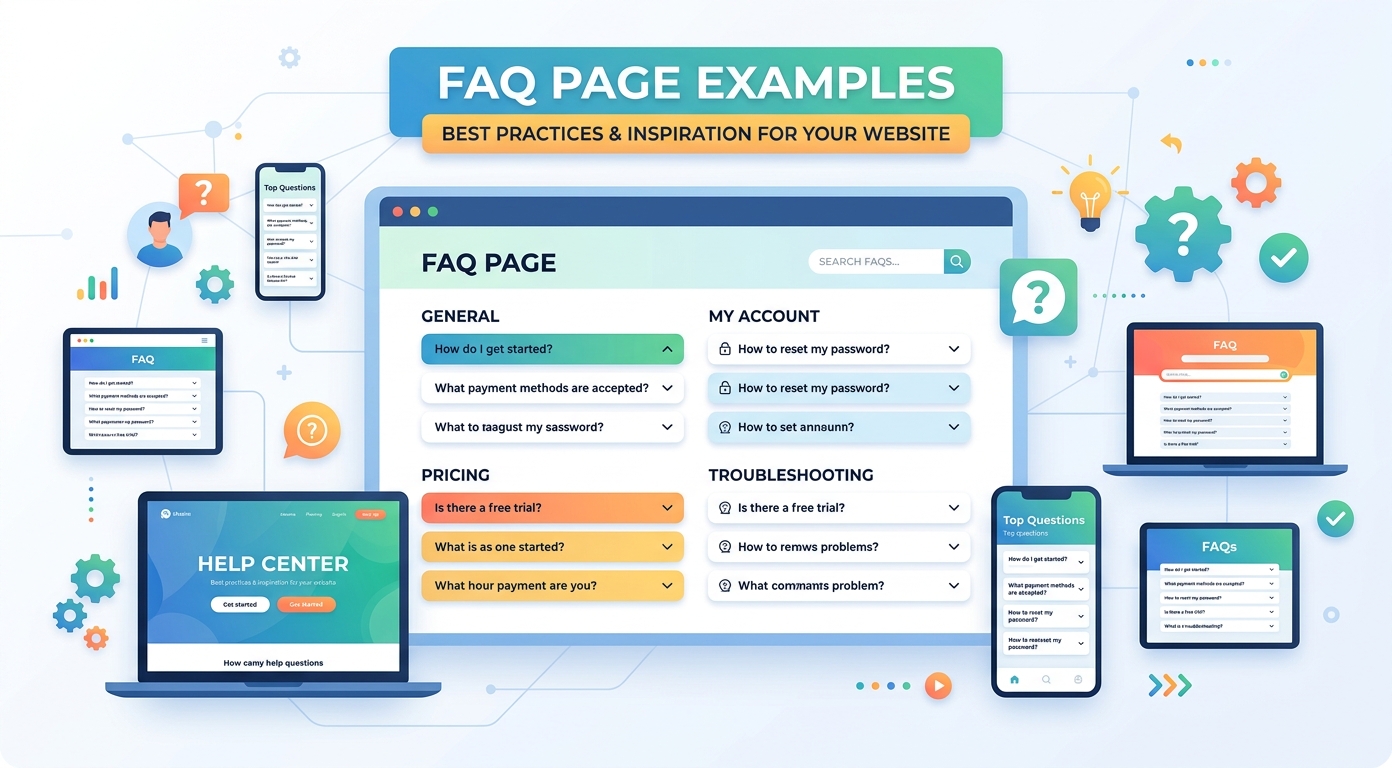
The best FAQ page examples share a trait that has nothing to do with design trends: they answer the question faster than a support agent could. A good FAQ page deflects repetitive tickets, reassures buyers at the exact moment of doubt, and quietly feeds search engines and AI assistants structured answers about your business. A bad one is a wall of marketing copy with questions nobody asked. This guide walks through ten FAQ page examples from well-known companies, extracts the specific pattern each one gets right, and ends with a checklist for building your own.
Every example below is a publicly available help or FAQ page you can visit today. We describe the patterns, not the pixels, so the lessons survive each brand's next redesign.
What separates a great FAQ page from a dead one
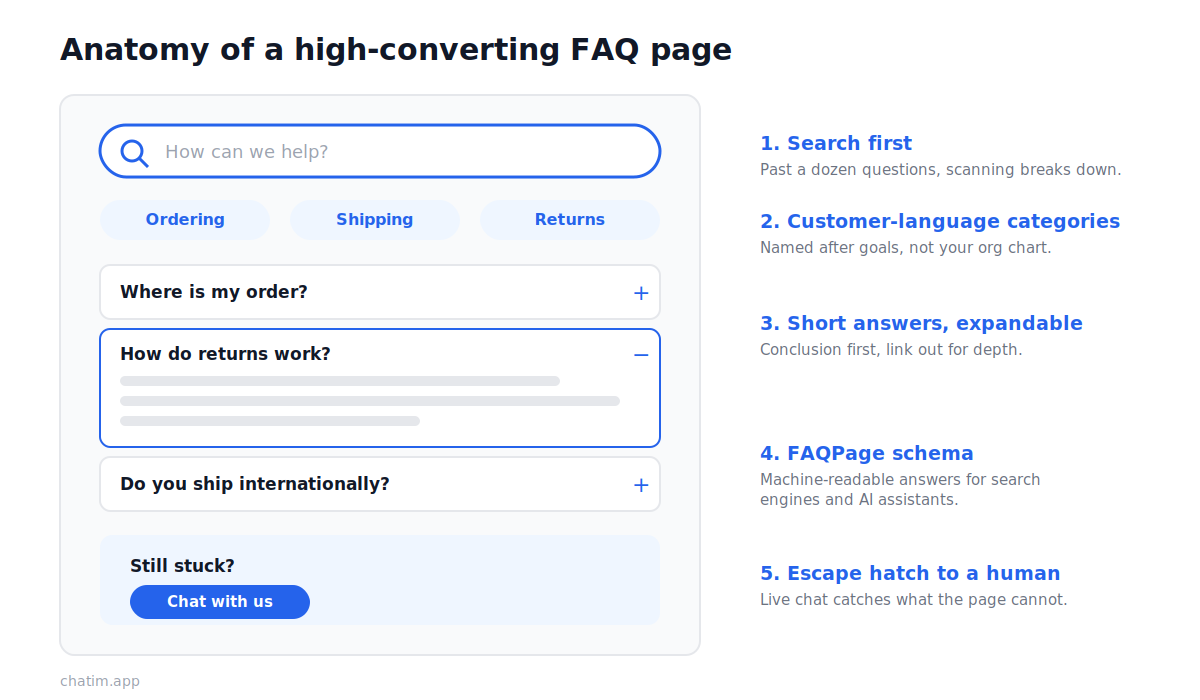
Before the examples, the anatomy. High-performing FAQ pages consistently combine five elements.
Search first. Past roughly a dozen questions, scanning breaks down. A search bar at the top is the difference between an FAQ page and an FAQ graveyard.
Categories that match how customers think. Group questions by the customer's situation (ordering, shipping, returns, account) rather than by your internal org chart. Nobody searches for "fulfillment operations."
Short answers with an expansion path. Lead with the one-sentence answer, then link to a deeper guide for the minority who need detail. Accordion layouts work because they show many questions while hiding long answers until asked.
An escape hatch to a human. Every FAQ page fails for somebody. The good ones put a contact option, ideally live chat, at the end of the page and inside unhelpful-answer moments ("Did this answer your question?").
Freshness. An FAQ answering questions about a product you discontinued signals nobody is home. Great FAQ pages have an owner and a review cadence.
10 FAQ page examples and what to copy from each
1. Shopify: search-first help at scale
Shopify's help center is the reference example of search-first structure. The search bar dominates the page, categories sit below it for browsers, and answers link into deeper documentation when a merchant needs the full walkthrough. Copy this: when your question count grows past a single page, promote search to the hero position and let categories become the secondary path.
2. Airbnb: answers segmented by who is asking
Airbnb serves two audiences with opposite questions, guests and hosts, and its help experience asks who you are before it answers. That single fork keeps every answer shorter, because it never has to hedge with "if you are a host..." Copy this: if your customers split into distinct roles (buyers and sellers, admins and members, patients and providers), segment the FAQ by role at the top level.
3. Slack: categories in the customer's language
Slack's help center organizes by what people are trying to do (getting started, workspace administration, notifications) in plain task language. The lesson is the vocabulary: category names read like the user's goal, not like Slack's internal team names. Copy this: write category labels as verbs and outcomes, then test them by asking a customer where they would click.
4. Notion: the FAQ that blends into learning
Notion's help content blurs the line between FAQ, documentation, and courseware, and that blend fits a product people need to learn, not just troubleshoot. Quick answers sit next to guides and video walkthroughs. Copy this: if your product has a learning curve, let FAQ answers link forward into "here's how to actually do it" material instead of dead-ending.
5. Canva: visual answers for a visual product
Canva's help answers lean on annotated visuals and short step lists, which matches how its users think. A text-only answer about a design tool makes the reader translate words into interface locations; a visual answer removes the translation step. Copy this: match the answer format to the product. Screenshots for interface questions, tables for pricing questions, short videos for motion.
6. McDonald's: the classic single-page FAQ done right
McDonald's runs a classic one-page FAQ covering the questions people genuinely ask about its food and restaurants, answered plainly and often with unexpected directness. It proves the humble format still works when the questions are real. Copy this: source questions from what customers actually ask (support tickets, chat logs, search queries), not from what marketing wishes they would ask.
7. Nike: FAQ as a front door to service actions
Nike's help experience pairs each common question (returns, order status, sizing) with the action it implies: track the order, start the return, find the size guide. The answer and the button live together. Copy this: when a question has an obvious next step, embed the action in the answer instead of describing where to find it.
8. Wise: plain answers in a regulated industry
Money transfers are a trust business, and Wise's help content answers fee, timing, and safety questions in blunt, plain language rather than compliance-speak. Clarity is the conversion lever: a confused user in fintech is a lost user. Copy this: if your industry is regulated or fee-sensitive, treat the FAQ as the place to be radically concrete about costs, timelines, and edge cases.
9. WhatsApp: minimalist answers for a massive audience
WhatsApp's help center serves one of the largest user bases on earth, and it stays usable by keeping each answer ruthlessly short, standalone, and translated. No answer assumes you read another answer first. Copy this: write every FAQ answer as if it is the only page the visitor will ever see, because for most visitors arriving from search, it is.
10. Dropbox: troubleshooting flows instead of flat answers
Dropbox's help shines on problem questions (sync issues, missing files) where a flat answer cannot cover every case. Instead, answers branch: check this first, then this, then contact support with these details ready. Copy this: for troubleshooting FAQs, structure the answer as an ordered flow that ends at your support channel with context, not at a dead end.
How to write FAQ answers people actually read
The examples share a writing pattern you can apply this afternoon. Answer in the first sentence, even if the honest answer is "it depends, and here are the two cases." Use the customer's words for the question itself; the question is the search query. Keep answers under a hundred words and link out for depth. Say "you" more than you say your brand name. And when the answer is no (no refunds after 30 days, no international shipping), say it clearly and offer the nearest alternative, because a hedge reads as a hidden no anyway.
Two patterns to avoid, no names needed: the marketing FAQ, where every "question" is a setup for a pitch ("What makes your platform the best?"), and the legal FAQ, where every answer reads like terms of service. Both exist because they are written for the company; the pages in this list are written for the reader.
FAQ pages, SEO, and AI answers
FAQ pages earn search traffic because they mirror how people query: full questions, asked in natural language. Two technical steps multiply that effect. First, mark up your questions with FAQPage structured data (schema.org), which makes your answers machine-readable. Second, keep one question per heading so each answer can rank, and get cited, independently. This matters more in 2026 than it did five years ago: AI assistants and AI-generated search answers pull heavily from clearly structured question-and-answer content, and a well-marked FAQ page is among the easiest content for them to quote. If your FAQ answers are accurate and structured, they become your voice inside answers you do not control.
FAQ page or knowledge base?
The two formats solve different sizes of the same problem. An FAQ page is one curated page of your top questions; a knowledge base is a searchable library of articles. Most businesses need the FAQ first, then graduate: when your FAQ passes thirty or so questions, or answers keep growing past a paragraph, the content wants to become a knowledge base with the FAQ as its front door. Our knowledge base software guide covers the tooling for that next stage.
When your FAQ page should become a chatbot
An FAQ page waits for the customer to find it. A chatbot brings the same answers to the customer wherever they are on your site, at the moment the question forms. The two are complements, not rivals: the FAQ page catches search traffic and anchors your structured answers, while a chatbot trained on those same questions handles the visitor who will never scroll to your footer. Teams usually see the crossover point in their chat logs: when the same five questions dominate every week, those five belong in both the FAQ page and an automated flow. A customer support setup that pairs the two deflects the repetitive volume and saves the humans for the questions that deserve them.
Build your FAQ page: a practical checklist
Pull your last ninety days of support tickets, chat transcripts, and site searches, and list the fifteen most-asked questions in the customer's own phrasing. Write first-sentence answers for each, under a hundred words, with links for depth. Group them into categories named after customer goals. Add search if you have more than a dozen questions. Put a live chat or contact option at the bottom and after any answer that might not resolve the issue. Add FAQPage schema. Assign an owner and a quarterly review date. Then watch what people search for on the page and ask in chat, because that stream of real questions is the only FAQ roadmap you need. If you want the automated half of the pattern, the customer support chatbot template turns your top questions into an automated flow in an afternoon.
Keep going with our guides to canned responses and help desk vs service desk.
Frequently Asked Questions
What is an FAQ page?
An FAQ (frequently asked questions) page is a single page on your website that answers the questions customers ask most often, in the customer's own wording. Its job is to resolve doubts at the moment they appear: before purchase, during setup, or when something goes wrong, without the customer needing to contact support.
What should an FAQ page include?
Five elements show up in nearly every strong FAQ page: a search bar (once you pass about a dozen questions), categories named after customer goals, short answers that lead with the conclusion and link to deeper guides, a visible path to a human (live chat or contact), and FAQPage structured data so search engines and AI assistants can read the answers.
How many questions should an FAQ page have?
Enough to cover your genuinely frequent questions and no more, typically 10 to 30. Below ten, fold the answers into the relevant product pages. Above thirty, the content usually wants to become a knowledge base with the FAQ page as a curated front door to it.
What are some good FAQ page examples?
Well-known examples include Shopify (search-first help at scale), Airbnb (answers segmented by audience role), Slack (categories in plain task language), McDonald's (a classic single-page FAQ built from real customer questions), Nike (answers paired with service actions), and WhatsApp (short standalone answers). Each demonstrates a specific pattern you can copy regardless of your industry.
How do I design an FAQ page?
Start with real questions from support tickets, chat logs, and site searches. Write the answer's conclusion in the first sentence, keep answers under about a hundred words, and use accordion sections so many questions fit on one screen. Group by customer goal, add search past a dozen questions, and end the page with a live chat or contact option for everything the FAQ cannot solve.
What is the difference between an FAQ page and a knowledge base?
An FAQ page is one curated page of your most common questions with short answers. A knowledge base is a searchable library of longer articles organized into categories. They complement each other: the FAQ handles the top of the demand curve, and the knowledge base handles depth. Most businesses start with an FAQ and add a knowledge base as content outgrows one page.
Do FAQ pages help SEO?
Yes, when they answer real queries. FAQ content mirrors how people search (full natural-language questions), so each well-written answer can rank for its question. Using one question per heading and adding FAQPage structured data lets search engines index each answer independently, and structured answers are also among the content AI assistants cite most readily.
What is FAQ schema?
FAQ schema (the FAQPage type from schema.org) is structured data markup that labels each question and answer on your page in a machine-readable format. It helps search engines understand the content and makes your answers eligible for enhanced treatment in search results and AI-generated answers.
How do I add an FAQ page to my website?
Most site builders and CMS platforms offer an FAQ section or accordion block: create a page, add your questions and answers, and publish it with a link in your site footer and help menu. For the structured-data step, many platforms add FAQPage schema automatically; otherwise add the JSON-LD snippet to the page manually or via a plugin.
How often should an FAQ page be updated?
Review it quarterly at minimum, and immediately after product, pricing, or policy changes. The strongest signal comes from your own data: questions appearing repeatedly in chat and support tickets belong on the page, and answers referencing features or policies you have changed need fixing before they erode trust.
Should an FAQ page have a search bar?
Once the page passes roughly a dozen questions, yes. Scanning breaks down quickly, and visitors arriving with a specific question will not read twenty accordion headings to find it. Search also produces a valuable byproduct: a log of what visitors actually looked for, which is a ready-made roadmap for your next FAQ update.
Can a chatbot replace an FAQ page?
They work best together. The FAQ page catches search traffic and gives structured answers a permanent home, while a chatbot trained on the same questions delivers those answers anywhere on the site at the moment the question forms. When the same handful of questions dominates your chat logs weekly, those questions belong in both places.
How do I write good FAQ answers?
Lead with the answer in the first sentence, keep it under about a hundred words, use the customer's own phrasing for the question, and link to a deeper guide for detail. When the answer is no, say it plainly and offer the nearest alternative. Avoid turning questions into marketing setups; FAQ pages written for the company instead of the reader are the ones nobody uses.
Related articles
More in Customer service → SaaS Customer Support: The Stage-by-Stage Guide (2026)
How SaaS customer support actually works at each stage: the right stack from founder-led live chat to a full support operation, channels, and metrics.
 How to Reduce Customer Churn: 5 Levers in Payback Order
Reduce customer churn by pulling five levers in payback order: payment recovery, onboarding, support quality, pricing fit, and a 90-day win-back.
 12 Customer Service Email Templates for Every Scenario (2026)
12 customer service email templates for complaints, refunds, delays, bugs and saying no, plus the five-line skeleton that keeps them sounding human.
 Canned Responses for Customer Service: 20 Examples (2026)
20 canned responses for customer service, organized by situation, plus the one editing habit that keeps saved replies from sounding robotic.