SaaS Customer Support: The Stage-by-Stage Guide (2026)

SaaS customer support is a different sport from retail or ecommerce support. Your customer is not asking where a package is; they are stuck inside a product they pay for every month, and every unresolved question quietly votes for churn. That changes what good support looks like: it has to live inside the product experience, answer fast enough to keep a workflow moving, and feed what it learns back into the roadmap. This guide lays out how SaaS customer support actually works at each company stage, which channels earn their keep, what to automate, and which metrics tell you the truth.
It is written for founders and small SaaS teams, because that is where support strategy is decided, usually by accident, usually while doing five other jobs.
Why customer support in SaaS is different
Three structural facts shape SaaS support. First, revenue is recurring, so support is not a cost center attached to a one-time sale; it is a retention function attached to every renewal. A support interaction that saves an account is worth the account's remaining lifetime, not the price of one order.
Second, the product is the store, the delivery truck, and the help desk all at once. Customers hit problems mid-workflow, inside the app, and the support experience that meets them there (in-app chat, contextual help) beats the one that makes them open their email client and wait.
Third, support is your highest-volume user research channel. Every confused question is a usability finding; every feature request in a ticket is roadmap signal. SaaS teams that treat support transcripts as product data compound faster than teams that treat them as tickets to close.
The SaaS support stack, stage by stage
The right stack depends on headcount and volume, not ambition. Overbuilding early is as costly as underbuilding late.
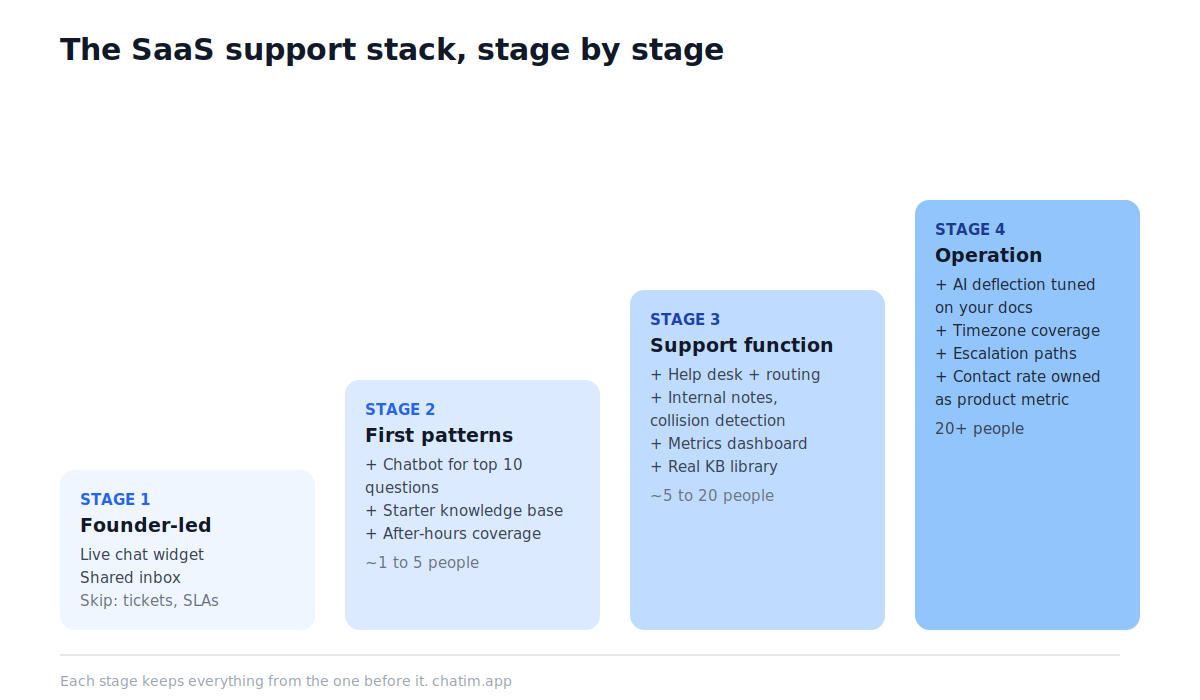
Stage 1: founder-led support (0 to first paying customers)
At this stage the founder answering every message is a feature, not a failure. You need exactly two things: a live chat widget on your site and in your app so prospects and users can reach you where they already are, and a shared place where conversations accumulate so patterns become visible. Speed and honesty beat polish. What to skip: ticketing systems, SLAs, macros. With a handful of conversations a day, process is procrastination. A free live chat plan covers this entire stage.
Stage 2: first patterns (roughly 1 to 5 people)
Volume grows and the same questions start repeating. This is the stage where a chatbot earns its place: not to replace you, but to absorb the ten questions that make up half your volume (password resets, billing basics, "how do I invite my team"). Pair it with the first version of a knowledge base, even if that is twenty articles. The goal is that a customer at 2 a.m. in another timezone gets unblocked without waiting for your morning.
Stage 3: a real support function (roughly 5 to 20 people)
Now support is somebody's actual job. You need routing (billing questions to the person who can see invoices, technical questions to the person who can read logs), internal notes, collision detection so two people do not answer the same thread, and your first metrics dashboard. This is where teams typically add help desk software on top of chat, and where the knowledge base graduates into a real library; our knowledge base software guide covers that step.
Stage 4: support as an operation (20+ people)
At scale the problems change shape: coverage across timezones, AI deflection tuned on your own docs, escalation paths into engineering, and a support leader who owns contact rate as a product metric, pushing fixes upstream instead of hiring against symptoms. The tooling matters less than the loop: every recurring ticket type should have an owner deciding whether to automate it, document it, or eliminate it in the product.
Live chat for SaaS: the default front door
Live chat for SaaS companies is the highest-leverage channel for one reason: it meets users inside the moment of friction. A trial user confused on the pricing page, a customer stuck mid-setup, an admin about to write an angry email; chat catches all three while the intent is still warm. For trials specifically, chat is a conversion tool wearing a support costume: answering a question during onboarding is often the difference between activation and a silent exit.
Practical rules that make chat work in SaaS: put the widget in the app, not just the marketing site; set expectations honestly when you are offline and let a bot cover the gap; and treat pre-sales questions in chat as sales conversations, because that is what they are. If you are choosing a tool, our live chat software comparison ranks the field, free and paid.
Which support channels earn their keep in SaaS
Email remains the workhorse for anything asynchronous, attachable, or billing-sensitive; every SaaS needs it. Live chat and in-app messaging carry the real-time load. A knowledge base and in-product help handle the silent majority who never contact you at all. Community (Slack, Discord, forums) works once your users start answering each other, usually later than founders hope. Phone support is rare in SMB SaaS for good reason: it does not scale, it does not leave a transcript, and your buyers mostly do not want it. Social channels are listening posts, not support queues; route them into your inbox and reply where the customer started.
The principle underneath: fewer channels answered fast beat many channels answered slowly. Add a channel only when you can commit to its response-time expectation.
Self-serve support: docs, bots, and deflection done honestly
Self-serve is where support margins live, but it only works when it is built from real questions. The sequence that works: mine your chat and email transcripts for the most-asked questions, write short answers in the customer's own words, publish them as a knowledge base, then train your chatbot on the same material so the answers travel to wherever the user is. Deflection done honestly always leaves a door to a human; a bot that traps users in loops converts a support problem into a churn problem. Measure deflection by resolved-without-human conversations that did not come back within a few days, not by how many people the bot managed to keep away.
The metrics that tell the truth
Four numbers cover most of what matters. First response time, because in chat, minutes are the unit that decides whether the customer waits or leaves. Resolution time, tracked separately for first-touch resolutions versus escalations. CSAT on closed conversations, read as a trend rather than a trophy. And contact rate, support conversations per active account per month, which is the most product-shaped support metric you have: when contact rate falls while activation holds, your product and your self-serve content are doing support's job for free. Tie churn data in when you can; accounts that contacted support and got fast resolutions typically renew differently than accounts that went silent, and knowing your own version of that curve is worth more than any industry benchmark.
Five mistakes SaaS teams make with support
Buying an enterprise helpdesk at ten conversations a day, then blaming the tool. Hiding the chat widget because "we get too many messages" instead of automating the repetitive half. Writing docs nobody asked for while the actual top questions live only in one teammate's head. Treating support as a junior role while expecting it to prevent churn. And answering the same product-confusion question two hundred times without ever filing it as a bug, which is the most expensive politeness in SaaS.
A one-afternoon starting point
If you are early, the whole strategy fits in an afternoon: install live chat on your site and app, connect it to your inbox, write down your ten most-asked questions, publish them as short answers, and wire a simple bot flow that serves those answers after hours. Review transcripts weekly for the next repeating question, and revisit the stack only when volume, not anxiety, demands it. The customer support setup most small SaaS teams need to start costs nothing to run; the free tier of a chat-plus-chatbot tool covers stage one and most of stage two, and our customer onboarding guide covers the adjacent battle of getting users activated before they ever need to ask.
Related reading: SaaS onboarding best practices, free trial conversion, reducing customer churn, best help desk for SaaS, and SaaS marketing strategies.
Frequently Asked Questions
What is SaaS customer support?
SaaS customer support is the function that helps users of a subscription software product succeed with it: answering questions, unblocking workflows, resolving bugs, and guiding onboarding. Because revenue is recurring, SaaS support doubles as a retention function; every interaction influences whether the account renews.
How is SaaS customer support different from regular customer service?
Three ways: the customer pays repeatedly, so support protects lifetime value rather than a single sale; problems happen inside the product, so support works best in-app and in real time; and support conversations are product feedback, surfacing usability issues and feature requests that shape the roadmap.
What is the best support channel for a SaaS company?
For most SaaS companies, live chat combined with email covers the core: chat for real-time questions inside the product and on the site, email for asynchronous and billing-sensitive threads. A knowledge base plus a chatbot handles the repetitive volume. Phone support is uncommon in SMB SaaS because it does not scale or leave a transcript.
Do SaaS startups need a help desk tool from day one?
No. In the founder-led stage, a live chat widget plus a shared inbox is enough, and process beyond that is usually premature. Help desk software earns its place when a real team needs routing, collision detection, internal notes, and metrics, typically once several people share the support load.
What is live chat for SaaS?
Live chat for SaaS is a chat widget embedded in the marketing site and inside the product, letting prospects and users ask questions in the moment of friction. It shortens time-to-answer during trials and onboarding, which is when responsiveness most influences conversion and retention.
Should the chat widget go in the app or on the website?
Both. The website widget catches pre-sales and pricing questions; the in-app widget catches users stuck mid-workflow, which is where support actually prevents churn. Teams that only install chat on the marketing site miss the higher-value half of the conversations.
How do I automate SaaS customer support without annoying users?
Automate the repetitive half, keep humans for the rest. Train a chatbot on your genuinely most-asked questions, let it resolve those instantly, and always leave a visible path to a person. Deflection that traps users in bot loops trades a support cost for a churn cost, which is a bad trade in subscription software.
What metrics should a SaaS support team track?
Four cover most needs: first response time, resolution time, CSAT as a trend, and contact rate (support conversations per active account per month). Contact rate is the most product-shaped metric: falling contact rate with healthy activation means the product and self-serve content are absorbing support demand.
What is a good first response time for SaaS support?
It depends on the channel promise: live chat implies minutes, email implies hours. What matters most is setting an expectation and beating it consistently, and letting a bot acknowledge and start on requests after hours. A fast honest 'we are offline until 9 a.m., here is what I can do now' outperforms a slow pretend-live chat.
How does customer support affect churn in SaaS?
Support touches churn twice: directly, when unresolved problems drive cancellations, and indirectly, through what the support flow reveals about the product. Accounts that reach support and get fast resolutions tend to renew differently from accounts that go silent, so response speed and follow-through are retention levers, not just service metrics.
When should a SaaS company hire its first support person?
When support volume regularly interrupts product work, or repetitive questions persist even after automation and docs have absorbed the top ten. Before that point, founder-led support with a chatbot safety net is usually the better trade, both for cost and for the product insight founders get from raw conversations.
Can a small SaaS run support for free?
The early stack can be free: free live chat with a chatbot covers real-time and after-hours questions, and a simple published FAQ covers the repetitive ones. Costs typically start when the team needs seats for multiple agents, advanced automation, or a full help desk with routing and reporting.
What should be in a SaaS knowledge base?
Start from real demand: the questions your chat and email transcripts show most often, written as short answers in the customer's own phrasing, plus setup guides for onboarding steps where users stall. Twenty honest articles built from transcripts outperform a hundred speculative ones, and the same content can train your support chatbot.
Related articles
More in Customer service → How to Reduce Customer Churn: 5 Levers in Payback Order
Reduce customer churn by pulling five levers in payback order: payment recovery, onboarding, support quality, pricing fit, and a 90-day win-back.
 10 FAQ Page Examples That Actually Help Customers (2026)
10 FAQ page examples from Shopify, Airbnb, Slack, Nike and more, with the exact pattern each gets right and a checklist to build your own FAQ page.
 12 Customer Service Email Templates for Every Scenario (2026)
12 customer service email templates for complaints, refunds, delays, bugs and saying no, plus the five-line skeleton that keeps them sounding human.
 Canned Responses for Customer Service: 20 Examples (2026)
20 canned responses for customer service, organized by situation, plus the one editing habit that keeps saved replies from sounding robotic.