11 Best Chat Widgets for Your Website (2026)
Your visitors will never see your support dashboard, your routing rules, or your analytics. The chat widget is the only part of the whole stack they ever touch, which is why choosing one on back-office features first is backwards. This guide compares 11 chat widgets on what the visitor experiences (speed, design fit, mobile behavior) and what the free tiers really include, with pricing verified against vendor pages in July 2026. It ends with a look at the other website widgets worth adding around your chat, and the load-time rule that should govern all of them.
A definition to keep the comparison honest: the widget is the on-page component, the bubble, the launcher, the chat window. Most vendors sell it bundled with an agent inbox and automation, and the deeper software behind the bubble is a separate decision we cover in our live chat platforms guide. Here, the widget itself is the product being judged.
What makes a chat widget good
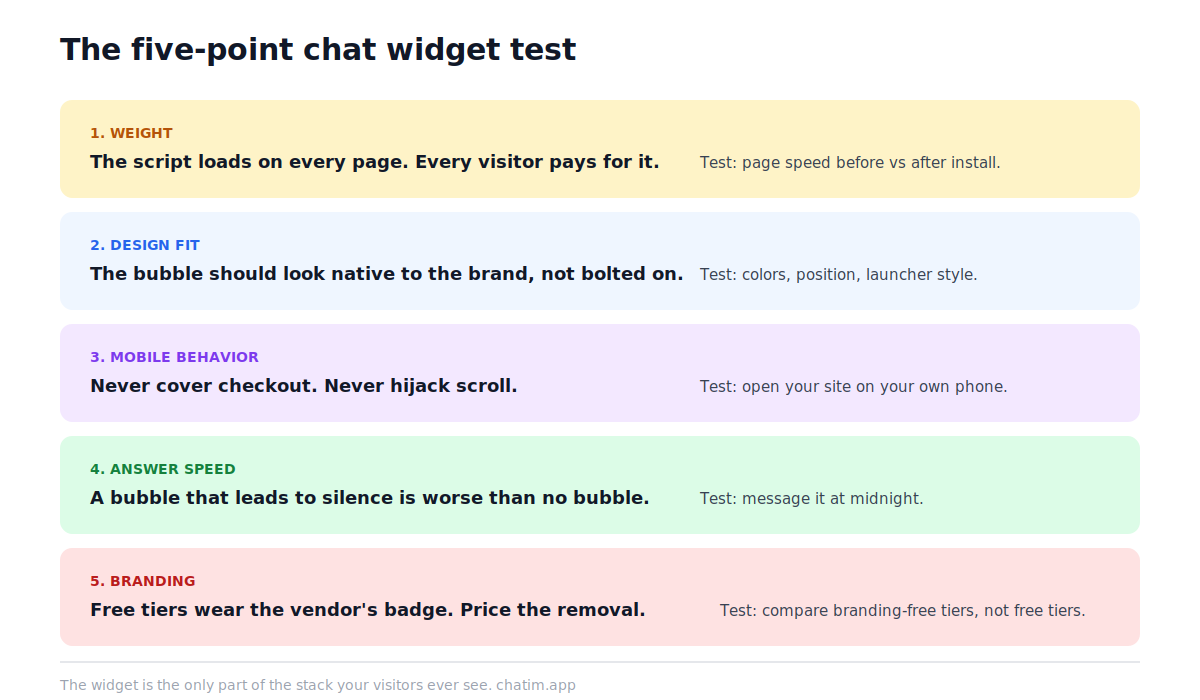
Five things, in the order visitors notice them. Weight: the chat widget script loads on every page of your site, so a heavy one taxes every visit; prefer widgets that load lazily after the page is interactive, and test your pages before and after installing. Design fit: colors, position, shape, and launcher style should be adjustable enough that the bubble looks native to your brand rather than bolted on. Mobile behavior: a widget that covers the checkout button or hijacks scroll on a phone costs more sales than it saves; open the widget on your own phone before shipping it. Answer speed: a bubble that leads to silence is worse than no bubble, so the widget needs either a bot behind it or honest offline behavior with expectations set. And branding: most free tiers print the vendor's name on the bubble, and removing it is where several business models hide; the price of removal belongs in your comparison, not in the fine print.
11 chat widgets compared
Annual-billing rates where vendors publish both; branding-removal pricing called out separately because free tiers live and die on it.
| Widget | Free plan | Paid entry | Branding removal | Stand-out trait |
|---|---|---|---|---|
| Chatim | Unlimited chats, chatbot flows | From $9/mo | On paid plans | Bot included free |
| Tawk.to | Unlimited agents and chats | Free core | $29/mo annual | Truly free forever |
| Smartsupp | 1 operator, 25 conversations/mo | From $17/mo | Paid plans | EU/GDPR positioning |
| Tidio | 50 billable conversations/mo | From $24.17/mo | Paid add-on | Lyro AI agent |
| Crisp | 2 seats, 100 profiles | $45/mo per workspace | Paid plans | Flat per-workspace pricing |
| Chaport | 2 operators, unlimited chats | From $29/mo | Paid plans | Simplicity |
| Formilla | 1 agent, unlimited chats | From $13.99/mo annual prepay | Paid plans | Popups bundled |
| Pure Chat | None (trial) | $39/mo (4 users) | Included | Flat team pricing |
| LiveChat | None (trial) | $19/person/mo | Included | Polish and ecosystem |
| JivoChat | Up to 5 agents | $28/agent/mo | Paid plans | Telephony add-ons |
| Olark | None | $29/agent/mo human-only | Paid plans | AI-first restructure |
Free-first widgets
1. Chatim: the free widget with a chatbot inside
Full disclosure: Chatim is built by the team behind this blog, so judge this entry with that in mind. It leads this list because of what the free tier includes at the widget level: unlimited conversations, a customizable launcher, and rule-based chatbot flows, so the bubble answers at 3 a.m. instead of collecting messages for the morning. The widget also doubles as a multi-channel contact button (WhatsApp, Telegram, Messenger, phone, email), which for some sites replaces chat entirely. Paid plans start at $9/month and every limit is listed on the pricing page; widget appearance, position, and behavior are covered in the widget settings docs. The honest limit: the free plan is built around a single user, so teams that need several seats in the inbox start on paid tiers.
2. Tawk.to: free without an asterisk, branding as the business
Tawk.to remains the reference point for free: unlimited agents, unlimited chats, core features included, indefinitely. The widget is competent and configurable, and the business model sits exactly where this guide said to look: removing the "Powered by tawk.to" branding costs $29/month billed annually ($39 monthly), and the company sells hired live agents as a service. For a team that does not mind the badge, it is the strongest pure-free offer on the market; the trade-offs that eventually push teams elsewhere are collected in our Tawk.to alternatives guide.
3. Smartsupp: the EU-flavored starter, now narrower at free
Smartsupp's 2026 restructure matters if you last looked a year ago: the free plan now covers a single operator with 25 conversations a month and 14-day history, and the old unlimited-agent tiers are gone. Paid plans start at $17/month billed annually per workspace (not per agent), with an AI reply assistant included in small doses and an AI agent as an add-on. Its enduring appeal is European: EU hosting and GDPR-first positioning, plus visitor recording features. Fit: small European sites that want a light chat widget and local data posture; the field around it is in our Smartsupp alternatives guide.
Widgets with AI in the box
4. Tidio: the widget as an AI agent's front door
Tidio's widget is polished and mobile-friendly, but the reason it appears on shortlists in 2026 is Lyro, its AI agent, which answers from your content and hands off to humans when it should. The free plan covers 50 billable conversations a month with a fair definition (only human-agent replies count), paid plans start at $24.17/month billed annually, and Lyro starts at $32.50/month with the first 50 AI conversations free. Watch the conversation meter on busy sites, and see our Tidio alternatives guide if it stops fitting.
5. Crisp: the design-forward widget on workspace pricing
Crisp ships one of the best-looking default widgets in the category, with a shared inbox, campaigns, and a knowledge base behind it. Pricing changed structurally: the old per-tier model is gone, and plans are now flat per workspace, free for 2 seats, then $45/month (Mini, 4 seats) and $95/month (Essentials, 10 seats), with AI credits included by tier. Flat workspace pricing is excellent for small teams that hate per-seat math and ages poorly only at the boundaries between tiers. Details and neighbors: our Crisp alternatives guide.
Simple and lightweight widgets
6. Chaport: the widget that stays out of the way
Chaport's pitch is restraint: a clean chat widget, a simple inbox, free for 2 operators with unlimited chats and 60-day history, and paid plans from $29/month. It skips the feature sprawl of bigger suites, which is precisely why small teams keep it for years. The ceiling is the same as the pitch: automation and integrations are thinner, which is when our Chaport alternatives guide becomes relevant.
7. Formilla: chat plus popups in one script
Formilla bundles live chat with popup and in-app messaging tools, one script doing two marketing jobs. The free plan covers one agent with unlimited chats, and paid starts from $13.99/month on annual prepay. It is a fit for small sites that want chat and lead-capture popups without two vendors; teams that outgrow it usually do so on automation depth, mapped in our Formilla alternatives guide.
8. Pure Chat: flat pricing, minimal motion
Pure Chat sells the simplest deal on this list: $39/month billed annually for 4 users on one website, branding removal included, no permanent free plan (a 30-day trial instead). Acquired by Ruby in 2020, it has seen minimal feature development since, which cuts both ways: nothing changes under you, and nothing new arrives. Fit: small service businesses that want a stable, predictable widget and consider feature stability a feature.
Widgets for bigger teams
9. LiveChat: the polished per-seat standard
LiveChat is the category's professional default: a refined widget, deep reporting, a large integration marketplace, and per-person pricing from $19/month billed annually (Starter, 1 user) through $49 Team and $79 Business tiers. There is no free plan, and its ChatBot sibling is sold separately, so budget both if you want automation. Fit: teams that live in the inbox all day and will use the reporting depth; the field around it is in our LiveChat alternatives guide.
10. JivoChat: the widget as a call center's front end
JivoChat's free plan covers up to 5 agents, paid starts at $28/agent/month billed annually, and its personality is the add-on shelf: telephony with IVR, a WhatsApp module, AI assistants, and video calls bolt onto the widget, edging it toward a lightweight contact center. Fit: teams that want chat and phone in one pane; the trade-offs are collected in our JivoChat alternatives guide.
11. Olark: the veteran, restructured around AI
Olark spent 2026 repositioning as an AI-first "website agent": the headline offer is now $400/month billed annually for its Standard AI agent with unlimited AI conversations as the page advertises it, while classic human-only live chat remains at $29/agent/month. The old free plan is gone from the pricing page. That makes today's Olark two different products in one brand: a premium AI bet and a modest per-agent widget. Evaluate whichever one you are actually buying, and see our Olark alternatives guide for the field.
Beyond chat: website widgets worth adding
Chat is one member of a family of website widgets, and the same five-point test applies to all of them. A multi-channel contact button (the contact button docs show the pattern) lets visitors jump to WhatsApp, Messenger, or a phone call instead of a chat window, often the better fit for service businesses. A help or FAQ widget surfaces knowledge base articles on the page before a conversation starts. Review and social-proof widgets put third-party ratings where hesitation happens. Lead-capture popups trade attention for email addresses and pair naturally with chat when they share targeting rules rather than compete for the same corner. The governing rule for the whole family: every widget is a script your visitors pay for in load time, so each one must earn its place, arrive after the content, and never cover the thing the page exists to sell. Two widgets doing clear jobs beat five doing vague ones.
Which chat widget fits your site
Take Chatim if you want a free chat widget that answers by itself at night and grows into live chat by day. Take Tawk.to if free-forever with a badge is an acceptable deal, and Smartsupp if EU data posture leads your checklist. Take Tidio or Crisp when AI answering is the point, Chaport, Formilla, or Pure Chat when simplicity is, and LiveChat, JivoChat, or Olark when a bigger team needs reporting, telephony, or a premium AI agent respectively. Then hold your pick to the five-point test on your slowest page and your own phone, because that is where your visitors will meet it. For the platform decision behind the bubble, the free live chat tools comparison covers budgets, and the paid landscape lives in the live chat guide linked above.
More on this from our team: live chat vs chatbot, welcome messages that get replies, and how Chatim's widget works.
Frequently Asked Questions
What is a chat widget?
The on-page component visitors see and click: the bubble or launcher in the corner of a website and the chat window it opens. Vendors bundle it with an agent inbox and automation behind the scenes, but the widget itself is the only part of the support stack a visitor ever touches.
What is the best chat widget for a website?
For most small sites, the strongest free starting points are Chatim (unlimited chats with a chatbot included) and Tawk.to (unlimited agents with vendor branding). Teams wanting AI answering lean Tidio or Crisp, and bigger teams wanting depth lean LiveChat. The right pick depends on whether free, AI, simplicity, or reporting leads your list.
Are chat widgets free?
Several are genuinely free at meaningful levels: Tawk.to offers unlimited agents and chats, Chatim includes unlimited conversations and chatbot flows, JivoChat covers up to 5 agents, and Chaport covers 2 operators. The common catch is vendor branding on the bubble, which usually costs money to remove, so compare that price alongside the plans.
Do chat widgets slow down a website?
Any widget adds a script visitors download, so the honest answer is that every one costs something. The difference is how much and when: well-built widgets load lazily after the page is interactive. Test your key pages before and after installing, and prefer widgets that defer loading over ones that block rendering.
How do I add a chat widget to my website?
Nearly all of them install the same way: paste a JavaScript snippet into your site template or through a tag manager, then configure appearance and behavior in the vendor dashboard. Platforms like WordPress, Shopify, and Wix are covered by plugins or settings fields, and no coding is needed beyond the paste.
What is the difference between a chat widget and live chat software?
The widget is the visitor-facing front end; live chat software is the whole system behind it, including the agent inbox, routing, automation, and reporting. Most vendors sell them together, but judging the visitor-facing half separately keeps comparisons honest, because that is the part customers experience.
Should a chat widget have a chatbot behind it?
For most sites, yes. A bubble that leads to silence outside business hours is worse than no bubble, and a bot answering predictable questions keeps the widget useful around the clock. The alternative is honest offline behavior: state when a human will reply and collect the message.
How do I remove vendor branding from a chat widget?
Usually by paying. As of July 2026, Tawk.to charges for branding removal as a dedicated add-on, while most other vendors include white-labeling in paid tiers. If a clean bubble matters to your brand, price the branding-free tier of each candidate, not the free tier.
What other website widgets are worth adding besides chat?
The usual suspects are a multi-channel contact button, a help or FAQ widget surfacing knowledge base articles, review and social-proof widgets, and lead-capture popups. The governing rule: every widget is a script visitors pay for in load time, so each must earn its place and never cover the content the page exists for.
Can a chat widget work on mobile?
All modern ones render on phones, but rendering is not the bar. Check that the bubble never covers checkout or navigation buttons, that the chat window is dismissible with one tap, and that keyboard behavior does not break the page. Open your own site on your own phone before shipping any widget.
How many website widgets is too many?
When widgets compete for the same corner, fire on the same trigger, or add noticeable load time, you have crossed the line. Two widgets doing clear jobs beat five doing vague ones, and chat plus one other purposeful widget covers most sites well.
How much does a chat widget cost?
As of July 2026, real free tiers exist across the category, and paid entry points cluster between $9 and $29 per month, with per-agent pricing (LiveChat from $19 per person, JivoChat from $28 per agent) at the team end and premium AI offerings above that. Verify on each vendor's pricing page, since several restructured their plans during 2026.
What happened to Olark's free plan?
It no longer appears on Olark's pricing page following the company's 2026 restructure around an AI-first website agent. Current published options are the AI product billed monthly at a premium rate and classic human-only live chat billed per agent. Teams relying on older reviews should recheck the live page.
Related articles
More in Live chat → Live Chat Best Practices: A Working Playbook (2026)
Live chat best practices that hold up in real queues: speed, honest availability, widget setup, bot pairing, team habits, and metrics that matter.
 Best Free Live Chat Software in 2026: 11 Truly Free Tools
11 free live chat software tools compared: seat limits, conversation caps, branding rules, and which free plan scales with you.
 Customer Service Scripts: 45+ Live Chat Templates (2026)
45+ customer service scripts, written for live chat and adaptable to phone and email: greetings, troubleshooting, apologies, sales, and closings.
 Live Chat Statistics and Trends to Know
Live chat statistics and trends explained: what the data shows about customer preference, satisfaction, response time, sales impact, and AI chatbots.