Customer Service Scripts: 45+ Live Chat Templates (2026)

A chat script is a prewritten reply your support team can reuse in a chat, so every customer gets a fast, clear, and on-brand answer. Good ones do not make agents sound robotic; they free agents to focus on the customer instead of on wording.
This guide is a working library of live chat script examples: more than 45 templates for greetings, troubleshooting, apologies, sales, feedback, and closing a chat. Copy any of them, swap in your own details, and adapt the tone to fit each customer. Together they form a complete set of customer service scripts for the chat channel, and a section near the end shows how to adapt the same library for phone, email, and social messages.
Every template uses simple placeholders such as [customer name] and [company], so you can drop it straight into your live chat software and start using it in real customer service today.
What are live chat scripts?
Live chat scripts are ready-made replies that support agents use during a chat. They cover the situations a service team meets every day: a greeting, a request for more information, a troubleshooting step, an apology, or a closing line.
These scripts are not a word-for-word screenplay. Think of them as a reliable starting point. The agent keeps the structure, then personalizes the reply for the customer in front of them. That balance of consistency and flexibility is what makes chat templates genuinely useful rather than stiff.
Most teams store their live chat templates as canned responses inside their live chat tool. Your team inserts a template with a keyboard shortcut, edits a detail or two, and sends. The result is a faster response time and a steadier customer experience across the whole support team.
Saved replies also work hand in hand with automation. Many businesses pair human agents with a chatbot that handles simple questions, while the saved library keeps every human reply consistent. Used together, they give customers quick answers at any hour.
Why your team needs live chat scripts
Well-built chat scripts solve several problems at once. They cut response time, because the team is not writing every reply from scratch while the customer waits. On live chat, where customers expect an answer in seconds, that speed matters.
They also keep quality even. A new hire using proven templates sounds as confident as your most experienced agent, which shortens training and protects customer service quality during busy periods. Customer support teams that grow quickly rely on this.
They protect your brand voice too. When every agent works from the same live chat templates, customers get a consistent tone and consistent information whether they reach out on Monday morning or Friday night. That steady customer communication builds trust over time.
Finally, a reviewed library reduces mistakes. A reviewed template will not promise something your policy does not allow, so a good script library keeps support accurate, not just fast. For a wider view of support quality, see our guide to customer service.
What makes an effective chat script
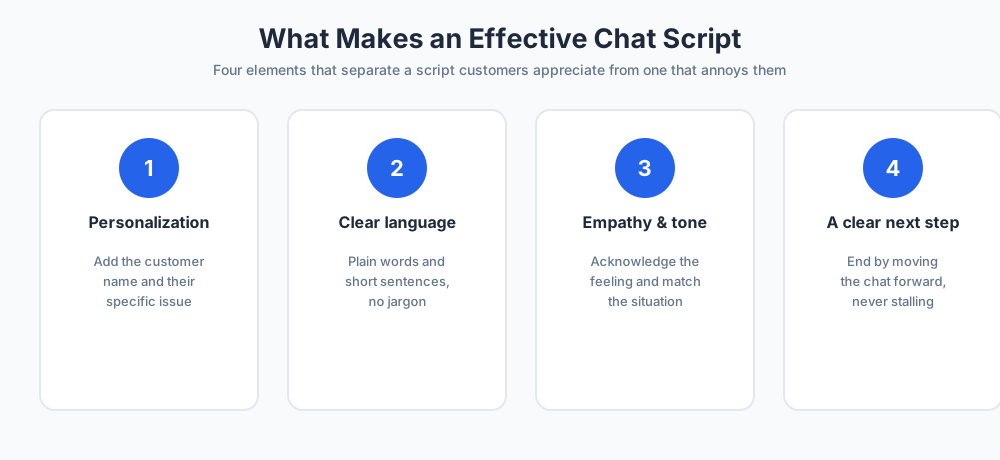
Not every template is a good one. Before you build a library, it helps to know the four elements that separate a script that works from one that quietly annoys customers.
Personalization
A script should never feel like a form letter. Add the customer name, reference their account, and mention the specific issue they raised. A template with a [customer name] placeholder is a built-in reminder to personalize every reply before you send it, which keeps each customer interaction human.
Clear, simple language
Drop the jargon. Customers want a clear answer, not technical terms or internal product names. Short sentences and plain words make your chat scripts easy to read on a phone, where most live chat now happens.
Empathy and the right tone
That tone shows the customer you are on their side. A positive tone and a line of genuine empathy, such as acknowledging that a problem is frustrating, change how the whole conversation feels. Match the tone to the situation rather than keeping every message flat.
A clear next step
Every script should end by moving the chat forward. Tell the customer what happens next, ask a question, or offer a choice. Clear next steps stop a conversation from stalling and keep customer engagement high right to the end of the chat.
Opening a live chat warmly
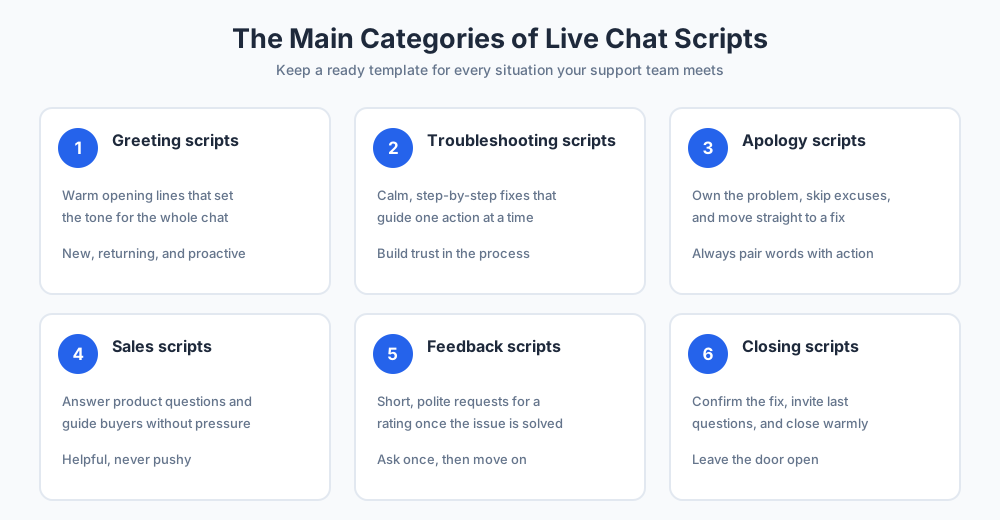
First impressions matter, and an opening line sets the tone for the whole chat. Keep opening lines warm, short, and ready to help. Here are templates for the three most common situations a support team meets.
Welcoming a new visitor
When someone opens a chat for the first time, a friendly general greeting works best:
- "Hi [customer name]! Welcome to [company]. How can I help you today?"
- "Good [morning/afternoon]! Thanks for reaching out. What can I help you with?"
- "Hi there! You are chatting with [agent name]. What brings you in today?"
A warm greeting reassures the customer that a real person is ready to help, which is the start of a good live chat experience.
Greeting a returning customer
If your live chat software shows past chats, use that history to make a returning customer feel known:
- "Welcome back, [customer name]! Good to see you again. How can I help?"
- "Hi [customer name], thanks for returning to [company]. Is this about your recent order?"
Referencing earlier contact shows the customer that your service remembers them, which raises customer satisfaction from the first line.
Proactive chat invitations
A proactive message invites a visitor to chat before they ask. Trigger these scripts on key pages so the offer feels timely, not pushy:
- "Hi [customer name]! I see you are looking at our plans. Can I answer any questions?"
- "Need a hand choosing the right product? I am here if you do."
- "Hello! Let me know if you would like help comparing your service options."
Understanding the customer's issue
Before an agent can help, they need the full picture. These scripts gather information without making the customer feel interrogated, which keeps the conversation friendly.
Asking for details
Ask for the exact information you need to act, and explain why you need it. Customers share information happily when the reason is clear:
- "Thanks, [customer name]. To look into this faster, could you share your order number?"
- "Happy to help with that. Can you tell me which product this is about?"
- "To pull up your account, could you confirm the email address and any contact information you used to sign up?"
Clarifying a vague request
When a request is unclear, a calm clarifying question keeps the conversation moving and saves time later:
- "I want to get this right for you. Could you tell me a little more about what happened?"
- "Just so I understand, are you asking about [option A] or [option B]?"
Putting a customer on hold
Sometimes a rep needs a moment to check an account or ask a colleague. Customers on hold are fine with a short wait if you tell them what is happening and never leave them in silence.
Set the expectation, give a rough time, and thank them for waiting:
- "Thanks, [customer name]. Let me check that for you. This will take about two minutes, so please stay with me."
- "I am looking into this now. I will be right back, hold on just a moment."
- "Thank you for waiting, [customer name]. I have an update for you."
If a hold runs long, send a brief check-in so the customer knows they have not been forgotten. A short status line is far better than a long, silent gap.
Troubleshooting scripts
These templates walk a customer through a fix one step at a time. The goal is to sound calm and methodical, so the customer trusts the process and stays patient.
Starting the troubleshooting
Open by reassuring the customer and confirming what they are seeing:
- "Sorry to hear that is happening, [customer name]. Let us fix it together. Can you tell me what you see on your screen?"
- "I can help with that. First, can you confirm which device or browser you are using?"
Guiding through the steps
Give one instruction at a time and wait for a reply before the next step. This keeps the troubleshooting clear and stops the customer from feeling overwhelmed:
- "Great. Now please try [the first fix] and let me know what happens."
- "Thanks for trying that. Next, could you [the second step]? I will wait here."
- "That should do it. Is everything working as expected now?"
Apologizing on live chat
When something goes wrong, a sincere apology protects the relationship. Apology templates should own the problem, avoid excuses, and move straight to a fix.
Use these lines when the customer has had a genuine bad experience:
- "I am sorry, [customer name]. That is not the experience we want for you, and I will sort it out now."
- "You are right to be frustrated, and I apologize. Here is what I am going to do to make it right."
- "I am sorry for the delay on your order. I have escalated it and you will have an update by [time]."
Notice that each apology is followed by an action. An apology without a next step rarely satisfies a customer, so always pair the words with a clear plan.
Replies for angry or unhappy customers
Angry customers test any support team. The script's job here is to lower the temperature: acknowledge the feeling, stay calm, and show you are taking the issue seriously.
These lines help with difficult conversations and frustrated customers:
- "I hear you, [customer name], and I am sorry this has been so frustrating. Let us get it fixed."
- "That is completely understandable. I would feel the same way. Give me a moment to make this right."
- "Thank you for your patience. I am treating this as a priority and will stay with you until it is resolved."
Never argue or match the customer's tone. A steady, warm reply almost always calms an angry customer faster than a defensive one, and it often turns a bad moment into a loyal customer.
Escalating and transferring a chat
Some issues need a specialist. An escalation script hands the customer over smoothly, so they do not feel passed around or have to repeat themselves.
Use these escalation scripts when you transfer a chat to another team:
- "This needs our technical support team, who can help faster than I can. I am connecting you to [agent name] now, and I have shared your details so you will not need to repeat anything."
- "I want to make sure you get the best answer, so I am bringing in a specialist. Please hold for one moment."
- "Our billing team handles this directly. I have passed on your notes, and they will reply here shortly."
Always tell the customer why you are transferring them and confirm that their information is moving with them. That single sentence prevents most transfer frustration.
Sales and upsell live chat scripts
Live chat is not only for support. The same channel can answer product questions and guide a visitor toward a purchase, as long as the scripts stay helpful rather than pushy.
Answering product questions
When a visitor asks about a product, answer clearly and offer the natural next step:
- "Great question! [Product] does exactly that. Would you like me to show you how it works?"
- "Yes, that is included on the [plan name] plan. Want me to walk you through what else it covers?"
- "That product pairs well with [related product]. I can send details on both if that helps."
Offering a demo or promo
If the customer seems ready, a soft offer of a demo or a promotional script can move the sale along:
- "It sounds like [product] is a good fit. Would a quick demo or a short sales call help you decide?"
- "Since you are getting started today, here is a promo code for your first order: [code]."
These promotional scripts work because they offer real value, not pressure. Let the customer choose the next step.
Keep a few product-focused lines ready too. When a visitor weighs their options, a clear script that explains what each product offering includes, then suggests a next step such as a demo or a quick call with sales, keeps customer engagement high without pressure. Handled this way, sales chats feel like customer support, not a pitch, and the visitor leaves with the information they need to decide. A strong product script answers the real question first and mentions the offering second, so live chat stays useful for sales without losing the helpful tone customers trust.
Asking for customer feedback
The end of a chat is a natural moment to ask for customer feedback. A short, polite request gets far more responses than a long survey ever will.
Use these feedback request scripts once the issue is resolved:
- "Glad that is sorted, [customer name]! Would you mind rating this chat? It takes one click and helps us improve."
- "Before you go, how did I do today? Your feedback helps the whole team get better."
- "If you have a moment, we would love a quick review of your experience with [company]."
Keep the request light. A customer who feels pressured rarely leaves useful feedback, so ask once and move on.
Closing a live chat
How a chat ends shapes what the customer remembers. A good closing line confirms the issue is solved and leaves the door open for next time.
Ending a resolved chat
Confirm the fix, invite any last questions, and close warmly:
- "You are all set, [customer name]. Is there anything else I can help with before you go?"
- "Happy I could help! If anything else comes up, just start a new chat. Have a great day."
When the customer goes quiet
If unresponsive customers stop replying, send a gentle check-in before you end the chat:
- "I want to make sure you got everything you needed. I will keep this chat open for a few more minutes."
- "It looks like you may have stepped away. I will close the chat for now, but you can reply any time to reopen it."
Canned responses and away messages
Canned responses are the shortest scripts of all: one-line answers to questions you get constantly. Stored in your live chat tool, these canned responses let a rep reply in a second.
After-hours and offline messages
When no agent is online, an away message sets expectations so the customer is not left guessing:
- "Thanks for your message! Our team is offline right now. Leave your email and we will reply within [time]."
- "You have reached us outside business hours. We are back at [time] and will answer your chat then."
Everyday canned responses
Keep a set of canned responses for the questions that come up daily, including routine policy requests:
- "You can reset your password from the login page using the Forgot password link."
- "Our current hours and policy details are on this page: [link]."
- "Thanks for letting us know! I have logged your request and the right team will follow up."
Canned responses save the most time of any script, but review them often so the saved information never goes stale.
A sample live chat conversation
A live chat transcript is the saved record of a chat. Reading one shows how the scripts above fit together in a real conversation. Here is a sample chat for a delayed order:
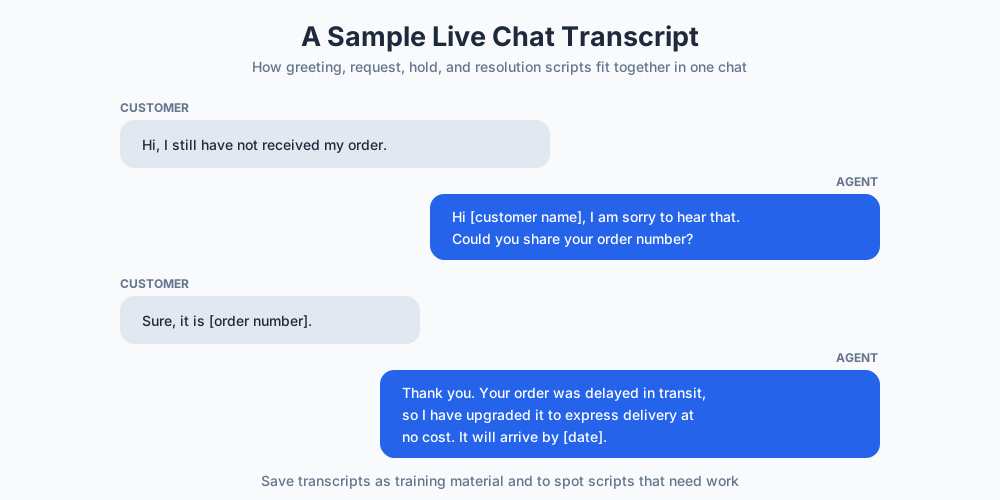
- Customer: "Hi, I still have not received my order."
- Agent: "Hi [customer name], I am sorry to hear that. Could you share your order number so I can check?"
- Customer: "It is [order number]."
- Agent: "Thank you. Let me look into this, it will take about a minute."
- Agent: "Thanks for waiting. Your order was delayed in transit, and I have upgraded it to express delivery at no cost. You will have it by [date]."
- Customer: "Great, thanks for the help."
- Agent: "Happy to help! Is there anything else I can do before you go?"
Save transcripts like this one. They are useful training material and a quick way to spot scripts that need work.
Where to keep your live chat scripts
A template library only helps if your team can reach the right reply fast. Most service teams keep their live chat templates inside their chat tool, so the whole set of canned responses is one click away during a chat.
A good chat tool lets you save replies as canned responses, sort them by topic, and insert them with a shortcut. Group them the way your service works: opening lines in one folder, troubleshooting and chat responses in another, sales replies in a third. Clear folders mean nobody hunts for information while a customer waits, and real-time scripts stay a click away.
Pair your canned responses with chatbots for the simplest questions. The bot handles routine chat support and collects basic information, while a person steps in for anything complex. Together they keep responses fast and let a small service team help far more customers.
Give the whole team the same access. When your customer support team works from one shared library, replies and information stay consistent as the business grows. Many help centers and support blog guides cover these live chat support workflows in more depth.
How to tell if your live chat scripts are working
Scripts are easy to write and easy to forget. To know they earn their place, watch a few simple signals and gather steady feedback from the people who use them.
Speed is the first signal. If your saved live chat responses are doing their job, your team answers faster and handles more chats without rushing customers. Quick, accurate responses are what customers remember most about good service.
Read your transcripts. A handful of recent chats shows which live chat templates land well and which produce confused follow-up questions. Those live chat response examples are the clearest guide to what you should rewrite.
Ask the people closest to your customers. Support reps know which lines feel natural and which they quietly skip, so collect their feedback every month. That input, plus a look at how many customers your team helps, tells you whether the library is lifting your service or just sitting in a folder.
How scripts shape the customer experience
Scripts are not only an efficiency tool. Used well, they directly shape how people feel about your brand after a chat.
Consistent replies set clear customer expectations. When every agent answers a common question the same way, customers learn they can trust what your service tells them, and that reliability lifts customer satisfaction over time.
Scripts also speed up resolutions, and speed is one of the strongest drivers of a good experience on live chat. A customer who gets a clear answer quickly is far more likely to return and recommend your business.
There is a balance to strike. Lean too hard on templates and replies feel cold; ignore them and quality drifts. The teams that win treat scripts as a base for warm, human conversation, not a replacement for it.
Across email, phone, and social, scripted responses keep your service consistent on every channel, not just live chat. A customer who gets the same clear answer whether they call, message, or email learns to trust your service and your whole business.
Turning these into customer service scripts for every channel
Everything above is written for chat, but the skeleton under each template (acknowledge, inform, act, confirm) is channel-neutral, which means this library can double as your customer service scripts for phone, email, and social messages with a dialect change rather than a rewrite.
For phone, adapt for the ear instead of the eye: sentences get shorter, links become descriptions ("I will text you the guide" rather than a URL), and the silent moments need words, so the hold and troubleshooting templates gain verbal check-ins ("still with me?") that a chat window never needs. A caller cannot re-read your last message, so the confirm step repeats the essentials once more before goodbye.
For email, collapse the dialogue into one complete answer: where a chat script asks one question and waits, the email version anticipates the likely branches and answers them in labeled sections, because every back-and-forth costs a day instead of a minute. The greeting and closing templates port almost unchanged; the troubleshooting ones merge into numbered steps.
For social and messaging apps, the chat versions apply nearly as written, just shorter and warmer to match the medium. The rule that keeps a multi-channel library manageable: write the chat version first, because chat has the tightest constraints, then let each channel keep its own dialect of the same customer service script rather than inventing new content per channel. One library, one voice, four surfaces.
How to write your own live chat scripts
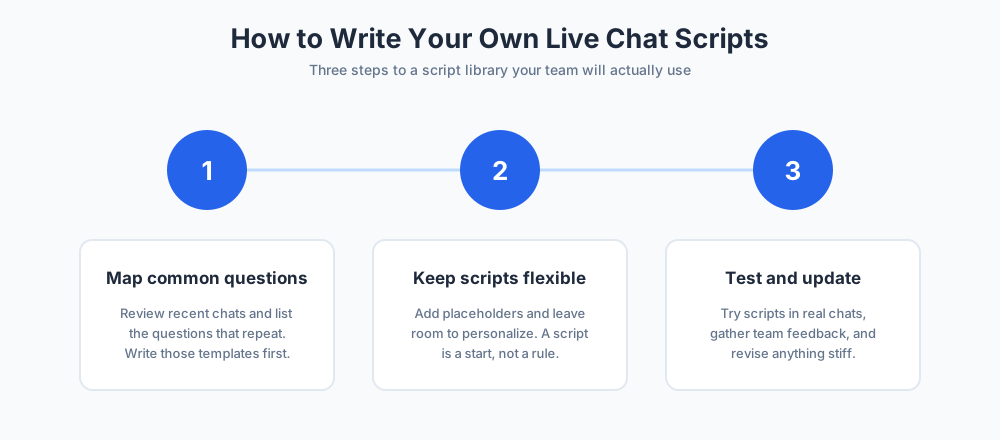
The templates above cover most situations, but every business is different. Use this process to build a script library that fits your own team and tools.
Map your most common questions
Look at your last few hundred chats and list the questions that repeat. Those high-frequency topics are where a script saves the most time, so write templates for them first and leave rare cases to free-form replies.
Keep every script flexible
Write each script as a strong starting point, not a rule. Add placeholders, leave room to personalize, and remind agents that adapting the wording to each customer is expected, not optional.
Test and update regularly
Try new scripts in real chats, gather feedback from the customer service team, and revise anything that feels stiff. Review the whole library when products or policies change, so no script ever sends outdated information.
Common mistakes to avoid with live chat scripts
A few habits can undo all the value of a script library. Watch for these mistakes as your team grows.
The first is sounding robotic. If an agent pastes a template without editing it, the customer can tell, and a generic chat feels worse than a slow one. Always personalize.
The second is letting scripts go stale. An old template that quotes a discontinued product or an outdated policy damages trust fast. Treat your scripts as living documents and check them on a schedule.
The third is having no script at all for hard moments, such as an outage or a refund refusal. Prepare calm, honest wording for those cases before you need it, so no agent has to improvise under pressure.
Final thoughts
A strong set of live chat scripts makes support faster, steadier, and easier to scale. Start with the templates in this guide, adapt them to your brand, and keep them current as your business grows.
The best replies still leave room for a human touch. Use them as a foundation, then let agents personalize every chat so customers feel heard, not processed.
For more on building a great support experience, see our guides to customer service and welcome messages for additional resources, and explore Chatim live chat to put these replies to work with built-in canned responses.
Keep going with our guides to canned responses and live chat best practices.
Frequently Asked Questions
What are live chat scripts?
Live chat scripts are prewritten replies that support agents reuse during a chat. They cover the situations a team meets every day, such as greetings, requests for information, troubleshooting steps, apologies, and closing lines. Scripts are a starting point, not a screenplay: the agent keeps the structure and personalizes the wording for each customer. Most teams store them as canned responses inside their live chat tool.
What are customer service scripts?
Prewritten replies a support team reuses for the situations that repeat every day: greetings, information requests, troubleshooting, apologies, and closings. The same script library serves chat, phone, email, and social messages, with each channel keeping its own dialect of the shared wording rather than separate content.
Can I use these scripts for phone and email support?
Yes, with channel adaptations rather than rewrites. Phone versions use shorter sentences, describe links instead of pasting them, and add verbal check-ins during quiet moments. Email versions collapse the back-and-forth into one complete, sectioned answer. Write the chat version first, since it has the tightest constraints, then adapt outward.
What are some script chat examples?
Common examples include a greeting like "Hi [customer name]! Welcome to [company]. How can I help today?", a hold message like "Let me check that for you, this will take about two minutes", and a closing line like "You are all set. Is there anything else I can help with?". This guide includes more than 45 templates across greetings, troubleshooting, apologies, sales, feedback, and closing.
What is a live chat transcript?
A live chat transcript is the saved, written record of a chat between a customer and an agent. It captures every message in order, so the conversation can be reviewed later. Transcripts are useful for training new agents, spotting scripts that need rewriting, and giving a customer or a colleague the full context if an issue is reopened or escalated.
How does script chat live work?
Live chat scripts work by giving agents a ready library of approved replies. During a chat, the agent picks the template that fits the situation, edits a detail or two such as the customer name, and sends it. Many teams trigger these canned responses with a keyboard shortcut, which cuts response time and keeps every reply consistent across the whole support team.
Why should a support team use live chat scripts?
Scripts cut response time, because agents are not writing every reply from scratch. They keep quality even, so a new hire sounds as confident as an experienced agent. They protect your brand voice, since everyone works from the same wording. And they reduce mistakes, because a reviewed template will not promise something your policy does not allow.
How do I write my own live chat scripts?
Start by reviewing your last few hundred chats and listing the questions that repeat. Write templates for those high-frequency topics first. Keep each script flexible, with placeholders and room to personalize. Then test new scripts in real chats, gather feedback from the team, and revise anything that feels stiff. Review the whole library whenever products or policies change.
Do live chat scripts make agents sound robotic?
Only if they are used badly. A script pasted word for word with no edits will feel cold, and customers notice. Used well, a script is just a reliable starting point: the agent adds the customer name, references the specific issue, and adjusts the tone. Good scripts actually free agents to sound more human, because they spend less effort on wording.
What should a live chat greeting say?
A good greeting is short, warm, and ready to help. Welcome the visitor, identify yourself if it suits your brand, and invite their question, for example: "Hi [customer name]! Welcome to [company]. How can I help you today?". For a returning customer, reference their history. For a proactive invitation, mention the page they are on so the offer feels timely.
What are canned responses?
Canned responses are the shortest scripts of all: saved one-line answers to questions you get constantly, such as how to reset a password or where to find your hours. Stored in your live chat tool, they let an agent reply in a second with a shortcut. Review them regularly so the saved information never goes stale.
How many live chat scripts does a team need?
There is no fixed number. Most teams do well with one or two solid templates for each common situation: greetings, asking for details, holds, troubleshooting, apologies, escalations, feedback, and closings. Start with the high-frequency topics, then add scripts as new patterns appear in your chats. A focused library the team actually uses beats a huge one nobody maintains.
How do you handle an angry customer on live chat?
Lower the temperature first. Acknowledge the feeling, stay calm, and show you are taking the issue seriously, with a line like "I hear you, and I am sorry this has been so frustrating. Let us get it fixed." Never argue or match the customer's tone. A steady, warm reply almost always calms an angry customer faster than a defensive one.
Can live chat scripts be used for sales?
Yes. The same channel that handles support can answer product questions and guide a visitor toward a purchase. Keep sales scripts helpful rather than pushy: answer the real question first, then suggest a natural next step such as a demo or a quick call. A good sales script still feels like support, which is what builds trust.
What is the best way to close a live chat?
Confirm the issue is solved, invite any last questions, and close warmly, for example: "You are all set, [customer name]. Is there anything else I can help with before you go?". If the customer has gone quiet, send a gentle check-in and let them know the chat will stay open for a few more minutes.
Where should a team store its live chat scripts?
Keep them inside your live chat software as canned responses, sorted into clear folders by topic, so an agent can insert the right reply with a shortcut. Give every agent access to the same shared library. A document buried in a drive is too slow to use mid-chat, so the scripts belong in the tool where the chat happens.
Related articles
More in Live chat → Live Chat Best Practices: A Working Playbook (2026)
Live chat best practices that hold up in real queues: speed, honest availability, widget setup, bot pairing, team habits, and metrics that matter.
 Best Free Live Chat Software in 2026: 11 Truly Free Tools
11 free live chat software tools compared: seat limits, conversation caps, branding rules, and which free plan scales with you.
 Live Chat Statistics and Trends to Know
Live chat statistics and trends explained: what the data shows about customer preference, satisfaction, response time, sales impact, and AI chatbots.
 Live Chat Lead Generation: The Complete Guide
Live chat lead generation explained: how to turn website visitors into qualified leads with proactive chat, smart qualifying questions, and the right tools.