WooCommerce Chatbot: What It Does and How to Add One (2026)
A WooCommerce chatbot has to clear a bar that Shopify apps never face: WooCommerce owners have been burned by plugins before. Every addition to a WordPress store is weighed against the bloat it might bring, the conflicts it might cause, and the updates it will demand. So this guide treats the bot the way a careful store owner would: what it actually does for a store (product questions answered mid-purchase, order status self-served, nights covered), how to add it without adding weight, and how to judge tools by the one question that matters. It pairs with our WooCommerce live chat guide, which covers the human half of the same widget.
New to bots in general? The chatbot guide has the fundamentals; this page stays store-specific.
What a chatbot adds to a WooCommerce store
The same three question streams every store drowns in, answered inside the visit. Pre-purchase product questions (sizing, materials, compatibility, shipping times) are buying decisions phrased as questions, and answering them while the shopper is on the product page is the cheapest conversion work available. "Where is my order?" is the volume stream, fully self-servable once the bot can look up order status. And policy questions (returns, refunds, delivery regions) get answered from the pages you already wrote. Around all three sits the after-hours shift: for a store selling across timezones, the bot is the difference between an answer at 2 a.m. and a refund request at 9.
One widget, three paths
Under the hood, a well-configured store bot is a router, and knowing the three paths makes every setup decision obvious.
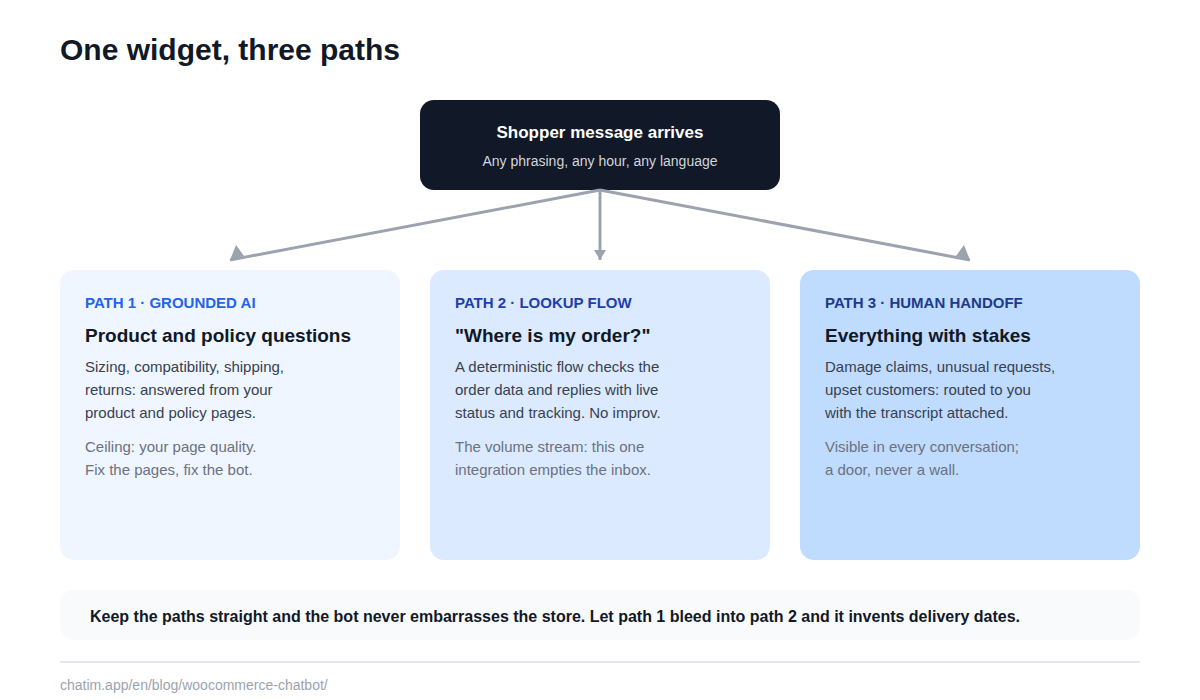
Path one: free-form product and policy questions get AI answers grounded in your product pages, category pages, and policies, which means the answer quality is set by page quality; tightening your shipping and returns pages is the highest-leverage bot configuration you can do. Path two: order status runs through a deterministic lookup flow connected to your store's order data, no improvisation involved. Path three: everything else (damage claims, unusual requests, upset customers) hands off to you with the transcript attached. A bot that keeps those three paths straight almost never embarrasses a store; a bot that lets path one bleed into path two invents delivery dates.
Plugin or snippet: adding it to WordPress
Two clean routes. The plugin route: install the chat tool's WordPress plugin from the directory, connect your account, done; this is the friendliest path and keeps configuration inside the dashboard your team already uses. The snippet route: paste the widget script into your theme or through your tag manager, which some owners prefer for keeping the plugin list short. Either way the widget itself should load asynchronously from the vendor's servers, meaning the real weight on your pages is close to identical; pick the route your maintenance habits favor. Our WordPress live chat page covers the install path and the inbox setup end to end.
Teaching it your store
Point the bot at the content that answers real questions: product pages, category descriptions, the FAQ, and above all the policy pages for shipping, returns, and payments. Two WooCommerce-specific habits pay off. First, variations: if size and color options carry different prices or availability, make sure the product pages say so in text the bot can ground on, not only in dropdown data. Second, the re-sync: WooCommerce catalogs change constantly, so confirm the tool re-indexes on a schedule rather than treating your store as a one-time import. Then test with a skeptic's questions: discontinued products, bundle questions, a typo in every message, and confirm it escalates rather than invents.
Choosing without adding bloat
Six checks, ordered for a WordPress owner's instincts. Async loading, verified on your own store with your usual speed tool before and after; no chat feature is worth a slower product page. Grounding on your content with scheduled re-sync. An order-lookup integration, because the volume stream is where the time savings live. A transcript-carrying handoff into a shared inbox someone actually watches. Widget styling that matches your theme. And per-plan pricing rather than per-conversation metering, which converts your best sales month into your biggest software bill. Finish with the revealing question: what does the bot do when it does not know? Escalation is the right answer; a confident guess is how stores end up in screenshots.
Flows for the money-adjacent moments
Some tasks should never improvise, and on a store they cluster around money. Returns intake: the bot collects order number, item, reason, and photos, then hands the decision to you. Back-in-stock and restock notifications: a flow captures the email against the product. Discount questions: published codes can be shared by the bot; anything negotiable gets collected and routed. The pattern across all three is the same one that runs the whole setup: facts and structured steps are automated, judgment stays human, and the shopper always knows which one they are talking to. The online store template patterns cover these flows so you configure rather than invent.
Mistakes WooCommerce stores make with bots
Judging the bot by plugin-weight instincts without measuring, or the opposite, installing without measuring at all; the before-and-after speed check settles it in ten minutes. Grounding it on nothing and letting it improvise about products. Skipping the order-lookup connection and wondering why the inbox still fills with tracking questions. Leaving last year's shipping promises in the policy pages the bot reads from. Greeting-spamming shoppers who arrived from an expensive click. And skipping the weekly transcript read, which is where a store learns what its product pages forgot to say. Every one is a habit, not a purchase.
An afternoon launch plan
Pull your last hundred customer messages and list the ten questions that repeat. Fix the policy and product pages they expose. Install by plugin or snippet, run the speed check, point the bot at the fixed pages, connect order lookup, brand the widget, set the honest offline state, and attack it for an hour before shoppers do. Launch scoped, read every transcript for two weeks, and expand from the evidence. The free tier of a chat-plus-chatbot tool covers the whole experiment, and paid plans earn their place when conversation volume proves the bot is carrying weight. If you are still weighing the wider toolset, our live chat software comparison ranks the chat-plus-bot field this whole setup lives inside.
More on this from our team: Shopify chatbots.
Frequently Asked Questions
What is a WooCommerce chatbot?
A chat widget on a WooCommerce store that answers shoppers' questions automatically from the store's own pages (products, categories, policies), self-serves order-status requests through a lookup, and hands anything unusual to the owner with the conversation attached. Modern versions understand free-form questions rather than only menus.
How do I add a chatbot to WooCommerce?
Two routes: install the chat tool's WordPress plugin and connect your account, or paste the widget snippet into your theme or tag manager. The widget loads from the vendor's servers either way, so the page-weight difference is minimal; choose the route your maintenance habits prefer, then do the real work of grounding the bot on your pages.
Will a chatbot slow down my WooCommerce site?
A well-built widget loads asynchronously after your content and should not meaningfully affect speed scores, but this audience is right to verify rather than trust. Run your usual speed tool on a product page before and after installing, compare, and reject any tool that fails your own test.
Does it conflict with caching or optimization plugins?
Rarely, because the widget is an external script rather than something your cache renders, but WordPress stacks vary enough that the honest answer is: test on staging or during a quiet hour. If the widget misbehaves, script-exclusion settings in the caching plugin resolve most cases.
Is there a free chatbot for WooCommerce?
Yes; free tiers in the category include the widget, a bot grounded on your content, and basic handoff, which comfortably covers a small store. Paid plans add team seats, deeper automation, and integrations. Prefer per-plan pricing; per-conversation metering charges most in your best months.
Can it answer "where is my order" automatically?
Yes, through an order-lookup integration with your store's data, and it is usually the single highest-volume message, so this connection tends to justify the whole setup. Lost or damaged shipments should still route to a person, with the order context attached.
How does the bot learn my products and policies?
You point it at your product pages, category pages, FAQ, and policy pages; it indexes them and grounds its answers there, re-syncing as the catalog changes. Its ceiling is your page quality: products with thin descriptions produce thin answers, and stale shipping pages produce confidently wrong ones.
Does it handle product variations correctly?
It answers from what the pages say, so variations that differ in price or availability should be described in page text, not only in dropdown data. Where variation logic is genuinely complex, let the bot answer the general case and route the specifics to you.
Does it work with page builders and custom themes?
Yes; the widget floats above the page rather than inside your layout, so builders and themes rarely matter. The check worth doing is visual: confirm the collapsed bubble does not cover buttons on mobile, whatever builder produced the page.
Can the bot give out discount codes?
Published codes, yes, through a flow. Negotiable discounts, no: that is a judgment call, so the correct configuration collects the request and routes it to you. A bot that improvises discounts is the fastest way to turn automation into margin leakage.
Should returns go through the bot?
Intake yes, decision no. The bot collects the order number, item, reason, and photos, so you open a complete case instead of a half-question; the approval stays with you. This split keeps the queue moving without delegating anything with money attached.
Can it answer shoppers in other languages?
Generally yes; modern bots reply in the language the shopper writes even when the store content is in English. If a market matters to you, spot-check transcripts in that language after launch rather than assuming parity.
How do I know if the bot is helping the store?
Track conversations resolved without you that did not come back, the share of order-status questions self-served, and after-hours conversations that previously bounced. Read transcripts weekly: the questions shoppers ask right before leaving are a list of what your product pages have not said yet.
Related articles
More in Ecommerce & platforms → Best Shopify Apps to Increase Sales & Conversions (2026)
12 Shopify apps to increase sales and conversions, sorted by the lever each one pulls: AOV, hesitant visitors, lost carts, trust, repeat buyers.
 Best Shopify Apps for Customer Service in 2026: 9 Compared
9 customer service apps for Shopify stores compared: the free native option, chat widgets, and ecommerce helpdesks, with verified pricing.
 Wix Chatbot: How to Add One and What It Can Do (2026)
What a Wix chatbot can do for your site: answer service questions, capture leads politely, help with bookings and store orders, and cover after-hours.
 Webflow Live Chat: How to Add It and Hand It Off (2026)
How to add live chat to a Webflow site, keep it on-design, turn it into a lead engine on marketing sites, and ship it as an agency deliverable.