PrestaShop Live Chat: How to Add It to Your Store (2026)
PrestaShop live chat has one job most store platforms never face at this scale: the multilingual storefront. PrestaShop stores routinely sell across borders in three or four languages, which means the shopper typing into your widget might write in French, Polish, Spanish, or English, at any hour, about shipping to a country your team has never personally mailed to. A modern chat widget with a bot handles exactly that: grounded answers from your own pages, delivered in the language the shopper writes in, with order status self-served and anything delicate handed to a human. This guide covers how to add chat to a PrestaShop store, how to make the multilingual side actually work, and how to keep cross-border questions honest.
Comparing tools first? Our live chat software comparison ranks the chat-plus-bot field; this page stays PrestaShop-specific.
Why PrestaShop stores add chat
The store arithmetic is universal: pre-purchase doubts (sizing, delivery time, returns) decide conversions and expire within the visit, while "where is my order?" and policy questions flood the inbox on repeat. Chat with a bot attacks both ends: answers inside the visit for the questions that decide sales, and self-service for the volume that eats the day. The PrestaShop-shaped addition is reach: a store that lists in four languages effectively runs four storefronts, and a bot is the only support staffing model that covers all of them at once without hiring for each.
Module or snippet: adding it to PrestaShop
Two clean routes, neither touching core files. The module route: install the chat tool's module through the back office and connect your account, keeping everything inside the admin your team already uses. The snippet route: paste the widget script into your theme or through your tag manager, which some owners prefer to keep the module list short. The widget loads asynchronously from the vendor's servers either way, so page weight is near-identical between routes; choose by maintenance habit. Then do the work that decides the result: ground the bot on your policy, shipping, and FAQ pages plus the catalog, connect order lookup, brand the widget to the theme, set the honest offline state, and test on the live store in more than one language.
The multilingual store, finally answerable
This is where the technology earns its keep on PrestaShop specifically.
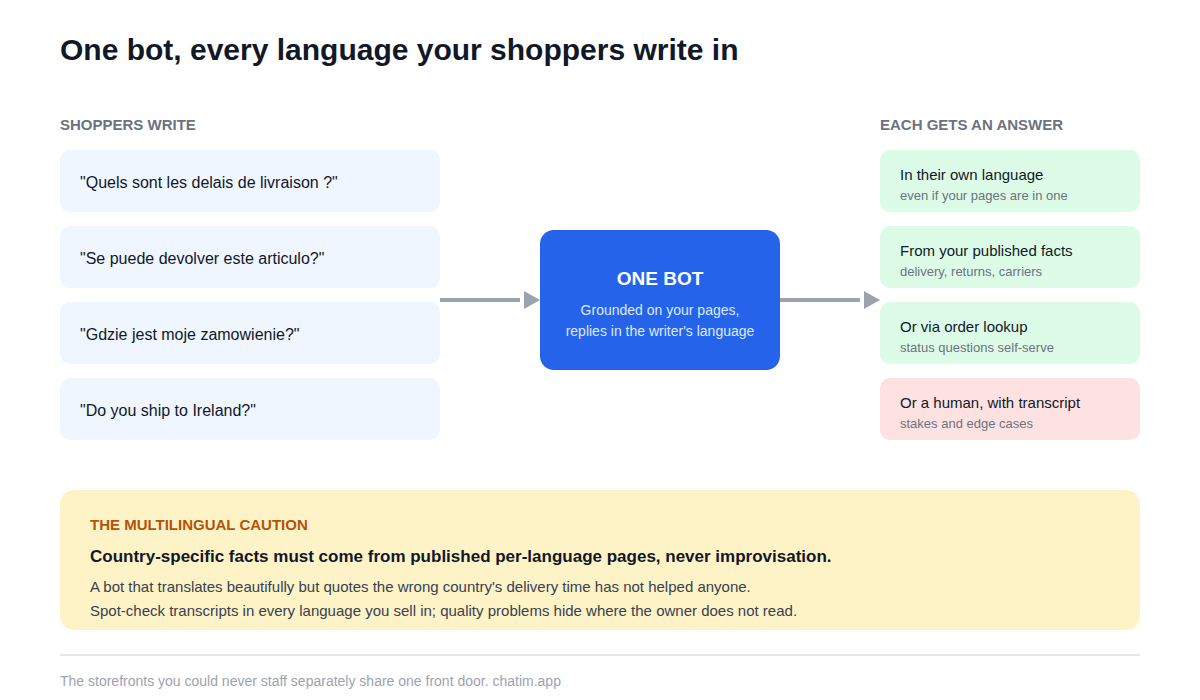
Modern bots reply in the language the shopper writes, even when your source content is in one language, which turns the four-storefront staffing problem into a configuration detail. Two disciplines keep it trustworthy. First, spot-check transcripts in each of your top languages after launch rather than assuming quality parity; reading five French conversations tells you more than any feature page. Second, mind the facts that differ by country: delivery times, carriers, and return logistics per region belong on published pages the bot grounds on, and where your language editions carry different policies, configure per-language content or keep those topics with humans. A bot that translates beautifully but quotes the wrong country's delivery time has not helped anyone.
Grounded answers, order lookup, human handoff
The three-path split holds here as on every store platform. Free-form product and policy questions get AI answers grounded in your pages, so page quality is the ceiling and tightening the shipping and returns pages is the best configuration hour you can spend. Order status runs through a deterministic lookup against your store data, no improvisation. Everything with stakes (damage claims, unusual requests, upset customers) hands off to a human with the transcript attached, and the path to a person stays visible in every conversation. The standing rule travels unchanged: unpublished pricing and negotiable anything get collected as requests for a human, never improvised by the bot.
Cross-border questions, answered honestly
Selling across borders multiplies exactly the questions a bot is good at, provided you keep it on published ground. Delivery times and shipping costs per country: answer from your carrier and shipping pages, kept current. Customs and import charges: the honest configuration states what your store does (who pays, what is included) from your published policy and routes the rest to a human, because improvised customs guidance is wrong in two countries at once. Returns from abroad: the bot explains the published process and collects the case details for you. Every one of these answered in the visit is a cross-border cart that survives; our guide to selling channels covers the wider expansion picture this store setup lives inside.
What to look for in a PrestaShop chat tool
Six checks, with the first one weighted for this platform. Multilingual answering that you have verified in your own languages, not just believed from the brochure. Grounding on your own content with scheduled re-sync, since catalogs and carrier terms change. An order-lookup integration for the volume stream. A transcript-carrying handoff into a shared inbox someone actually staffs across your coverage hours. Widget styling that matches the theme, mobile checked separately. And per-plan pricing over per-conversation metering, which on a growing store charges you most in your best months. Then the one revealing question: what does the bot do when it does not know? Escalation is the trustworthy answer, in every language.
Mistakes PrestaShop stores make with chat
Launching in the store's main language and never reading a transcript in the others, so quality problems hide where the owner does not look. Letting one generic bot quote one country's delivery times to every shopper. Grounding it on nothing and hoping. Skipping order lookup and drowning in tracking questions anyway. Faking presence around the clock instead of configuring the honest offline state with a promised reply window. And treating the transcripts as a log rather than a to-do list, when the questions shoppers ask before leaving are the exact list of what your pages have not said, in the exact languages that need the fixing. All habits, no budget.
An afternoon launch plan
Pull your last hundred customer messages and list the ten questions that repeat, noting which languages they arrived in. Fix the policy and shipping pages they expose, in each language edition that differs. Install by module or snippet, brand the widget, ground the bot, connect order lookup, set the offline state, and test in your top two languages with a skeptic's questions. Launch scoped, read transcripts weekly in every language you sell in, and expand from evidence. The online store template patterns cover the starting flows, free tiers cover the whole experiment, and paid plans earn their place when conversation volume proves the widget is carrying real weight; the wider inbox habits live on our live chat hub. For a multilingual store, the payoff is structural: the storefronts you could never staff separately finally share one front door that answers.
Keep going with our guides to Magento live chat and WooCommerce chatbots.
Frequently Asked Questions
How do I add live chat to a PrestaShop store?
Install the chat tool's module through the back office, or paste the widget snippet into your theme or tag manager; neither route touches core files, and the widget loads asynchronously either way. The real setup follows: ground the bot on your policy and shipping pages plus the catalog, connect order lookup, and test in more than one language.
Does PrestaShop have built-in live chat?
PrestaShop does not ship a native live chat feature in core; chat is added through modules or scripts. Dedicated chat tools bring the parts a built-in feature would not anyway: the multilingual bot, the shared inbox, and the styling control.
Is there a free live chat for PrestaShop?
Yes; free tiers in the category include the widget, a bot grounded on your content, and basic handoff, which covers a small store comfortably. Paid plans add team seats and deeper automation. Prefer per-plan pricing; per-conversation metering charges most in your best months.
Can the bot answer shoppers in different languages?
Yes, and on a multilingual PrestaShop store this is the headline feature: the bot replies in the language the shopper writes, even when your content is in one language. Verify rather than assume: after launch, read a sample of transcripts in each of your top languages and confirm the quality holds.
How does chat work with multiple language editions of my store?
Where facts differ by edition (delivery times, carriers, policies), make sure each language's pages state its own facts and the bot grounds on them, or keep those topics with humans. One generic bot quoting one country's delivery time to every shopper is the classic multilingual failure.
Can it answer "where is my order" automatically?
Yes, through an order-lookup integration with your store data, and it is usually the highest-volume message a store receives, in every language. Lost or damaged shipments still route to a person with the order context attached.
Should the bot answer customs and import questions?
Only from your published policy: what your store charges, who pays duties, what is included. Country-specific customs guidance beyond that belongs with a human, because improvised import advice is wrong in two countries at once. State what you publish; collect and route the rest.
Will the widget slow down my store?
A well-built widget loads asynchronously after your content and should not meaningfully affect speed. Verify on your own store: run your usual speed check on a product page before and after installing, and compare.
Does it work with my theme?
Yes; the widget floats above the page rather than living inside the theme, so compatibility is rarely an issue. Do the visual check that matters: on mobile, the collapsed bubble must cover no buttons and the open chat must dismiss in one tap.
Can returns be handled through the bot?
Intake yes, decision no. The bot explains the published process (including the cross-border version) and collects the order number, item, reason, and photos, so you open a complete case. Approvals and exceptions stay human.
What should always go to a human?
Damage and loss claims, refunds beyond policy, negotiable pricing, customs edge cases, anything legal, and any upset customer. The bot's role is collection and routing with the transcript attached; the relationship stays with people.
How do I keep answer quality consistent across languages?
Two habits: keep the per-language pages that carry differing facts current, since the bot inherits their accuracy, and read a weekly sample of transcripts in every language you sell in, not just your own. Quality problems hide wherever the owner does not read.
How do I know the chat is paying for itself?
Track conversations resolved without a human that did not come back, order-status questions self-served, after-hours and other-language conversations that previously bounced, and satisfaction as a trend. The transcripts double as a per-language list of what your pages still need to say.
Related articles
More in Ecommerce & platforms → Best Shopify Apps to Increase Sales & Conversions (2026)
12 Shopify apps to increase sales and conversions, sorted by the lever each one pulls: AOV, hesitant visitors, lost carts, trust, repeat buyers.
 Best Shopify Apps for Customer Service in 2026: 9 Compared
9 customer service apps for Shopify stores compared: the free native option, chat widgets, and ecommerce helpdesks, with verified pricing.
 WooCommerce Chatbot: What It Does and How to Add One (2026)
What a WooCommerce chatbot does for a store: product and order questions answered from your own pages, plus how to add one without plugin bloat.
 Wix Chatbot: How to Add One and What It Can Do (2026)
What a Wix chatbot can do for your site: answer service questions, capture leads politely, help with bookings and store orders, and cover after-hours.