Best WordPress Live Chat Plugin & Chatbot Plugins in 2026 (11 Compared)
Picking the best WordPress live chat plugin can transform user engagement, lift conversions, and cut support load. We tested 11 WordPress live chat plugins and WordPress chatbot plugins across pricing, ease of install, AI chatbot quality, and free-plan generosity. Here is the 2026 ranking, with verified pricing as of July 2026.
Whether you are after the best live chat plugin for WordPress, a WordPress chatbot for 24/7 support, a free chat plugin for WordPress (or simply a chat plugin WordPress users can install in two minutes), a chatbot plugin for WordPress that handles forms, or a complete WordPress customer service chat solution, this guide covers the realistic options for sites of every size. All eleven entries below count among the best chatbot plugins for WordPress in 2026; the right pick depends on your site's traffic, stack, and budget.
Why use a live chat plugin for WordPress?
- Instant customer support. A WordPress live chat plugin gives visitors real-time answers without leaving the page, a proven driver of higher conversion and lower bounce.
- 24/7 coverage. A WordPress chatbot handles routine queries (sizing, shipping, opening hours, returns) overnight and weekends, so your team only sees the inquiries that need a human.
- Lead generation. Proactive WordPress chat triggers fire on pricing pages, blog posts, and exit intent, capturing emails and qualifying leads automatically.
- Lower support cost per ticket. Chatbot plugins for WordPress deflect tickets that would have become emails or phone calls.
- Customer insight. Every WordPress chat widget conversation feeds analytics on visitor intent, so you can refine your site, your offer, and your chatbot scripts over time.
Key features to look for in a WordPress chat plugin
- One-click install. The best WordPress live chat plugin should install from the WordPress plugin directory in two minutes, no theme edits, no PHP, no developer.
- WordPress chat widget customization. Colors, position, greeting copy, and triggers should match your brand and theme.
- WooCommerce support. A live chat plugin for WordPress that does not recognize WooCommerce orders is a dealbreaker for stores.
- AI chatbot for WordPress. A modern WordPress chatbot plugin should offer an AI option trained on your own content, not just rule-based flows.
- Mobile compatibility. The chat widget and the agent app must work well on mobile.
- CRM integration. Look for plugins that pipe contact info into HubSpot, Salesforce, or a built-in CRM.
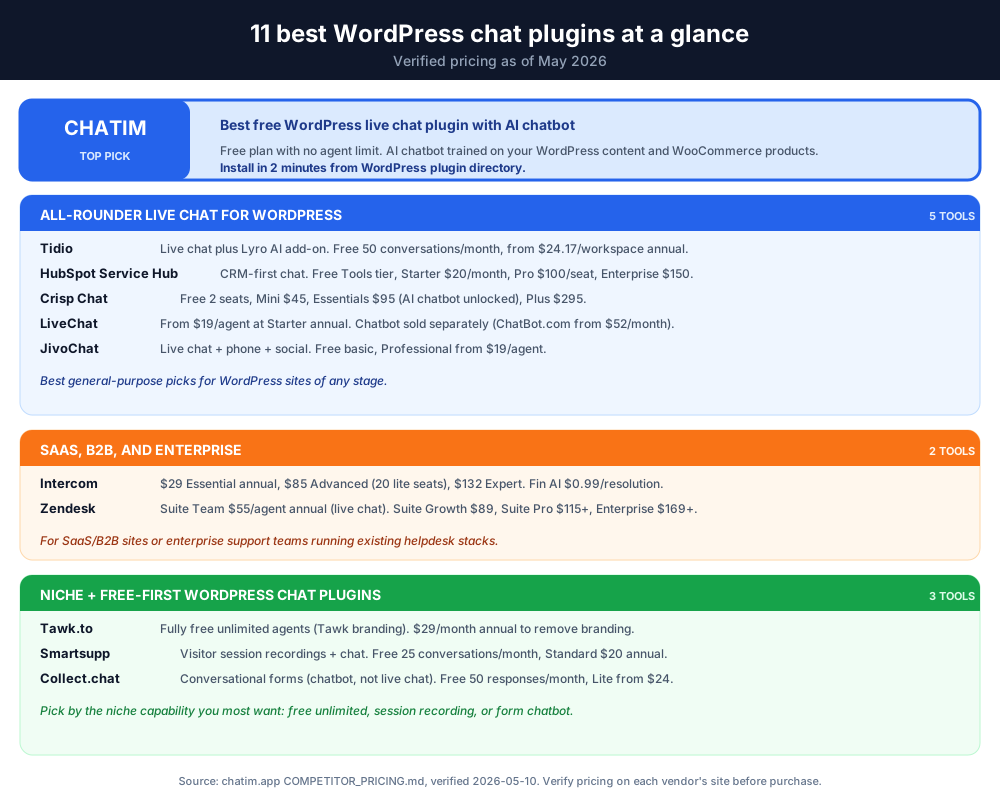
Comparison table: WordPress chat plugins at a glance
| Plugin | Free plan | Paid from (verified, July 2026) | Best for | Built-in chatbot |
|---|---|---|---|---|
| Chatim | Yes, no agent limit | Free plan covers most small sites | All WordPress sites | Yes, AI + rules |
| Tidio | Yes, 50 conversations/month | From $24.17/workspace at Starter (annual) | Growing sites | Yes (Lyro AI add-on) |
| HubSpot Service Hub | Yes, up to 2 users | From $20/month list at Starter | CRM-driven sites | Yes |
| Intercom | 14-day trial | $29/seat at Essential (annual) | SaaS / B2B | Yes (Fin AI per-resolution) |
| LiveChat | 14-day trial | $19/agent at Starter (annual) | Larger support teams | Add-on (ChatBot.com from $52/month) |
| JivoChat | Yes, basic features | Basic $28, Professional $42, VIP $56 per agent annual | All-in-one messenger | Yes |
| Smartsupp | Yes, 1 operator, 25 conversations/month | $17/month at Solo (annual) | Session recordings | Yes |
| Zendesk | 14-day trial | $55/agent at Suite Team (annual) | Enterprise | Yes |
| Tawk.to | Yes, unlimited agents (with Tawk branding) | $29/month to remove branding | Tight budgets | AI Assist from around $29/month |
| Crisp | Yes, 2 seats | From $45/workspace at Mini | Modern UI / startups | Yes (on Essentials and Plus) |
| Collect.chat | Yes, 100 responses/month | From $14/month at Lite (annual) | Forms and lead capture | Form-style chatbot |
Pricing accurate as of July 2026. Plan names, tiers, and features change frequently, verify on each vendor's official pricing page before purchase. Some prices shown above reflect annual billing.
Chatim, a WordPress-native chat plus chatbot pick
Disclosure: Chatim is built by the team behind this blog. We ship a native WordPress plugin that bundles live chat plus a chatbot with predictable per-plan pricing and a free tier for small teams. For WordPress sites that want chat plus bot in one widget without per-agent scaling, Chatim is positioned in that gap.
Try Chatim free at chatim.app →
Best WordPress live chat plugin and chatbot picks
Now that you know what to look for, here are the realistic options ranked.
1. Chatim: Best Free WordPress Live Chat Plugin with AI Chatbot
At the top of our list is Chatim live chat for WordPress, the WordPress chat plugin we would pick first for any site, large or small. It bundles a live chat widget, an AI WordPress chatbot, a built-in CRM, and a help-center-style knowledge base in a single WordPress plugin. The free plan has no agent limit, which is rare in this category.
- One-click WordPress plugin install. Search for Chatim in your WordPress plugin directory, click Install and Activate. The WordPress chat widget appears immediately. Works with WordPress 5.0+ and PHP 7.4+, with any theme, and with Elementor, Divi, Gutenberg, and WPBakery.
- AI WordPress chatbot. Train it on your WordPress pages, posts, and WooCommerce products so it answers visitor questions 24/7 and hands off to a human only when the conversation needs one.
- WooCommerce live chat and cart recovery. Engage WooCommerce shoppers in real time, recover abandoned carts with proactive chat triggers, and turn more browsers into paying customers.
- WordPress customer service chat in one plugin. Live chat, AI chatbot, shared inbox, and knowledge base. Replaces several separate WordPress chat plugins with one tool.
- Free forever, no agent limit. The free Chatim plan is enough for most small WordPress sites; paid tiers unlock advanced AI, analytics, and team collaboration.
Ready to add Chatim to your WordPress site?
Install the free WordPress live chat plugin in under 2 minutes; no agent limit, no credit card required.
Worth knowing: Chatim is one of the few WordPress chatbot plugins that bundles the AI chatbot with a no-agent-limit free plan. If you only need rule-based bots, you can stay on the free tier indefinitely.
2. Tidio: All-in-One WordPress Live Chat and Chatbot
Tidio is a flexible chat plugin for WordPress that combines live chat, chatbot, and email in a single dashboard. The Free plan covers 50 conversations per month with 10 seats. Paid Starter is $24.17 per workspace per month billed annually. Growth starts from $49.17. Lyro AI is priced separately as an add-on from $32.50 per month.
- AI-powered chatbot (Lyro) answers common queries around the clock so visitors always get a reply.
- Customizable WordPress chat windows with multiple themes that match your site's design.
- Email and Messenger integration so you can handle WordPress live chat, Facebook Messenger, and email from one inbox.
Worth knowing: Tidio's Free plan caps at 50 billable conversations per month and reserves Lyro AI for the separately priced add-on. Costs scale by conversation volume, so spiky seasonal traffic can blow past the cap mid-month.
See how it stacks up against Chatim: Tidio alternatives.
3. HubSpot Service Hub: WordPress CRM with Live Chat and Chatbot
HubSpot Service Hub is a marketing and CRM platform with a free WordPress plugin. Every chat contact syncs into the HubSpot CRM. The Free Tools tier covers basic chat for up to 2 users. Service Hub Starter lists at $20 per month (1 Core Seat included; promos as low as $7 as of July 2026). Professional is $90 per seat per month plus a required onboarding fee, Enterprise is $150.
- Native HubSpot CRM sync. Every WordPress chat conversation creates or updates a HubSpot contact automatically.
- Customizable chatbots with branching flows for lead qualification, meeting booking, and FAQ deflection.
- Built-in chatbot analytics and reporting tied to HubSpot's marketing dashboards.
Worth knowing: HubSpot's free chat is generous, but most growth features sit inside paid HubSpot plans. Costs ramp once your CRM list grows past the free tier.
See how it stacks up against Chatim: HubSpot alternatives.
4. Intercom: Premium WordPress Live Chat for SaaS
Intercom is a premium WordPress live chat plugin and customer messaging platform. The pick of choice for SaaS and B2B sites that want a polished customer-conversations product across every channel. Essential is $29 per seat per month annual, Advanced is $85 (includes 20 lite seats), Expert is $132 (includes 50 lite seats). Fin AI is priced separately at $0.99 per resolved conversation.
- Custom automation and chat workflows with conditional logic and visitor-attribute targeting.
- Automated lead qualification tied to performance dashboards for the support team.
- Facebook Messenger integration on top of the WordPress chat widget.
Worth knowing: Intercom sits at the higher end of the pricing range in this comparison, and Fin AI is metered per resolution on top of the seat price. It can be a strong fit for SaaS teams, and overkill for small WordPress blogs and marketing sites.
See how it stacks up against Chatim: Intercom alternatives.
5. LiveChat: Mature WordPress Live Chat Plugin
LiveChat is a long-running pure live chat product with a deep feature set, available as a WordPress plugin. Pricing (billed annually): Starter $19 per agent per month (1 user, track up to 100 visitors), Team $49 (unlimited users, 400 visitors), Business $79 (1,000 visitors), Enterprise contact sales. ChatBot.com is sold separately from $52 per month annual.
- Email marketing and CRM integrations with automated greetings based on visitor behavior.
- Ticketing system for offline messages and out-of-hours coverage.
- Detailed analytics and reporting on chat performance and customer satisfaction.
Worth knowing: As of July 2026, LiveChat has no permanent free plan, only a 14-day trial. The chatbot is a separate product (ChatBot.com), so you pay for two subscriptions if you want both.
See how it stacks up against Chatim: LiveChat alternatives.
6. JivoChat: All-in-One WordPress Business Messenger
JivoChat is an all-in-one business messenger that bolts phone support and social inboxes onto a WordPress chat plugin. A free plan covers up to 5 agents. Paid plans start from $28 per agent per month billed annually at Basic, with Professional at $42 and VIP at $56.
- Pre-chat and in-chat contact info collection so leads are captured automatically.
- Canned responses, chat transfer between agents, and live chat monitoring.
- Mobile-friendly agent apps for chatting on the go.
Worth knowing: JivoChat's Free plan is functional, but most growth features (chatbot, advanced reports) sit behind paid tiers.
See how it stacks up against Chatim: JivoChat alternatives.
7. Smartsupp: WordPress Live Chat with Session Recordings
Smartsupp stands out from other WordPress live chat plugins by bundling visitor session recordings with the chat. See exactly what a visitor did before opening a conversation. Free plan covers 1 operator and caps at 25 conversations per month with 14-day history. Solo is $17 per month annual, Plus $25, Expert $83, Ultimate starts from $280.
- Session recordings alongside chat history, useful for debugging checkout issues or confusing pages.
- Chatbots handle FAQs and route conversations to the right agent.
- WordPress plugin install from the official directory.
Worth knowing: Session recording is the headline reason to pick Smartsupp; without it, the rest of the product is comparable to its competitors at the same price point.
See how it stacks up against Chatim: Smartsupp alternatives.
8. Zendesk: Enterprise WordPress Live Chat
Zendesk is a powerful WordPress live chat plugin that integrates with the broader Zendesk helpdesk. The Support Team tier starts at $19 per agent per month for ticketing only (no chat). The full Suite Team plan (with live chat) starts at $55 per agent per month annual. Suite Professional is from $115, Suite Enterprise by quote (the $89 Suite Growth tier no longer appears on Zendesk's pricing page as of July 2026).
- Real-time chat with customizable WordPress chat widgets.
- Proactive chat triggers based on visitor activity (URL, time on page, exit intent).
- Advanced reporting and visitor analytics tied into the Zendesk ecosystem.
Worth knowing: Zendesk is overkill for most small WordPress sites. The pricing curve is enterprise-shaped, and live chat sits in the Suite tier, not the cheaper Support tier.
See how it stacks up against Chatim: Zendesk alternatives.
9. Tawk.to: Free WordPress Live Chat Plugin (with Branding)
Tawk.to is a free WordPress live chat plugin with a long track record. Fully free with unlimited agents and unlimited chat history, with the Tawk.to branding shown on the widget. Paid add-ons include $29 per month annual to remove branding (or $39 monthly), $1 per hour for hired chat agents, and AI Assist tiers from around $29 per month for 1,000 AI messages (per rates published earlier in 2026).
- Unlimited agents and chat sessions on the free plan, with Tawk.to branding included.
- Mobile apps for iOS and Android plus desktop dashboards with detailed analytics.
- Visitor tracking with geolocation, browsing path, and a live visitor list.
Worth knowing: The Tawk.to branding on the widget is shown on the free tier, and removing it costs more than many paid WordPress chat plugins on small-site volume.
See how it stacks up against Chatim: Tawk.to alternatives.
10. Crisp: Modern WordPress Live Chat Widget
Crisp is a modern WordPress live chat widget with a clean, design-forward interface. The Free tier covers 2 seats and 100 customer profiles. Paid tiers: Mini $45 per workspace per month (4 seats, 5,000 customer profiles), Essentials $95 (10 seats, 50,000 profiles, AI chatbot unlocked), Plus $295 (20+ seats, 200,000 profiles, full AI-first suite).
- Shared inbox covering chat, email, and Messenger.
- MagicReply AI drafts replies based on your past WordPress chat conversations.
- Chatbots and triggers with a visual flow builder (available on Essentials and Plus).
Worth knowing: Crisp's Free tier covers 2 seats only, and the AI chatbot is gated to Essentials ($95) and Plus ($295). Crisp restructured pricing in 2025-2026, so older WordPress comparison content may show different tier names.
See how it stacks up against Chatim: Crisp alternatives.
11. Collect.chat: Lightweight WordPress Chatbot for Forms and Lead Capture
Collect.chat is a lightweight WordPress chatbot plugin focused on conversational forms: feedback collection, appointment booking, and lead generation. Good fit if you want a chatbot for WordPress without a full live chat layer. Free plan covers 100 responses per month. Paid tiers (billed yearly): Lite from $14 per month (1,000 responses), Standard $29 (unlimited responses), Unlimited $149.
- 50+ pre-built chatbot templates for common form-style flows.
- Drag-and-drop visual editor for fast setup.
- Native integrations including Google Sheets, Slack, and email.
Worth knowing: Collect.chat is a chatbot plugin, not a live chat tool, there is no live agent inbox. Pair it with one of the live-chat picks above if you need both.
See how it stacks up against Chatim: Collect Chat alternatives.
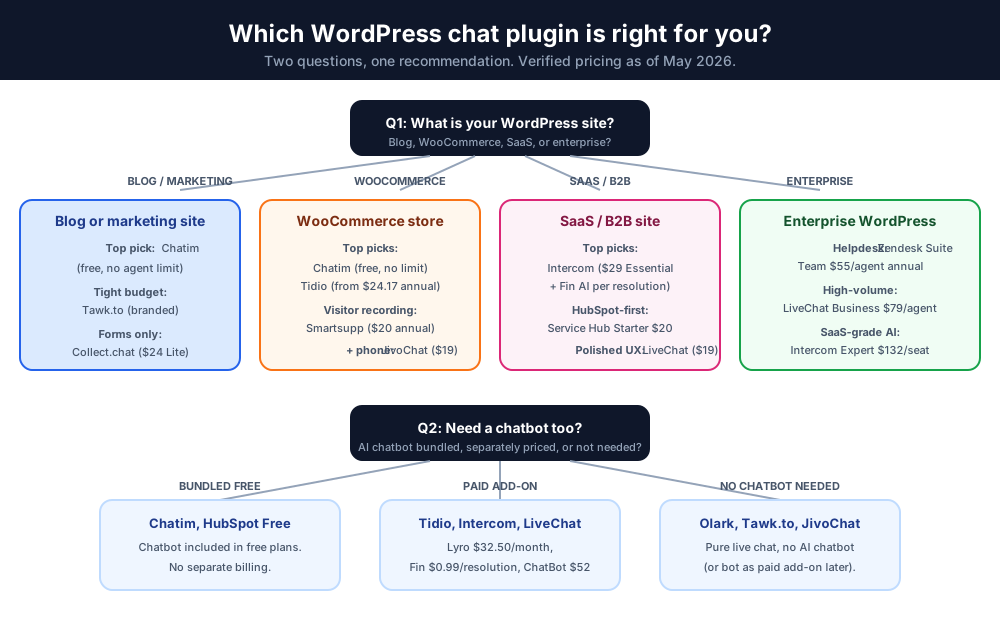
How to choose the right WordPress chat plugin
Picking the right WordPress chat plugin depends on what you actually need. Quick decision tree:
- Need both live chat and a WordPress chatbot in one plugin? Chatim, Tidio, HubSpot Service Hub, Intercom, Crisp.
- On a tight budget? Chatim's free plan (no agent limit), Tawk.to (with branding), or HubSpot's free tier.
- Already running WooCommerce? Chatim, Tidio, JivoChat, or Smartsupp, all integrate cleanly.
- Need deep CRM integration? HubSpot Service Hub or Intercom.
- Just need a chatbot for forms / lead capture? Collect.chat or Chatim's no-code chatbot builder.
- Enterprise WordPress site with existing helpdesk? Zendesk or LiveChat.
FAQ: WordPress live chat and chatbot questions
The picks above cover the core decision. The FAQ section in the blog footer covers the rest of the common questions on WordPress chat plugins, pricing, free plans, AI chatbots, and WooCommerce.
For the broader chat landscape, see our guides on the best live chat platforms, live chat for Shopify, Crisp alternatives, Tidio alternatives, and LiveChat alternatives.
Adding a WordPress live chat plugin or a WordPress chatbot to your site is one of the highest-ROI conversion changes you can make. Options range from free, no-limit plugins to enterprise customer-conversation platforms. There is a WordPress chat plugin for every business need. Chatim stands out as the top all-rounder: a generous free plan, a one-click WordPress install, an AI WordPress chatbot, and a single plugin that doubles as a WordPress customer service chat. Tidio, HubSpot Service Hub, and Crisp are strong picks for growing sites; Intercom, LiveChat, and Zendesk are for support-heavy operations; JivoChat, Smartsupp, Tawk.to, and Collect.chat round out the list with strong free tiers and niche specialties.
Spend ten minutes in each top-3 option and you will know which one fits your site best. If you specifically need free live chat WordPress on the cheap, start on the free plan from Chatim, Tidio, HubSpot, or Tawk.to.
Want to start with our top pick?
Related reading: WooCommerce live chat and AI chatbot for your website.
Frequently Asked Questions
What is the best WordPress live chat plugin?
For most WordPress sites Chatim is the best WordPress live chat plugin because it bundles live chat, an AI WordPress chatbot, CRM, and a help-center knowledge base in one WordPress plugin, and the free plan has no agent limit. Tidio (from $24.17 per workspace annual), HubSpot Service Hub (free tier with paid Starter from $20), and Intercom (from $29 per seat Essential plus per-resolution Fin AI) are strong alternatives depending on your stack and budget. The best free live chat plugin for WordPress for most sites is Chatim's free tier.
How do I add live chat to WordPress?
To add Chatim live chat to your WordPress site: log in to WordPress admin, go to Plugins > Add New, search for 'Chatim', click Install and then Activate. The live chat plugin for WordPress is set up immediately and the WordPress chat widget appears on your site. The whole process takes under 2 minutes, no coding, no theme edits, no developer. Most other plugins in this guide (Tidio, HubSpot, JivoChat, Smartsupp, Crisp) install the same way through the WordPress plugin directory.
Is there a free WordPress live chat plugin?
Yes. Chatim, Tidio, HubSpot Service Hub, JivoChat, Smartsupp, Tawk.to, Crisp, and Collect.chat all offer free WordPress live chat plans with different limits. Chatim's free plan is the most generous of the group, no agent limit, no chat-volume cap, and the AI chatbot is included. That is why we rate it the best free live chat plugin for WordPress in {year}. WordPress live chat free options are also available from Tawk.to (with branding on the widget) and HubSpot's perpetual free tier. Tidio Free covers 50 conversations per month. Crisp Free covers 2 seats.
What is a WordPress chatbot plugin?
A WordPress chatbot plugin is software that automates conversations on your WordPress site: answering visitor questions, qualifying leads, booking appointments, and recovering abandoned carts. Modern WordPress chatbot plugins offer both rule-based flows and AI chatbots trained on your own content. Chatim, Tidio (Lyro AI add-on), HubSpot Service Hub, Intercom (Fin AI), Smartsupp, Crisp (on Essentials and Plus), and Collect.chat are all popular WordPress chatbot plugins.
How do I install a WordPress chat plugin?
Most WordPress chat plugins install through the WordPress plugin directory: go to Plugins > Add New, search for the plugin name, click Install Now, and then Activate. With Chatim and most modern WordPress chat plugins you then sign in to a separate dashboard to configure the WordPress chat widget, no PHP edits needed. Tawk.to and Collect.chat use a code snippet method instead, which is also two minutes.
Do WordPress live chat plugins slow down my website?
A well-built WordPress live chat plugin should add under 50 KB and zero render-blocking scripts to your page. Chatim, Tidio, HubSpot, Crisp, and Intercom all use async-loaded chat widgets that load after the page is interactive, so they do not affect Largest Contentful Paint, First Contentful Paint, or Cumulative Layout Shift in your Core Web Vitals. Older or heavier WordPress live chat plugins can hurt site speed if they inject jQuery, multiple stylesheets, or sync scripts. To check your specific setup, run a Lighthouse audit before and after installing the plugin. If you see a regression of more than 100 ms in Total Blocking Time, swap to a leaner plugin or disable the widget on landing pages that need to stay fast. Chatim, Tidio, and HubSpot Service Hub are consistently rated among the lightest WordPress chat plugins in 2026 PageSpeed comparisons.
How do I integrate a WordPress live chat plugin with my CRM and email marketing tools?
Most modern WordPress live chat plugins integrate with leading CRM and email tools out of the box. HubSpot Service Hub has the deepest native integration with HubSpot CRM (the chat and CRM share the same database, so every chat creates or updates a contact). Tidio integrates with HubSpot, Salesforce, Mailchimp, and Klaviyo via native connectors. Chatim ships native HubSpot, Mailchimp, and Zapier integrations plus an open API and webhooks. LiveChat has 200+ marketplace integrations including Salesforce, HubSpot, Pipedrive, Mailchimp, and ActiveCampaign. JivoChat, Crisp Chat, Intercom, and Zendesk all offer Salesforce, HubSpot, and major email-marketing connectors. For custom integrations (your own CRM, niche email tool), almost every plugin in this guide exposes a webhook or REST API. The deepest CRM-first integration without a third-party tool is HubSpot Service Hub Free.
Does a WordPress live chat plugin work with WooCommerce?
Yes, every plugin on this list integrates with WooCommerce in some form. Chatim, Tidio, JivoChat, and Smartsupp recognize WooCommerce orders, cart contents, and customer details inside the chat thread. If WooCommerce live chat and cart recovery are your main goals, Chatim and Tidio are the strongest picks because both bundle a chatbot with the live chat (Chatim free, Tidio's Lyro is a paid add-on).
Which WordPress chat plugin has the best AI chatbot?
Chatim's AI WordPress chatbot trains on your pages, posts, and WooCommerce products out of the box. Tidio's Lyro AI is the strongest sub-$50 add-on for SMB WordPress sites, priced from $32.50 per month. Intercom Fin is the most cited in SaaS, priced per resolved conversation at $0.99 each. HubSpot Service Hub bundles a chatbot inside the CRM. Crisp Chat's AI chatbot is available on the Essentials ($95) and Plus ($295) tiers.
How much does WordPress live chat cost in 2026?
Costs vary widely. Free plans available on Chatim, Tawk.to, Tidio (50 conversations/month), HubSpot Service Hub Free, Crisp (2 seats), JivoChat (basic features), Smartsupp (25 conversations/month), and Collect.chat (100 responses/month). Paid tiers (verified July 2026): Collect.chat Lite $14 (yearly), Smartsupp Solo $17 annual, LiveChat from $19 per agent annual, HubSpot Service Hub Starter $20 list, Tidio Starter $24.17 per workspace annual, JivoChat from $28 at Basic, Intercom Essential $29 per seat annual, Crisp Mini $45 per workspace. Zendesk Suite Team is $55 per agent annual. Verify all pricing on the vendor's pricing page before purchase.
What's the cheapest paid WordPress chat plugin?
On a per-month basis, Smartsupp Solo ($17 annual), LiveChat Starter ($19 per agent annual), and HubSpot Service Hub Starter ($20 list, promos as low as $7 as of July 2026) are the cheapest paid tiers in this guide that include chat without significant feature gates. Tidio Starter is $24.17 per workspace annual, cheaper per-agent if you have multiple agents.
Can I install Chatim on WordPress without using the plugin directory?
Yes. The fastest install is via the WordPress plugin directory (Plugins > Add New > search Chatim). If your WordPress site does not allow plugin installs (managed hosting in some cases), you can also embed Chatim via a code snippet pasted into your theme's footer.php or header.php file, or via Google Tag Manager. Both alternative methods take under 5 minutes.
Which WordPress chat plugin is best for WooCommerce stores?
Chatim is the strongest pick for WooCommerce stores because it bundles WooCommerce-aware live chat, cart-recovery triggers, and an AI chatbot trained on your products, all on the free plan. Tidio is the next-strongest pick with a deeper Shopify ecosystem (also covers WooCommerce). JivoChat and Smartsupp also recognize WooCommerce orders. For high-volume WooCommerce stores that need ticketing alongside chat, Re:amaze and Gorgias (covered in our Shopify live chat guide) work on WooCommerce too.
Do these WordPress chat plugins work with Elementor and Divi?
Yes. Chatim, Tidio, HubSpot Service Hub, JivoChat, Smartsupp, Tawk.to, and Crisp all work with Elementor, Divi, Gutenberg, WPBakery, and the standard WordPress block editor. The chat widget is injected via a small JavaScript snippet, so it sits above the theme regardless of the page builder. LiveChat, Intercom, and Zendesk also work with all major WordPress page builders.
Is Chatim better than Tidio for WordPress?
Both are strong picks. Chatim is better than Tidio for WordPress sites that want a no-agent-limit free plan with AI chatbot included (Tidio's Lyro AI is a separately priced add-on from $32.50/month). Tidio is better than Chatim for sites with very high conversation volume that benefit from per-conversation pricing rather than agent-based limits. For most small and growing WordPress sites, Chatim's free plan covers the use case without needing to upgrade.
How accurate is the pricing in this guide?
All pricing in this guide reflects published vendor tiers as of July 2026 (chatim.app verification date). Plan names, prices, and feature limits change frequently. Crisp Chat restructured tiers in 2025-2026 (now Free / Mini / Essentials / Plus, not the old Pro / Unlimited). LiveChat list prices updated in early 2026. Tidio shifted to conversation-metered pricing. Always verify current pricing on each vendor's official pricing page before purchase. The chatim.app team re-verifies competitor pricing every 30 days; the most recent COMPETITOR_PRICING reference was refreshed on 2026-07-26.
Related articles
More in Ecommerce & platforms → Best Shopify Apps to Increase Sales & Conversions (2026)
12 Shopify apps to increase sales and conversions, sorted by the lever each one pulls: AOV, hesitant visitors, lost carts, trust, repeat buyers.
 Best Shopify Apps for Customer Service in 2026: 9 Compared
9 customer service apps for Shopify stores compared: the free native option, chat widgets, and ecommerce helpdesks, with verified pricing.
 WooCommerce Chatbot: What It Does and How to Add One (2026)
What a WooCommerce chatbot does for a store: product and order questions answered from your own pages, plus how to add one without plugin bloat.
 Wix Chatbot: How to Add One and What It Can Do (2026)
What a Wix chatbot can do for your site: answer service questions, capture leads politely, help with bookings and store orders, and cover after-hours.