Instagram Chatbot Guide: Features, Benefits, and Uses
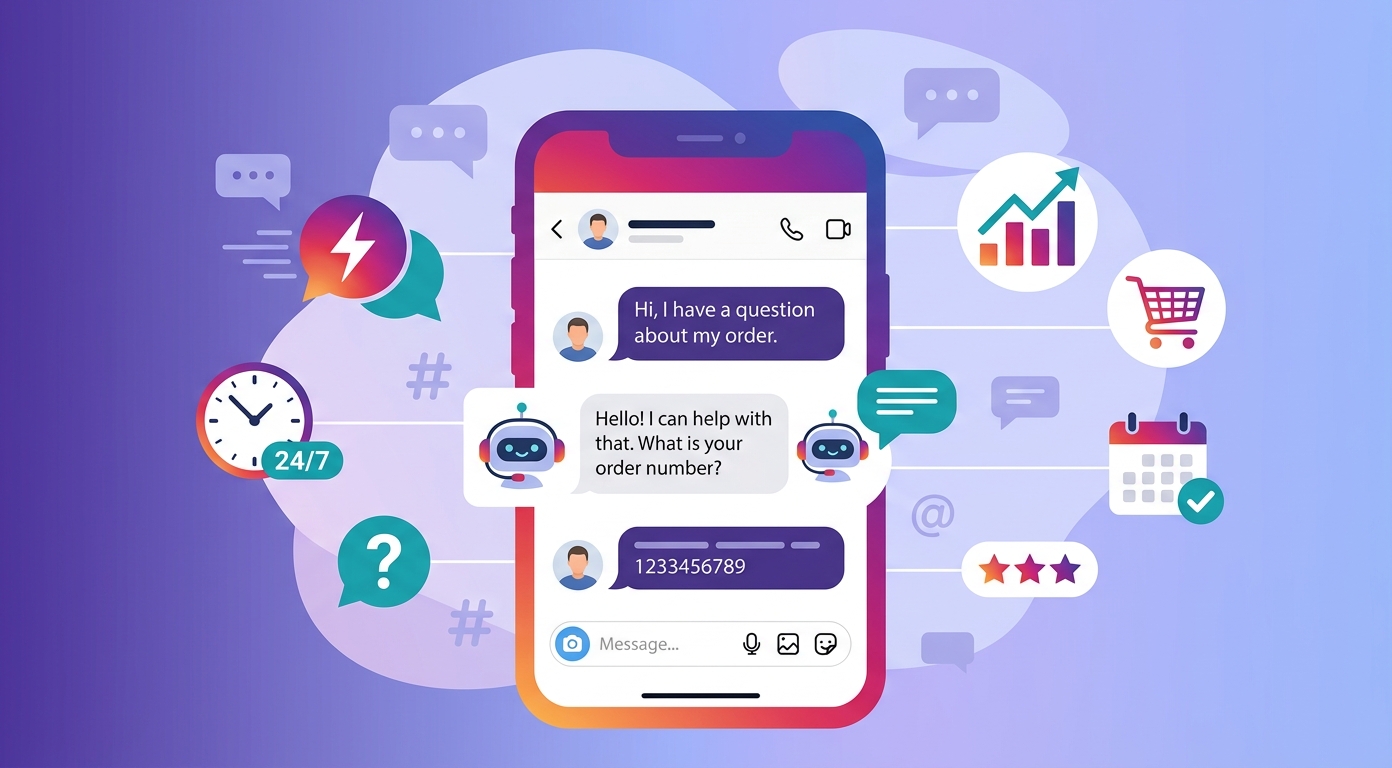
An Instagram chatbot is software that automatically replies to messages and comments on your Instagram profile, so your business can answer people on Instagram instantly at any hour.
This is a practical, no-jargon ultimate guide to Instagram chatbots: what they are, how they work on Instagram, their features and benefits, what they can do, how to set one up, and the platforms to use.
What is an Instagram chatbot?
An Instagram chatbot is an automated assistant that lives inside your Instagram inbox. It reads what a person sends and answers with the right message, with no agent involved.
Some bots on Instagram follow simple rules. Others use an AI chatbot model to understand plain language and respond in a natural, human way.
The goal is the same: handle routine Instagram messages automatically so your team can focus on the conversations that need a person.
Instagram today is one of the busiest places for customer questions, which is why so many businesses now automate the channel with a bot.
How does an Instagram chatbot work?
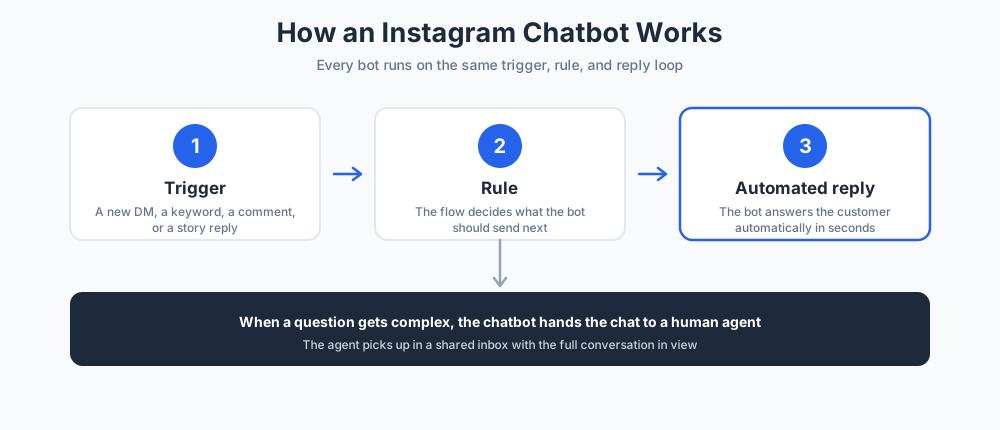
Instagram automation runs on a simple loop: a trigger, a rule, and a reply. Once you understand that loop, the rest of the tool makes sense.
The bot watches your account, waits for an event, then responds from the flows you built.
Connecting your account
A bot cannot send messages for you until it is linked to your Instagram profile. You connect it through the official Instagram API in a few clicks.
This is why account type matters: the API and most automation features are open only to Instagram business and creator profiles, not personal ones.
The link runs through Meta, the company behind Facebook. If your business already automates a Facebook page, adding Instagram is a quick integration rather than a fresh build.
Triggers and automation rules
A trigger is the event that starts a flow: a new DM, a keyword, a comment, or a tap on an Instagram story.
Each trigger is tied to a rule that decides what the bot sends next. Build enough rules and the automation can hold a full conversation.
Handing off to a human
No bot should trap a customer. A good flow always lets the person reach a human when the question gets complex.
The bot routes the chat to your inbox, where agents pick up with the full Instagram history in view.
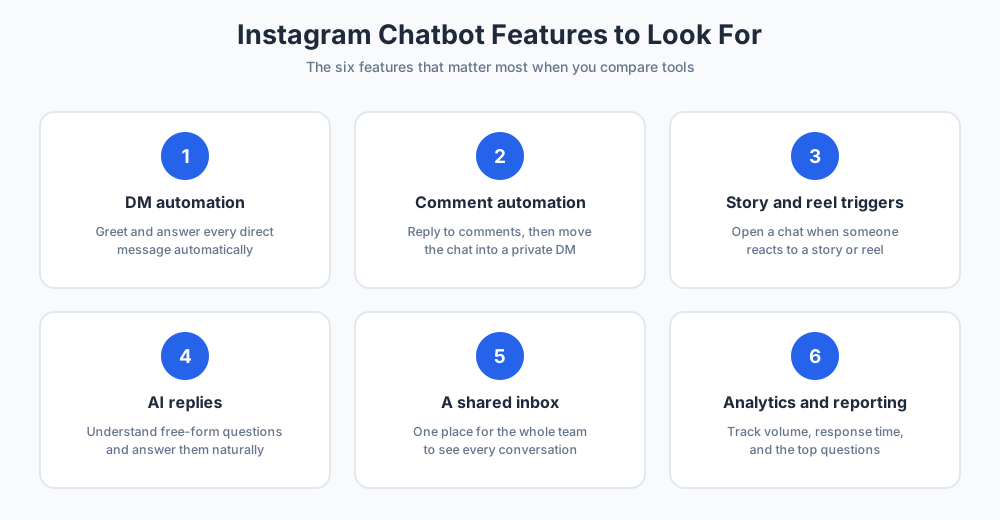
Instagram chatbot features to look for
The strongest features all serve one purpose: replying faster on Instagram without losing the personal feel of your business.
DM automation
DM automation is the core feature. The bot greets new direct messages, answers them, or collects details before an agent steps in.
Instagram DM automation works around the clock, so a question sent to your Instagram DMs at midnight still gets an instant answer.
You can also automate DMs that begin from an ad or a profile link, so every message path into your business is covered.
Comment automation
The bot can reply to comments on your Instagram posts and reels, then move the chat into a private message.
This comment-to-DM flow turns public comments into private conversations, and it works for both DMs and comments.
Active comments also lift your reach. When the bot answers comments fast, followers leave more comments and the comments section stays lively.
Story and reel triggers
When someone reacts to your Instagram stories or mentions your business, the bot can open a chat automatically.
It is a natural way to reward attention from followers with a fast, relevant reply.
AI replies and an AI agent
Rule-based bots are predictable, but an AI chatbot can understand free-form queries and answer from your knowledge base.
The best Instagram setup blends both, so simple intents follow rules and tricky ones get a smart, generated answer.
A shared inbox
A unified inbox puts every Instagram conversation in one place for your whole team.
Agents see what the bot already said, so no customer has to repeat themselves.
Analytics and reporting
Good Instagram tools report on message volume, response time, and the questions people ask most.
That data shows your business what to automate next and where the bot still falls short.
Benefits of using an Instagram chatbot
The benefits of an Instagram bot show up quickly, both for your customers and for your business.
Speed, lower cost, and stronger engagement are the three that matter most.
Instant replies, around the clock
People expect a fast answer on Instagram. A bot responds in seconds, day or night, with no queue.
That speed alone lifts satisfaction and keeps buyers from drifting to a competitor.
More leads from your profile
Every Instagram chat is a chance to capture a lead. The bot can ask for an email or a phone number while interest is high.
For many businesses, Instagram marketing turns into real pipeline only once a bot is in place to catch each lead.
Lower support costs
Automation handles the repetitive Instagram questions, so a small team covers far more conversations.
Because the bot answers first, your customer support team scales without hiring for every spike in messages.
Each shift opens with a shorter queue, which makes customer support calmer and faster for everyone.
Higher engagement with followers
A quick, helpful reply makes followers feel heard, and they come back to your Instagram more often.
Active conversations also signal to Instagram that your account and its followers are worth showing to more people.
A consistent brand voice
Every automated message uses the wording your business approved, so the experience never depends on which agent is online.
What can an Instagram chatbot do?
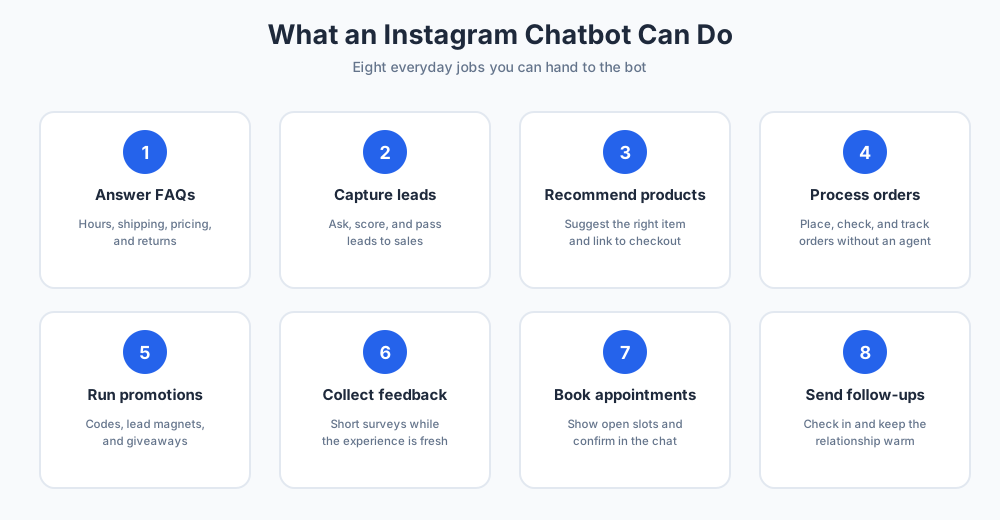
Once it is live, a well-built bot can take on a surprising range of jobs across support, sales, and marketing.
Here are eight of the most useful, and most businesses start with two or three.
Answer common questions
The bot handles the questions you hear every day on Instagram: opening hours, shipping, pricing, and returns.
Handing these off frees your agents for the conversations that genuinely need a human.
Capture and qualify leads
It can ask a few quick questions, score each lead, and pass strong prospects to your sales team.
This is where Instagram quietly becomes a sales channel that feeds your pipeline every day.
Recommend products
By asking about needs and budget, the bot can suggest the right product and link straight to checkout.
Done well, it feels like a helpful shop assistant who already knows the catalog and never loses patience.
Process and track orders
Customers can place an order, check status, or get tracking details without waiting for an agent.
That self-service cuts the where-is-my-order messages that would otherwise pile up in your Instagram queue.
Run promotions
The bot can deliver discount codes and lead magnets, or enter followers into a giveaway through a simple keyword.
Because the offer arrives inside a chat, redemption is simple and you can see which campaign drove each sale.
Collect feedback
A short automated survey after a purchase gathers honest feedback while the experience is still fresh.
Book appointments
Service businesses let the bot show open slots and confirm a booking inside the Instagram conversation.
Send follow-ups
The bot can check in after an order or a missed message, which keeps the relationship warm.
A gentle nudge at the right moment often recovers a sale that would otherwise have quietly slipped away.
How to set up an Instagram chatbot
Setting up a chatbot is quicker than most people expect. This five-step guide covers the whole process for your Instagram business, from profile to launch.
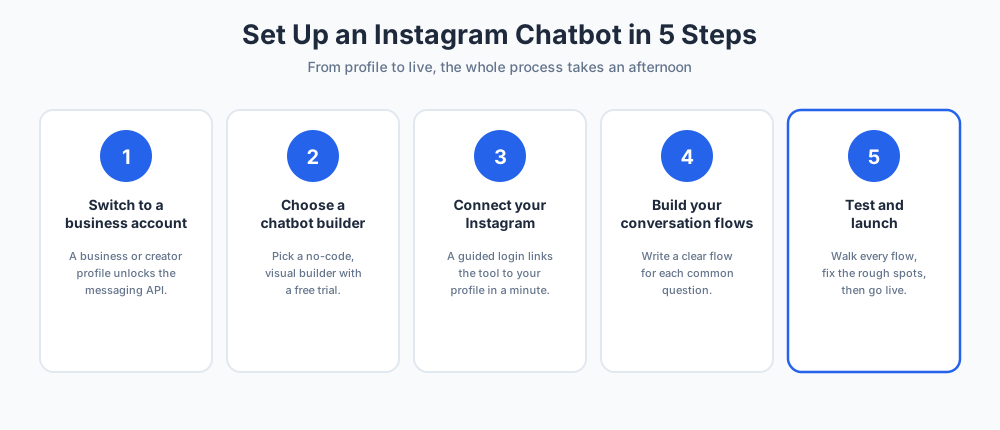
Step 1: Switch to a business account
Automation needs the right profile type. In settings, switch to an Instagram business account, or a creator account if you are an individual.
This unlocks the Instagram messaging API that every bot depends on. An Instagram business account also adds the contact buttons and insights your team will want.
Step 2: Choose a chatbot builder
Next, pick an Instagram chatbot builder, such as ManyChat, that fits your size and goals. A visual, drag-and-drop builder lets you design flows with no code.
Most tools offer a free trial, so you can test the fit on your own Instagram before you commit.
Step 3: Connect Instagram account to the builder
Link the tool to your profile. The Instagram integration is usually a guided login that takes a minute.
If you also run a Facebook page, the same tool often automates that page too, since Instagram and Facebook both sit inside Meta.
Step 4: Build your conversation flows
Map the questions you get most on Instagram and write a clear flow for each. Keep replies short and friendly.
Add a path to a human at every point so no customer ever feels stuck with the bot.
Step 5: Test and launch
Message your own profile and walk every chat flow as a customer would.
Fix anything that feels robotic, then turn the automation on for real traffic.
Best Instagram chatbot platforms
Many chatbot tools exist, from ManyChat to niche apps, and a few stand out for ease of use and depth.
Compare them on the builder, the inbox, AI quality, and pricing before you choose.
ManyChat
ManyChat is the best known name in this space. It is built for Instagram automation and offers a friendly visual builder.
ManyChat handles Instagram DMs, comment triggers, and story replies, and it connects to email and SMS as well.
For most small and mid-sized businesses, ManyChat is the default first choice, and its free tier makes it easy to try.
ManyChat also reuses flows across stories, posts, and ads, so one build serves many campaigns, which is why many growing teams standardize on it.
Chatfuel
Chatfuel is another established option, with strong Instagram and Facebook support and a focus on sales flows. Teams that outgrow ManyChat often look here.
Tidio
Tidio blends Instagram messaging with website live chat, so one team can cover both channels from a single inbox.
Chatim
Chatim brings live chat and chatbot automation together, with a free plan that suits small businesses just getting started.
How to choose the right Instagram chatbot
The right tool depends on your goals, not on the longest feature list.
If you mostly need customer support, prioritize the inbox and AI replies. If you sell, prioritize lead capture and product flows.
Integration is the quiet make-or-break factor. A clean integration with your CRM and email keeps every new contact flowing to the right place, so review the integration list before you buy.
Check that the builder is genuinely no-code and that pricing scales with your message volume.
Always run the trial with real Instagram queries before you decide, and compare two tools side by side.
Instagram chatbot best practices
A few habits separate a bot that helps from one that annoys.
Keep replies short and human
Write the way you would speak. Short, warm messages beat long, formal ones in an Instagram chat.
Always offer a human option
Make the path to a person obvious. Bots should assist your agents, never wall the customer off from them.
Respect Instagram's rules
Use the official API, automate only your own profile, and never spam. Breaking the rules risks your reach and your account.
Common Instagram chatbot mistakes to avoid
The most common mistake is automating everything and hiding the human option, which frustrates customers fast.
The second is a robotic tone. A bot can be efficient and still sound friendly and on-brand.
The third is launching and forgetting. Review your Instagram conversations each week and improve the weak flows.
The fourth is ignoring data. The questions in your inbox tell you exactly what to automate next.
Avoid these and your bot stays an asset rather than a source of complaints.
Final thoughts
An Instagram bot is no longer a nice-to-have for an active profile. It answers people in real time, captures every lead, and frees your team for the work that needs a human.
Start small with a few flows, pick a platform with a free trial, and grow the automation as you learn what your audience asks.
Even creators and influencers benefit from a simple bot that never misses a direct message. For any Instagram business, Instagram automation is now part of doing the job well.
Frequently Asked Questions
What is an Instagram chatbot?
An Instagram chatbot is software that automatically replies to messages and comments on your Instagram profile. It reads what a person sends and answers with the right message, with no agent involved. Some bots follow simple rules, while others use AI to understand plain language, so your business can respond instantly at any hour.
Is there an Instagram chat bot?
Yes. Instagram supports chatbots through its official messaging API. Instagram does not give you a built-in bot of its own, but many third-party platforms let you add one to a business or creator account. Once connected, the bot replies to DMs, comments, and story interactions automatically, around the clock.
What exactly is Instabot used for?
Instabot is a chatbot and conversational marketing platform used to automate conversations, qualify leads, and book meetings across websites and messaging channels. Like other Instagram chatbot tools, its purpose is to answer common questions instantly and capture leads without an agent. Compare it against options such as ManyChat based on the channels you use and your budget.
How do I enable AI on Instagram?
Instagram includes some built-in AI features in the app, which you can turn on or off in your settings. For an AI chatbot that answers your customers, you connect a third-party tool to your Instagram business account through the API. That tool, rather than Instagram itself, provides the AI replies and the conversation flows.
Do Instagram bots still exist?
Yes. Legitimate Instagram chatbots are very much active and fully supported through the official API. What Instagram has cracked down on is spam bots that fake likes and follows. Compliant automation that replies to your own DMs and comments is allowed and is used widely by businesses today.
How does an Instagram chatbot work?
An Instagram chatbot runs on a simple loop: a trigger, a rule, and a reply. A trigger is an event such as a new DM, a keyword, or a comment. Each trigger is tied to a rule that decides what the bot sends next. When a question gets complex, a good flow hands the chat to a human agent.
How do I set up an Instagram chatbot?
Setting up an Instagram chatbot takes five steps: switch to an Instagram business or creator account, choose a chatbot builder, connect your Instagram account to the builder, build your conversation flows, then test and launch. Most builders are no-code and visual, so the whole process can be done in an afternoon.
Do you need a business account for an Instagram chatbot?
Yes. Automation features and the messaging API are open only to Instagram business and creator accounts, not personal profiles. Switching is free and takes a moment in your settings. A business account also unlocks contact buttons and insights, which your team will want anyway.
What is the best Instagram chatbot platform?
There is no single best platform; the right one depends on your goals. ManyChat is the best known choice and a strong default for most small and mid-sized businesses. Chatfuel suits sales-focused teams, and tools like Tidio and Chatim combine Instagram messaging with website live chat. Run a free trial before deciding.
Can an Instagram chatbot reply to comments?
Yes. Comment automation is a core feature. The bot can reply to comments on your posts and reels, then move the conversation into a private DM. This comment-to-DM flow is one of the most popular ways to turn public interest into a private, trackable conversation.
Can a chatbot send Instagram DMs automatically?
Yes. DM automation is the main job of an Instagram chatbot. It greets new direct messages, answers them, or collects details before an agent steps in. It can also automate DMs that start from an ad or a profile link, so every message path into your business is covered.
Are Instagram chatbots allowed by Instagram?
Yes, as long as you use the official API and automate only your own account. Instagram permits compliant automation that helps you answer customers. What is not allowed is spam, fake engagement, or automating accounts you do not own. Breaking those rules can hurt your reach, so stick to approved tools.
How much does an Instagram chatbot cost?
Pricing varies by platform and is usually charged per month based on contacts or conversations. Several tools, including ManyChat and Chatim, offer a free plan or free trial that is enough to get started. Costs rise with volume and advanced features, so check current pricing on each vendor's own page.
Can an Instagram chatbot use AI?
Yes. Many Instagram chatbots now include an AI layer. A rule-based bot follows fixed flows, while an AI chatbot can understand free-form questions and answer from your knowledge base. The strongest setups blend both, so simple intents follow rules and harder questions get a smart, generated reply.
Related articles
More in Chatbots & AI → Facebook Messenger Chatbot: The 2026 Guide + 5 Platforms
How Messenger chatbots work now: comment-to-DM automation, click-to-Messenger ads, 5 platforms compared, and when a contact button is enough.
 Chatbot Templates: 26 Free, Ready-to-Use Flows (2026)
26 free chatbot templates organized by goal and industry, what a good template contains, and the five edits that turn a ready-made flow into your own bot.
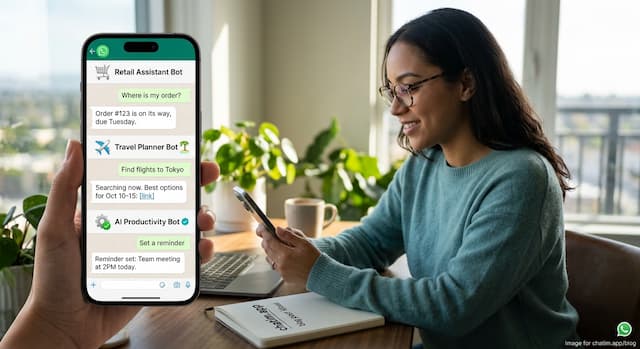 Best WhatsApp Chatbots in 2026: 7 Platforms Compared
7 WhatsApp chatbot platforms compared, with both bills modeled: subscriptions and Meta fees. Plus the free path if you only need a WhatsApp button.
 Best Chatbot Platforms in 2026: 10 Builders Compared
10 chatbot platforms compared by what their pricing actually meters, with free plans, AI features, and a pick for each use case