WhatsApp chatbot template
A WhatsApp chatbot template with ready flows for FAQs, lead capture, order questions and appointments. Built with Chatim, this template runs in your website chat and pairs with a WhatsApp contact button and wa.me links, so WhatsApp-first customers continue with your team in the app they already use - and a native WhatsApp Business API integration, where the bot replies inside WhatsApp, is coming soon.

How a Chatim bot supports the WhatsApp-first customer journey
WhatsApp is the default messaging app for billions of customers. A WhatsApp chatbot template lets a small team meet those customers halfway: the bot handles the conversation on your website and a contact button carries it into WhatsApp. Use this template as a starting point and tailor the flows, contact buttons and handoff rules to your business.
WhatsApp-friendly today, Business API coming soon
The Chatim chatbot template runs on your website and pairs with a WhatsApp contact button next to the widget, so visitors who prefer WhatsApp open a conversation with your business number in their own app in one tap. A native WhatsApp Business API integration, where the bot will reply inside WhatsApp itself, is coming soon.
Pre-built flows for the jobs WhatsApp does best
The template ships with ready conversation flows for the work WhatsApp-first customers actually expect: FAQs, lead capture, order questions, appointment booking and customer support, all running in your website chat. Mix and match the flows, change the questions and copy, and launch a tailored chatbot with a WhatsApp handoff in an afternoon.
Broadcast and proactive WhatsApp messages (coming soon)
Native WhatsApp broadcasts for product launches, shipping updates, appointment reminders and abandoned-cart nudges are planned as part of the upcoming WhatsApp Business API integration. Today the template captures opt-ins and contact details in the website chat and streams them to your outreach tools via webhooks, so your team can follow up on WhatsApp from your business number.
Shared team inbox with a WhatsApp handoff
Every website conversation lands in a shared Chatim inbox where multiple agents can pick up a chat, transfer it to a teammate and add internal notes. The chatbot handles routine messages on its own, hands the complex ones to a human with the full chat history attached, and customers who tap the WhatsApp contact button continue with your team in your WhatsApp Business app.
Click-to-chat and WhatsApp QR codes
Drop a WhatsApp contact button next to your website widget, a wa.me link in your bio and a WhatsApp QR code on store windows, flyers and packaging. Chatim's free WhatsApp link generator creates the links and QR codes in seconds, and customers reach your team on WhatsApp in one tap or one scan.
Multilingual conversations for WhatsApp-first customers
WhatsApp is the default messaging app in Latin America, Europe, the Middle East and Asia. The same chatbot template replies in English, Spanish, Portuguese, French, German, Arabic and more in your website chat, so a global, WhatsApp-first customer base reaches a fluent assistant before they ever tap the contact button.
CRM and e-commerce integrations
The Chatim WhatsApp chatbot template connects to HubSpot, Salesforce, Shopify, WooCommerce and your help desk via webhooks today, with native connectors and Zapier coming soon. Leads land in the right pipeline, Chatim's built-in CRM keeps every contact in one place and support handoffs carry the chat history end to end.
Analytics for the WhatsApp channel
Track chatbot conversations, response time, deflection rate, sales attributed to chat and customer satisfaction in one dashboard. See which pages, flows and WhatsApp contact-button placements actually drive conversations and revenue, and double down on the entry points that work.
Most businesses get WhatsApp wrong the same way. They turn on a WhatsApp Business number, post it on the website and watch the inbox melt down inside a week. A WhatsApp chatbot template fixes that. The Chatim bot picks up every website message in seconds, answers the repetitive questions on its own and hands the ones that need a person to a real agent with full chat history, so only the conversations that belong on WhatsApp reach your number through the contact button. Here is how one customer message flows through Chatim from the chat widget to a closed conversation.
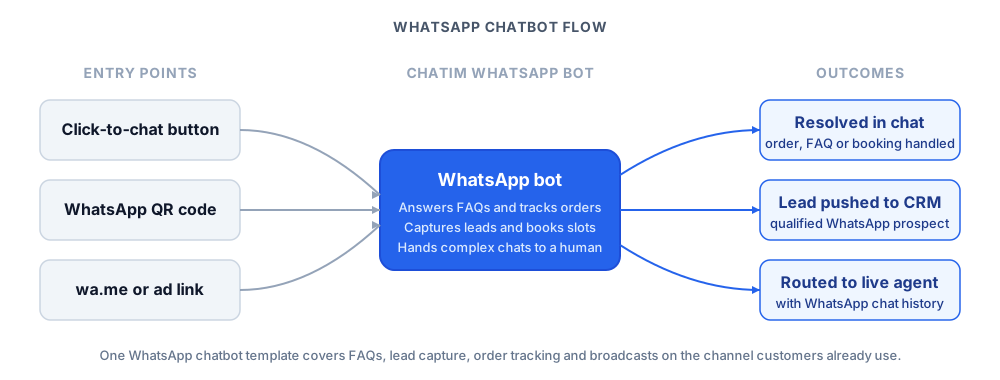
Behind that flow the WhatsApp chatbot template runs in your website chat today, and a native WhatsApp Business API integration is coming soon: once it ships, Chatim will handle the API connection, the verified business profile, the message templates and the opt-in records so the bot can reply inside WhatsApp itself. In the meantime, the WhatsApp contact button and the free WhatsApp link generator create the wa.me links and QR codes that connect visitors to your business number in one tap. Your team only edits the parts that are specific to the business: the welcome message, the FAQ answers and the handoff rules.
The shared inbox side matters too. Every website conversation the bot escalates lands in the Chatim team inbox, where multiple agents can pick up chats, transfer conversations and add internal notes, with Slack and email notifications keeping the team on top of new messages. The customer never sees the seam between the chatbot and the human, and conversations that move to WhatsApp through the contact button continue with your team in your own WhatsApp Business app.
Pair this WhatsApp chatbot template with the rest of your stack. The dedicated WhatsApp live chat product covers the channel side: the WhatsApp contact button, wa.me links and QR codes that connect visitors to your business number. The FAQ chatbot template and lead generation chatbot template are good companions when you want a deeper version of either flow in the same website chat. Browse the full set of Chatim chatbot templates for cross-industry flows you can run on your website, with WhatsApp and Messenger contact buttons alongside.
Frequently asked questions
Everything you need to know about Chatim
What is a WhatsApp chatbot template?
How is the WhatsApp template different from the Chatim WhatsApp live chat product?
Do I need WhatsApp Business API access to use the template?
Is the Chatim WhatsApp chatbot template free to use?
With a Chatim WhatsApp chatbot template you can turn the channel your customers already use into a steady stream of qualified leads and faster support, with an easy path from your website chat into WhatsApp conversations with your team. Start free and tailor the bot to your business, your audience and your team.