FAQ chatbot template
An FAQ chatbot template that answers common customer questions from your knowledge base 24/7. Built with Chatim, this bot runs on your website, with WhatsApp and Messenger contact buttons for customers who prefer those channels, ingests your existing help content and hands off to a live agent the moment a question goes beyond what the FAQ covers.

How a Chatim FAQ chatbot deflects routine questions
FAQ chatbots take the repetitive questions off your team and turn the help center into a real conversation. Use this template as a starting point and point it at the docs and help articles you already have.
Instant answers from your knowledge base
An FAQ chatbot reads the question, searches your help docs, product pages and policy library, and returns the answer in seconds. The same routine ticket your support team handles ten times a day gets answered around the clock without anyone touching a queue.
Build the bot from content you already have
Point the FAQ chatbot at your existing help center, FAQ page, knowledge base export or even a PDF policy doc. The template ingests that content and starts answering. No rewriting a hundred Q&A pairs by hand.
Conversational AI for the questions buyers actually ask
Customers do not phrase their question the way your docs are titled. The FAQ chatbot uses natural language understanding to match a question to the right answer even when the wording is loose, vague or covers two topics at once.
Clean handoff when the bot does not know
When confidence is low or the question is outside the scope of the FAQ, the chatbot routes the conversation to a live agent with the full message history attached. No customer ever gets stuck in an automated loop.
Multi-channel deployment
Run the FAQ chatbot on your website widget, with WhatsApp, Telegram and Messenger contact buttons for customers who prefer to message you in their own app. Every page gets the same bot, so the answers stay consistent everywhere on your site.
Multilingual support out of the box
Answer FAQs in English, Spanish, French and more so customers from any market get the same fast, accurate reply without your team scrambling for a translator or maintaining a dozen separate help centers.
Continuous improvement from real conversations
Every chat shows where the FAQ chatbot got it right and where it missed. Top unanswered questions surface automatically so you know exactly which help articles to add next. The bot keeps getting smarter without anyone retraining a model.
Analytics for support and product
Track deflection rate, top questions, time to answer and CSAT from one dashboard. Spot which parts of the product create the most confusion and which help articles actually resolve issues. Use the data to ship a better product, not just a better bot.
Every team eventually faces the same problem: the same handful of questions absorb most of the support inbox. Shipping policy, refund policy, hours, pricing tiers, integrations, where the download link is. An FAQ chatbot solves this by answering those questions instantly, without making the customer hunt through a help center or wait for a reply. Here is how one question flows through Chatim from a first message to a resolved chat.
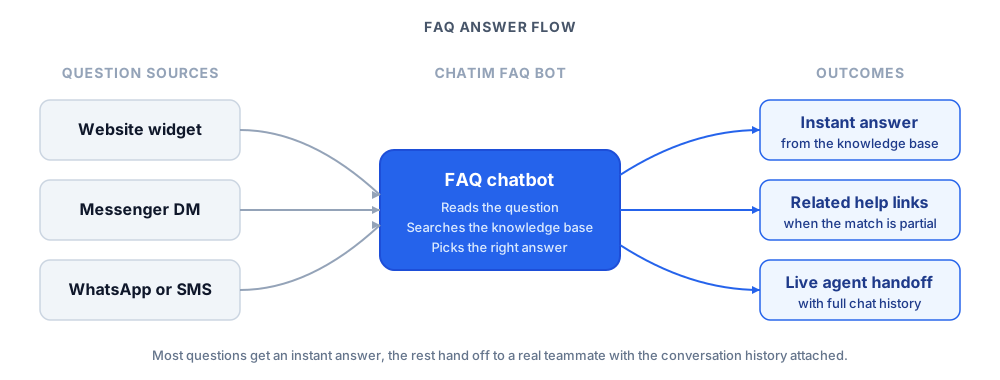
Behind that flow the chatbot ingests your help center, FAQ page, policy documents and product docs into a searchable knowledge base. Natural language understanding matches the intent of each incoming question to the right answer, and a confidence score decides whether the bot replies directly, surfaces related articles or escalates to a human. The same template handles "do you ship to Canada?" and "how do I cancel my subscription?" without anyone scripting branches by hand.
The integrations side matters too. Chatim builds the bot's knowledge base from the help centers and documentation platforms most teams already publish with (Intercom, Zendesk, Notion, custom CMS) so the FAQ chatbot reflects your latest docs. When the help center changes, refresh the knowledge base and the bot is updated too. Combine that with multilingual support and the FAQ template becomes the front door for customer service in every market you operate in.
Pair this template with the rest of your stack. Browse other Chatim chatbot templates to add lead capture, review collection or vertical flows, and see the customer service chatbot template for a deeper look at ticket deflection and escalation. For background reading, see our guides to customer service fundamentals and empathy in customer service so your bot and your team open every conversation with the right tone.
Frequently asked questions
Everything you need to know about Chatim
What is an FAQ chatbot?
How does an FAQ chatbot work?
How do I build an FAQ chatbot from my existing help docs?
Is the Chatim FAQ chatbot template free to use?
With a Chatim FAQ chatbot template you can deflect the routine questions, give every customer an instant answer and free your support team for the conversations that actually need a human. Start free and tailor the bot to your help center, your tone and the channels your customers actually use.