Professional Email Phrases for Every Situation
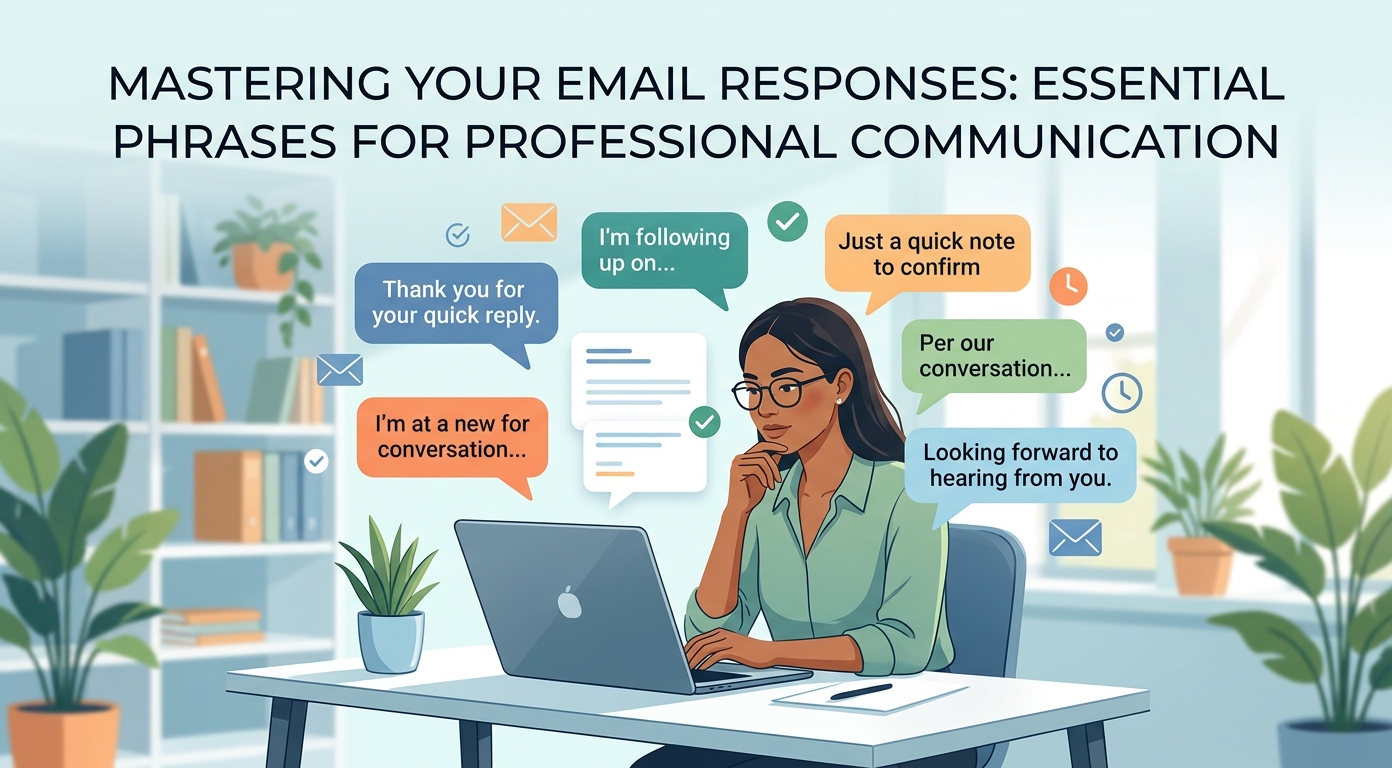
The right professional email phrases do quiet, powerful work. They set the tone, make your point clear, and gently steer the reader toward the response you want. The wrong ones leave a note vague, cold, or easy to ignore. This guide is a practical email toolkit of business email wording for every part of a message, from the greeting to the signature. Strong email phrasing is a core communication skill in any workplace, and it improves with a little practice.
Good writing is mostly a matter of reusable building blocks. Once you have a set of useful email phrases for greetings, requests, follow-ups, and closings, every email gets faster to write and easier to read. There are many types of email, from a quick internal note to a formal client message, yet the same building blocks help in each case. Copy the lines below, adapt them to your situation, and keep this page handy whenever you draft an important email. We will help you find wording that fits your voice.
Why the right email phrases matter
In a busy workplace, your reader skims. A clear, well-phrased email gets read and answered; a rambling one gets left for later. The wording you choose decides which one you send, so a little care here pays off every time.
Strong email phrases also protect tone. The same request can sound demanding or polite depending on a few words, and in professional communication that difference shapes how people respond to you. Reusable lines keep your business email consistent, courteous, and quick to write, which is exactly what effective emails need. The same skill carries over to academic writing and any setting where written English has to be clear and polite. Good communication skills make every message land, and a stock of common business email phrases gives you a reliable starting point for each one.
Email greetings and opening lines
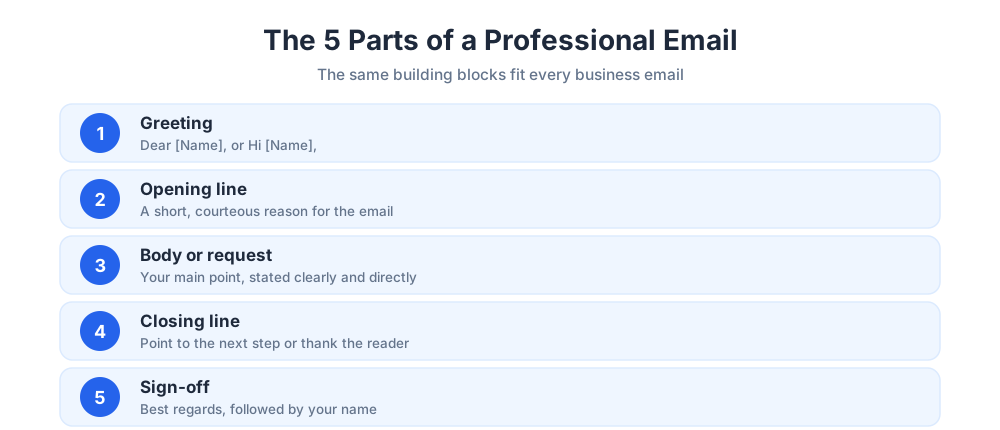
The start of your email sets the tone for everything that follows. A warm, correct greeting and a focused opening line tell the reader this note is worth their attention. The introduction of your email is the first thing anyone reads, so it deserves a moment of thought.
Professional greetings
Match the greeting to the relationship. For a formal first contact, use "Dear [Name],". For a familiar colleague, "Hi [Name]," or "Hello [Name]," reads as friendly and professional. When you do not have a name, "Hello," is safer than the dated "To whom it may concern". Good greetings are simple and never overthought, and they help the reader settle into your email quickly.
Opening lines
After the greeting, skip the long wind-up. Good email opening lines get to the point while staying courteous. Try "I hope this email finds you well," for a friendly email, "Thank you for getting back to me so quickly," to acknowledge a reply, or "I am writing to follow up on [topic]," when the opening needs a clear reason. A sharp opening respects the reader's time and helps them grasp your purpose at once.
Phrases for making a request
Most professional emails ask for something. The trick is to be direct and polite at once, so the request is easy to act on and never feels pushy. Clear wording here also makes it simple for the reader to help you.
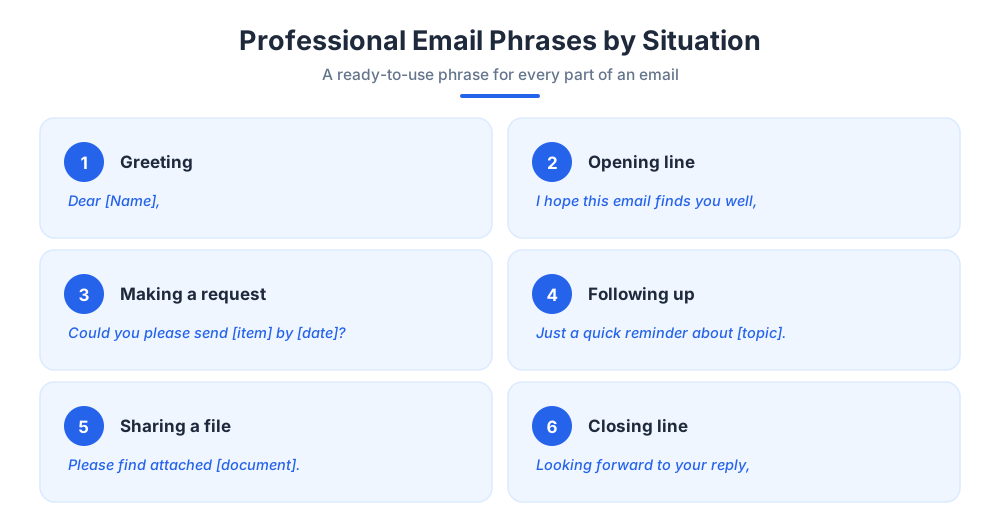
Helpful request lines include "Could you please send me [item] by [date]?", "I would appreciate it if you could review the attached document," and "When you have a moment, could you confirm [detail]?" To ask for more detail, "Could you provide further information on [topic]?" works well. For a faster reply, name the impact: "A prompt response would help us keep the project on track." These lines make a request clear without sounding like a demand, and they work for formal emails and friendly notes alike.
Follow-up and reminder phrases
When an email goes unanswered, a polite nudge keeps things moving. The goal is to be courteous, not pushy, and to make replying easy.
Friendly reminders
A friendly reminder works best when it is short and assumes good intent. Try "Just a quick reminder about [topic]," or "I wanted to gently follow up on my last email." A line like "Following up on the note I sent on [date], in case it slipped through," gives the reader an easy, blame-free way back in.
Chasing a reply
If a reply is genuinely overdue, stay professional. "I am checking in on [topic], as I have not heard back," is clear without being sharp. Offer help to keep the tone collaborative: "If there is anything you need from me to move this forward, I am happy to help." A good follow-up never makes the reader feel cornered, and the offer to help keeps the relationship warm.
Phrases for sharing information and attachments
Sometimes the email body simply delivers information. Clear phrasing helps the reader find what matters fast and helps them act on the information without extra questions.
To share a file, "Please find attached [document]," remains the cleanest option, and "I have attached [item] for your reference," is a natural alternative. When you point to an attachment or extra detail, say so plainly: "You will find the full breakdown in the attached file," or "For more detail, see the link below." If the reader may need to reach you, add your contact information clearly so no one has to hunt for it. Plain, specific wording here keeps your business communication easy to act on, and it ensures the information lands the first time. Group related information into short paragraphs so the reader can scan the message at a glance.
Email endings and signatures
How you end an email shapes the final impression. A clear final line plus a fitting signature keeps the note professional to the last word. Closing emails well is a small habit that quietly builds trust.
Closing lines
Strong closing lines point to the next step or thank the reader. Use "Looking forward to your reply," to invite a response, "Thank you for your time and help with this," to close warmly, or "Please let me know if you need anything else from me," to keep the door open. The right ending makes a professional email feel finished, not abrupt, and it helps the reader know what to do next.
Sign-offs
The sign-off should match the tone of the note. "Best regards," and "Kind regards," suit almost any professional email, while "Best," or "Thanks," works for a familiar colleague. Skip overly casual or dated options. A clean, consistent professional email sign reassures the reader and rounds the note off neatly.
Email phrases to avoid
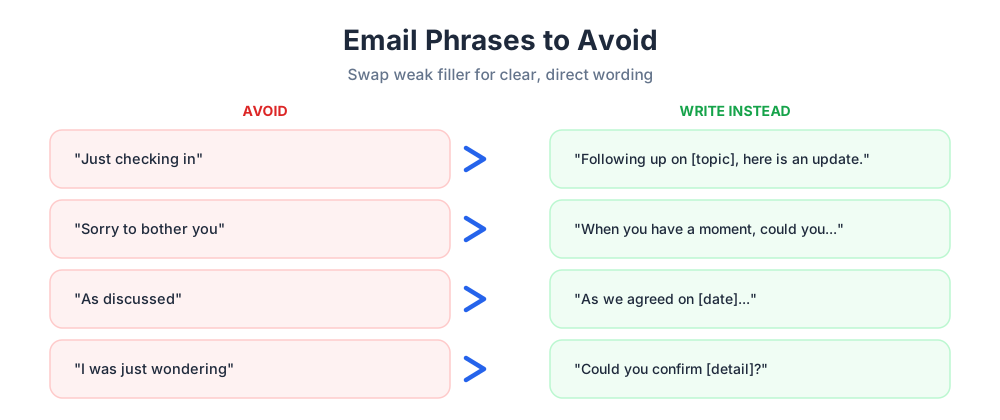
Some common phrases quietly weaken an email. Knowing the alternatives keeps your writing crisp. Below are common examples of weak wording and what to write instead.
Avoid filler that adds nothing, such as "Just checking in" with no real update, or "Sorry to bother you," which undercuts your own ask. Skip vague lines like "As discussed," when you can name what was discussed instead. Soft hedges ("I was just wondering if maybe...") bury the ask, so replace them with a direct request. Replacing weak fillers with clear, useful phrases is one of the simplest ways to strengthen any email and to help the reader respond with confidence.
Tips for writing professional emails
Beyond the phrases themselves, a few habits make every email land better. This advice applies whether you are writing to a client, a manager, or the office next door, and it holds for any business that runs on email.
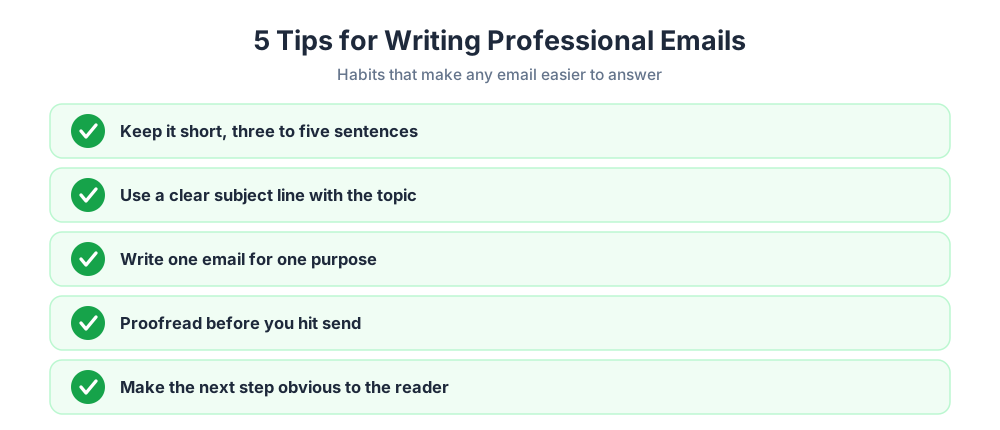
Keep it short: most professional emails are stronger at three to five sentences. Use one clear subject line that names the topic and any deadline. Write one email for one purpose rather than burying several asks in a single note. Proofread before you send, since a clean draft signals care. And read the email once from the reader's point of view; if the next step is not obvious, add a line that makes it so. Treat this guide as a set of templates and examples you can adapt rather than scripts to copy word for word. These templates speed up routine writing and still leave room for your own voice.
When email is not the fastest channel
Even the best professional email phrases cannot beat a real-time conversation for speed. When a customer needs an answer now, a back-and-forth email thread is slower than a quick chat, and the reader feels the delay.
Chatim adds a free live chat widget and chatbot to your website, so your team can answer questions in the moment instead of trading emails for days. Email still matters for records and detail, but pairing it with live chat means a customer never has to wait for a reply when a one-line answer would do. Use polished wording for considered emails, and live chat when speed is what the reader really wants. The best email is the one that reaches the reader at the right moment, and choosing the right channel is part of any good toolkit.
Put these professional email phrases to work
Clear, professional email phrases turn email writing from a chore into a quick, repeatable task. With reliable building blocks for greetings, requests, follow-ups, and closings, every email you send is easier to read and more likely to get a response.
Save the lines that fit your work, adapt them to your own voice, and use them consistently. Strong, considerate communication compounds: each well-phrased email builds a little more trust and keeps your projects moving. Keep practising, and clear writing soon becomes second nature.
Keep going with our guides to customer service email templates and thank-you messages.
Frequently Asked Questions
What are common email phrases?
Common professional email phrases fall into a few groups. Greetings such as 'Dear [Name],' or 'Hi [Name],'. Opening lines like 'I hope this email finds you well,' or 'Thank you for getting back to me.' Request phrases such as 'Could you please send me [item] by [date]?' Follow-up lines like 'Just a quick reminder about [topic].' And closings such as 'Looking forward to your reply,' followed by 'Best regards,'. This guide covers a useful phrase for every part of an email.
What are the 5 C's of email?
The 5 C's of email writing are commonly given as clear, concise, correct, courteous, and complete, though the exact wording varies between sources. Clear means the reader understands your point. Concise means no wasted words. Correct means accurate facts and clean spelling. Courteous means a polite, respectful tone. Complete means the reader has everything they need to act. Treat the 5 C's as a quick checklist before you hit send.
What is the 3 sentence rule for emails?
The 3 sentence rule is a guideline that says many professional emails can and should be kept to about three sentences: one for context, one for your main point or request, and one for the next step. It is not a strict law, but it pushes you to cut filler and respect the reader's time. Short, focused emails tend to get faster replies, so when a message starts to sprawl, the 3 sentence rule is a useful reminder to trim it.
How do you phrase a professional email?
Phrase a professional email in clear, courteous building blocks. Open with a correct greeting and a short opening line, state your purpose or request directly in the body, and close with a clear next step and a fitting sign-off. Keep the tone polite and the wording specific, avoid filler and vague hedges, and make the action you want obvious. Reusing reliable phrases for each part keeps every email consistent and quick to write.
How do you start a professional email?
Start a professional email with a greeting that matches the relationship: 'Dear [Name],' for a formal first contact, or 'Hi [Name],' for a familiar colleague. Follow it with a focused opening line that gives a reason for the message, such as 'I am writing to follow up on [topic],' or a brief note of thanks like 'Thank you for getting back to me.' Skip long wind-ups and get to the point quickly.
How do you end a professional email?
End a professional email with a clear closing line and a fitting sign-off. The closing line should point to the next step or thank the reader, for example 'Looking forward to your reply,' or 'Please let me know if you need anything else.' Then add a sign-off such as 'Best regards,' or 'Kind regards,' followed by your name. A clean ending leaves a professional final impression.
What is a good email opening line?
A good email opening line is short, courteous, and gives the reader a reason for the message. Friendly options include 'I hope this email finds you well,' and 'Thank you for getting back to me so quickly.' When you need a clear reason, try 'I am writing to follow up on [topic],' or 'I am reaching out about [topic].' Avoid long introductions; a sharp opening line respects the reader's time.
How do you politely ask for something in an email?
To ask politely, be direct and courteous at once. Phrases like 'Could you please send me [item] by [date]?' or 'I would appreciate it if you could review the attached document,' state the request clearly without sounding pushy. Naming a reason or impact helps too, such as 'A prompt response would help us keep the project on track.' One clear ask, politely phrased, is far more effective than a vague hint.
How do you write a polite follow-up email?
Write a polite follow-up by being courteous, brief, and easy to reply to. Reference the original email, for example 'Following up on the note I sent on [date], in case it slipped through.' Keep the tone blame-free and assume good intent. Offering help keeps it collaborative: 'If there is anything you need from me to move this forward, please let me know.' A good follow-up nudges without pressuring the reader.
What email phrases should you avoid?
Avoid filler phrases that weaken your message. 'Just checking in' with no real update wastes the reader's time. 'Sorry to bother you' undercuts your own request before you make it. Vague lines like 'As discussed,' should be replaced with the specific point you mean. And soft hedges such as 'I was just wondering if maybe' bury the ask. Replace weak fillers with clear, direct wording.
How do you make an email get a faster response?
To get a faster response, make the email easy to act on. Use a clear subject line that names the topic and any deadline. Keep the message short and focused on one purpose. State your request directly and make the next step obvious, ideally with a specific date. A polite, well-structured email that respects the reader's time is far more likely to get a quick reply than a long, vague one.
What is the best sign-off for a professional email?
There is no single best sign-off, but 'Best regards,' and 'Kind regards,' are safe, professional choices for almost any email. For a familiar colleague, 'Best,' or 'Thanks,' reads as friendly and still appropriate. Match the sign-off to the tone of the message, stay consistent, and avoid overly casual or dated options. The sign-off should feel like a natural, courteous close, not an afterthought.
How long should a professional email be?
Most professional emails are strongest when they are short, often three to five sentences. The reader skims, so a brief, focused message gets read and answered while a long one gets left for later. Keep one email to one purpose, cut filler, and if a message truly needs more detail, use clear structure and short paragraphs so the reader can still scan it quickly.
How do you sound professional and polite in an email?
Sounding professional and polite comes down to tone and structure. Use a proper greeting, a courteous opening line, and please and thank you where they fit naturally. Frame requests as questions rather than demands, acknowledge the reader's time, and avoid blunt or vague wording. Keep the email clear and well-organized, since a tidy message itself signals respect. Reusing tested, courteous phrases makes a polite, professional tone effortless to maintain.
Related articles
More in Customer service → SaaS Customer Support: The Stage-by-Stage Guide (2026)
How SaaS customer support actually works at each stage: the right stack from founder-led live chat to a full support operation, channels, and metrics.
 How to Reduce Customer Churn: 5 Levers in Payback Order
Reduce customer churn by pulling five levers in payback order: payment recovery, onboarding, support quality, pricing fit, and a 90-day win-back.
 10 FAQ Page Examples That Actually Help Customers (2026)
10 FAQ page examples from Shopify, Airbnb, Slack, Nike and more, with the exact pattern each gets right and a checklist to build your own FAQ page.
 12 Customer Service Email Templates for Every Scenario (2026)
12 customer service email templates for complaints, refunds, delays, bugs and saying no, plus the five-line skeleton that keeps them sounding human.