13 Best Marketing Automation Tools for 2026
Choosing the best marketing automation software is one of the highest-leverage decisions a growing team can make. The right platform turns slow, repetitive work into dependable workflows, so marketers spend less time on busywork and more time on strategy. This guide reviews the leading options available today and groups each one by the job it does best.
Marketing automation is no longer reserved for large companies. Affordable, easy-to-use marketing tools now put serious marketing automation within reach of small teams and solo marketers. The category has matured to the point where a one-person operation can run the same kind of campaigns a large department once needed. Whatever stage you are at, there is a tool on this list built for the way you work.
Below you will find all-in-one platforms, email-first tools, software for large teams, and products tuned for an online store. Each review covers who the platform suits, its standout automation capabilities, and how its pricing model tends to work, so you can build a shortlist that fits your budget and your marketing channels.
What Marketing Automation Software Does
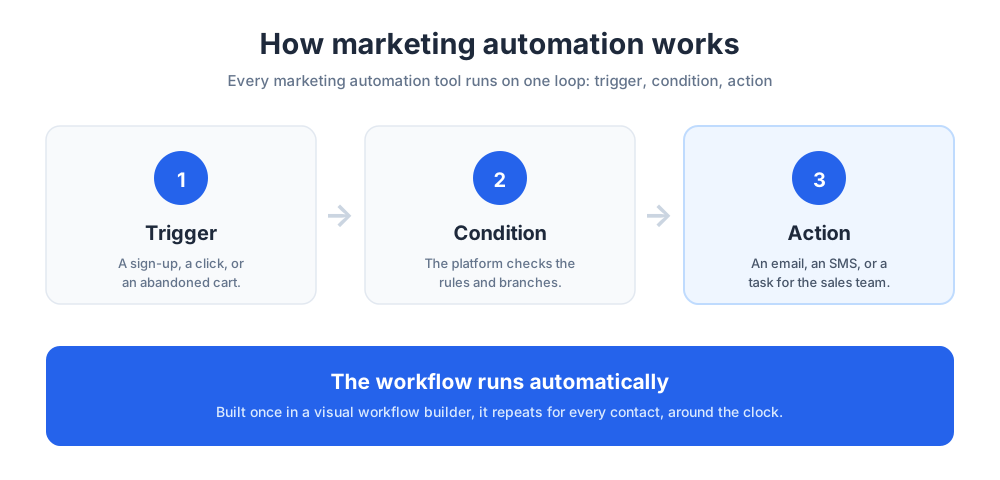
Marketing automation software is a category of software that runs marketing tasks automatically based on rules, triggers, and customer behavior. Instead of sending every email by hand or updating every record manually, you build a workflow once and the platform runs it for every contact who qualifies. The result is a set of campaigns that keep working long after you finish setting them up.
A typical marketing automation platform handles email marketing, lead nurturing, audience segmentation, and reporting from a single dashboard. Many products also cover SMS, mobile alerts, and ad retargeting, so a single platform can coordinate marketing campaigns across several channels. The breadth of these systems is what makes them so valuable to a busy team.
The core idea is simple. You define what should happen, when it should happen, and who it should happen to. The automation tool then watches for the trigger, such as a form submission or a product view, and runs the matching workflow without anyone lifting a finger. Every contact who meets the rule moves through the same sequence automatically.
This goes far beyond basic automation. Modern marketing automation software branches on behavior, waits for the right moment, and tests variations against each other. Where a simple email tool sends one message to a list, advanced automation tools build a path that adapts to each person and reacts in real time.
Because the software keeps a record of every interaction, it doubles as a light customer relationship management system. That shared data is what lets a platform personalize messages and route hot leads to the sales team at the right time. It also means your customer engagement improves as the system learns more about each contact.
Why Marketing Automation Matters
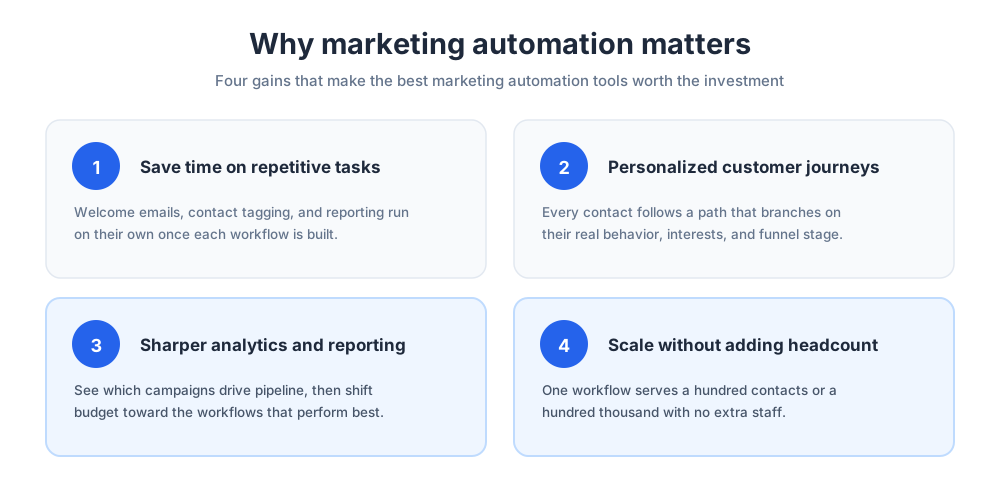
Marketing automation matters because it removes the ceiling on what a small team can deliver. The benefits show up quickly, and they compound as your contact list and campaign volume grow.
Saving Time on Repetitive Tasks
The first benefit every team notices is time. Automation takes over the repetitive tasks that quietly drain a working week: sending welcome emails, tagging contacts, scheduling social posts, and updating spreadsheets. None of that work is hard, but together it eats hours that could go to strategy.
When those jobs run automatically, marketers reclaim time for creative and strategic work. A welcome sequence built once keeps running for every new subscriber, so the time you invest up front pays back continuously. Over a quarter, the time saved by even a handful of workflows adds up to entire working days.
Personalization and Customer Journeys
Modern buyers expect relevant messages, not generic blasts. Marketing automation software makes personalization practical at scale by tailoring content to each contact's behavior, interests, and stage in the funnel.
Instead of one campaign for everyone, you design customer journeys that branch based on what people actually do. Someone who downloads a pricing guide can receive a different path than someone who only read a blog post, and both journeys run on their own. This kind of personalization lifts customer engagement because every message feels timely and relevant.
Well-built customer journeys also reduce wasted sends. Contacts who already converted stop receiving promotional email, and quiet contacts get a re-engagement path instead.
Reporting and Performance Insight
Good decisions need good data. Most marketing automation platforms include reporting and analytics that show open rates, click rates, conversions, and revenue attribution across every campaign.
Built-in analytics turn guesswork into evidence. You can see which workflows drive pipeline, which subject lines win, and where contacts drop off, then adjust campaigns with confidence rather than instinct. Strong analytics also make it easier to defend the marketing budget, because you can tie spend directly to revenue.
The best marketing tools present this data in dashboards a non-analyst can read at a glance. That accessibility matters: reporting only helps if the people running marketing campaigns actually see it and act on it.
Scaling Campaigns Without Adding Headcount
As a business grows, manual marketing breaks down. Automation lets companies scale campaigns without scaling headcount, because workflows handle thousands of contacts as easily as a handful.
That scalability is why both small teams and large enterprises invest in marketing automation. The same platform that nurtures your first hundred leads can support your hundred-thousandth without a redesign. You build the workflows once, and they keep performing as your audience multiplies.
How to Choose the Best Marketing Automation Tools
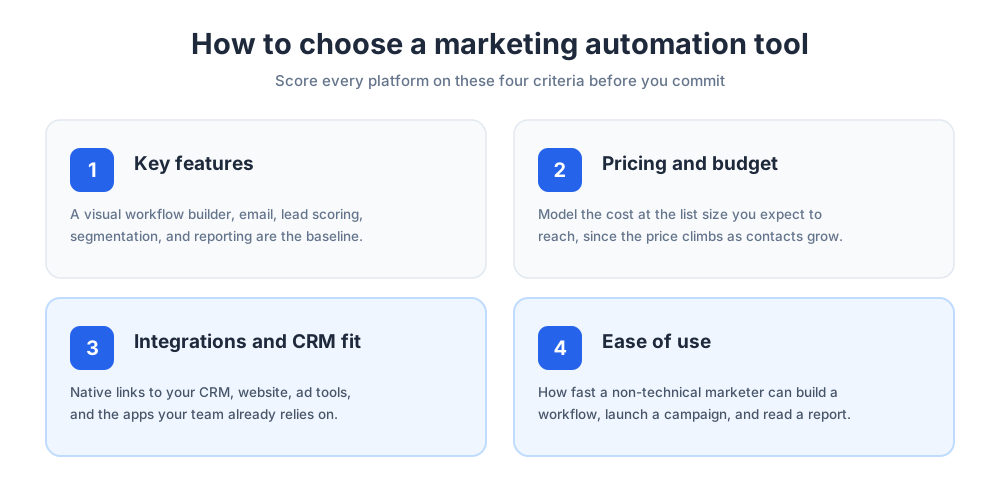
The best marketing automation tool for one company is the wrong fit for another. Before comparing logos, get clear on the criteria below so your shortlist reflects real needs rather than feature checklists.
Key Features to Look For
Start with the core capabilities that match your goals. A visual workflow builder, email marketing, lead scoring, audience segmentation, and reporting are the baseline. Teams that sell across channels should also weigh SMS, mobile messaging, and the ability to coordinate messages across more than one channel.
List the automation features you will actually use in the first ninety days. A tool packed with capabilities you will never touch is harder to learn and rarely worth the premium. It is better to master a focused set of workflows than to half-use a sprawling one.
Pricing and Budget
Pricing is where marketing automation tools differ most. Some platforms offer a genuine free tier, others price by the number of contacts, and enterprise software is usually quoted per seat or per feature bundle.
Watch how the cost scales. A plan that looks affordable at a thousand contacts can climb sharply as your list grows, so model the spend at the size you expect to reach this year. Transparent pricing pages make that math much easier, and a vendor that hides its rates is often a sign of friction later.
Budget-conscious small teams often start on a free or low-cost plan, while enterprises accept higher rates in exchange for advanced reporting and dedicated support.
Integrations and CRM Fit
A marketing automation platform should connect cleanly to the rest of your stack. Check for native integrations with your CRM, your website, your store software, and the apps your team already relies on. Look specifically at how it connects to advertising tools, since Google Ads and similar networks are central to many campaigns.
CRM integration is especially important. When marketing and the sales team share one record for each contact, lead handoffs are smooth and no opportunity slips through the cracks. If a tool cannot sync with your CRM, expect manual cleanup later. Modern CRMs are designed to exchange data both ways, so the marketing system should respect that.
Think about retargeting as well. A platform that can push audiences to Google Ads lets you follow up with paid placements when an email goes unopened, which keeps a campaign working across both owned and paid channels.
Ease of Use and Onboarding
Even the most powerful software fails if no one adopts it. Judge each platform on how quickly a non-technical marketer can build a workflow, launch a campaign, and read a report.
Look at onboarding support, template libraries, and documentation. Tools with strong onboarding shorten the time between signing up and seeing results, which protects the return on your investment. A free trial is the best way to test this before you commit any budget.
Best Marketing Automation Tools Compared
The table below summarizes the thirteen tools reviewed in this guide. Use it as a quick shortlist, then read the full review of any product that fits your business size and marketing channels. The reviews that follow add the detail the table cannot show.
| Tool | Best for | Standout strength | Pricing approach |
|---|---|---|---|
| HubSpot Marketing Hub | All-in-one growth teams | CRM-native automation | Free tier, scales with contacts |
| ActiveCampaign | SMBs that want deep automation | Powerful automation builder | Tiered, priced by contacts |
| Brevo | Budget-conscious teams | Email and SMS in one | Free tier, priced by sends |
| Mailchimp | Small businesses new to automation | Ease of use | Free tier, scales with contacts |
| GetResponse | Marketers building funnels | Conversion funnels and webinars | Tiered, priced by list size |
| Marketo Engage | Enterprise B2B teams | Advanced reporting | Quote-based enterprise pricing |
| Salesforce Marketing Cloud | Salesforce customers | CRM and marketing automation | Quote-based enterprise pricing |
| Ortto | Data-led marketing teams | Customer data and journeys | Tiered, priced by contacts |
| Klaviyo | Online stores | Store-data segmentation | Free tier, priced by profiles |
| Omnisend | Shopify and WooCommerce sellers | Pre-built store workflows | Free tier, priced by contacts |
| Drip | Direct-to-consumer brands | Behavior-based online retail automation | Tiered, priced by contacts |
| Customer.io | Product and lifecycle teams | Cross-channel messaging | Tiered, priced by profiles |
| Zapier | Connecting your whole stack | App automation across thousands of apps | Free tier, priced by tasks |
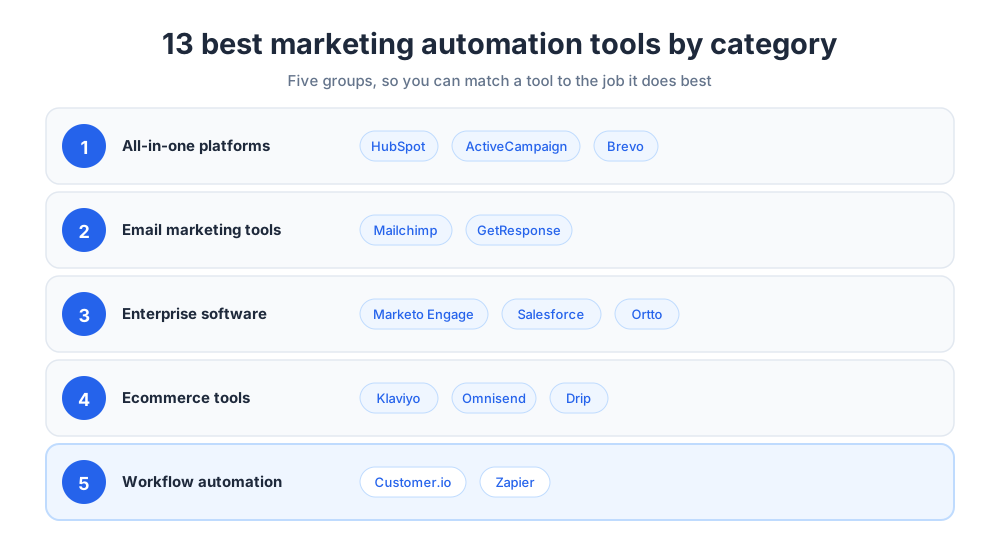
All-in-One Marketing Automation Platforms
All-in-one tools combine email, automation, a CRM, landing pages, and analytics in a single product. They suit teams that want one login, one dataset, and one bill instead of stitching several tools together. For most growing companies, this category is the natural starting point.
The advantage of an all-in-one platform is consistency. Because every channel reads from the same contact records, your messaging stays coordinated without any manual syncing. The three products below are the strongest options in this group.
HubSpot Marketing Hub
HubSpot Marketing Hub is one of the best-known platforms on the market, and the company helped popularize the inbound marketing approach. HubSpot pairs a visual workflow builder with email marketing, landing pages, forms, and reporting, all sitting on top of the free HubSpot CRM.
Because the HubSpot Marketing Hub shares one database with HubSpot's sales and service products, contact data stays consistent across teams. HubSpot workflows can update deal stages, notify the sales team, and score leads without exporting a single file. HubSpot is, in effect, a CRM platform with marketing layered on top, which is why HubSpot appeals to companies that want both functions in one place. The analytics inside HubSpot tie every campaign back to revenue, so the value of the marketing automation software is easy to prove.
HubSpot offers a free tier that is genuinely useful for small businesses, and the cost of the marketing automation software scales as your contact list grows. The trade-off is that advanced HubSpot tiers carry premium pricing, so model the spend before you commit. For a wider view of this category, see our guide to marketing automation platforms. HubSpot also offers a large academy and partner network, so a team rarely has to learn HubSpot alone.
ActiveCampaign
ActiveCampaign is marketing automation software built around automation first. Its workflow builder is among the most flexible of any platform in this guide, letting you chain triggers, conditions, and actions into detailed customer journeys without code.
ActiveCampaign blends email marketing, a sales CRM, text messaging, and predictive features such as send-time and content suggestions. That mix makes ActiveCampaign a strong choice for SMBs that have outgrown a basic email tool but do not want enterprise complexity. In practice, ActiveCampaign behaves like a CRM with marketing automation built in, so sales teams and marketers work from the same contact timeline.
ActiveCampaign uses tiered pricing based on contacts and feature level. ActiveCampaign sits in the mid-range of the market, offering deep automation at a rate most growing businesses can absorb. The deeper feature tiers add lead scoring and reporting analytics that rival far pricier platforms.
One reason ActiveCampaign earns loyal users is the depth of its automation library. ActiveCampaign ships pre-built recipes for onboarding, abandoned carts, and re-engagement, so a new account can launch real campaigns on day one. ActiveCampaign also keeps its sales CRM tightly linked to marketing, which is why ActiveCampaign suits teams that want one tool for both. For many growing companies, ActiveCampaign is the platform that finally aligns sales and marketing.
Brevo
Brevo, formerly Sendinblue, is a practical all-in-one platform with a strong focus on value. It combines email marketing, SMS, transactional messaging, and marketing automation workflows in one affordable package.
Brevo prices many plans by the number of emails sent rather than the number of contacts stored, which keeps costs predictable for businesses with large lists but modest send volume. A free tier lets small teams test the automation features before paying. Brevo also includes a lightweight CRM, so it works as a CRM with marketing automation attached for teams that do not need a dedicated sales tool.
For companies that want capable marketing automation software without enterprise pricing, Brevo is one of the best-value options available today. Its automation workflows cover the essentials cleanly, and the platform keeps adding capability without raising the entry cost.
Email Marketing Automation Tools
Some teams do not need a full platform. They need excellent email marketing with automation attached. The tools below started as email marketing software and grew automation around that strength, so email remains the thing they do best.
Both options here are popular email marketing tools that smaller companies reach for first. They keep the learning curve gentle while still offering enough automation to grow into.
Mailchimp
Mailchimp is one of the most recognizable email marketing tools, and for many small businesses it is the first automation platform they ever use. It is known for ease of use, a friendly editor, and a generous free tier that makes it easy to start.
Over the years Mailchimp has evolved from a simple email tool into a broader marketing platform with audience segmentation, behavior-based automation, landing pages, and reporting. Owned by Intuit, it now connects to a wide range of business and online retail apps. That breadth means Mailchimp can handle a surprising amount of marketing for a tool people still think of as just email.
Mailchimp pricing scales with your audience size and the features you unlock. It is a comfortable starting point for teams new to automation, though heavy users sometimes graduate to a tool with a deeper workflow builder. Our explainer on what Mailchimp does covers the platform in more detail.
Mailchimp also leans on design. Its templates and content tools help non-designers produce campaigns that look polished, which is part of why the brand stays a default choice for newer teams. For many users, Mailchimp is less a stepping stone and more a long-term home.
GetResponse
GetResponse is an email marketing platform that has expanded into a capable all-round tool. Alongside email campaigns and automation, it offers landing pages, signup forms, conversion funnels, and even webinar hosting.
Its conversion funnel feature is a useful differentiator. You can map a complete path from an ad to a landing page to an email sequence to a sale inside one tool, which appeals to marketers who think in funnels rather than single campaigns. The webinar feature is rare among email-first platforms and makes GetResponse a natural fit for course creators and consultants.
GetResponse uses tiered pricing based on list size, with higher tiers unlocking advanced automation and webinar capacity. It is a solid mid-market option for teams that want marketing automation and lead generation features together.
GetResponse also includes paid-ad and SMS add-ons, so a small team can run an entire campaign without leaving the platform. That consolidation is the main reason marketers pick it over a pure email tool.
Enterprise Marketing Automation Software
Large organizations have different demands: complex approval flows, advanced reporting, account-based marketing, and tight governance. The software below is built for that scale, and the pricing reflects it.
These tools reward teams that have dedicated operations staff to run them. In return, they offer depth that lighter products simply cannot match.
Marketo Engage
Marketo Engage, part of Adobe, is a long-standing leader in marketing automation for large organizations. It is renowned for advanced reporting, sophisticated handling of leads, and account-based marketing features that suit large B2B teams.
Marketo handles complex, multi-stage campaigns across many marketing channels and integrates with the wider Adobe Experience Cloud. Its depth is a genuine strength for enterprises, though it asks more of the teams who run it. Qualifying leads at scale, attributing revenue, and orchestrating long sales cycles are all areas where Marketo excels.
Pricing is quote-based and aimed at the largest accounts. Marketo rewards organizations that have the resources to use its full capability and can struggle to justify its cost for smaller teams.
Because Marketo sits inside Adobe's ecosystem, it pairs naturally with analytics, content, and advertising products from the same vendor. For a company already standardized on Adobe, that fit is a strong argument in its favor.
Marketing Cloud Account Engagement
The Salesforce ecosystem includes a dedicated marketing automation product. For B2B teams, Marketing Cloud Account Engagement, formerly known as Pardot, delivers lead scoring, lead nurturing, and ROI reporting tied directly to the Salesforce CRM.
The standout advantage is unity. When your CRM and marketing automation live in the same ecosystem, the sales team and marketers share one source of truth, and campaign performance maps cleanly to pipeline and revenue. Account Engagement makes qualifying leads a shared process rather than a handoff.
Salesforce uses quote-based enterprise pricing. It is the natural choice for companies already invested in the Salesforce ecosystem, and less compelling for teams that are not. The value grows with every other Salesforce product a company already runs.
Implementation is rarely quick, so most companies bring in a partner to configure Account Engagement properly. Once it is set up, though, the link between marketing activity and closed revenue is as tight as any platform on this list.
Ortto
Ortto blends a customer data platform with marketing automation and reporting. It pulls behavioral and profile data into one place, then lets you act on it with a visual journey builder.
Ortto supports email, SMS, and mobile messaging, and its dashboards make it easy to connect campaigns to outcomes. The data-first design appeals to marketing teams that want segmentation and reporting to feel native rather than bolted on. For data-led teams, Ortto turns raw customer data into customer engagement without a separate analytics tool.
Ortto uses tiered pricing based on contacts and feature level, sitting between mid-market tools and the largest suites. It is a strong fit for data-led teams that have outgrown a basic email tool.
Ecommerce Marketing Automation Tools
An online store needs ecommerce automation tuned to carts, orders, and product catalogs. The store-focused platforms below connect to Shopify, WooCommerce, and other commerce systems, so campaigns can react to real shopping behavior.
What sets this group apart is data depth. These ecommerce tools read order history and product views, then build workflows around them, which is why they outperform general-purpose software for online retail. An ecommerce platform that ignores purchase data leaves revenue on the table.
Klaviyo
Klaviyo is one of the best ecommerce automation tools for online retail. It is built around store data, so segments and campaigns can react to purchase history, browsing behavior, and predicted customer value.
Klaviyo combines email marketing and SMS marketing with deep ecommerce integrations, and its Shopify connection is among the strongest in the market. Pre-built workflows cover abandoned carts, post-purchase follow-ups, and win-back campaigns. Because every workflow can read order data, the campaigns feel personal without manual effort.
Klaviyo offers a free tier for small stores and prices paid plans by the number of profiles and messages. For sellers on Shopify and WooCommerce, it is a category leader, and its reporting ties revenue back to specific workflows clearly.
Klaviyo also keeps adding predictive features, such as estimated lifetime value and next-order date. Those signals let an online store target its best buyers with offers that match where each shopper is in their cycle.
Omnisend
Omnisend is a commerce-focused platform that brings email, SMS, and push notifications into a single automation tool. It is designed for WooCommerce stores and other commerce platforms that want results without a long setup.
Its strength is speed. Pre-built workflows for welcome, cart recovery, and order follow-up can be live in minutes, and the templates are tuned to drive sales rather than just opens. For a small online store, that head start removes most of the friction of getting automation running.
Omnisend has a free tier and prices paid plans by contacts and channels used. As a multi-channel marketing platform, it is a budget-friendly pick for smaller stores that want email, SMS marketing, and push working together.
Drip
Drip positions itself as a CRM platform for online retail with marketing automation built in. It focuses on behavior-based campaigns that respond to what shoppers browse, buy, and abandon.
Drip's segmentation and automation are aimed squarely at direct-to-consumer brands that want personalized email marketing without enterprise overhead. It integrates with major commerce platforms and supports SMS alongside email, so a brand can reach shoppers wherever they pay attention.
Drip uses tiered pricing based on the number of contacts. It suits growing ecommerce brands that have outgrown a basic email tool and want analytics and automation tuned to revenue.
Messaging and Workflow Automation Apps
The last group is not made of classic marketing software. These automation apps connect channels and tools so the rest of your stack works as one system. They are the glue that holds a multi-tool setup together.
If your tools do not talk to each other natively, the two products below close that gap. Both turn isolated systems into coordinated workflows.
Customer.io
Customer.io is a messaging automation platform for lifecycle and product marketing. It sends email, SMS, push notifications, and in-app messages based on real-time behavior data.
Because it is built for event-driven messaging, Customer.io is popular with product-led companies that want to trigger campaigns from in-app actions. Its workflow builder is flexible, and it gives technical teams fine control over data and timing. Precision is the point: every message fires from something the user actually did.
Customer.io uses tiered pricing based on profiles and message volume. It is best for teams whose customer engagement depends on behavior rather than scheduled sends.
Customer.io rewards teams with developer support, since its data model and APIs are deep. For those teams, it offers a level of precision that most automation tools cannot reach.
Zapier
Zapier is not a marketing automation platform in itself, but it is the connective tissue many stacks depend on. It links thousands of apps so an action in one tool can trigger an action in another.
With Zapier, a new form submission can create a CRM record, add a contact to an email campaign, and post a message to your team channel, all without code. It fills the gaps between tools that lack native integrations. Zapier can even sync audiences into Google Ads, so a sign-up in one app updates an audience in another.
Zapier has a free tier and prices paid plans by the number of automated tasks. For teams running several tools, it is one of the most valuable automation apps available, turning separate products into one workflow.
Zapier scales with the complexity of your stack. A simple two-step automation costs little, while a deep multi-step workflow that touches many systems can replace a custom integration project entirely. That flexibility is why Zapier appears in so many marketing stacks.
CRM and Marketing Automation Platforms
Integrating CRM and marketing automation is essential for businesses that want sales and marketing aligned. When both functions share one record for each contact, leads move from first touch to closed deal without manual handoffs, and sales reps always see the latest marketing activity. This alignment is one of the biggest reasons teams adopt automation in the first place.
Tools like HubSpot and ActiveCampaign offer CRM integration as a core feature, and each works as a CRM with marketing automation built in. Most modern CRMs are designed to exchange data with marketing software both ways, so the two systems stay in sync automatically. That sync gives sales and marketing a unified view of customer data.
That shared data is what makes campaigns smarter. The best marketing automation software uses CRM history to score leads, personalize messages, and route hot prospects to the sales team at the right moment. Modern CRMs store that history automatically. To go deeper on the underlying system, read our guide to what a CRM is.
If your current automation tool cannot sync with a CRM, treat that as a serious gap. Strong customer relationships depend on every team seeing the same information, a theme explored in our overview of customer service. Good service starts with everyone working from the same record.
Marketing Automation for Small Businesses and Enterprises
The right tool depends heavily on the size of your business. Small teams and large enterprises use marketing automation differently, and the best platform respects that gap. Buying the wrong size of tool is one of the most common and most costly mistakes.
Smaller companies and SMBs usually want fast setup, a gentle learning curve, and pricing that starts low. Tools like Mailchimp, Brevo, and Omnisend let a small team launch campaigns quickly and grow into deeper automation over time. For these teams, time to first result matters more than raw feature depth.
Small business marketing automation has improved so much that an SMB can now run nurture campaigns, lead scoring, and reporting that once needed a dedicated department. The gap between what a small team and a large team can achieve has narrowed sharply, and marketing automation is now a realistic investment at almost any budget.
Medium businesses often need a deeper workflow builder and tighter CRM integration as their teams specialize. ActiveCampaign, HubSpot, GetResponse, and Ortto serve this middle market well, balancing capability with manageable pricing. At this stage, the sales team usually grows, and the marketing platform has to keep handoffs clean.
Enterprises prioritize advanced reporting, governance, and account-based marketing across many marketing channels. Large-scale tools such as Marketo Engage and the Salesforce ecosystem are designed for that scale, and their pricing reflects it. Big teams also weigh security, permissions, and audit trails that smaller teams rarely think about.
The lesson is to buy for where your business is heading, not only where it is today. A tool that fits both your current size and your next stage saves a painful migration later. Re-platforming mid-growth is disruptive, so a little foresight here pays off for years.
Marketing Automation Features Explained
Automation platforms share a common vocabulary. Understanding the core features below makes it far easier to compare products and read their pricing pages. Once these terms are clear, every product page becomes easier to evaluate.
Workflow Builders
The workflow builder is the heart of any automation tool. It is the visual canvas where you set a trigger, add conditions, and define the actions that follow. Most of the capabilities you will use day to day live inside this one screen.
Good workflow builders let non-technical marketers map detailed customer journeys with branching paths. The quality of this builder is often the clearest difference between a basic email tool and a capable automation platform. A strong builder also makes workflows easy to revise as your campaigns evolve.
Lead Management and Scoring
Tools for managing leads capture, organize, and qualify the contacts your campaigns generate. Lead scoring assigns points based on behavior and profile data so the hottest prospects rise to the top.
When qualifying leads is automated, the sales team spends its time on contacts who are ready to buy. That focus is one of the clearest returns marketing automation delivers, and it ties directly into lead generation efforts. Scoring also keeps sales and marketing honest about what a qualified contact actually looks like.
Email, SMS, and Push Notifications
Email marketing remains the backbone of most automation, but modern marketing automation software coordinates several channels. SMS reaches contacts on their phones, push notifications re-engage app and website visitors, and posts to social media platforms keep a brand visible. Used together, these channels lift customer engagement well beyond what email alone delivers.
The ability to coordinate channel automation means the same workflow can choose the best channel for each message. A reminder might go out by email, then follow up by text only for contacts who did not respond, all handled by one campaign.
Time-sensitive nudges work best as a quick alert, while email carries the detail.
Reporting and Marketing Analytics
Reporting and analytics close the loop. Dashboards show how campaigns perform, while attribution links activity to revenue so you can prove what works.
Predictive analytics, available in tools like ActiveCampaign and Marketo, goes further by forecasting send times, content fit, and the likelihood a contact will convert. Strong reporting and analytics turn a marketing automation platform from a sending tool into a decision engine.
The Future of Marketing Automation
The next phase of this category is being shaped by artificial intelligence and richer customer data. AI already drafts copy, recommends segments, and predicts the best time to send, and those capabilities are spreading across every platform in this guide. What was once a premium add-on is quickly becoming a standard expectation.
For enterprises in 2026, the trend is consolidation. Teams want fewer tools that share one dataset, so marketing automation, CRM, and reporting increasingly live under one roof rather than in separate systems. Fewer moving parts means cleaner data and less time lost to integration work.
Smaller teams feel a parallel shift. As AI lowers the skill needed to build sophisticated campaigns, the gap between what an SMB and an enterprise can produce keeps shrinking, and that levelling is one of the most important changes ahead.
At the same time, automation is getting more conversational. Chat-based agents and live messaging now sit alongside email and ads, letting brands automate real-time customer engagement instead of only scheduled campaigns. Pairing a marketing automation platform with live chat is a practical way to capture and qualify leads as they arrive, a tactic covered in our guide to lead generation through live chat.
Privacy is reshaping the field too. With third-party tracking in decline, the marketing tools that win will be the ones that help brands collect and act on first-party data responsibly, turning consented information into relevant campaigns.
Whatever platform you choose, the goal stays the same. The best marketing automation software gives your team time back, makes every campaign more relevant, and turns scattered marketing channels into one coordinated system that grows with your business. Start with the job you most need solved, shortlist two or three products, and test them with your own data before you commit.
Frequently Asked Questions
Which is the best marketing automation tool?
There is no single best marketing automation tool, only the best fit for your team. HubSpot Marketing Hub is a strong all-in-one choice, ActiveCampaign offers deep automation at a mid-market price, and Mailchimp suits small teams getting started. For large organizations, Marketo Engage and the Salesforce ecosystem lead, while Klaviyo is a category leader for ecommerce. Match the tool to your business size, budget, and the marketing channels you use most.
What are the top 5 automation tools?
A common shortlist of marketing automation tools is HubSpot, ActiveCampaign, Mailchimp, Brevo, and the connector Zapier. HubSpot suits teams that want a CRM included, ActiveCampaign favors flexible workflows, Mailchimp is the easiest place to start, Brevo is strong value for email and SMS, and Zapier links the rest of your apps together. Treat this as a starting point for your own comparison rather than a fixed ranking.
What are automation tools in marketing?
Automation tools in marketing are software platforms that run marketing tasks automatically based on rules, triggers, and customer behavior. Instead of sending every email or updating every record by hand, you build a workflow once and the tool runs it for every contact who qualifies. They typically handle email, lead nurturing, audience segmentation, and reporting from one dashboard, and many also coordinate SMS and other channels.
What is the most successful marketing tool?
Email remains the most consistently successful marketing channel, which is why email-driven marketing automation is the highest-impact tool for most teams. Among full platforms, HubSpot is one of the most widely adopted because it pairs automation with a built-in CRM. The most successful tool for your business, though, is the one your team will actually use every day, so ease of use matters as much as raw capability.
What is marketing automation software?
Marketing automation software is a category of tools that runs marketing work automatically. You define a trigger, the conditions that follow, and the actions to take, and the platform handles the rest for every qualifying contact. It coordinates email, lead nurturing, segmentation, and reporting, so a small team can run campaigns that once needed a much larger department.
How much do marketing automation tools cost?
Pricing varies widely. Several tools offer a genuine free tier for small lists, mid-market platforms charge by the number of contacts or by send volume, and enterprise software is usually quote-based. Costs can climb as your contact list grows, so model the expected spend at the list size you plan to reach this year and confirm current figures on each vendor's own pricing page before you commit.
What is the best marketing automation tool for small businesses?
Small businesses usually want fast setup, a gentle learning curve, and low entry pricing. Mailchimp, Brevo, and Omnisend all fit that profile and let a small team launch campaigns quickly. As needs grow, ActiveCampaign and HubSpot offer a deeper workflow builder without enterprise complexity.
Do I need a CRM with marketing automation?
A CRM is highly recommended. When your marketing automation platform and CRM share one record for each contact, sales and marketing stay aligned and no lead is lost in a handoff. Some tools, such as HubSpot and ActiveCampaign, include a CRM, so you get both functions in one place. If you already use a CRM, choose a platform that integrates with it cleanly.
What features should marketing automation tools have?
Look for a visual workflow builder, email automation, lead scoring, audience segmentation, and clear reporting as the baseline. Teams that sell across channels should also weigh SMS and mobile messaging. Strong integrations with your CRM, website, and ad platforms matter too, since a tool that cannot connect to your stack creates manual work later.
Can marketing automation tools handle SMS and push notifications?
Yes. Many modern platforms coordinate several channels from one workflow. Tools like Brevo, ActiveCampaign, Klaviyo, Omnisend, and Customer.io support text messaging alongside email, and several also send push notifications to re-engage app and website visitors. This lets a single campaign choose the best channel for each message.
What is the best marketing automation tool for ecommerce?
Ecommerce teams are best served by tools built around store data. Klaviyo is a category leader thanks to its deep Shopify integration and revenue-focused segmentation, Omnisend offers fast pre-built workflows for online stores, and Drip focuses on behavior-based automation for direct-to-consumer brands. All three connect to common commerce platforms.
Is marketing automation worth it for a small team?
For most small teams, yes. Automation removes repetitive work, keeps campaigns consistent, and lets a small team run nurture sequences and reporting that once needed dedicated staff. Start on a free or low-cost plan, automate one or two high-value workflows first, and expand as you see results.
How do I get started with marketing automation?
Start small. Pick one high-value workflow, such as a welcome sequence or an abandoned-cart reminder, and build it well before adding more. Choose a tool that matches your current size and your next stage, use a free trial to test the workflow builder, and review your results regularly so each new automation builds on what already works.
What is the difference between marketing automation and email marketing?
Email marketing is the practice of sending campaigns to a list, while marketing automation is the broader system that triggers messages based on behavior and runs them across several channels. Many tools began as email platforms and grew automation around that strength, so the line blurs, but automation adds branching workflows, lead scoring, and multi-channel coordination that simple email sending does not.
Related articles
More in Tools & productivity →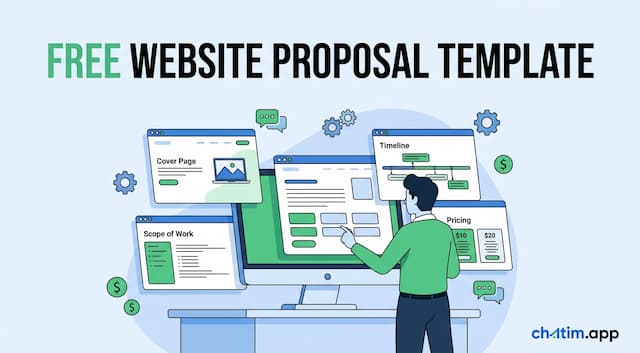 Website Proposal Template: 8 Sections That Win (2026)
A free website proposal template with all 8 sections copy-paste ready, plus the walkthrough: scoping, three-tier pricing, follow-up, and the expiry date.
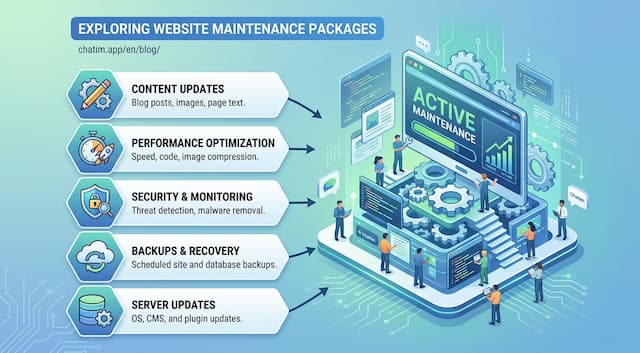 Website Maintenance Packages: What to Include & Charge (2026)
What goes into a website maintenance package, how providers price three tiers, the full maintenance checklist, and the recurring line items clients notice.
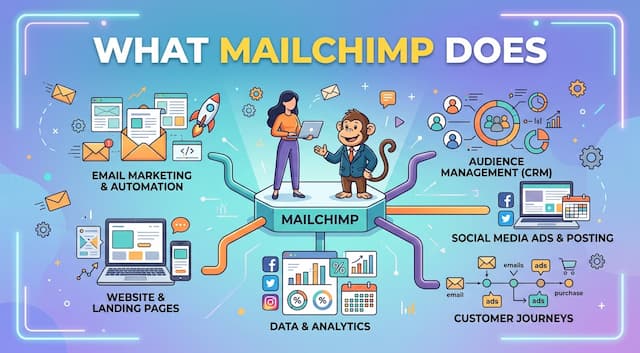 What Is Mailchimp? A Complete Guide to What It Does
Mailchimp is a leading email marketing platform. Learn what it is, what it does, its features and plans, and top alternatives.
 20 Best Email Tracking Software Tools to Use in 2026
20 email tracking tools compared: Mailtrack, HubSpot, Mixmax, Mailchimp, ZeroBounce. Pricing, free tiers, Gmail and Outlook picks for sales teams.