HelpScout Alternatives & WordPress Plugin Guide (2026)

HelpScout is a popular customer service platform, but it isn't the only option, and it doesn't fit every team. This 2026 guide covers the key features of HelpScout, its pricing plans, the official HelpScout WordPress plugin (also called Help Scout Beacon) for adding HelpScout to a WordPress website, and 19 HelpScout alternatives you can switch to if HelpScout's pricing, features, or integrations don't match what you need.
Whether you're choosing your first helpdesk software, comparing customer support tools for an e-commerce store, or installing the free Help Scout plugin for WordPress, this article gives you the information to decide.
What is HelpScout?
HelpScout is a customer service and helpdesk platform built for small to medium-sized businesses. It centres on a shared inbox for email support, paired with a live chat widget (Help Scout Beacon), a knowledge base, and reporting. It's known for its clean interface and "human, helpful" approach to support, in contrast with bigger ticketing systems that can feel clunky.
HelpScout works for teams looking to offer email support, a live chat box, and self-service options without the complexity of larger platforms. The HelpScout application has solid integrations, including a free WordPress plugin and a WooCommerce add-on.
Key features of HelpScout
Email management
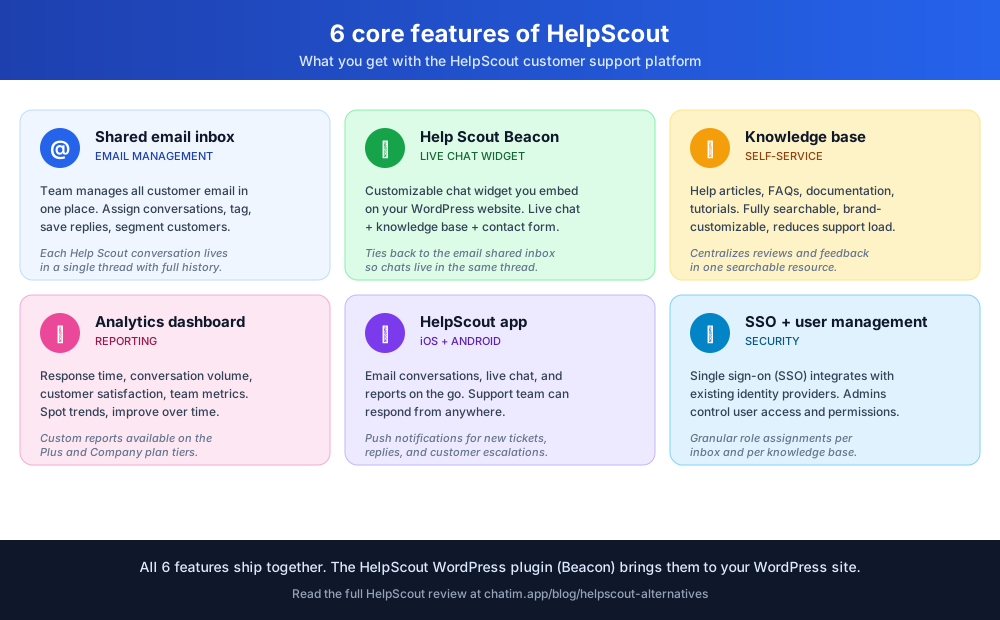
HelpScout's core is a shared inbox where teams manage customer email in one place. You can assign conversations, categorize tickets, save replies for common queries, and tag customers for segmentation. Each help scout conversation lives in a single thread with full history, which keeps customer information consistent across the team.
HelpScout Chat
HelpScout's live chat is delivered through Help Scout Beacon, a customizable chat widget you embed on your website. The chat ties back to the email shared inbox, so all customer interactions live in one thread regardless of channel.
Knowledge base
HelpScout includes a self-service knowledge base for help articles, FAQ entries, documentation, and tutorials. The knowledge base is fully searchable and brand-customizable. It reduces support load by letting customers find answers without contacting your team and keeps reviews and feedback central in one resource.
Reporting and analytics
HelpScout's analytics dashboard tracks response time, conversation volume, customer satisfaction, and team performance. The data lets you spot trends and improve your support process over time.
HelpScout app and login
The HelpScout mobile app (iOS and Android) gives the team access to email conversations, live chat, and reports on the go. Login supports single sign-on (SSO), so admins can manage user access through existing identity providers.
HelpScout pricing plans
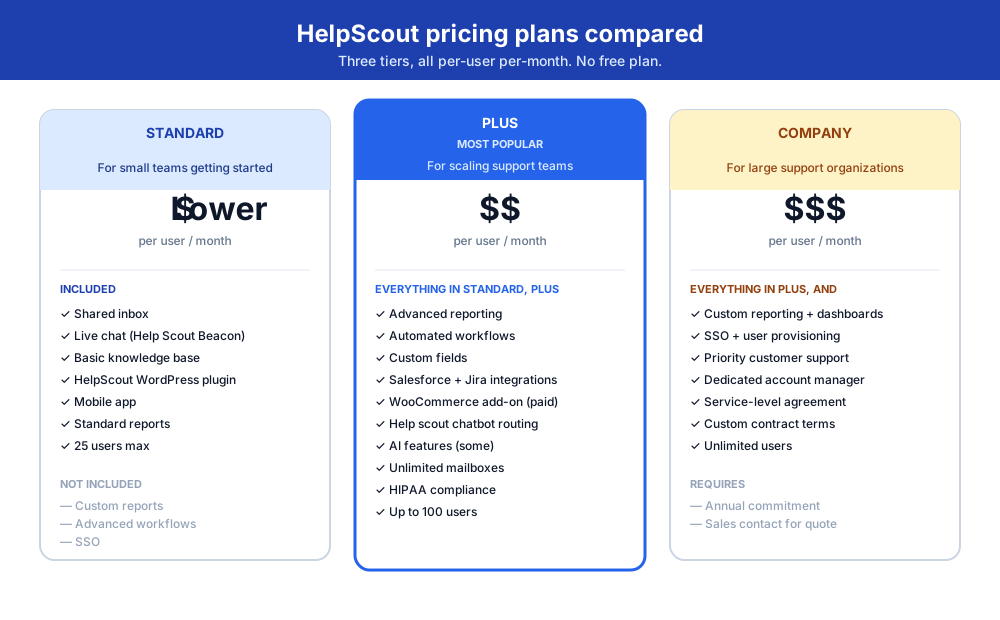
HelpScout doesn't offer a free plan, but its three paid tiers are competitive for the feature set:
- Standard — shared inbox, live chat, basic knowledge base. For small teams just getting started.
- Plus — adds advanced reporting, automated workflows, and additional integrations. For teams scaling support.
- Company — custom reporting, priority support, dedicated account management. For larger organizations.
Pricing is per-user per-month. Compare the per-seat cost against the volume of inbound support you handle; for very small teams, free alternatives like Tawk.to or low-cost options like Chatim can be more economical.
HelpScout chat and chatbot features
HelpScout's chatbot functionality, delivered via Help Scout Beacon, can route incoming questions, suggest knowledge-base articles, and create new support tickets when a customer needs a human. Chatbot capabilities scale with the plan tier, so the most advanced automation is reserved for Plus and Company subscriptions.
HelpScout WordPress plugin and integration
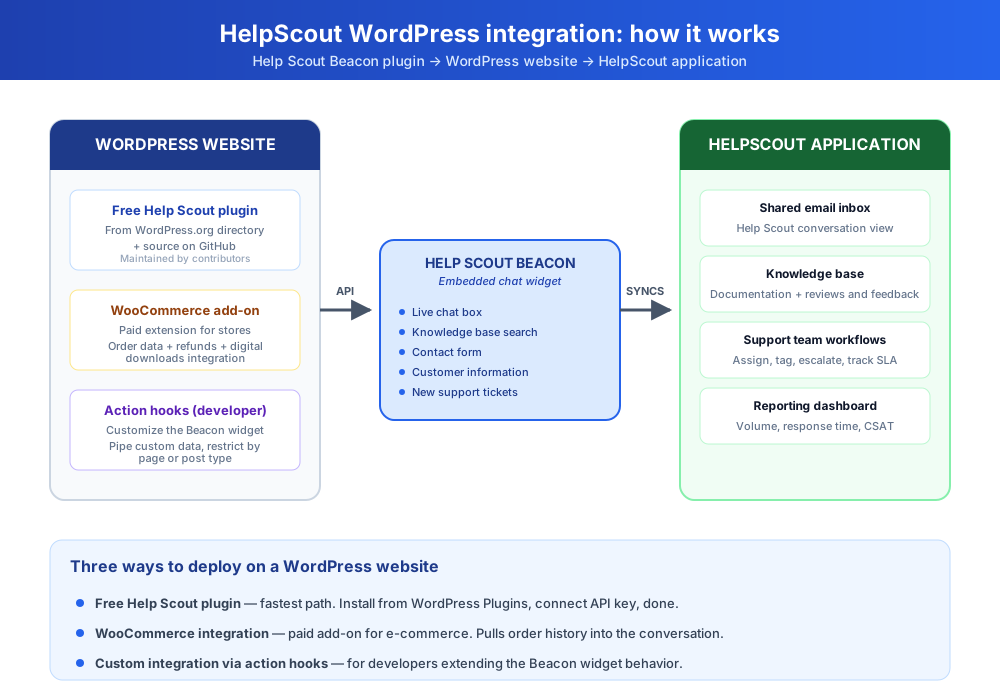
If you run a WordPress website, the HelpScout WordPress integration is the fastest way to add HelpScout's chat, contact form, and knowledge base to your site. There are two paths: the free Help Scout plugin from the WordPress.org plugin directory, and a paid WooCommerce add-on for e-commerce stores.
Help Scout Beacon WordPress plugin
The free Help Scout plugin (sometimes called the Help Scout Desk plugin) is available from the WordPress.org plugin directory and on GitHub. It embeds the Help Scout Beacon chat widget on your WordPress website with a few clicks, no code required. Setup steps:
- Install the plugin from WordPress Plugins directory and activate it
- Connect your Help Scout application via API key
- Customize the Beacon widget appearance, position, and target pages
- Optionally, restrict the widget to specific WordPress page types (posts, products, support forum, etc.)
The plugin is open source and maintained by community contributors on GitHub. It's a solid free Help Scout plugin for teams that want a basic embed without the WooCommerce add-on. Documentation is available both in the WordPress plugin readme and on Help Scout's official support documentation site.
HelpScout for WooCommerce and Shopify
For e-commerce stores, the paid WooCommerce add-on gives Help Scout agents direct access to a customer's order history, refund status, and digital downloads integration data inside the Help Scout conversation view. New support tickets from a WooCommerce order link the customer information automatically, so agents see the full purchase context without context-switching to a separate dashboard.
HelpScout also offers a separate Shopify integration. With it, Shopify store owners can manage customer inquiries directly from the HelpScout dashboard, with order data pulled in via webhooks and action hooks. Both integrations support live chat, email, and self-service knowledge base from one shared inbox.
If you want to extend the WordPress integration further, HelpScout exposes WordPress action hooks that lets developers customize the Beacon widget behavior or pipe additional data into the Help Scout application from custom WordPress plugins.
HelpScout pros and cons
Like any customer support software, HelpScout has clear strengths and a few real weaknesses:
- Pros: intuitive interface, strong email management, robust live chat via Beacon, extensive analytics, deep WordPress and Shopify integration, mobile app for on-the-go support, scalable pricing tiers.
- Cons: no free plan, per-user pricing adds up fast for larger teams, chatbot features are limited compared to dedicated platforms like Intercom or Tidio, customisation requires developer help (action hooks, custom hooks), and the free WordPress plugin only covers a subset of the full HelpScout feature set.
19 HelpScout alternatives compared
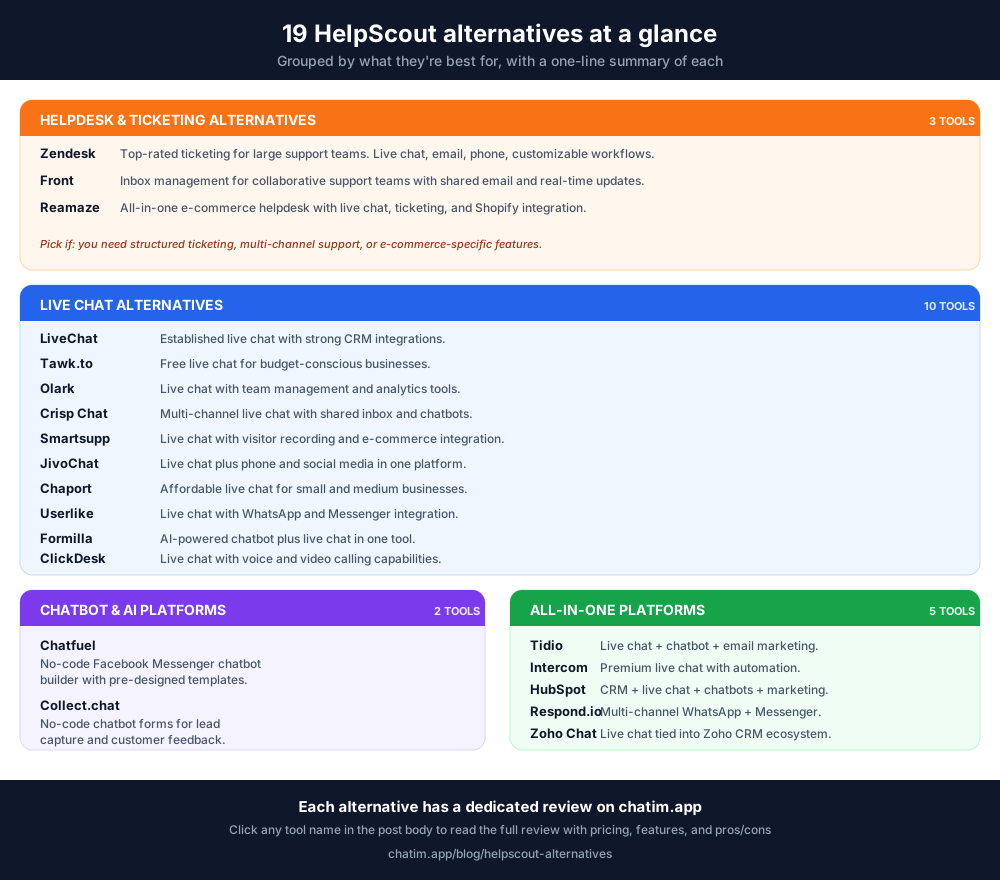
HelpScout is solid, but if its pricing, feature set, or integrations don't fit, here are 19 alternatives grouped by what they're best for. Each alternative has a dedicated review with full pricing, features, pros, and cons.
Helpdesk and ticketing alternatives
For teams that need ticketing, multi-channel support, and structured workflows.
- Zendesk — top-rated ticketing platform for large support teams, with live chat, email, phone, and customizable workflows. Zendesk review.
- Front — inbox management built for collaborative support teams, with shared email and real-time updates. Front review.
- Reamaze — all-in-one e-commerce helpdesk with live chat, ticketing, and Shopify integration. Reamaze review.
Live chat alternatives
For teams that want real-time conversation as the primary support channel.
- LiveChat — established live chat with strong CRM integrations. LiveChat review.
- Tawk.to — free live chat for budget-conscious businesses. Tawk.to review.
- Olark — live chat with team management and analytics tools. Olark review.
- Crisp Chat — multi-channel live chat with shared inbox and chatbots. Crisp chat review.
- Smartsupp — live chat with visitor recording and e-commerce integration. Smartsupp review.
- JivoChat — live chat plus phone and social media in one. JivoChat review.
- Chaport — affordable live chat for small and medium businesses. Chaport review.
- Userlike — chat with WhatsApp and Messenger integration. Userlike review.
- Formilla — AI-powered chatbot plus live chat. Formilla review.
- ClickDesk — live chat with voice and video calling. ClickDesk review.
Chatbot and AI platforms
For teams whose primary need is automation, lead capture, or Messenger-first interactions.
- Chatfuel — no-code Facebook Messenger chatbot builder. Chatfuel review.
- Collect.chat — no-code chatbot forms for lead capture and feedback. Collect chat review.
All-in-one customer communication platforms
For teams that want chat, chatbot, email, and CRM features in one platform.
- Tidio — live chat + chatbot + email marketing in one. Tidio review.
- Intercom — premium live chat with automation and in-app messaging. Intercom review.
- HubSpot — CRM with live chat, chatbots, and marketing automation. HubSpot review.
- Respond.io — multi-channel messaging across WhatsApp, Messenger, and more. Respond.io review.
- Zoho Chat — live chat tied into the Zoho CRM ecosystem. Zoho chat review.
HelpScout is one of the cleanest customer service platforms for small and medium teams, especially if you live in WordPress and want the official Help Scout Beacon plugin. If its pricing, chatbot limitations, or per-seat cost don't fit, the 19 alternatives above each cover a different angle. For most growing businesses, an all-in-one platform like Chatim, Tidio, or Intercom (or a focused live chat alternative) will deliver more value than HelpScout's per-user model.
Frequently Asked Questions
What is HelpScout used for?
HelpScout is a customer service and helpdesk platform built around a shared email inbox, with a live chat widget (Help Scout Beacon), a self-service knowledge base, and reporting. Small and medium-sized teams use it to manage customer support across email, chat, and self-service in a single platform. It's positioned as a simpler, more human alternative to bigger ticketing systems like Zendesk.
Does HelpScout have a free WordPress plugin?
Yes. HelpScout has a free Help Scout plugin available in the WordPress.org plugin directory and on GitHub. The plugin embeds the Help Scout Beacon chat widget on a WordPress website, with no code required. It's open-source and maintained by community contributors. You'll still need a paid HelpScout subscription to use the plugin, but the plugin itself is free.
How do I install HelpScout on WordPress?
Install the Help Scout plugin from the WordPress Plugins directory, activate it, and connect it to your Help Scout application via API key. Then customize the Help Scout Beacon widget appearance, position, and target pages. The plugin supports WordPress action hooks for developers who want to extend it. Documentation is available in the plugin readme and on Help Scout's official support documentation site.
Does HelpScout integrate with WooCommerce?
Yes. HelpScout has a paid WooCommerce add-on that lets agents see a customer's order history, refund status, and digital downloads integration data inside the Help Scout conversation view. New support tickets from a WooCommerce order automatically link the customer information, so agents see the full purchase context without switching dashboards.
What are the best HelpScout alternatives?
It depends on what you need. For ticketing-heavy support, Zendesk and Front are the top alternatives. For e-commerce, Reamaze and Tidio. For real-time live chat with strong WordPress integration, LiveChat, Crisp, or Chatim. For chatbot-led automation, Intercom or Chatfuel. For budget-conscious teams, the free Tawk.to or low-cost Chaport. The best fit depends on your team size, channel mix, and whether you want a per-user pricing model (HelpScout's approach) or a flat or volume-based model.
Is HelpScout worth the price?
HelpScout is competitive on price for small teams (3-10 agents) that want a clean shared inbox plus live chat. The per-user pricing becomes expensive as teams grow past 15-20 agents, at which point platforms with flat or volume-based pricing (Tidio, Intercom on enterprise plans, or Chatim) often deliver better value. There's no free plan, so the cheapest way to evaluate HelpScout is the standard tier trial.